導入
The MIFA WildBox is a portable Bluetooth speaker designed for robust outdoor and indoor use. It features powerful audio output, dynamic LED lighting, and a durable waterproof and dustproof design. This manual provides essential information for setting up, operating, maintaining, and troubleshooting your MIFA WildBox speaker to ensure optimal performance and longevity.

Figure 1: MIFA WildBox Bluetooth Speaker showcasing its waterproof design and power bank feature.
箱の中身
Upon unboxing your MIFA WildBox, please ensure all the following items are present:
- 1 x MIFA WildBox Bluetooth Speaker
- 1 x USB-C充電ケーブル
- 1 x User Guide Manual
特徴
- 強力なオーディオ出力: 60W total output with 2x20W RMS woofers and 2x10W RMS tweeters for loud sound and deep bass.
- IP67防水・防塵: Designed to withstand immersion in water up to 1 meter for 30 minutes and fully protected against dust ingress. The speaker is also floatable.
- ダイナミックLEDライト: Features 16 million dynamic LED lights with multiple modes to enhance your listening experience.
- TWS & Partyadd Function: Allows pairing of two MIFA WildBox speakers for true stereo sound, or connecting over 100 MIFA WildBox speakers for a synchronized party experience.
- 多彩な接続性: Supports Bluetooth 5.3 for stable wireless connection up to 197ft, Aux input, and Micro SD card slot for various audio sources.
- 内蔵パワーバンク: Equipped with a 10000mAh battery that can charge external devices via its USB-A output port.
- 長時間プレイ: 1回の充電で最大24時間連続音楽再生可能。
- ポータブルデザイン: Integrated carrying handle for easy transport.

図2:以上view of MIFA WildBox key features.
設定
1. 初期充電
Before first use, fully charge your MIFA WildBox speaker. Connect the provided USB-C cable to the speaker's USB-C input port (labeled 'IN') and the other end to a compatible USB power adapter (not included). The charging indicator will show the charging status. A full charge takes approximately 4 hours.
2.電源のオン/オフ
- 電源を入れるには: を押し続けます 電源ボタン (
 ) for 2-3 seconds until you hear an audible prompt and the LED lights activate.
 - 電源を切るには: を押し続けます 電源ボタン もう一度2〜3秒間押します。
3.Bluetoothペアリング
- Power on the MIFA WildBox speaker. It will automatically enter Bluetooth pairing mode, indicated by a flashing blue LED.
- モバイル デバイス (スマートフォン、タブレットなど) で Bluetooth を有効にし、利用可能なデバイスを検索します。
- Select "MIFA WildBox" from the list of devices.
- Once successfully paired, the blue LED will remain solid, and you will hear a confirmation tone.
4. TWS(トゥルーワイヤレスステレオ)ペアリング
To pair two MIFA WildBox speakers for a stereo experience:
- Ensure both MIFA WildBox speakers are powered on and not connected to any Bluetooth device.
- 片方のスピーカーで、 TWSボタン (
 ). It will search for the second speaker.
 - The speakers will automatically connect to each other. Once connected, the main speaker's LED will flash blue (ready to pair with a device), and the secondary speaker's LED will be solid blue.
- Connect your mobile device to the main speaker via Bluetooth as described in step 3. Audio will now play in stereo through both speakers.

Figure 3: Multiple speakers connected via Partyadd for an immersive audio experience.
5. Aux Input & Micro SD Card Usage
The MIFA WildBox supports audio playback via a 3.5mm AUX cable and a Micro SD card.
- 補助入力: Connect a 3.5mm audio cable (not included) from your audio source to the AUX-in port on the speaker. The speaker will automatically switch to AUX mode.
- マイクロSDカード: Insert a Micro SD card (up to 32GB, not included) with your music files into the Micro SD card slot. The speaker will automatically switch to Micro SD mode and begin playback.

Figure 4: Connectivity options including Bluetooth, Micro SD, and AUX.
操作手順
1. ボタンの機能
The control panel on top of the speaker provides easy access to various functions:
- 電源スイッチ (): 押し続けると電源がオン/オフになります。
- モードボタン(M): 短く押すと、Bluetooth、AUX、Micro SD カード モードを切り替えます。
- ボリュームダウン (-): 短く押すと音量が下がります。
- 再生/一時停止ボタン(
 ): Short press to play or pause music. Long press for next track.
 - ボリュームアップ(+): 短く押すと音量が上がります。
- ライトボタン(
 ): Short press to cycle through different LED light modes. Long press to turn lights off/on.
 - ベースボタン: Press to activate or deactivate the extra bass effect.
- TWSボタン(): Press to initiate TWS or Partyadd pairing.
2. LEDライトモード
The MIFA WildBox features 6 distinct RGB light modes. Use the Light button to switch between them or turn the lights off completely.
3. パワーバンク機能
スピーカーをパワーバンクとして使用するには:
- Open the rubber flap on the back of the speaker to access the ports.
- Connect your device's charging cable to the USB-A output port (labeled 'OUT') on the MIFA WildBox.
- 充電が自動的に開始されます。

Figure 5: The MIFA WildBox functioning as a power bank.
メンテナンス
- Waterproof & Dustproof Care: Ensure the rubber flap covering the ports is securely closed before exposing the speaker to water or dust. While IP67 rated, avoid prolonged submersion or exposure to high-pressure water jets.
- クリーニング: 柔らかくてamp スピーカーの外装を拭く際は布を使用してください。刺激の強い化学薬品や研磨剤入りの洗剤は使用しないでください。
- ストレージ: 長期間使用しない場合は、スピーカーを直射日光や極端な温度を避け、涼しく乾燥した場所に保管してください。
- バッテリーのケア: バッテリーの寿命を延ばすには、スピーカーを頻繁に完全に放電させないでください。頻繁に使用しない場合でも、定期的に充電してください。

Figure 6: The MIFA WildBox is designed to be waterproof and floatable.
トラブルシューティング
| 問題 | 考えられる原因 | 解決 |
|---|---|---|
| スピーカーの電源が入りません。 | バッテリー残量が少なくなりました。 | Charge the speaker fully (approx. 4 hours). |
| Bluetooth経由でペアリングできません。 | Speaker is already connected to another device or out of range. | Ensure the speaker is in pairing mode (flashing blue LED). Disconnect from other devices. Move speaker closer to your device. |
| スピーカーから音が出ません。 | Volume too low, incorrect mode, or audio source issue. | Increase speaker and device volume. Check if the correct input mode (Bluetooth, AUX, SD card) is selected. Ensure audio source is playing. |
| TWSペアリングに失敗します。 | スピーカーが離れすぎているか、すでに他のデバイスに接続されています。 | Ensure both speakers are disconnected from other devices. Place them close to each other during TWS pairing. |
| LEDライトが動作しません。 | ライトはオフになっているか、静止モードになっています。 | Short press the Light button to cycle modes. Long press to turn lights on/off. |
仕様
| 特徴 | 詳細 |
|---|---|
| モデル名 | MIFA WildBox |
| スピーカータイプ | Outdoor / Portable Bluetooth Speaker |
| スピーカー最大出力 | 60ワット |
| ウーファー直径 | 2.75 Inches (70mm) x 2 |
| ツイーター直径 | 0.79 Inches (20mm) x 2 |
| パッシブラジエーター | 85mm×2 |
| 接続技術 | Bluetooth 5.3, Auxiliary (3.5mm), USB (for power bank) |
| ワイヤレス範囲 | 最大197フィート(60メートル) |
| 耐水性レベル | IP67(防水・防塵) |
| バッテリー容量 | 10000mAh |
| 遊びの時間 | 最大24時間 |
| 充電時間 | 約4時間 |
| 製品寸法(長さ x 幅 x 高さ) | 12インチ x 7インチ x 5インチ |
| アイテム重量 | 4 ポンド |
| 材料 | プラスチック |
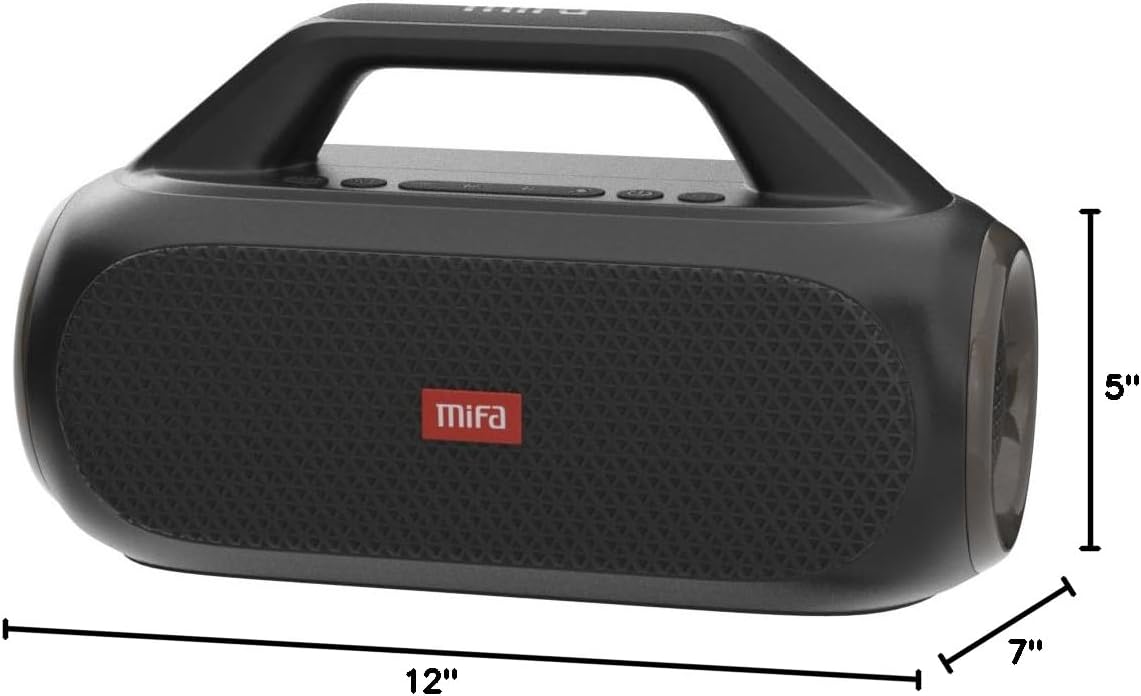
Figure 7: MIFA WildBox dimensions.
保証とサポート
The MIFA WildBox Bluetooth Speaker comes with a limited warranty. For specific details regarding warranty coverage, duration, and terms, please refer to the warranty information provided in the packaging or contact MIFA customer support directly.
For technical assistance, troubleshooting beyond this manual, or warranty claims, please visit the official MIFA website or contact their customer service team. Contact information can typically be found on the product packaging or the MIFA brand store on Amazon.