
導入
This manual provides detailed instructions for the safe and effective use of your VANPO 1/2" Digital Torque Wrench. This advanced digital torque wrench offers precise torque management with a clear digital display. It is designed for various applications, including automotive, motorcycle, and bicycle maintenance. Please read this manual thoroughly before operation and keep it for future reference.
パッケージ内容
パッケージを開封したら、以下のアイテムがすべて揃っていることを確認してください。
- 1 x VANPO 1/2" Digital Torque Wrench
- 単2電池XNUMX本
- ドライバー x 1
- 取扱説明書(本書)1部

Image: The VANPO Digital Torque Wrench, screwdriver, and instruction manual neatly arranged in its protective case.
設定
1. バッテリーの取り付け
- トルクレンチのハンドルにある電池ボックスを見つけます。
- 付属のドライバーを使用して電池カバーを開きます。
- 正しい極性 (+/-) を確認して、単 4 電池 2 本を挿入します。
- バッテリーカバーを元に戻し、ネジで固定します。
2. 電源のオン/オフ
- To power on: Press the 'C' (ON/OFF) button.
- To power off: Press and hold the 'C' (ON/OFF) button. The device will automatically shut off after approximately five minutes of inactivity to conserve battery life.
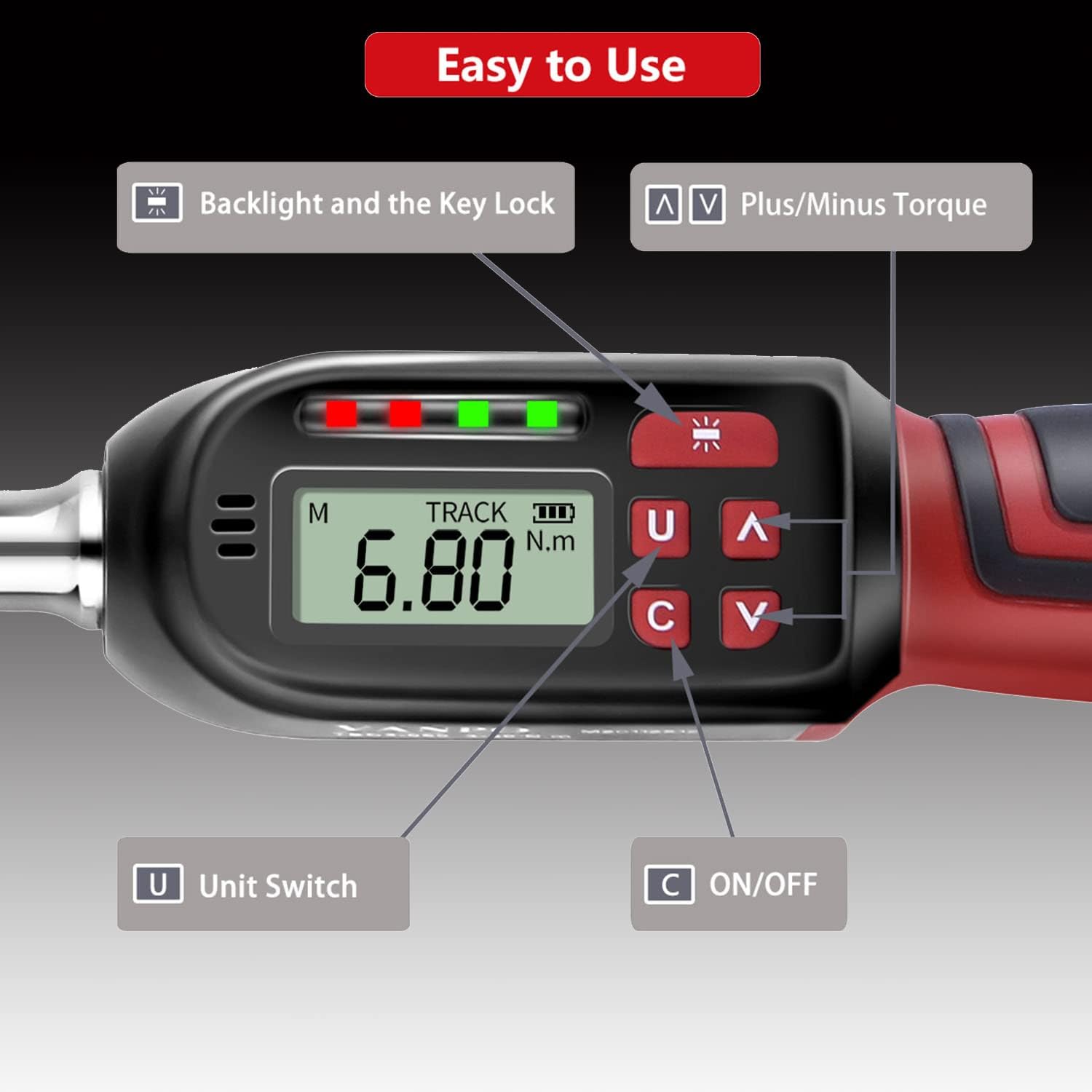
画像: 詳細 view of the digital display showing "TRACK" mode and "6.80 N.m", with labeled buttons for Backlight/Key Lock, Plus/Minus Torque, Unit Switch, and ON/OFF.
操作手順
1. 測定単位の変更
Press the 'U' (Unit Switch) button to cycle through available measurement units: N-m (Newton-meters), kgf-cm (kilogram-force centimeters), lbf-ft (pound-force feet), and lbf-in (pound-force inches).
2. Selecting Measurement Mode (TRACK / PEAK)
The torque wrench offers two measurement modes:
- TRACK Mode: Displays the real-time torque value as force is applied.
- ピークモード: 操作中に達成された最大トルク値を記録して表示します。
To switch between modes, press the 'M' button (Mode button, usually located near the display).

Image: The display showing "TRACK" mode with a real-time torque value (6.80 N.m) and "PEAK" mode displaying a maximum recorded torque value (30.00 N.m).
3. 目標トルク値の設定
Use the '∧' (Plus) and '∨' (Minus) buttons to adjust the desired target torque value. The display will show the set value.
4. トルクの適用
- Attach the appropriate socket or bit to the 1/2" square drive.
- Place the tool onto the fastener.
- Apply steady force. The LCD will show the current torque.
- 方向変更: If the product does not perform the tightening operation in the desired direction, hold the square drive interface of the ratchet head with one hand and rotate the ratchet disk with the other hand to change the direction (left or right).

Image: The ratchet head of the torque wrench, illustrating the direction of rotation for clockwise (±2% accuracy) and counter-clockwise (±3% accuracy) operations.

Image: A user applying the VANPO Digital Torque Wrench to tighten a fastener on a bicycle wheel, demonstrating practical use.
5. Torque Alert System
The wrench provides visual and audible alerts as you approach and reach the preset torque value:
- When the applied torque reaches 85%-95% of the preset value, a green LED will illuminate, and the buzzer will sound intermittently.
- When the applied torque reaches 100% of the preset value, a red LED will illuminate, and the buzzer will emit a continuous tone. This indicates the target torque has been reached.

Image: The digital torque wrench display indicating a torque value of 60.00 N.m, with a visual representation of the "BEEP" sound alert when the preset torque is achieved.
6. Backlight and Key Lock
The advanced LCD display features a backlight for use in dark environments.
- To activate/deactivate the backlight: Press the backlight button (often indicated by a sun icon).
- To lock the product: Press and hold the backlight button.
- To unlock the product: Press and hold the backlight button again.
メンテナンスと注意事項
- Over-Torque Protection: Do not apply force exceeding 110% of the maximum torque value (135 Nm), as this may damage the torque wrench.
- 取り扱いにはご注意ください: Avoid violently shaking or dropping the torque wrench. Do not store it in locations subject to strong vibrations.
- 使用目的: This digital torque wrench is designed for precise torque application. Do not use it as a threading tool or for any purpose other than its intended function.
- バッテリーストレージ: If the product will not be used for an extended period, remove the batteries to prevent leakage and damage.
- 自動遮断: The product will automatically power off after approximately five minutes of non-use to conserve battery life.
- 較正: This product cannot be reset to zero by the user. For professional calibration, please contact customer support.
トラブルシューティング
| 問題 | 考えられる原因 | 解決 |
|---|---|---|
| レンチの電源が入りません。 | 電池が切れているか、正しく取り付けられていない。 | 電池の極性を確認してください。新しい単4電池と交換してください。 |
| ディスプレイが暗くなったり、ちらついたりします。 | バッテリー残量が少なくなっています。 | 電池を交換してください。 |
| Wrench not tightening in desired direction. | Ratchet direction is set incorrectly. | Hold the square drive and rotate the ratchet disk to change direction. |
| 不正確なトルクの読み取り。 | Tool may require calibration or has been damaged. | Ensure proper usage. If issues persist, contact customer support for calibration or service. |
| Wrench is locked and buttons are unresponsive. | Key lock feature is active. | Press and hold the backlight button to unlock the device. |
仕様
| 特徴 | 詳細 |
|---|---|
| 製品名 | VANPO Digital Torque Wrench |
| モデル番号 | VP016 |
| ドライブサイズ | 1/2インチ |
| トルク範囲 | 6.8 - 135 Nm (10-135 N.m for this variant) |
| 精度(時計回り) | ±2% |
| 精度(反時計回り) | ±3% |
| 測定単位 | N-m, kgf-cm, lbf-ft, lbf-in |
| 画面 | バックライト付きLCD |
| 電源 | 単2電池XNUMX本(付属) |
| 材料 | クロムバナジウム鋼 |
| 寸法(長さ×幅×高さ) | 35 x 12 x 5 cm |
| 重さ | 1.15キロ |
保証とサポート
Specific warranty information is not provided in this manual. For details regarding warranty coverage, technical support, or service, please refer to the product packaging or contact VANPO customer service directly through their official web製品を購入したサイトまたは小売店。
Electronic manuals in five languages are available. Please refer to the product's official support channels for access.