
導入
This manual provides detailed instructions for the setup, operation, and maintenance of your Monkey Loop WS-10 Wireless Guitar System. This system is designed to offer musicians a cable-free solution for their instruments, maintaining sound quality and signal integrity.
製品終了view
The Monkey Loop WS-10 system consists of a transmitter and a receiver unit. Both units are compact, lightweight, and feature a rotatable design for compatibility with various instruments.
Text description: An image showing the Monkey Loop WS-10 wireless guitar system, featuring both the transmitter and receiver units side-by-side, highlighting their compact design and the 'Monkey Loop WS-10' branding.

主な特徴:
- Wireless UHF System: Utilizes UHF technology for clear audio transmission and reduced interference.
- バッテリー寿命の延長: Integrated rechargeable battery provides approximately 5 to 6 hours of operation.
- コンパクトで持ち運びに便利: Lightweight design for easy transport and use.
- 回転式プラグ: Ensures compatibility with most electric guitars and basses.
- 幅広い互換性: Suitable for various 6.35mm audio devices.
セットアップ手順
1.ユニットの充電
Before initial use, fully charge both the transmitter and receiver units. Use the included dual USB charging cable to connect both units to a USB power source (e.g., computer USB port, USB wall adapter).
Text description: An image showing the transmitter and receiver units connected to a dual USB charging cable, with a charging LED indicator visible on each unit, illustrating the charging process.

The charging indicator light will illuminate during charging and turn off or change color when fully charged (refer to the specific LED behavior in the operating section).
2. 送信機の接続
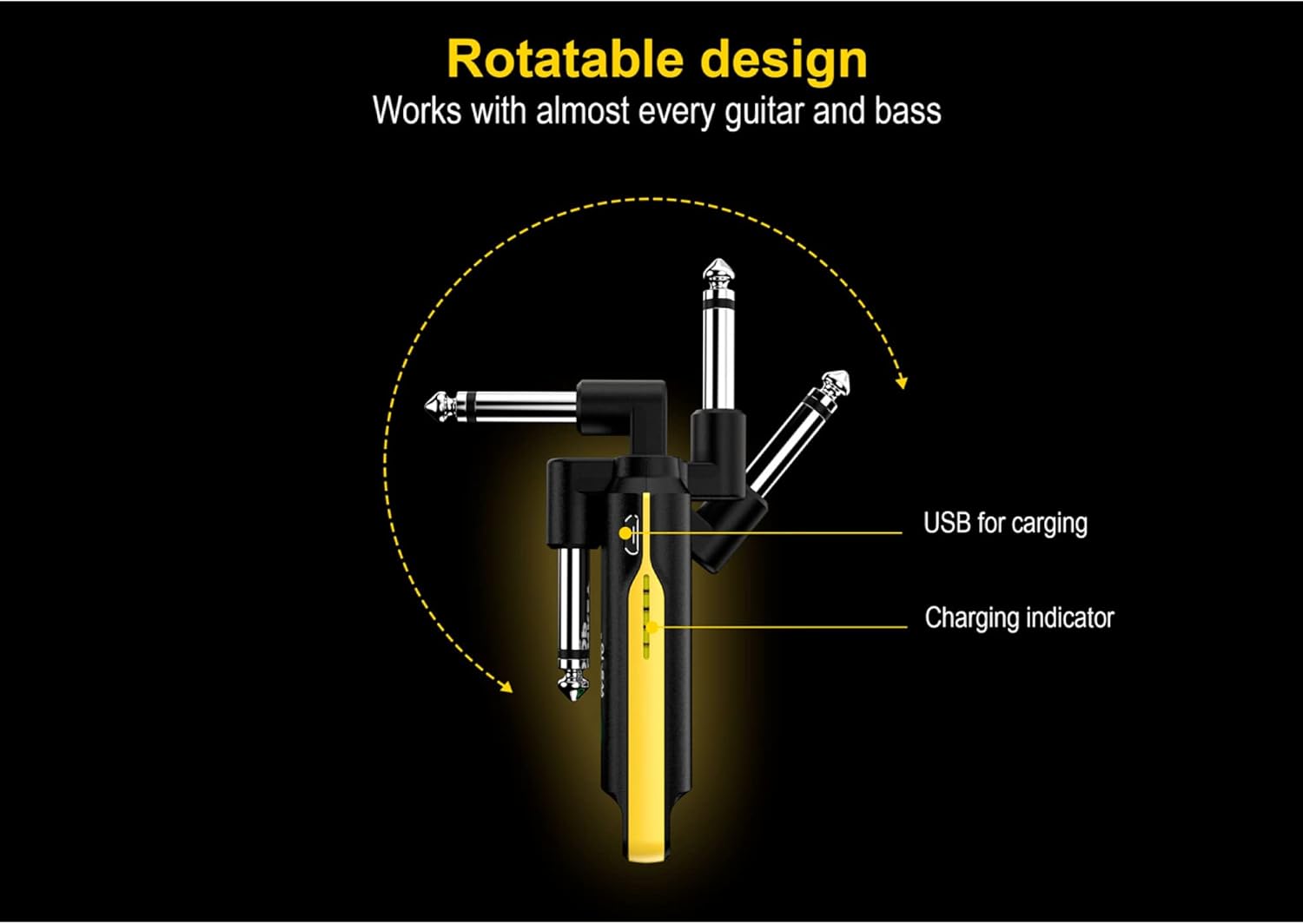
Plug the transmitter unit into your instrument's 6.35mm output jack. The rotatable plug allows for optimal positioning on various guitar and bass body types.
Text description: An image illustrating the rotatable design of the Monkey Loop WS-10 unit, showing how the 6.35mm jack can pivot to different angles for flexible connection to an instrument, ensuring compatibility.
3. 受信機の接続
受信機ユニットを入力ジャックに差し込みます amplifier, audio interface, or other audio device.
Text description: An image showing the Monkey Loop WS-10 receiver connected to an amplifier, with a guitar connected to the transmitter, demonstrating a typical wireless setup for an instrument.

操作手順
1.電源のオン/オフ
Press and hold the power button on both the transmitter and receiver units to turn them on. Repeat the action to power them off.
2. ペアリング
The units are typically pre-paired from the factory. If they do not connect automatically, ensure both units are powered on and within range. If issues persist, consult the troubleshooting section.
3. 使用方法
Once both units are powered on and paired, your instrument's signal will be transmitted wirelessly to your audio device. The system offers a maximum transmission range of 50 meters (approximately 164 feet) in an open environment.
Text description: An image displaying the Monkey Loop WS-10 transmitter and receiver units side-by-side, highlighting their compact form factor and indicating their roles as transmitter and receiver.
4. Multi-Unit Operation
Up to 99 sets of Monkey Loop WS-10 systems can be used simultaneously in the same environment without interference, provided they are on different channels (if channel selection is available, refer to advanced settings, otherwise, they should auto-select).
メンテナンス
- クリーニング: ユニットは柔らかく乾いた布で拭いてください。研磨剤入りの洗剤や溶剤は使用しないでください。
- ストレージ: ユニットは直射日光や極端な温度を避け、涼しく乾燥した場所に保管してください。
- バッテリーのケア: バッテリーの寿命を延ばすには、頻繁に完全に放電することを避けてください。長期間使用しない場合でも、定期的に充電してください。
トラブルシューティング
- 音が出ない、または信号が途切れる:
- 送信機と受信機の両方が完全に充電され、電源がオンになっていることを確認します。
- Verify that both units are within the operational range (up to 50 meters).
- 潜在的な干渉源(Wi-Fi ルーター、その他のワイヤレス デバイスなど)を確認します。
- Confirm that the transmitter is securely plugged into the instrument and the receiver into the audio input.
- Test with a standard cable to rule out issues with the instrument or amplifier。
- Poor Sound Quality or Noise:
- 電磁干渉の潜在的な発生源から離れてください。
- Ensure the units are not too close to other electronic devices.
- 機器の出力を確認し、 amplifier's input for proper function.
- The UHF system is designed for clarity; if noise persists, it might indicate environmental interference or a faulty unit.
- ペアリングされないユニット:
- Power off and then power on both units.
- Ensure they are close to each other during the pairing process.
- If there's a reset function (not explicitly mentioned, but common), perform a factory reset.
仕様
| 特徴 | 詳細 |
|---|---|
| ブランド | モンキーループ |
| モデル番号 | 10194525 (WS-10) |
| ワイヤレステクノロジー | 超短波 |
| バッテリー寿命 | 約5~6時間 |
| 充電 | USB (dual USB charging cable included) |
| 伝送距離 | 最大 50 メートル (オープン環境) |
| 寸法(約) | 120 x 29 x 18 ミリメートル |
| 互換性 | Most electric guitars, basses, and 6.35mm audio devices |
Text description: An image detailing the physical dimensions of the Monkey Loop WS-10 unit, showing measurements for length, width, and thickness in millimeters for precise understanding of its size.

保証とサポート
Information regarding specific warranty terms and support contacts is not available in the provided product data. Please refer to the product packaging or the manufacturer's official web詳細な保証情報とカスタマー サポート オプションについては、サイトをご覧ください。