
Senicare ZH027
デジタル目覚まし時計ユーザーマニュアル
Brand: Senicare | Model: ZH027
導入
ご購入ありがとうございますasing the Senicare Digital Alarm Clock. This alarm clock is designed to provide clear time display, customizable night lighting, and convenient charging options for your devices. Its large LED display ensures readability from a distance, making it suitable for all ages. This manual provides detailed instructions for setup, operation, and maintenance to ensure optimal performance and longevity of your device.

Figure 1: Senicare Digital Alarm Clock Overview
パッケージ内容
開梱したらパッケージの内容を確認し、すべてのアイテムが揃っていることを確認してください。
- 1 x Senicare Digital Alarm Clock (Model: ZH027)
- 電源アダプター x 1
- 1 x USB Power Cable (approx. 59.06 inches / 1.5 meters)
- ユーザーマニュアル (本書) x 1

図2: パッケージ内容
設定
Follow these steps to set up your Senicare Digital Alarm Clock:
- 電源接続: Connect the provided USB power cable to the "INPUT 5V===2A" port on the back of the alarm clock. Plug the other end into the power adapter, and then plug the adapter into a standard electrical outlet (100-240V AC). The display will light up.
- バッテリーバックアップ(オプション): For power failure memory, insert 2 x AAA batteries (not included) into the battery compartment on the bottom of the clock. This feature ensures that time and alarm settings are retained during a power outage, though the screen will go blank.
- 初期時間設定:
- を押す 時間設定 時計の裏側にあるボタンを押します。「時」の数字が点滅し始めます。
- 使用 時間 そして 分 buttons on the top of the clock to adjust the hour and minute respectively.
- プレス 時間設定 時間を確認するためにもう一度。
- 12/24時間形式: を押す 12/24時間 button on the back to switch between 12-hour (with AM/PM indicator) and 24-hour time formats.

Figure 3: Power Failure Memory Feature

図4: 主な特徴view
操作手順
アラームを設定する
- を押す ALセット button on the back of the clock. The alarm hour digits will flash.
- 使用 時間 そして 分 buttons on the top to set your desired alarm time.
- プレス ALセット もう一度押してアラーム時間を確認します。
- アラームをオンまたはオフにするには、 アラームのオン/オフ slider switch on the back of the clock. When the alarm is active, an alarm icon will appear on the display.
スヌーズ機能
アラームが鳴ったら、大きな スヌーズライト button on the top of the clock to activate the snooze function. The alarm will pause for 9 minutes and then sound again. You can repeat this process multiple times.

図5: スヌーズ機能
アラーム音量の調整
The alarm volume can be adjusted to High (HI), Medium (MI), or Low (LO) using the 音量 slider switch located on the back of the clock.

Figure 6: Volume and Alarm Controls
常夜灯機能
The clock features a 7-color soft night light. Tap the large スヌーズライト button on the top of the clock to cycle through the different colors or turn the night light off. This provides a gentle illumination for your room.

Figure 7: 7-Color Soft Night Light

Figure 8: Night Light Color Options
自動調光器
The clock is equipped with a photosensitive sensor that automatically adjusts the display brightness (0-100%) to a comfortable level based on ambient light conditions, ensuring clear visibility day and night without being too bright in the dark.

Figure 9: Auto Dimmer Display Brightness

図10: 自動明るさ調整
デュアルUSB充電ポート
The back of the alarm clock features two 5V 1A USB charging ports (USB1, USB2) and one Type-C output port (5V 1A). These ports allow you to conveniently charge your smartphone, tablet, or other USB-powered devices directly from the alarm clock, eliminating the need for extra wall adapters.
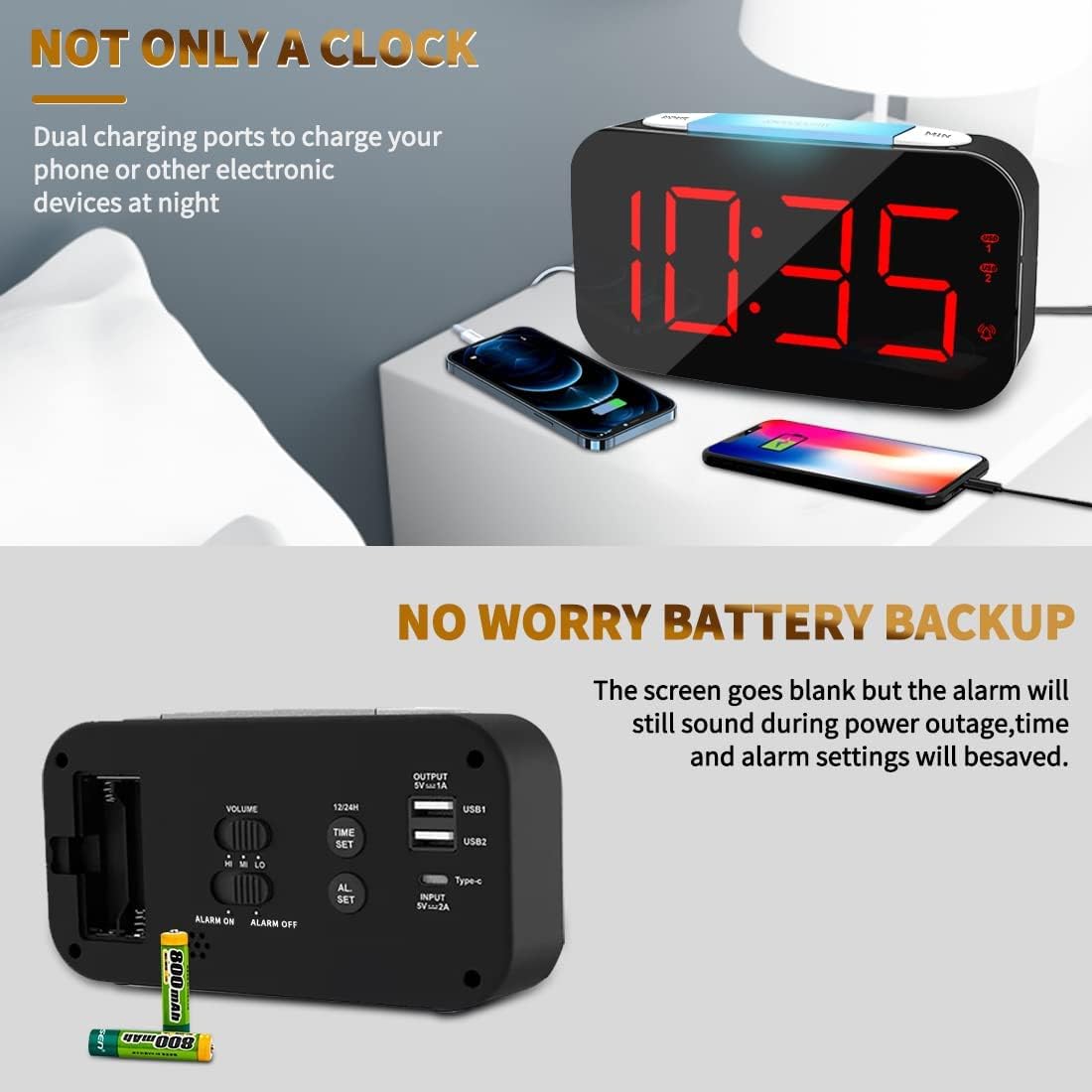
図11: デュアルUSB充電ポートの使用

Figure 12: USB and Type-C Output Ports
メンテナンス
To ensure the longevity and proper functioning of your Senicare Digital Alarm Clock, please follow these simple maintenance guidelines:
- クリーニング: Use a soft, dry cloth to wipe the surface of the clock. Do not use abrasive cleaners, waxes, or solvents as they may damage the finish.
- 配置: 時計は直射日光、熱源、過度の湿気を避け、安定した平らな場所に置いてください。
- 力: Always use the original power adapter and cable provided with the device.
- バッテリー交換: If using the battery backup feature, replace the AAA batteries annually or when the power failure memory function becomes unreliable.
トラブルシューティング
目覚まし時計に問題が発生した場合は、次の一般的な問題と解決策を参照してください。
| 問題 | 考えられる原因 | 解決 |
|---|---|---|
| ディスプレイが空白または点灯しません。 | 電源接続または電源出力なしtage. | Ensure the power adapter is securely plugged into both the clock and a working electrical outlet. Check if there's a power outage in your area. If using battery backup, the display will be blank during an outage, but settings are saved. |
| アラームは鳴りません。 | Alarm not activated, volume too low, or incorrect alarm time set. | チェックしてください アラームのオン/オフ switch on the back to ensure it's in the "ON" position. Adjust the 音量 slider to a higher setting. Verify that the alarm time is set correctly. |
| Display digits flicker or go blank partially. | Internal component issue or power fluctuation. | Try unplugging the clock for a few minutes and then plugging it back in. If the issue persists, contact customer support for assistance. |
| USB充電ポートが機能していません。 | デバイスが正しく接続されていないか、電源の問題です。 | Ensure your device's USB cable is fully inserted into the clock's USB port. Verify the clock is powered on. Try a different USB port or cable. |
仕様
| 特徴 | 詳細 |
|---|---|
| ブランド | セニケア |
| モデル番号 | ZH027 |
| 色 | 黒 |
| 表示タイプ | デジタルLED |
| 特集 | Adjustable Brightness, Charging Station, Large Display, Snooze, 7-Color Night Light |
| 製品寸法 | 幅6.65インチ x 高さ3.35インチ(約幅16.9cm x 高さ8.5cm) |
| 電源 | Corded Electric (100-240V AC) |
| バッテリーバックアップ | 2 x AAA Batteries (Not Included) for settings memory |
| USB出力 | Dual USB-A (5V 1A), One Type-C (5V 1A) |
| 材料 | プラスチック |
| アイテム重量 | 0.63 Pounds / 10.1 ounces (approx. 286g) |
保証とサポート
Senicare offers a hassle-free 18ヶ月保証 for this Digital Alarm Clock. We are committed to providing high-quality products and excellent customer service.
For any questions, concerns, or warranty claims, please contact our friendly customer service team through the platform where you purchased the product. Please have your order number and product model (ZH027) ready for faster assistance.
We also offer an easy return policy. Refer to the retailer's return guidelines for more details.
Ask a question about this manual
Ask about setup, troubleshooting, compatibility, parts, safety, or missing instructions. Manuals+ will review the question and use this page’s manual context to help answer it.