
1.製品オーバーview
The XTAR VC4H is a smart LCD display universal battery charger designed for efficient and safe charging of various rechargeable batteries. It features four independent charging slots and supports both 3.6V/3.7V Li-ion (IMR/INR/ICR) and 1.2V Ni-MH/Ni-CD battery types. The charger provides fast charging capabilities and a clear LCD screen to monitor charging status.
2. 主な特徴
- 幅広い互換性: Supports 3.6V/3.7V Li-ion/IMR/INR/ICR batteries (10440, 14500, 14650, 16340, 17335, 17500, 17670, 18350, 18490, 18500, 18650, 18700, 20700, 21700, 22650, 25500, 26650, 32650) and 1.2V Ni-MH/Ni-CD batteries (AAAA, AAA, AA, A, SC, C, D). Note: Can charge protected 21700 batteries.
- スマートLCDディスプレイ: 170° view angle colorful VA LCD screen provides real-time information on charging current, voltage, capacity, battery type, and channel.
- 急速充電技術: Features Type-C QC3.0 input (5V/3A, 9V/2A) and offers optional charging currents (2A/1A/0.5A/0.25A). Can charge up to 2A in two slots simultaneously.
- 複数の保護: Includes overcharge protection, overvoltage protection, overcurrent protection, short-circuit protection, overheating protection, and reverse polarity protection.
- 温度監視設計: Integrated design for effective heat dissipation during charging.

Image: The XTAR VC4H charger's display showing its compatibility with a wide range of Li-ion and Ni-MH/Ni-CD batteries.

Image: Visual representation of the XTAR VC4H's multiple protection features, including overcharge, overvoltage, overcurrent, short-circuit, overheating, and reverse polarity protection.
3. セットアップ手順
3.1 パッケージ内容
Before using the charger, ensure all items are present in the package:
- XTAR VC4H Charger Unit
- Type-C電源コード
- 取扱説明書
- 収納バッグ

Image: The XTAR VC4H package contents, showing the charger, Type-C power cord, manual, and storage bag.
3.2 電源の接続
- Connect the provided Type-C power cord to the charger's Type-C input port.
- Connect the other end of the USB cable to a compatible power source (e.g., a QC3.0 USB wall adapter, car charger, power bank, or computer USB port). The charger requires a 5V/3A or 9V/2A input for optimal performance.
- The LCD screen will illuminate, indicating the charger is powered on and in standby mode.

Image: The XTAR VC4H charger connected to a laptop, illustrating its versatility with different power sources like car chargers, USB adapters, mobile power banks, and notebooks.
4. 操作手順
4.1バッテリーの挿入
Carefully insert rechargeable batteries into the charging slots, ensuring correct polarity (+/-). The charger can accommodate up to four batteries simultaneously. The LCD screen will automatically detect the battery type and begin charging.
Video: This video demonstrates the XTAR VC4H charger's features, including its ABS fire-retardant material, Type-C port, 170° view angle LCD screen, temperature monitoring design, and compatibility with various battery sizes. It also shows how to adjust charging current and switch display content between channels, highlighting its ability to charge four 21700 batteries simultaneously.
4.2 LCDディスプレイの理解
The LCD screen provides detailed information for each charging channel:
- Charging Current Gear: Displays the selected charging current (e.g., 0.5A, 1.0A, 2.0A).
- リアルタイムVoltage: 現在のボリュームを表示しますtagバッテリーのe。
- 充電容量: Indicates the accumulated mAh charged into the battery.
- 電池のタイプ: Identifies whether the battery is Li-ion or Ni-MH.
- Battery Channel: Shows the active charging slot (CH1, CH2, CH3, CH4).
画像: 詳細な view of the XTAR VC4H's LCD screen, illustrating the display of charging current, real-time voltage, charging capacity, battery type, and channel. It also highlights the 'Curr' button for current adjustment and 'Mode' button for switching display content.
4.3 充電電流の調整
To adjust the charging current for a specific channel:
- を押す 'Curr' button (Current Button) to cycle through available charging currents (2A/1A/0.5A/0.25A).
- The selected current will be applied to the active channel.
4.4 表示内容の切り替え
に view details for different channels:
- In charging mode, press the 'モード' button (Slot Button) to switch the display content between CH1, CH2, CH3, and CH4.

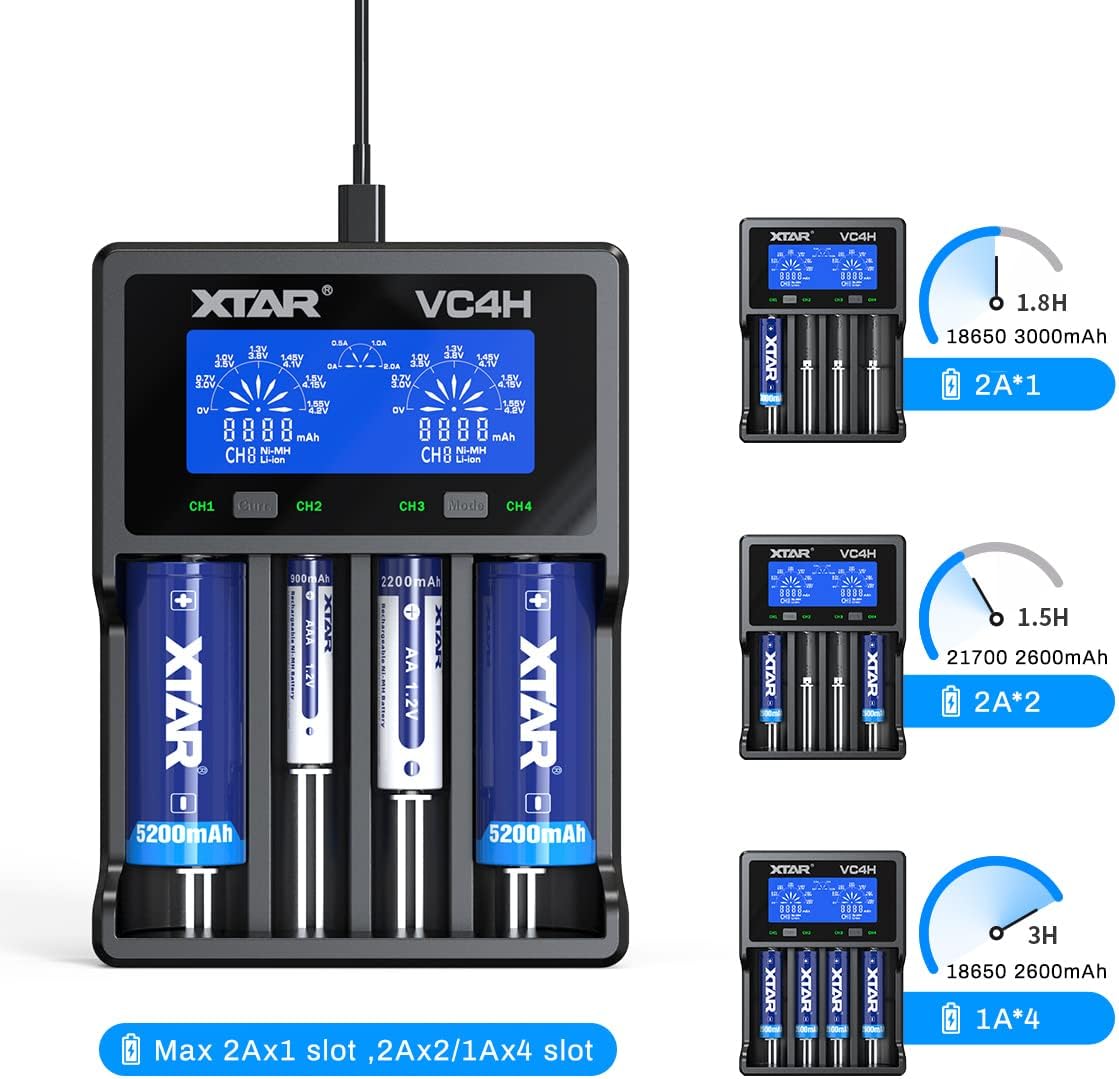
Image: The XTAR VC4H charger demonstrating various charging scenarios, including charging two 18650 3000mAh batteries at 2A, two 21700 2600mAh batteries at 2A, and four 18650 2600mAh batteries at 1A, with estimated charging times.
5. メンテナンス
- クリーニング: Regularly clean the charger's slots and contacts with a dry, soft cloth to ensure optimal conductivity. Do not use liquid cleaners.
- ストレージ: 充電器は直射日光や極端な温度を避け、涼しく乾燥した場所に保管してください。
- 取り扱い: 充電器を落としたり、強い衝撃を与えたりしないでください。
- 電源切断: Always disconnect the power cord when the charger is not in use or during cleaning.
6。 トラブルシューティング
6.1 Charger Not Powering On
- Ensure the Type-C power cord is securely connected to both the charger and the power source.
- Verify that the power source (e.g., wall adapter, USB port) is functional and providing adequate power (5V/3A or 9V/2A recommended).
- 別の Type-C ケーブルまたは電源アダプターを試してください。
6.2 バッテリーが充電されない
- 電池が正しい極性(+/-)で挿入されていることを確認してください。
- バッテリーの接点が清潔でゴミなどがないことを確認してください。
- Confirm the battery type is compatible with the charger (refer to specifications).
- If the battery is deeply discharged, it may take a few minutes for the charger to detect and initiate charging.
- If the charger displays an error, remove and reinsert the battery. If the error persists, the battery may be faulty.
6.3 Inaccurate Display Readings
- Ensure the charger is on a stable, flat surface.
- If readings seem inconsistent, try removing and reinserting the battery.
- Environmental factors like extreme temperature can affect sensor accuracy. Use the charger within its specified operating temperature range.
7. 製品仕様
| 特徴 | 詳細 |
|---|---|
| モデル | VC4H |
| 互換性のあるバッテリー | 3.6V/3.7V Li-ion/IMR/INR/ICR (10440-32650), 1.2V Ni-MH/Ni-CD (AAAA, AAA, AA, A, SC, C, D) |
| 入力 | QC3.0 (5V/3A, 9V/2A) |
| Constant Current (Li-ion) | 4.2V === 2Ax1 / 1Ax2 / 0.5Ax2 |
| Constant Current (Ni-MH/Ni-CD) | 1.45V === 1Ax1 / 1Ax2 / 1Ax4 / 0.5Ax4 |
| カットオフVoltage | 4.2 ± 0.05V (Li-ion), 1.45 ± 0.1V (Ni-MH/Ni-CD) |
| カットオフ電流 | ≤150mA |
| 動作温度 | 0〜40℃ |
| メーカー | エクスター |

Image: A detailed table outlining the XTAR VC4H's compatibility with various battery models and its technical specifications, including input, constant current, cut-off voltage, cut-off current, and operating temperature.
8. 保証とサポート
保証情報とカスタマーサポートについては、公式XTARをご覧ください。 webご購入いただいた販売店にお問い合わせいただくか、ウェブサイトをご覧ください。保証請求の際に必要となりますので、購入証明書を保管してください。
連絡先:
- 公式XTAR Webサイト: www.xtar.cc
- Customer Service Email: Refer to the product packaging or official web最新の連絡先情報については、サイトをご覧ください。