
導入
Thank you for choosing the Krisons Sound Blaster Tower Speaker. This manual provides essential information for the safe and efficient operation of your speaker system. Please read it thoroughly before use and retain it for future reference.
製品終了view
The Krisons Sound Blaster Tower Speaker is designed to deliver clear and balanced audio with an 8-inch woofer. It features multiple connectivity options including Bluetooth, USB, AUX, and FM radio, along with an LCD display for mode information. The speaker includes controls for volume, bass, and mode selection.

図1: 前面と側面 view of the Krisons Sound Blaster Tower Speaker, highlighting the display, USB port, mode button, play/pause, previous/next controls, bass, treble, volume knobs, 4-inch speakers, and 8-inch woofer.
設定
1. 開梱
すべての部品をパッケージから慎重に取り出します。以下のものがすべて揃っていることを確認してください。
- 1 x Krisons Sound Blaster Tower Speaker
- リモコン x 1
- ユーザーマニュアル (本書) x 1
- 保証カード x 1
2.配置
Position the tower speaker on a flat, stable surface. For optimal sound performance, place the speaker in a location that allows for clear sound dispersion. The compact design allows for flexible placement in various room sizes.
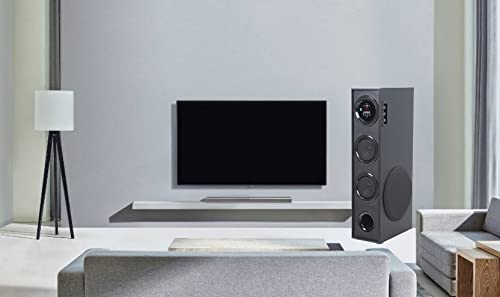
図2:例ample of speaker placement in a home environment.

Figure 3: Speaker dimensions for placement planning.
3. 電源接続
Connect the speaker's power cable to a standard AC power outlet. Ensure the power switch on the speaker is in the OFF position before connecting to power.
4.オーディオ接続
スピーカーは複数のオーディオ入力方法をサポートしています。
- ブルートゥース: スマートフォン、タブレット、その他の Bluetooth 対応デバイスへのワイヤレス接続用。
- USB: オーディオ再生用 fileUSBドライブから直接。
- オーキシン: For wired connection to devices using a 3.5mm audio cable.
- FMラジオ: Built-in FM tuner for radio broadcasts.

Figure 4: Available connectivity options.

Figure 5: Connecting to an external device via AUX cable.
操作手順
1. 電源のオン/オフ
Locate the power switch on the rear panel of the speaker. Flip the switch to the "ON" position to power on the speaker. The LCD display will illuminate. Flip to "OFF" to power down.
2. 制御方法
The speaker can be controlled using the physical buttons and knobs on the side panel or via the included remote control.
- サイドパネルコントロール: Includes buttons for mode change, play/pause, previous/next track, and knobs for volume and bass adjustment.
- リモートコントロール: Provides full functionality for convenient operation from a distance.
3.モードの選択
Press the "MODE" button on the speaker's control panel or the remote control to cycle through available input modes: Bluetooth, USB, AUX, and FM Radio. The selected mode will be indicated on the LCD display.
4.Bluetoothの操作
- Switch the speaker to Bluetooth mode. The LCD display will show "BT" or a similar indicator, and the speaker will enter pairing mode.
- デバイス(スマートフォン、タブレット)で Bluetooth を有効にし、利用可能なデバイスを検索します。
- Select "Krisons Sound Blaster" (or similar name) from the list of devices.
- ペアリングされると、スピーカーは接続を確認し、デバイスからオーディオを再生できるようになります。
5.USB再生
- MP3オーディオが入ったUSBドライブを挿入します fileスピーカーのUSBポートに差し込みます。
- Switch the speaker to USB mode. The speaker will automatically detect and begin playing audio fileUSB ドライブから s を取得します。
- Use the previous/next buttons to navigate tracks and the play/pause button to control playback.
6. AUX入力接続
- Connect one end of a 3.5mm audio cable to the AUX-in port on the speaker.
- Connect the other end of the 3.5mm audio cable to the audio output jack of your external device (e.g., TV, computer, MP3 player).
- Switch the speaker to AUX mode. Audio from your connected device will now play through the speaker.
7. FMラジオ
- スピーカーをFMラジオモードに切り替えます。
- The speaker will automatically scan and store available FM stations.
- Use the previous/next buttons to cycle through the stored stations.
8. 音量とトーンの調整
Use the "Volume" knob to adjust the overall sound level. Use the "Bass" knob to increase or decrease the low-frequency output. The speaker is designed to provide a balanced sound across treble, midrange, and bass frequencies.
メンテナンス
To ensure the longevity and optimal performance of your Krisons Sound Blaster Tower Speaker, follow these maintenance guidelines:
- クリーニング: Use a soft, dry cloth to wipe the exterior surfaces of the speaker. Do not use abrasive cleaners, waxes, or solvents, as these can damage the finish.
- ほこり: Regularly dust the speaker grilles and vents to prevent accumulation, which can affect sound quality and internal components.
- 液体への暴露: Keep the speaker away from water and other liquids. Do not place liquid-filled containers on or near the speaker.
- ストレージ: スピーカーを長期間保管する場合は、電源を外し、直射日光や極端な温度を避け、涼しく乾燥した場所に保管してください。
トラブルシューティング
スピーカーに問題が発生した場合は、次の一般的な問題と解決策を参照してください。
| 問題 | 考えられる解決策 |
|---|---|
| 電源なし |
|
| 音が出ない |
|
| Bluetoothが接続されない |
|
| リモコンが動作しない |
|
| Sound during power on/off | A brief sound or pop during power on/off is normal for this type of audio equipment and does not indicate a malfunction. |
仕様
| 特徴 | 詳細 |
|---|---|
| ブランド | Krisons |
| モデル名 | サウンドブラスター |
| スピーカー最大出力 | 80ワット |
| 接続技術 | 補助、Bluetooth、USB、ワイヤレス |
| オーディオ出力モード | 囲む |
| 取り付けタイプ | 床立ち |
| エンクロージャ材質 | 結晶 |
| スピーカータイプ | Subwoofer/Bookshelf/Woofer/Tower |
| 色 | 黒 |
| 制御方法 | タッチ、リモコン |
| Woofer Driver Diameter | 8インチ |
| Tweeter Driver Diameter | 1インチ |
| Total USB 2.0 Ports | 1 |
| オーディオチャンネルの数 | 2.1 |
| 商品の寸法(奥行き x 幅 x 高さ) | 奥行き39cm x 幅24cm x 高さ57cm |
| アイテム重量 | 8900グラム |
| 対応デバイス | スマートフォン、タブレット |
| 電源 | AC |
保証情報
This Krisons Sound Blaster Tower Speaker comes with a 6ヶ月保証 on manufacturing defects. Please refer to the included Warranty Card for detailed terms and conditions. Retain your purchase receipt as proof of purchase for warranty claims.
カスタマーサポート
For any questions, assistance, or support regarding your Krisons Sound Blaster Tower Speaker, please contact Krisons Customer Care:

Figure 6: Krisons Customer Support contact details.
- メールアドレス: service@krisons.com
- 電話: +91-8287124581 / +91-9910016757
- 営業時間: 午前10時から午後6時まで
- メーカー: Krisons Electronic Systems Limited, ZYTEL ENTERPRISES PVT