
導入
Thank you for choosing the BUFFBEE Alarm Clock with Wireless Charging Station. This device combines a digital alarm clock with a versatile wireless charging stand, designed to charge your iPhone, Apple Watch, and AirPods simultaneously. It features a dimmable LED display, adjustable volume, and multiple safety protections to ensure efficient and secure charging. Please read this manual carefully before use to ensure proper operation and to maximize the lifespan of your product.
箱の中身
パッケージを開封したら、以下のアイテムがすべて含まれていることを確認してください。
- BUFFBEE Alarm Clock with Wireless Charging Station
- USB-C充電ケーブル
- 電源アダプター
- ユーザーマニュアル(このドキュメント)
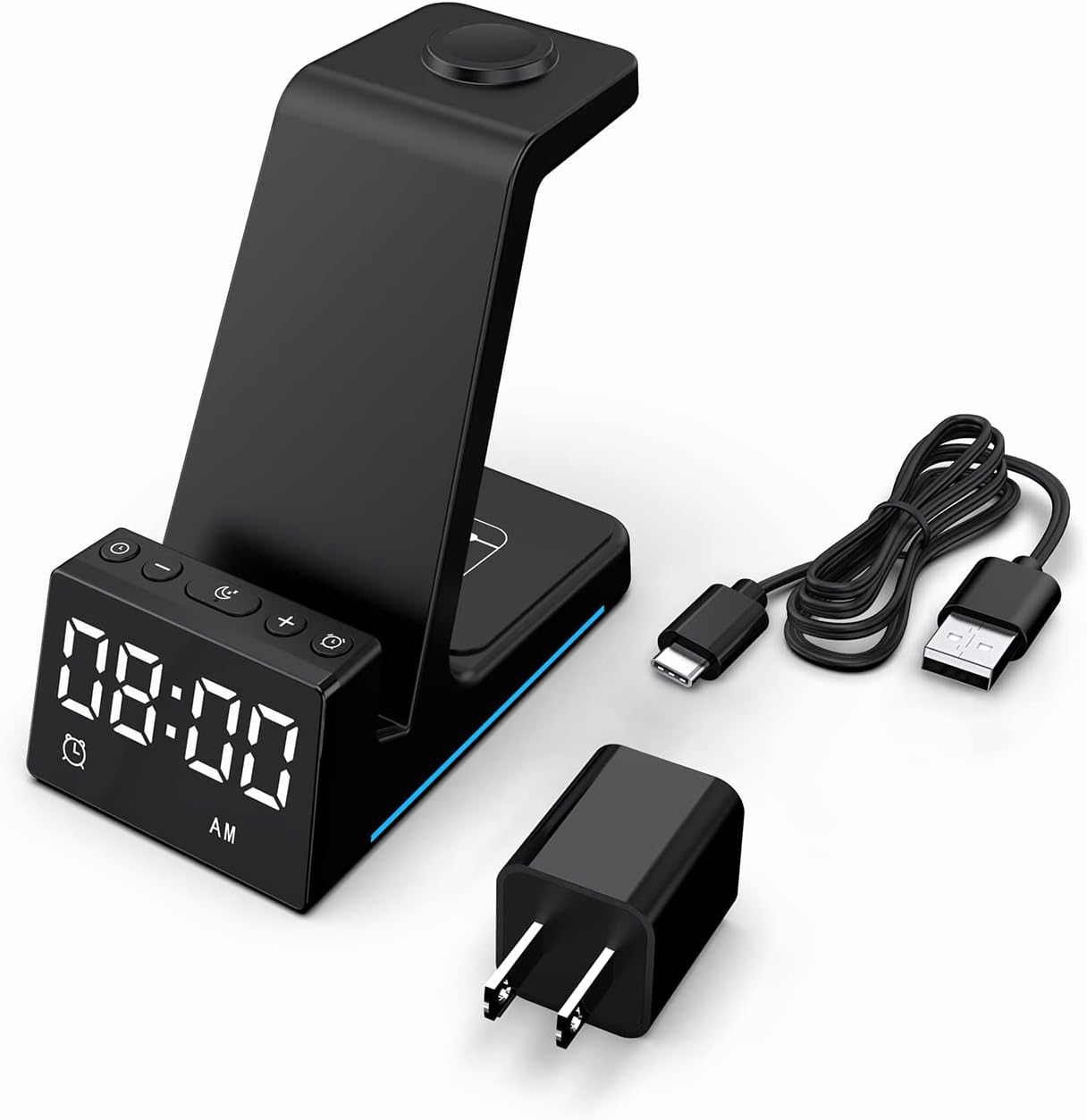
画像: 製品パッケージに含まれるすべてのコンポーネント。
製品終了view
The BUFFBEE Alarm Clock with Wireless Charging Station is designed for convenience and efficiency. It features dedicated charging areas for your smartphone, Apple Watch, and AirPods, alongside a clear digital clock display.
主な特徴:
- デジタル目覚まし時計: Features adjustable brightness and volume, with 12/24 hour format options.
- ワイヤレス電話充電: Supports 15W, 10W, 7.5W, and 5W output for various wireless charging enabled smartphones.
- Apple Watchの充電: Dedicated magnetic charging spot for Apple Watch Series 2-7, SE.
- AirPodsの充電: Wireless charging pad for AirPods 2 (with wireless charging case), AirPods 3, and AirPods Pro.
- 安全保護: Built-in overcharge, overvoltage, overheat, and overcurrent protection.

Image: The charging station with devices in place, highlighting its multi-device capability.

Image: Diagram illustrating the internal safety features and charging coils.
設定
Follow these steps to set up your BUFFBEE Alarm Clock with Wireless Charging Station:
- 接続電源: Insert the USB-C end of the charging cable into the port on the back of the charging station. Plug the other end of the cable into the provided power adapter, then plug the adapter into a wall outlet. The digital display will light up, indicating power is connected.
- デバイスの配置:
- スマートフォン: Place your wireless charging enabled smartphone vertically or horizontally on the main charging stand. Ensure it is centered for optimal charging.
- アップルウォッチ: Place your Apple Watch on the magnetic charging disc at the top of the stand.
- AirPods: AirPods (ワイヤレス充電ケース付き) を本体底部の平らな充電パッドの上に置きます。
- 充電の確認: A blue indicator light will briefly illuminate when a device is correctly placed and charging. Your device's screen will also show a charging icon.
Video: Official product video demonstrating the setup and charging capabilities of the BUFFBEE Alarm Clock with Wireless Charging Station for iPhone, Apple Watch, and AirPods.

Image: Universal compatibility chart for different devices and charging wattages。
操作手順
時間の設定
- を押し続けます 時間設定 ボタン(通常は時計のアイコンが付いています)を3秒間押し続けます。「時」の数字が点滅し始めます。
- 使用 + そして - 時間を調整するボタン。
- を押す 時間設定 button again to switch to minute adjustment. The minute digits will flash.
- 使用 + そして - 分を調整するためのボタン。
- を押す 時間設定 もう一度ボタンを押して確定し、時間設定モードを終了します。
- 12時間形式と24時間形式を切り替えるには、 時間設定 設定モード以外のときにボタンを押します。
アラームを設定する
- を押し続けます アラームセット button (usually marked with an alarm clock icon) for 3 seconds. The alarm hour digits will flash.
- 使用 + そして - ボタンでアラーム時間を調整します。
- を押す アラームセット button again to switch to alarm minute adjustment. The alarm minute digits will flash.
- 使用 + そして - アラームの分数を調整するボタン。
- を押す アラームセット もう一度ボタンを押して確定し、アラーム設定モードを終了します。
- アラームをオンまたはオフにするには、 アラームセット ボタンを押します。ディスプレイにアラームアイコンが表示されたり消えたりします。
- When the alarm sounds, press any button to activate the snooze function (typically 9 minutes). To turn off the alarm completely, press and hold the アラームセット ボタン。

画像: 上view of the digital alarm clock features.
ディスプレイの明るさを調整する
The LED display has multiple brightness levels to suit your preference, especially for nighttime use.
- を押す 輝度 button (usually marked with a sun icon) repeatedly to cycle through the available brightness levels (e.g., 100%, 40%, 3%, 1%, 0% off).
- Select the desired brightness level. The '0% off' setting turns the display completely off for undisturbed sleep.

Image: Visual representation of the 5-level adjustable brightness settings.
アラーム音量の調整
The alarm volume can be adjusted to your preferred level.
- While the alarm is sounding, or during alarm setting mode, press the 音量 button (usually marked with a speaker icon) to cycle through the available volume levels.
- 希望の音量を選択します。

Image: Illustration of the 3-level adjustable volume feature.
メンテナンス
充電ステーションの寿命を延ばし、最適なパフォーマンスを確保するには、次のメンテナンス ガイドラインに従ってください。
- クリーニング: Disconnect the power before cleaning. Use a soft, dry cloth to wipe the surface. Do not use abrasive cleaners, solvents, or chemical sprays.
- 液体を避ける: 本製品を水やその他の液体から遠ざけてください。濡れた手で操作しないでください。
- 温度: Store and operate the device in a dry environment at room temperature. Avoid extreme heat or cold.
- 取り扱い: デバイスは丁寧に取り扱ってください。落としたり、強い衝撃を与えたりしないでください。
- 電源: Only use the provided power adapter and cable. Using unauthorized power sources may damage the device and void the warranty.
トラブルシューティング
If you encounter any issues with your BUFFBEE Alarm Clock with Wireless Charging Station, please refer to the following troubleshooting guide:
| 問題 | 考えられる原因 | 解決 |
|---|---|---|
| デバイスの電源が入りません。 | Power cable not connected properly; Power adapter faulty; Wall outlet not working. | Ensure the USB-C cable is securely connected to both the station and the power adapter. Try a different wall outlet. Verify the power adapter is functioning. |
| Smartphone/AirPods not charging wirelessly. | Device not placed correctly; Device not wireless charging compatible; Phone case too thick; Foreign objects on charging pad. | Reposition the device to ensure it is centered on the charging pad. Remove any thick phone cases or metallic objects. Confirm your device supports Qi wireless charging. |
| Apple Watchが充電されていません。 | Watch not placed correctly; Watch charger not making contact; Watch model not supported. | Ensure the Apple Watch is securely placed on the magnetic charging disc. Remove any watch cases that might obstruct contact. This charger supports Apple Watch Series 2-7, SE. |
| 充電が遅い、または断続的である。 | Using a non-original power adapter/cable; Device overheating; Multiple devices charging simultaneously. | Use the provided power adapter and cable. Ensure the device is in a well-ventilated area. Charging multiple devices may slightly reduce individual charging speeds. |
| 目覚まし時計の表示が明るすぎる/暗すぎる。 | 明るさ設定を調整する必要があります。 | を押す 輝度 button to cycle through the 5 brightness levels, including 'off'. |
| Alarm is not sounding or is too quiet/loud. | Alarm not set or deactivated; Volume level too low/high. | Verify the alarm is activated (alarm icon visible). Adjust the alarm volume using the 音量 ボタン。 |
仕様
| 特徴 | 詳細 |
|---|---|
| 製品寸法 | 6.3 x 1.5 x 3.5インチ |
| アイテム重量 | 15.8オンス |
| ブランド | バフビー |
| コネクタタイプ | 無線 |
| 対応デバイス | Cellular Phones, Apple Watch, AirPods (with wireless charging case) |
| 互換性のある電話モデル | Samsung Galaxy S10 series, iPhone 8 and newer, other Qi-enabled phones |
| 特集 | Adjustable, Fast Charging, Wireless Charger, Wireless Charging |
| 入力ボリュームtage | 9ボルト |
| USBポート合計 | 1(電源入力用) |
| ワットtage | 15ワット(最大出力) |
| 仕様が満たされました | Qi |
| 電源 | AC Adapter (Battery Powered refers to internal clock battery backup, not main power) |
保証とサポート
Your BUFFBEE Alarm Clock with Wireless Charging Station comes with a standard manufacturer's warranty. For specific warranty details, including duration and coverage, please refer to the warranty card included in your product packaging or contact BUFFBEE customer support directly.
If you require technical assistance, have questions about product operation, or need to report a defect, please reach out to BUFFBEE customer service through the contact information provided on the product packaging or the official BUFFBEE webサイトをご覧ください。サポートにお問い合わせの際は、製品のモデルと購入日をご用意ください。