
1.製品オーバーview
The LexonElec 60% Mechanical Gaming Keyboard is a compact 68-key keyboard designed for gaming and office use. It features RGB backlighting, durable Red mechanical switches, and full key anti-ghosting for responsive performance. Its ultra-compact design saves desktop space while providing essential functionality through FN key combinations.

画像1.1: 以上view of the LexonElec 60% Mechanical Gaming Keyboard, highlighting its compact size and RGB backlighting.
2. パッケージ内容
パッケージにすべてのアイテムが揃っていることを確認してください:
- 1 x LexonElec 68-Key Mechanical Keyboard
- USBタイプCケーブル1本
- 1 x Keycap Removal Tool
- ユーザーマニュアル (本書) x 1
3. セットアップ手順
Follow these steps to set up your LexonElec Mechanical Gaming Keyboard:
- キーボードを接続します: Insert the USB Type-C end of the provided cable into the port on the back of the keyboard. Connect the standard USB-A end to an available USB port on your computer.
- システム認識: Your operating system (Windows, Mac, Linux, Android) should automatically detect and install the necessary drivers. This may take a few moments.
- キーボードの脚を調整する: For optimal typing comfort, you can adjust the two-stage feet located on the bottom of the keyboard to achieve your preferred angle. Ensure the non-slip pads are securely in place for stability.
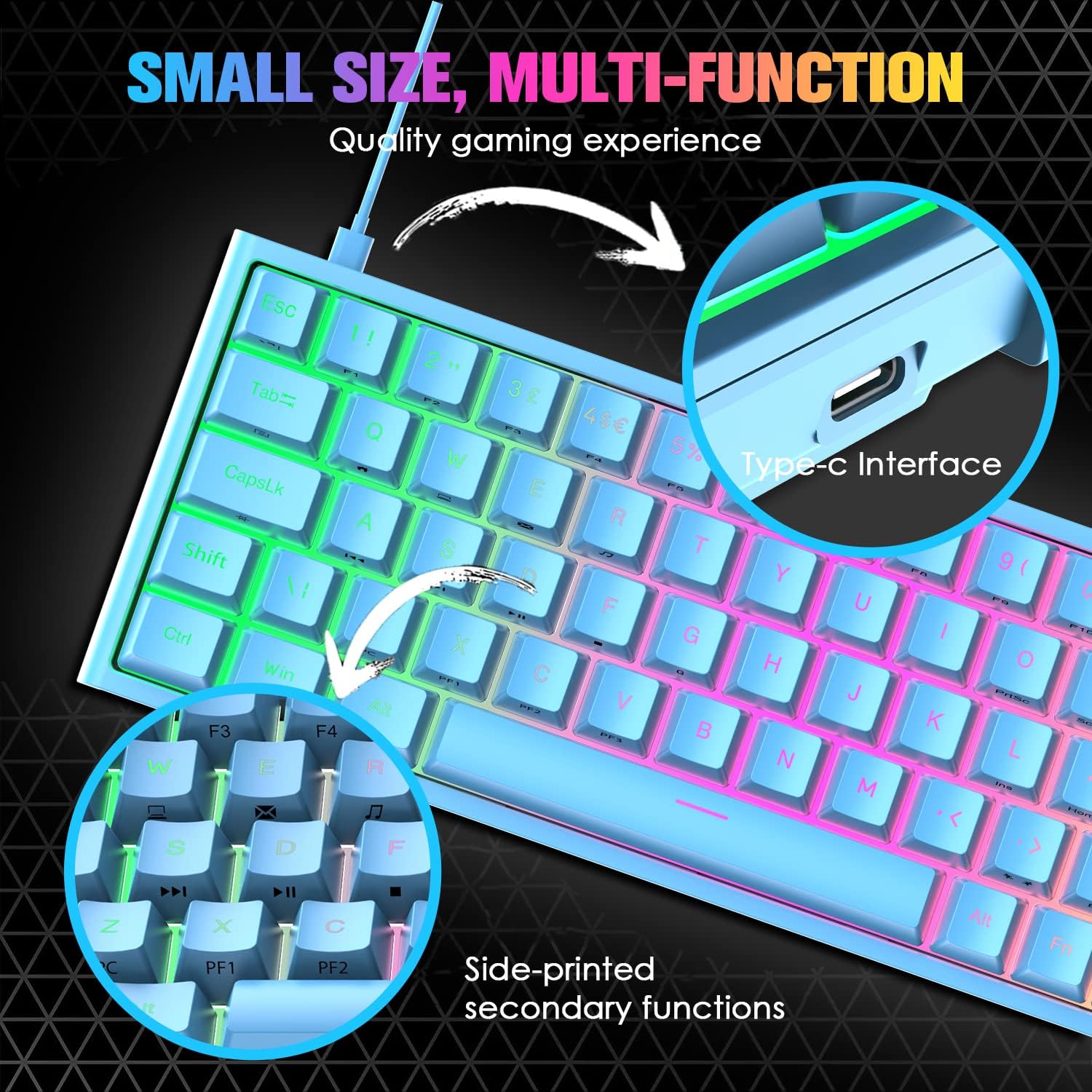
Image 3.1: Illustration of the Type-C interface connection point on the keyboard.
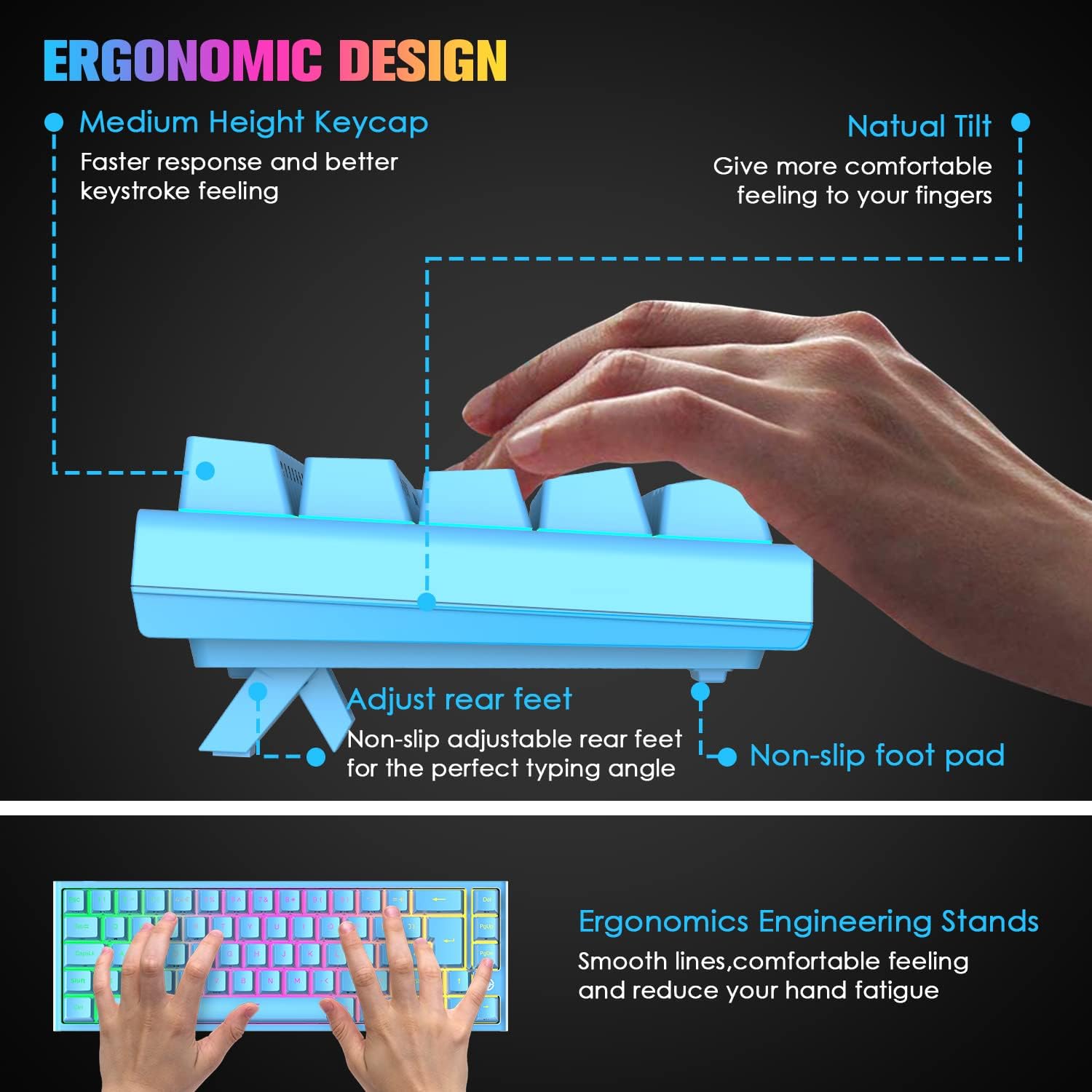
Image 3.2: Diagram showing the adjustable rear feet and non-slip foot pads for ergonomic positioning.
4. 操作手順
4.1. 基本的なキーボード機能
The keyboard functions as a standard 68-key layout. All keys feature anti-ghosting, ensuring that multiple simultaneous key presses are registered accurately, which is crucial for gaming.
4.2. RGBバックライト制御
The keyboard supports 14 RGB lighting effects and 8 monochromatic light modes. You can customize the brightness and breathing speed of the backlight.
- バックライトのオン/オフ: プレス Fn + ←
- 照明効果を切り替える: プレス Fn + タブ
- 明るさを調整: プレス Fn + ↑ (Increase) / ↓ (Decrease) (5 levels)
- 呼吸速度を調整する: プレス Fn + ← (Decrease) / → (Increase) (6 levels)

Image 4.1: The keyboard displaying various RGB backlight effects and controls.
4.3. FN Combination Functions
The keyboard utilizes FN key combinations to access multimedia and other functions due to its compact layout:
| 組み合わせ | 関数 |
|---|---|
| Fn + Q | ホームページ |
| Fn + W | 私のコンピュータ |
| Fn + E | Email Box |
| Fn + R | 音楽 |
| Fn + T | 電卓 |
| Fn + [ | 一時停止 |
| Fn + ] | 検索 |
| Fn + A | 最後の曲 |
| Fn + S | 次の曲 |
| Fn + D | 再生/一時停止 |
| Fn + F | 停止 |
| Fn + L | INS(挿入) |

Image 4.2: Visual guide to the FN combination functions for multimedia and system controls.
5. メンテナンス
5.1. キーボードのクリーニング
最適なパフォーマンスと外観を維持するために、キーボードを定期的にクリーニングしてください。
- ほこりの除去: 圧縮空気缶を使用して、キーキャップ間のほこりやゴミを吹き飛ばします。
- 表面洗浄: キーキャップとキーボードの表面を、柔らかくて少し硬めの布で拭いてください。amp 布で拭いてください。過度の湿気を避けてください。
- 徹底的なクリーニング(キーキャップ): For a more thorough clean, use the provided keycap removal tool to carefully detach keycaps. Clean them with mild soap and water, then ensure they are completely dry before reattaching.

Image 5.1: Close-up of the Red mechanical switches and double-shot keycaps, illustrating components that may require cleaning.
6。 トラブルシューティング
キーボードで問題が発生した場合は、次の一般的な解決策を参照してください。
- キーボードが応答しない:
- USB ケーブルがキーボードとコンピュータの両方にしっかりと接続されていることを確認します。
- キーボードをコンピューターの別の USB ポートに接続してみてください。
- 別のコンピューターでキーボードをテストして、問題がキーボードにあるか、コンピューターのポート/ドライバーにあるかを判断します。
- Keys Not Registering / Double Tapping:
- Dust or debris under the keycap can sometimes cause issues. Refer to the cleaning instructions in Section 5.1.
- If a specific key consistently malfunctions, it may indicate a switch issue. Contact customer support for assistance.
- Backlight Not Working / Incorrect:
- バックライトがオンになっていることを確認する Fn + ←.
- 明るさを調整する Fn + ↑ / ↓.
- 照明効果を切り替える Fn + タブ.
7. 仕様
| 特徴 | 仕様 |
|---|---|
| キーボードレイアウト | 68キー(60%コンパクト) |
| スイッチタイプ | 赤いメカニカルスイッチ |
| キーストロークライフ | 最大50万回のキーストローク |
| 作動力 | 40グラム |
| キーストロークの移動 | 2.0mm |
| バックライト | RGB (14 effects, 8 monochromatic modes) |
| インタフェース | USB Type-C(有線) |
| アンチゴースト | フルキーアンチゴースト |
| 材料 | ABS Keycaps, Metal Panel |
| 寸法(長さ×幅×高さ) | 350 x 155 x 50 mm (13.78 x 6.1 x 1.97 インチ) |
| 重さ | 850g(1.87ポンド) |
| 互換性 | Windows 7/8/10/Vista/XP, limited Mac OS, Android, Linux |

Image 7.1: Diagram illustrating the physical dimensions of the keyboard.
8. 保証とサポート
For warranty information or technical support, please refer to the purchase platform or contact LexonElec customer service directly. Keep your purchase receipt as proof of purchase.
For further assistance, you may visit the LexonElec official webサイトをご覧いただくか、サポート チャネルにお問い合わせください。