
導入
The GOLDCHAMP ET360 Digital Coating Thickness Gauge is a high-precision instrument designed for measuring the thickness of coatings on various metal substrates. It automatically identifies the substrate type (iron, aluminum, and zinc) and offers a measurement range of 0-1500 µm with 0.1 µm resolution. This compact and portable device is suitable for inspecting car paint thickness, steel structures, aerospace components, marine applications, and general metal surface treatment.

Image: The GOLDCHAMP ET360 gauge highlighting its magnetic and vortex measurement principles, 0.1µm accuracy, and 0-1500µm measurement range. It indicates compatibility with magnetic (Fe), non-magnetic (NF), and magnetic zinc (Fe+Zn) substrates.
パッケージ内容
パッケージを開封したら、すべての商品が揃っていて良好な状態であることをご確認ください。標準パッケージには以下が含まれます。
- ゴールドチAMP ET360 Digital Coating Thickness Gauge
- Aluminum Base Film
- Iron Base Film
- Calibration Pieces (50µm, 100µm, 250µm, 500µm, 1000µm)
- 吊りロープ
- ベルベットバッグ
- 単2電池XNUMX本
- 取扱説明書
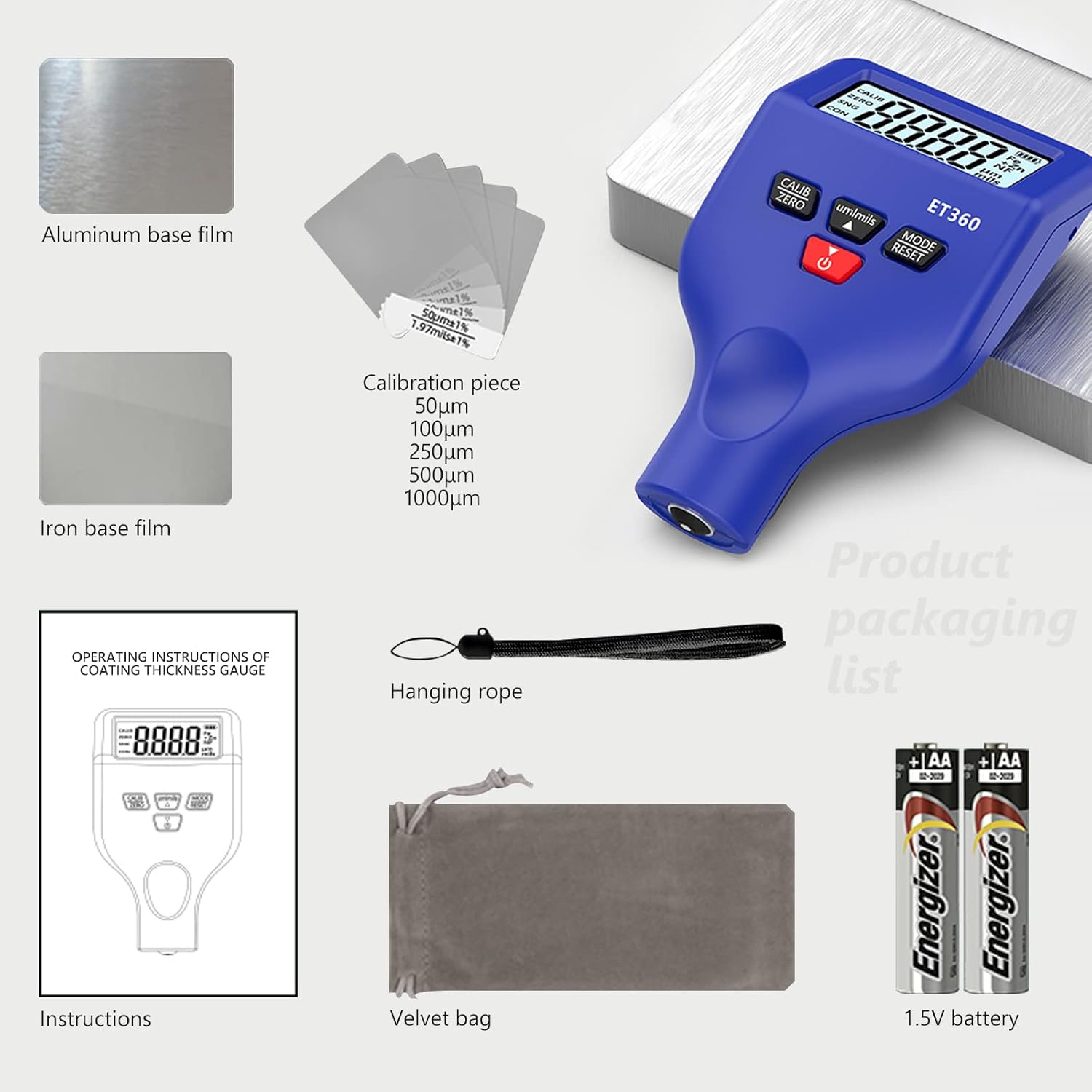
Image: A visual representation of the ET360 package contents, including the gauge, calibration films, batteries, and accessories.
設定
1. バッテリーの取り付け
The device requires 2 AAA batteries (included).
- デバイスの背面にある電池ボックスのカバーを見つけます。
- カバーをスライドさせて開きます。
- 正しい極性 (+/-) を確認して、単 4 電池 2 本を挿入します。
- 電池カバーをしっかりと閉じてください。
2. 電源のオン/オフ
電源ボタンを押します(⏻) to turn the device on or off. The LCD display will illuminate upon power-on.
Video: An unboxing and initial setup demonstration of a similar digital coating thickness gauge, showing battery installation and basic operation. This video is provided by the seller and demonstrates the product's functionality.
操作手順
1. ディスプレイの理解
The LCD display provides crucial information during operation. Refer to the diagram below for an explanation of each indicator.

画像: 詳細 view of the ET360's LCD screen and physical buttons. The screen shows indicators for calibration (CALIB), zeroing (ZERO), single point measurement (SNG), continuous measurement (CON), battery power, substrate types (Fe, Fe+Zn, NF), unit (µm, mils), and the measurement reading. The physical diagram points out the LCD display, unit switching/data regulation buttons, measurement mode/factory settings buttons, on/off/data down button, anti-slip groove, and measuring probe.
- キャリブ: Indicates calibration mode.
- ゼロ: Indicates zeroing operation is complete.
- シンジケート: Single point measurement mode (one point at a time).
- 欠点: Continuous measurement mode (continuous detection).
- バッテリーインジケーター: 現在のバッテリーレベルを表示します。
- Fe: Indicates magnetic conductive metal substrates (e.g., steel, iron).
- Fe+Zn: Indicates a zinc coating on magnetic conductive materials (e.g., galvanized steel).
- NF: Indicates non-magnetic metal substrates (e.g., aluminum, copper).
- µm / mils: Measurement unit (microns or mils).
- 測定値の読み取り: Displays the thickness value.
2. Substrate Identification
The ET360 automatically identifies the type of substrate:
- Fe (Magnetic Substrate): For iron and steel.
- NF (Nonmagnetic Substrate): For aluminum, copper, and other non-ferrous metals.
- Fe+Zn (Magnetic Zinc Substrate): For galvanized layers on magnetic substrates. This new function detects anti-corrosion, wear-resistant, and anti-oxidation coatings, helping to identify original accessories by detecting galvanized layers.
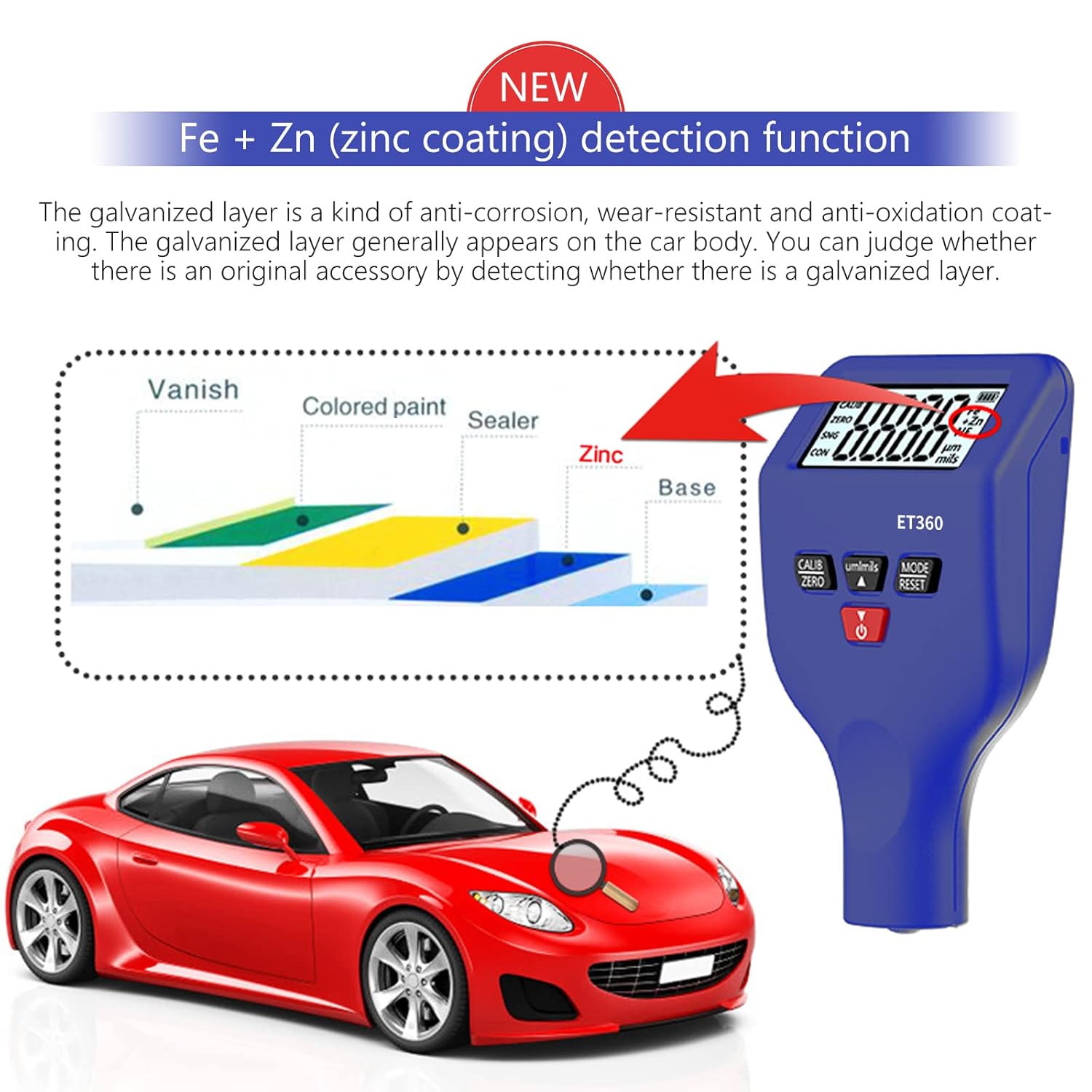
Image: Illustration of the Fe+Zn detection function, demonstrating how the gauge identifies a zinc coating layer on a car body, distinguishing between varnish, colored paint, sealer, zinc, and base layers.
3.測定手順
- デバイスの電源がオンになっていることを確認します。
- Place the measuring probe firmly and perpendicularly onto the surface to be measured.
- The device will automatically detect the substrate type and display the coating thickness on the LCD screen.
- For single point measurement (SNG mode), lift the probe and place it again for a new reading.
- For continuous measurement (CON mode), slide the probe across the surface for real-time readings.
4. Interval Calibration
To ensure accurate measurements, periodic calibration is recommended.
- Turn on the device and wait for a stable measurement value.
- を押す キャリブ ボタンを押してキャリブレーションモードに入ります。
- Adjust the displayed data to match the target value of your calibration piece using the up/down buttons.
- プレス キャリブ again to save the data.
- Take another measurement with the calibrated piece to verify the result.
メンテナンス
- デバイスを清潔で乾燥した状態に保ちます。柔らかく乾いた布で拭いてください。
- デバイスを極端な温度、湿度、または直射日光にさらさないでください。
- 長期間使用しない場合は、液漏れを防ぐために電池を取り外してください。
- Store the device in the provided velvet bag to protect it from dust and scratches.
- Handle the measuring probe with care to prevent damage.
トラブルシューティング
- デバイスの電源が入らない: 電池の取り付けを確認し、電池が消耗していないことを確認してください。必要に応じて交換してください。
- 不正確な読み取り: Perform an interval calibration using the provided calibration pieces. Ensure the probe is clean and making full contact with the surface.
- ディスプレイが暗い、またはちらつく: Batteries may be low. Replace with new AAA batteries.
- 表示されるエラー メッセージ: Refer to the full instruction manual for specific error codes or contact customer support.
仕様
| 特徴 | 仕様 |
|---|---|
| モデル | ET360 |
| 測定範囲 | 0~1500µm |
| 解決 | 0.1µm |
| 基質の識別 | Automatic (Fe, NF, Fe+Zn) |
| 電源 | 単2電池XNUMX本 |
| 寸法(パッケージ) | 14.2 x 10.3 x 5.3 cm |
| 重量(パッケージ) | 60グラム |
| メーカー | ゴールドチAMP |
保証とサポート
ゴールドチAMP products are manufactured to high-quality standards. If you encounter any issues with your ET360 Digital Coating Thickness Gauge, please contact our customer support team immediately. We are committed to responding to your inquiries within 24 hours.
For further assistance, please refer to the official GOLDCHAMP webサイトをご覧いただくか、販売店にお問い合わせください。