
1. はじめに
Thank you for choosing the FLEXISPOT EG1 Electric Standing Desk. This manual provides essential information for the safe and efficient assembly, operation, and maintenance of your new height-adjustable desk. The EG1 desk is designed to promote a healthier work environment by allowing seamless transitions between sitting and standing positions, enhancing focus and comfort throughout your workday.
The FLEXISPOT EG1 features a wide height adjustment range, a smooth one-piece desktop, and an intuitive control panel for ease of use. Please read this manual thoroughly before assembly and operation to ensure proper functionality and longevity of your product.
2. 安全情報
- 組み立て前に、すべての部品が揃っていて損傷がないことを確認してください。部品が不足または損傷している場合は使用しないでください。
- 怪我を防ぐため、操作中は子供やペットをデスクから遠ざけてください。
- Do not place hands or other objects near moving parts (e.g., lifting columns) during height adjustment.
- 安定性を保つために、机が水平な面に設置されていることを確認してください。
- デスクに過度の荷重をかけないでください。最大荷重については仕様を参照してください。
- 付属の電源アダプターとケーブルのみを使用してください。
- 清掃またはメンテナンスの前に電源を切ってください。
- コントロール パネルや電気部品に液体をこぼさないようにしてください。
- This desk is equipped with an anti-collision rebound function. However, always be aware of surroundings during movement.
3. パッケージ内容
The FLEXISPOT EG1 Electric Standing Desk is shipped in two separate packages to ensure better protection during transit. Please verify that all components listed below are present before beginning assembly.
- デスクトップ(1個)
- Desk Frame (includes legs, motor, control box)
- コントロールパネル
- 電源アダプターとケーブル
- 組み立て用ハードウェア(ネジ、ボルト、工具)
- 取扱説明書

Image: The FlexiSpot EG1 desk components are shipped in two distinct packages: one containing the desktop and another for the desk frame, ensuring secure delivery.
4. セットアップと組み立て
Assembly of the FLEXISPOT EG1 desk is designed to be straightforward with pre-drilled holes and a complete set of tools included. Follow these general steps for assembly:
- コンポーネントを解凍します: すべての部品をパッケージから慎重に取り出し、傷がつかないように清潔で柔らかい表面の上に広げます。
- デスクフレームの組み立て: Attach the lifting columns to the crossbar, ensuring all screws are securely tightened.
- 足を取り付ける: Secure the foot pads to the bottom of the lifting columns. The anti-slip foot pads provide stability and protect your floor.
- デスクトップをマウント: Carefully place the desktop upside down on a soft surface. Align the assembled desk frame with the pre-drilled holes on the desktop and secure it with the provided screws.
- コントロール パネルをインストールします。 Attach the control panel to the underside of the desktop in a convenient location.
- ケーブルを接続する: モーターケーブル、コントロールパネルケーブル、電源アダプターをコントロールボックスに接続します。すべての接続がしっかりと行われていることを確認してください。
- ケーブル管理 Use cable ties or clips (if provided) to organize and secure cables, preventing them from snagging during height adjustments.
- ポジションデスク: Carefully flip the desk upright and place it in its desired location. Ensure there is adequate clearance for height adjustments.
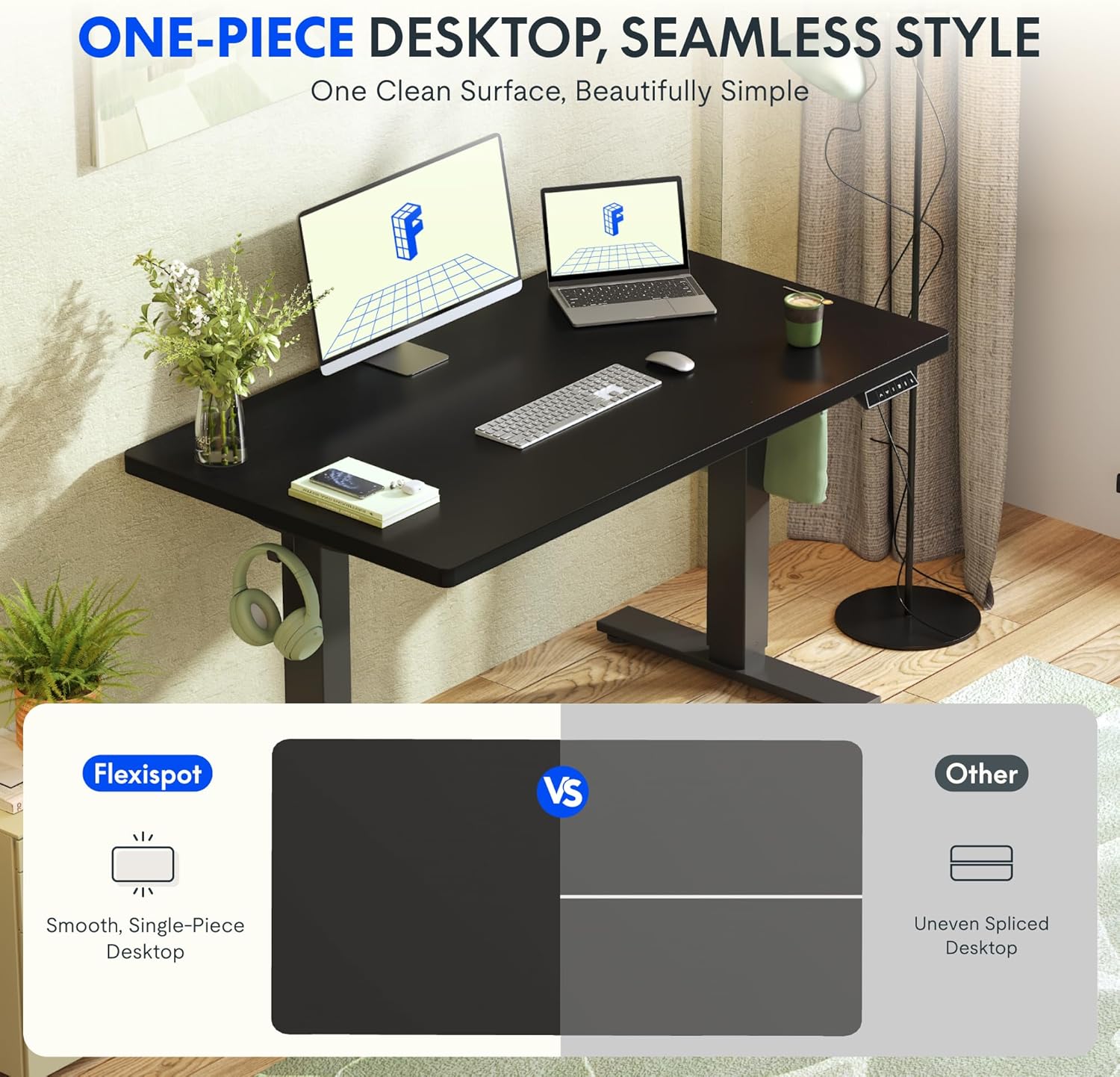
Image: The desk features a smooth, one-piece desktop, eliminating gaps and burrs often found in spliced desktops, contributing to a clean and stable work surface.
5. 操作手順
The FLEXISPOT EG1 Electric Standing Desk is operated using a simple 2-button control panel, allowing for quick and easy height adjustments and memory presets.
5.1 コントロールパネル機能

Image: The smart control panel features an LED display, up/down buttons for height adjustment, and four memory preset buttons for saving preferred desk heights.
- LEDディスプレイ: Shows the current desk height in centimeters or inches.
- 上/下ボタン(▲/▼): Press and hold to move the desk up or down. Release the button to stop at the desired height.
- メモリプリセット(1、2、3、4): これらのボタンを使用すると、最大 4 つのデスクの高さを保存して呼び出すことができます。
5.2 メモリプリセットの設定
- 上/下ボタンを使用して、デスクを希望の高さに調整します。
- Press the 'M' or 'SET' button (if available, otherwise proceed to step 3). The display may flash.
- Press one of the numbered memory buttons (1, 2, 3, or 4) within a few seconds. The display will confirm the setting.
- 保存した高さを呼び出すには、対応する番号のメモリボタンを押すだけです。デスクは自動的にその高さまで移動します。
5.3 衝突防止機能
デスクには衝突防止システムが搭載されています。高さ調整中に障害物に遭遇した場合、損傷を防ぐため、自動的に停止し、わずかに後退します。操作中は、常にデスクの周囲に障害物がないことを確認してください。

Image: The desk offers a wide height range (71.5 to 116 cm), accommodating various users for comfortable sitting or standing positions.
6. メンテナンス
Regular maintenance ensures the longevity and optimal performance of your FLEXISPOT EG1 Electric Standing Desk.
- クリーニング: デスクトップとフレームを柔らかくて乾いた布で拭きます。amp 布で拭いてください。研磨剤入りの洗剤や刺激の強い化学薬品は、仕上げを傷める可能性があるため、使用しないでください。清掃前にデスクの電源プラグを抜いてください。
- ケーブル管理 Periodically check cables for wear or damage. Ensure they are neatly organized and not pinched or tangled.
- ファスナーチェック: 定期的にすべてのネジとボルトがしっかりと締まっているか確認してください。必要に応じて締め直してください。
- 動きのチェック: Operate the desk through its full height range periodically to ensure smooth and consistent movement.
7。 トラブルシューティング
If you encounter issues with your FLEXISPOT EG1 desk, refer to the following troubleshooting guide:
| 問題 | 考えられる原因 | 解決 |
|---|---|---|
| 机は動きません。 | Power cable disconnected, control box error, motor issue. | Check power connections. Unplug and replug the desk for 10 seconds to reset. If problem persists, contact customer support. |
| 机の動きが不均一であったり、異常な音がしたりします。 | 荷物の不均一、留め具の緩み、障害。 | Ensure weight is evenly distributed. Check and tighten all assembly fasteners. Clear any obstructions. |
| 調整中にデスクが停止します。 | Anti-collision activated, overload. | Remove any obstacles. Reduce weight on the desk if it exceeds maximum capacity. |
| メモリプリセットが機能しません。 | プリセットが正しく保存されませんでした。 | セクション 5.2 の指示に従って、メモリプリセットを再度保存します。 |
8. 仕様
Key specifications for the FLEXISPOT EG1 Electric Standing Desk:
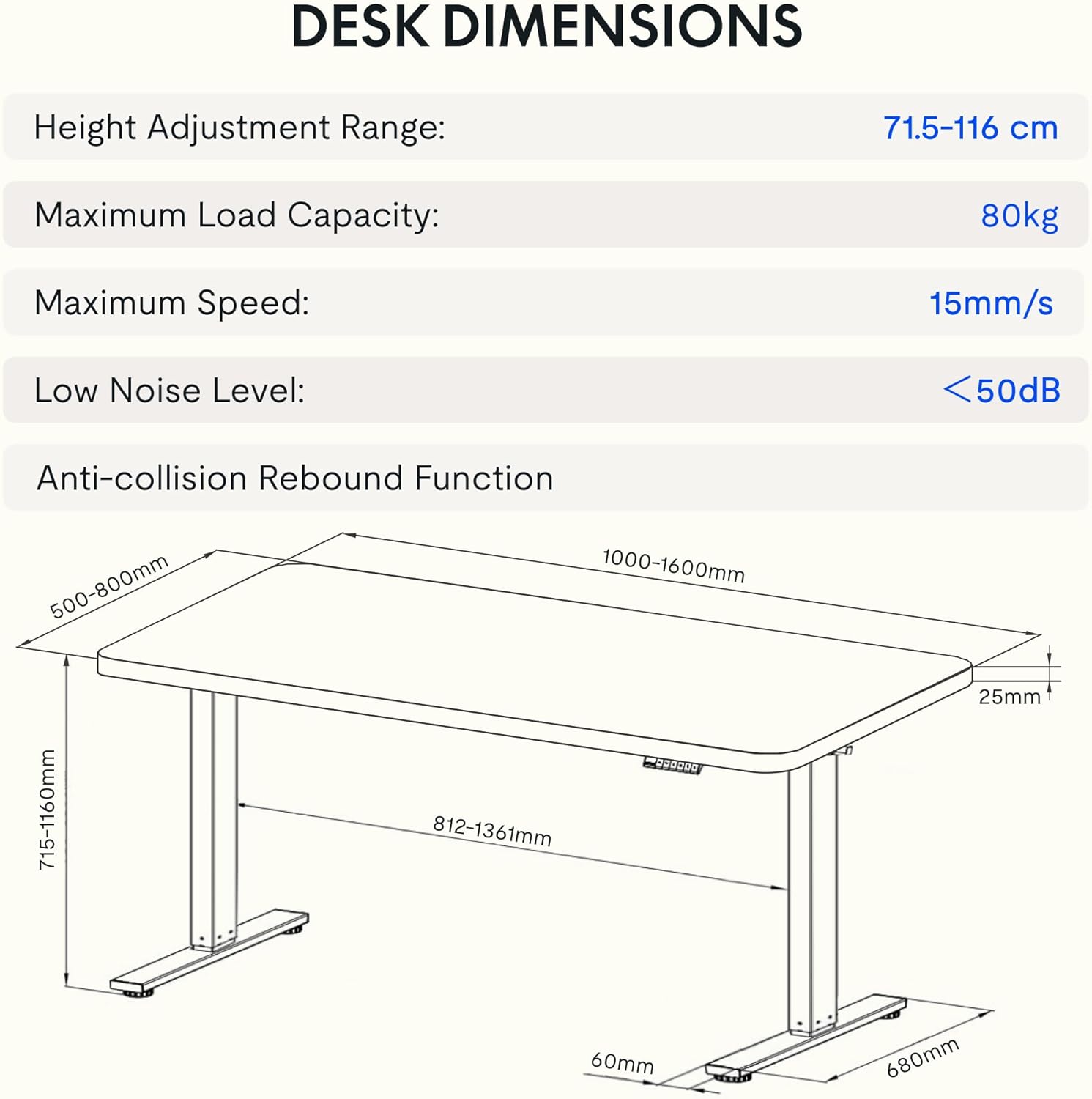
Image: Detailed diagram illustrating the desk's dimensions, height adjustment range (71.5-116 cm), maximum load capacity (80kg), maximum speed (15mm/s), and low noise level (<50dB).
| 特徴 | 仕様 |
|---|---|
| モデル番号 | EG1B+TP1608-Black |
| 高さ調整範囲 | 71.5~116cm(28~48インチ) |
| 最大積載量 | 80 kg (176 ポンド) |
| 最高速度 | 15mm/秒 |
| 低騒音レベル | 50dB未満 |
| デスクトップ素材 | Wood (2.5 cm thickness) |
| フレーム素材 | 鋼鉄 |
| 製品寸法(奥行き×幅×高さ) | 31.5インチ x 62.99インチ x 11.02インチ(パッケージ) |
| アイテム重量 | 30キログラム |
| 特集 | Electric, Anti-collision Rebound Function, 4 Memory Presets |
9. 保証とサポート
FLEXISPOT is committed to providing high-quality ergonomic solutions. With over 20 years of experience, our products undergo rigorous testing and meet various European certifications (IGR, CE, TÜV).
For warranty information, technical support, or any questions regarding your FLEXISPOT EG1 Electric Standing Desk, please visit the official FLEXISPOT website or contact our customer service department. You can find more information and contact details on the AmazonのFLEXISPOTストア.