導入
This manual provides essential information for the setup, operation, and maintenance of your Garmin DriveSmart 66 6-inch Car GPS Navigator. This device is designed to provide reliable navigation and enhance your driving experience with smart features.
Key features include a bright 6-inch high-resolution display, Garmin voice assist for directions and hands-free calling, driver alerts, and detailed map updates for North America. It also integrates with the Garmin Drive app for live traffic, weather, fuel prices, parking, and smart notifications.
設定
1. 開梱とコンポーネント
Carefully unpack your Garmin DriveSmart 66. Ensure all components are present:
- Garmin DriveSmart 66 Navigator
- 車両用吸盤マウント
- Traffic receiver
- 車両電源ケーブル
- ドキュメント
- Dual USB DC12V/24V Electronic Car Socket Cigarette Lighter
- 32GB MicroSD High-Speed Memory Card
- Deco Gear Microfiber Cleaning Cloth

Image: Garmin DriveSmart 66 GPS Navigator with included accessories.
2. デバイスの取り付け
Attach the vehicle suction cup mount to your windshield or dashboard. Ensure the mounting location does not obstruct your view of the road. Secure the Garmin DriveSmart 66 to the mount.

Image: Garmin DriveSmart 66 mounted on a car dashboard, showing a clear view ドライバーのために。
3. 電源投入と充電
Connect the vehicle power cable to the navigator and plug the other end into your vehicle's 12V power outlet. The device will automatically power on when connected to power. For charging other devices, use the included Dual USB DC12V/24V Electronic Car Socket Cigarette Lighter.

Image: Dual USB DC12V/24V Electronic Car Socket Cigarette Lighter for powering accessories.
4. Initial Setup and Smartphone Connection
Follow the on-screen prompts to select your language, time zone, and other preferences. To access live services and smart notifications, download the Garmin Drive app on your compatible smartphone and pair it with your navigator via Bluetooth. This also enables hands-free calling.
操作手順
1. 基本的なナビゲーション
From the main menu, select 'Where To?' to enter a destination. You can search by address, point of interest, or recent locations. Use Garmin voice assist by saying "OK Garmin" followed by your command to get directions or find places hands-free.
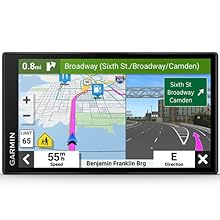
Image: The main menu of the Garmin DriveSmart 66, displaying options like 'Where To?' and 'View Map'.

Image: The Garmin DriveSmart 66 screen showing an active navigation route with turn-by-turn directions.
2. Smart Features and Driver Alerts
When paired with your smartphone via the Garmin Drive app, the navigator provides live traffic updates, weather forecasts, current fuel prices, and parking availability. It also delivers smart notifications from your phone directly to the device screen. Driver alerts notify you of sharp curves, speed changes, school zones, and other potential hazards.
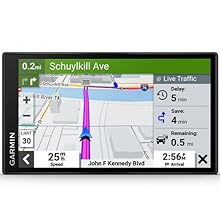
Image: The navigator screen showing live traffic conditions and estimated delays.
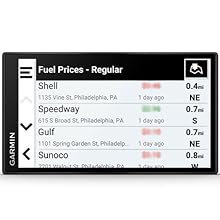
Image: The navigator screen showing a list of nearby fuel stations with their current prices.
3. Trip Planning and Points of Interest
Utilize the preloaded Tripadvisor traveler ratings to find highly-rated hotels, restaurants, and attractions along your route. The device also includes a directory of U.S. national parks and the HISTORY database of notable sites, enhancing your travel experience.

Image: The Garmin DriveSmart 66 screen showing details for a point of interest, including options to save or navigate.
メンテナンス
1.デバイスのクリーニング
Use the included Deco Gear Microfiber Cleaning Cloth to gently wipe the screen and exterior of your navigator. Avoid using abrasive cleaners or solvents, as these can damage the device.

Image: A red microfiber cleaning cloth, suitable for cleaning the device screen.
2. ソフトウェアと地図のアップデート
Keep your device's software and maps up to date for optimal performance and the latest road information. The Garmin DriveSmart 66 supports wireless updates via Wi-Fi. Connect your device to a Wi-Fi network and follow the on-screen prompts to install available updates.
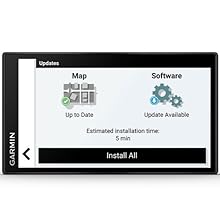
Image: The Garmin DriveSmart 66 screen showing available map and software updates.
3. バッテリーのお手入れ
To prolong battery life, avoid exposing the device to extreme temperatures. Charge the device regularly using the provided vehicle power cable.
トラブルシューティング
GPS信号がない
- デバイスにクリアな view 空の。
- Move away from tall buildings or dense foliage.
- デバイスが衛星を取得するまで数分間お待ちください。
デバイスの電源が入っていない
- Check that the vehicle power cable is securely connected to both the device and the vehicle's power outlet.
- 車両の電源コンセントが機能していることを確認します。
- デバイスのバッテリーが充電されていることを確認してください。
Bluetooth接続の問題
- Ensure Bluetooth is enabled on both your smartphone and the Garmin DriveSmart 66.
- 両方のデバイスを再起動します。
- Unpair and re-pair the devices through the Bluetooth settings.
For further assistance, refer to the comprehensive documentation included with your device or contact Garmin customer support.
仕様
| 特徴 | 仕様 |
|---|---|
| モデル番号 | E2GRDRIVE66 |
| 表示サイズ | 6インチ |
| ディスプレイ解像度 | 1280 x 720 ピクセル |
| アイテム重量 | 11.2オンス |
| 製品寸法 | 6 x 0.7 x 3.4インチ |
| 接続技術 | USB |
| マップタイプ | 北米 |
| 音声コマンド | Yes (Garmin voice assist) |
| 特集 | Driver Alerts, Tripadvisor, National Parks Directory, Voice Assist, Hands-Free Calling, Live Traffic and Weather, Traffic Cams, Parking, Smart Notifications, Wireless Updates |
| 取り付けタイプ | ダッシュボードマウント(吸盤) |
保証
This Garmin DriveSmart 66 Navigator is covered by an Authorized Garmin Limited Warranty. For specific terms, conditions, and duration of the warranty, please refer to the warranty documentation included in the product packaging or visit the official Garmin webサイト。
サポート
追加のサポート、製品登録、ソフトウェアのダウンロード、または view よくある質問については、Garminの公式サポートをご覧ください。 website. You can also contact Garmin customer service directly for personalized assistance.
ガーミンサポート Webサイト: www.garmin.com/support