
1. はじめに
ご購入ありがとうございますasing the Acctim Delaware 71682 Radio Controlled LCD Digital Alarm Clock. This manual provides essential information for setting up, operating, and maintaining your new alarm clock. Please read these instructions carefully before use and retain them for future reference.
2.製品オーバーview
The Acctim Delaware 71682 is a radio-controlled digital alarm clock featuring a large LCD display with a green backlight, dual alarms, calendar, and indoor temperature display. Its radio-controlled function ensures accurate timekeeping in the UK and Ireland.
2.1. コンポーネントとディスプレイ
Familiarize yourself with the clock's buttons and display elements.
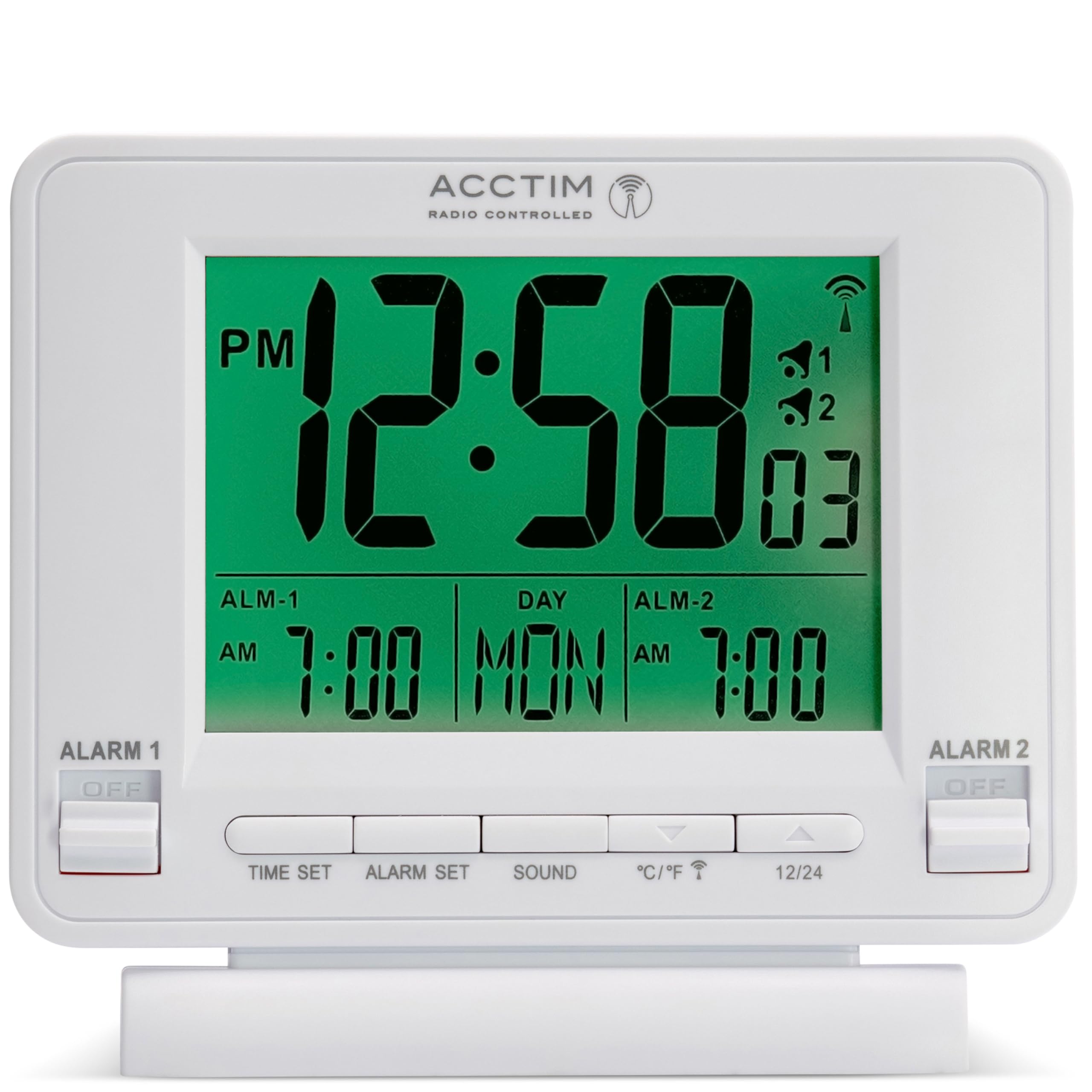
画像1: フロント view of the Acctim Delaware 71682 Radio Controlled LCD Digital Alarm Clock. The display shows time, day, date, and alarm settings. Control buttons are visible at the bottom, and alarm switches on the sides.
フロントパネルのコントロール:
- 時間設定: 時刻設定モードに入るために使用します。
- アラームセット: アラーム設定モードに入るために使用します。
- 音: Used to select alarm sound, and typically functions as the Snooze/Backlight button.
- °C /°F: Toggles between Celsius and Fahrenheit for temperature display. Also functions as a 'down' adjustment button in setting modes.
- 12/24: Toggles between 12-hour and 24-hour time format. Also functions as an 'up' adjustment button in setting modes.
サイドパネルコントロール:
- ALARM 1 ON/OFF Switch: アラーム 1 を有効または無効にします。
- ALARM 2 ON/OFF Switch: アラーム 2 を有効または無効にします。

画像2: 後方 view of the Acctim Delaware 71682 Alarm Clock. This image highlights the battery compartment cover and the recessed RESET button.
背面パネルのコントロール:
- バッテリーコンパートメント: Holds the required AA batteries.
- リセットボタン: A small, recessed button to reset the clock to factory defaults.
3. セットアップ
3.1. バッテリーの取り付け
- 時計の背面にある電池ケースのカバーを開きます。
- Insert 2 new AA batteries, ensuring the correct polarity (+ and -).
- 電池カバーをしっかりと閉じてください。
Note: Batteries are not included. Always use fresh batteries for optimal performance.
3.2. 初期設定と無線制御の同期
Upon battery installation, the clock will automatically attempt to synchronize with the radio-controlled time signal (MSF signal for UK and Ireland). This process may take several minutes to a few hours, depending on your location and signal strength. During synchronization, a radio signal icon will flash on the display.
- 信号受信を良くするために、時計を窓の近くに置きます。
- 干渉を引き起こす可能性のある電子機器の近くに置かないでください。
- Once synchronized, the radio signal icon will appear solid on the display, and the time will be set automatically.
If the clock fails to synchronize, you may need to set the time manually.
4. 操作手順
4.1. 手動で時刻と日付を設定する
If radio control is unavailable or you prefer manual setting:
- を押し続けます 時間設定 時間の数字が点滅し始めるまでボタンを押します。
- 使用 12/24 (上)と °C /°F (down) buttons to adjust the hour.
- プレス 時間設定 again to confirm the hour and move to minutes. Adjust minutes using the up/down buttons.
- 押し続ける 時間設定 年、月、日を循環して設定します。
- プレス 時間設定 one last time or wait for 10 seconds for the settings to be saved automatically.
4.2. アラームの設定(アラーム1とアラーム2)
時計には 2 つの独立したアラーム機能が付いています。
- を押し続けます アラームセット button until the Alarm 1 hour digits start flashing.
- 使用 12/24 (上)と °C /°F (down) buttons to adjust the desired Alarm 1 hour.
- プレス アラームセット again to confirm the hour and move to Alarm 1 minutes. Adjust minutes using the up/down buttons.
- プレス アラームセット again to move to Alarm 2 hour setting. Repeat the adjustment process for Alarm 2.
- プレス アラームセット one last time or wait for 10 seconds to save the alarm settings.
4.3. アラームの有効化/無効化
Use the physical switches on the sides of the clock:
- スライドして アラーム1オン/オフ switch to 'ON' to activate Alarm 1. An alarm icon (1) will appear on the display.
- スライドして アラーム2オン/オフ switch to 'ON' to activate Alarm 2. An alarm icon (2) will appear on the display.
- Slide the switches to 'OFF' to deactivate the respective alarms.

画像3: フロント view of the Acctim Delaware 71682 with Alarm 1 activated. The 'ALARM 1' switch is in the 'ON' position, and the corresponding alarm icon is visible on the LCD.
4.4. Using the Alarm and Snooze Function
- アラームが鳴ったら、 音 button (or any other front button, depending on model variation) to activate the snooze function. The alarm will pause and sound again after approximately 5 minutes.
- To stop the alarm completely, slide the corresponding アラームのオン/オフ 「OFF」に切り替えます。
4.5.ディスプレイ設定
- 12/24時間形式: を押す 12/24 button to switch between 12-hour (with AM/PM indicator) and 24-hour time display.
- 温度単位: を押す °C /°F button to toggle the indoor temperature display between Celsius and Fahrenheit.
- バックライト: を押す 音 button (or the top button if present) to activate the green backlight for a few seconds.

画像4: フロント view of the Acctim Delaware 71682 with its green backlight activated, illuminating the time, date, and temperature display for enhanced visibility in low light conditions.
5. メンテナンス
5.1. 清掃
To clean the clock, use a soft, dry cloth. Do not use abrasive cleaners or chemical solvents, as these may damage the casing またはディスプレイ。
5.2. バッテリーの交換
When the display becomes dim or the clock functions erratically, it's time to replace the batteries. Follow the battery installation steps in Section 3.1. Always replace both batteries at the same time with new ones.
6。 トラブルシューティング
- 何も表示されない、または暗い表示:
Ensure batteries are inserted correctly with the correct polarity. Replace with fresh AA batteries. - 時間が間違っています:
Check if the radio control signal icon is solid. If it's flashing or absent, the clock may not be receiving the signal. Move the clock to a location with better reception (e.g., near a window). If the issue persists, set the time manually as described in Section 4.1. - アラームが鳴らない:
Verify that the respective ALARM ON/OFF switch (Alarm 1 or Alarm 2) is in the 'ON' position. Ensure the alarm time is set correctly. - バックライトが機能しない:
Ensure batteries have sufficient power. The backlight is designed to illuminate for a short period only. - Clock unresponsive:
Remove the batteries, wait for a few minutes, then reinsert them. If the problem persists, use a pointed object (like a paperclip) to press the recessed リセット button on the back of the clock. Note that this will clear all settings.
7. 仕様
| 特徴 | 詳細 |
|---|---|
| モデル番号 | 71682 |
| ブランド | アクティム |
| 表示タイプ | デジタルLCD |
| 特集 | Radio Controlled (UK & Ireland), Dual Alarm, Snooze, Calendar, Indoor Temperature, Backlight |
| 電源 | Battery (2 x AA required) |
| 寸法(高さ×幅×奥行き) | 10.1 x 10.2 x 4 cm |
| 重さ | 0.14キロ |
| 色 | 白 |
8. 保証情報
This Acctim product comes with a 24ヶ月保証 from the date of purchase. Please retain your proof of purchase for any warranty claims. The warranty covers manufacturing defects but does not cover damage caused by misuse, accidents, unauthorized repairs, or normal wear and tear.
9. カスタマーサポート
For further assistance, troubleshooting, or warranty inquiries, please contact Acctim customer support through their official website or the retailer where the product was purchased. Please have your model number (71682) and proof of purchase ready.