
導入
Thank you for choosing the Audizio SB85 Soundbar with Subwoofer. This manual provides essential information for the safe and correct operation of your new audio system. Please read it thoroughly before use and retain it for future reference. The SB85 is designed to enhance your television's audio, providing a rich, immersive sound experience for movies, games, and music, complete with a dedicated subwoofer for powerful bass.
安全に関する注意事項
- デバイスを操作する前に、すべての指示をよくお読みください。
- Keep the unit away from water, moisture, and heat sources.
- 通気口を塞がないでください。
- メーカー指定のアタッチメント/アクセサリのみを使用してください。
- 雷雨の際や長期間使用しない場合は、装置のプラグを抜いてください。
- すべてのメンテナンスは資格のあるサービス担当者に依頼してください。
- Do not expose the battery (if applicable) to excessive heat such as sunshine, fire, or the like.
パッケージ内容
箱の中にすべてのアイテムが揃っていることを確認します。
- Audizio SB85 Soundbar
- 有線サブウーファー
- リモートコントロール
- 光ケーブル(Toslink)
- AUXケーブル
- 電源アダプター
- ユーザーマニュアル
製品終了view
The Audizio SB85 system consists of a soundbar and a separate wired subwoofer, designed to deliver a powerful and clear audio experience.
サウンドバーの機能
- Integrated 150W speaker system with 4 speakers (2x 2cm range, 2x 2cm tweeter).
- Front LED display for status indication.
- Control buttons on the side panel.
- Multiple input options: HDMI (ARC), USB, Line In (AUX), Coaxial, Optical.
- ワイヤレスオーディオストリーミング用の Bluetooth 5.0。

Image: Close-up of the Audizio SB85 Soundbar's control panel and its remote control, highlighting Bluetooth 5.0 and ease of use.

画像: 内部 view of the Audizio SB85 Soundbar's full-range speaker, emphasizing its 150W speaker system for an immersive audio experience.
サブウーファーの機能
- 5.25-inch wired subwoofer for enhanced bass response.

Image: Close-up of the Audizio SB85 wired subwoofer, designed to amplify bass frequencies.
設定
1.配置
Place the soundbar centrally below your television. The subwoofer can be placed on the floor near the soundbar, ideally in a corner for optimal bass reflection, but ensure it is not obstructed.

Image: Audizio SB85 Soundbar and Subwoofer setup in a living room, demonstrating room-filling sound and clean design.

Image: Audizio SB85 Soundbar placed below a television, illustrating its universal compatibility with any TV.
2。 電源への接続
Connect the power adapter to the DC IN port on the soundbar and then plug it into a wall outlet (230 Vac/50 Hz).
3. サブウーファーの接続
Connect the wired subwoofer to the dedicated subwoofer output port on the soundbar.
4. オーディオソースへの接続
The SB85 offers several connection options:
- HDMI(ARC): For the best audio quality and control, connect an HDMI cable from the HDMI (ARC) port on the soundbar to the HDMI ARC port on your TV. This allows the TV to send audio to the soundbar and often enables TV remote control of the soundbar's volume.
- 光学式 (トスリンク): Connect the included optical cable from the OPTICAL port on the soundbar to the Optical Digital Audio Out port on your TV or other audio source.
- Line In (AUX): Use the included AUX cable to connect the LINE IN port on the soundbar to the headphone jack or audio output of your device (e.g., smartphone, MP3 player).
- 同軸: Connect a coaxial cable (not included) from the COAXIAL port on the soundbar to the Coaxial Digital Audio Out port on your TV or other audio source.
- USB: MP3 を再生するには、USB ポートに USB フラッシュ ドライブを挿入します。
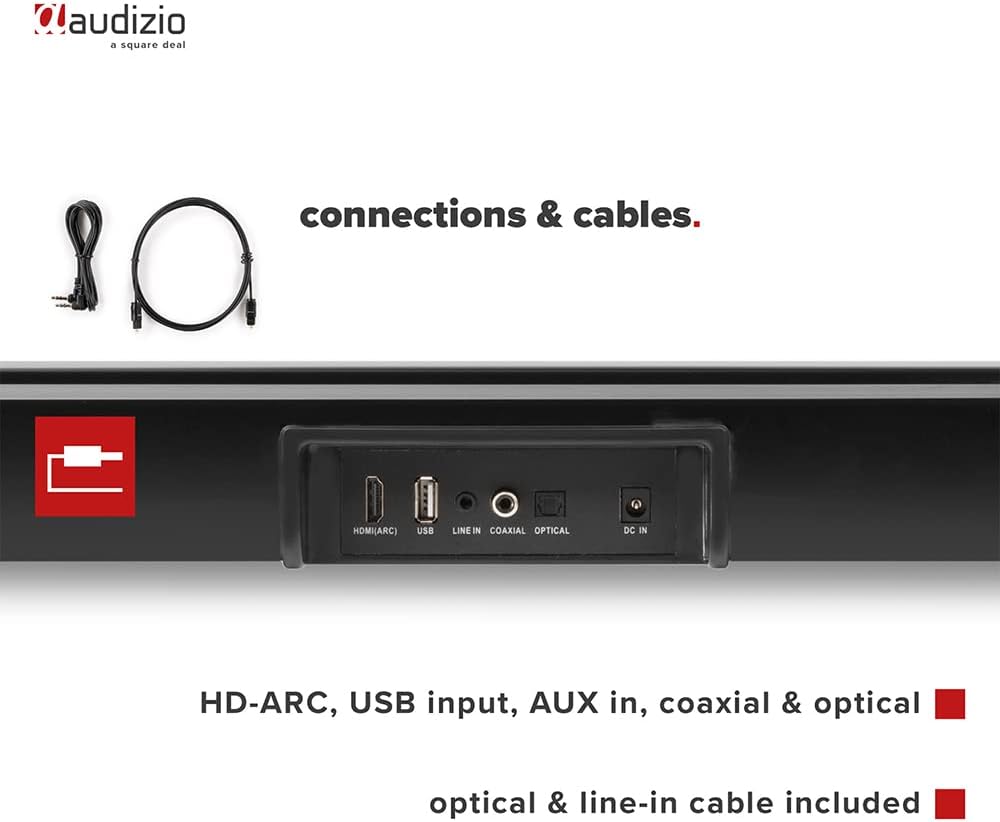
画像: 背面 view of the Audizio SB85 Soundbar showing various connection ports: HDMI (ARC), USB, Line In, Coaxial, and Optical. Includes optical and line-in cables.
操作手順
1. 電源のオン/オフ
サウンドバーまたはリモコンの電源ボタンを押して、ユニットの電源をオンまたはオフにします。
2. 入力ソースの選択
Press the 'MODE' button on the soundbar or the remote control repeatedly to cycle through the available input sources: HDMI (ARC), Optical, Coaxial, AUX, USB, and Bluetooth. The selected input will be shown on the front LED display.
3. 音量コントロール
Use the 'VOL+' and 'VOL-' buttons on the soundbar or the remote control to adjust the volume. The 'MUTE' button on the remote control will temporarily silence the audio.
4.Bluetoothペアリング
- Switch the soundbar to Bluetooth mode using the 'MODE' button. The LED display will show 'BT'.
- スマートフォンまたはタブレットで Bluetooth を有効にし、利用可能なデバイスを検索します。
- Select 'Audizio SB85' from the list of devices.
- Once paired, the soundbar will indicate a successful connection, and you can stream audio wirelessly.
5.USB再生
MP3オーディオが入ったUSBフラッシュドライブを挿入します files into the USB port. The soundbar will automatically switch to USB mode and begin playing the music. Use the remote control to navigate tracks (play/pause, next/previous).
6.リモコン機能
The remote control provides full functionality for the soundbar, including power, mode selection, volume, mute, and playback controls for USB and Bluetooth modes.
メンテナンス
クリーニング
Wipe the soundbar and subwoofer surfaces with a soft, dry cloth. Do not use abrasive cleaners, waxes, or solvents as they may damage the finish. Ensure the device is unplugged before cleaning.
ストレージ
ユニットを長期間保管する場合は、電源コンセントから抜き、直射日光や極端な温度を避け、涼しく乾燥した場所に保管してください。
トラブルシューティング
| 問題 | 考えられる原因 | 解決 |
|---|---|---|
| 電源なし | 電源ケーブルが接続されていない、電源コンセントに障害がある | 電源ケーブルの接続を確認し、別のコンセントを試してください。 |
| 音が出ない | Incorrect input selected; Volume too low; Mute activated; Cable connection loose | Select correct input source; Increase volume; Deactivate mute; Check all audio cable connections. |
| Bluetoothが接続されない | Soundbar not in Bluetooth mode; Device too far; Device already connected to another unit | Switch soundbar to BT mode; Move device closer; Disconnect from other devices and try again. |
| リモコンが動作しない | 電池切れ。リモコンとサウンドバーの間に障害物がある | 電池を交換してください。障害物を取り除いてください。 |
仕様
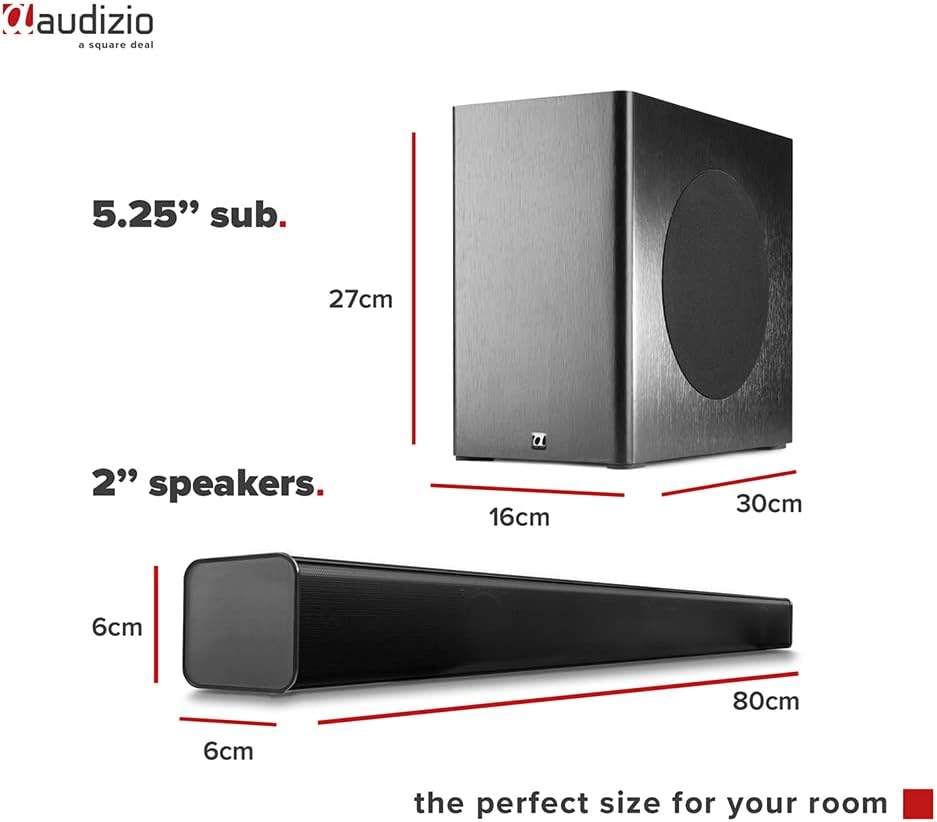
Image: Diagram showing the dimensions of the Audizio SB85 Soundbar and its subwoofer.
- 出力: 150W(最大)
- スピーカー構成: 4 speakers (2x 2cm range, 2x 2cm tweeter)
- サブウーファーのサイズ: 5.25インチ
- 周波数範囲: 50 Hz - 16,000 Hz
- 最大音圧レベル: 125デシベル
- 接続性: Bluetooth 5.0, HDMI (ARC), USB, Line In (AUX), Coaxial, Optical
- オーディオ出力モード: ステレオ
- 対応デバイス: MP3 Player, Smartphone, TV
- 電源: 230 Vac/50 Hz (via electric cable)
- サウンドバーの寸法(長さ x 幅 x 高さ): 80 x 6 x 6 cm
- サブウーファーの寸法(長さ x 幅 x 高さ): 16 x 30 x 27 cm
- 総重量: 3.9キロ
- モデル番号: 100.292
保証とサポート
保証情報やテクニカルサポートについては、ご購入時に付属のマニュアルをご参照いただくか、販売店にお問い合わせください。保証請求の際に必要となるため、購入証明書は保管してください。