
導入
This manual provides detailed instructions for the installation, operation, and maintenance of your Hama 00118498 Monitor Desk Mount. Designed to enhance your ergonomic workspace, this monitor arm allows for flexible positioning of your display, promoting a comfortable and productive environment. Please read these instructions carefully before beginning installation.
セットアップ手順
Follow these steps to correctly install your Hama 00118498 Monitor Desk Mount.
1. デスクClの取り付けamp
- 机の上に置くamp assembly onto the edge of your desk. Ensure the desk surface is sturdy and can support the weight of the mount and your monitor.
- 締めるamp screw firmly until the mount is securely fastened to the desk. Do not overtighten.
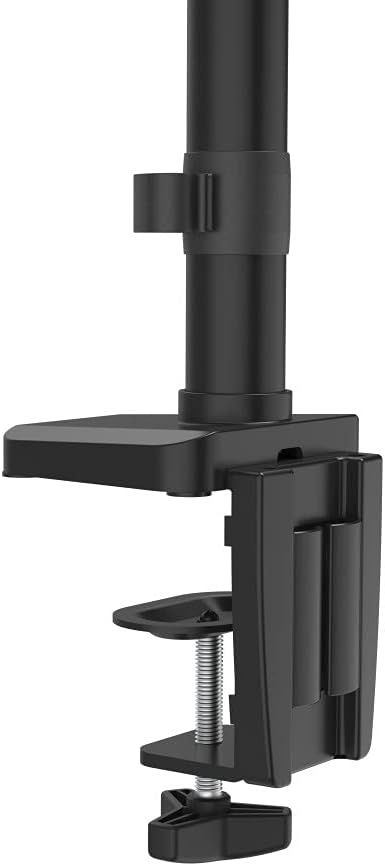
画像: デスクのclamp mechanism, showing how it attaches to the desk edge for secure mounting.
2. モニターの取り付け
- Ensure your monitor is VESA compatible (100x100mm or 75x75mm).
- Carefully attach the VESA plate from the monitor arm to the back of your monitor using the provided screws. Make sure the screws are tightened securely.
- Slide the monitor (with the attached VESA plate) onto the arm's mounting head. Ensure it clicks into place or is secured with any locking mechanism provided.

Image: The monitor arm's VESA plate and adjustable joint, ready for monitor attachment.

画像:側面 view of the assembled monitor arm, highlighting the VESA mount and integrated cable management channels.
3.ケーブル管理
Utilize the integrated cable management system to route your monitor cables neatly along the arm. This helps maintain a tidy workspace and prevents cable clutter.
操作手順
The Hama 00118498 Monitor Desk Mount offers various adjustment options for optimal view快適さを。
- 高さ調整: The integrated pneumatic spring allows for smooth and effortless vertical height adjustment. Gently push or pull the monitor to your desired height.
- スイベル: The arm can swivel horizontally, allowing you to rotate your monitor to share your screen or change your view角度。
- Adjust the monitor's tilt angle (up or down) to reduce glare and find the most comfortable viewing の位置。
- 回転: Rotate your monitor from landscape to portrait orientation as needed for different tasks.
Adjustments should be smooth. If the monitor does not hold its position, refer to the troubleshooting section for tension adjustments.
メンテナンス
定期的なメンテナンスにより、モニターアームの寿命が長くなり、最適なパフォーマンスが確保されます。
- クリーニング: モニターアームの表面を柔らかくて乾いた布で拭いてください。amp 布で拭いてください。研磨剤や溶剤の使用は避けてください。
- 接続を確認してください: すべてのネジと接続部がしっかりと締まっているか定期的に点検してください。必要に応じて締め直してください。
- 潤滑: The pneumatic spring is maintenance-free. Do not attempt to lubricate internal components.
トラブルシューティング
If you encounter issues with your Hama 00118498 Monitor Desk Mount, refer to the following common problems and solutions:
- モニターがたわんだり位置を維持できなかったりする: The tension of the pneumatic spring may need adjustment. Locate the tension adjustment screw (usually found on the arm joint) and turn it clockwise to increase tension for heavier monitors, or counter-clockwise for lighter monitors. Adjust gradually until the monitor holds its position.
- モニターの移動が難しい: If the arm is too stiff, the tension may be too high. Turn the tension adjustment screw counter-clockwise to decrease tension.
- Arm Feels Loose on Desk: デスクの清潔さを確保するamp is fully tightened. If the desk surface is too thin or fragile, consider adding a protective pad between the clamp and the desk.
- モニターの揺れ: Check all mounting screws on the VESA plate and the arm joints to ensure they are securely fastened.
仕様
| 特徴 | 詳細 |
|---|---|
| モデル番号 | 00118498 |
| 取り付けタイプ | デスクClamp |
| 移動タイプ | Rotating, Swivel, Tilt, Height Adjustable (Pneumatic Spring) |
| ブランド | ハマ |
| 材料 | アルミニウム |
| 色 | 黒 |
| 対応デバイス | モニター |
| 最小対応サイズ | 10インチ |
| 最大対応サイズ | 32インチ |
| アイテム重量 | 2.2キログラム |
| 原産国 | 中国 |
保証とサポート
For warranty information or technical support, please refer to the documentation included with your purchase or visit the official Hama webサイト。通常、サポートの連絡先の詳細、よくある質問、その他のリソースがそこに掲載されています。
公式ハマ Webサイト: www.hama.com