
1. はじめに
The TecMate OptiMate 7 (Model TM267) is an advanced 12V/24V battery charger and maintainer designed for lead-acid batteries, including AGM, Wet, EFB, Spiral Cell, and Gel types. It features a 10A output for 12V batteries and a 5A output for 24V batteries, making it suitable for a wide range of applications from motorcycles and cars to trucks, boats, RVs, and industrial equipment. This manual provides essential information for safe and effective use of your OptiMate 7 charger.

Figure 1: OptiMate 7 in use, demonstrating simple connection for various vehicles. Learn more about OptiMate 7
2. 安全情報
Always read and understand all safety warnings and instructions before using the OptiMate 7 charger. Failure to do so may result in electric shock, fire, or serious injury.
- Use the charger only for 12V or 24V lead-acid batteries (AGM, Wet, EFB, Spiral Cell, Gel). Do not use for other battery types.
- Ensure proper ventilation during charging. Do not charge in a sealed area.
- Avoid sparks or flames near the battery. Batteries can produce explosive gases.
- バッテリーを取り扱うときは、保護メガネと保護服を着用してください。
- お子様の手の届かない場所に保管してください。
- 充電器を雨や過度の湿気にさらさないでください。
- バッテリーへの接続を行う前、または切断する前に、AC 電源を切断してください。
- If the battery is completely dead or internally shorted, the OptiMate charger cannot revive it. Such batteries require replacement.
- If the green LED indicates full charge but the engine does not start, a minor internal short in the battery may be present. The OptiMate charger may not detect such minor shorts, and the battery will require replacement.
3. パッケージ内容
Verify that all items are present in your OptiMate 7 package:
- OptiMate 7 12V/24V Battery Charger Unit (Model TM267)
- M8/M10 Ring Terminal Cable (for permanent connection to vehicle battery terminals)
- Alligator Clip Cable (for temporary connection)
- User Manual (Japanese, refer to this translated version for English instructions)

Figure 2: Included accessories with the OptiMate 7 charger.
4 製品の特徴
The OptiMate 7 incorporates several advanced technologies to ensure optimal battery performance and longevity:
- Ampmatic Technology: This patented technology automatically adjusts the charge current based on the battery's size and condition, ensuring efficient and safe charging without overcharging.
- Battery Recovery Function: 強力な3Sを搭載tage desulfation mode to recover deeply discharged batteries, starting charging even from 0.5V.
- Battery Diagnosis Function: Provides clear battery health status indication (red, yellow, green LEDs) to help identify potential issues.
- 24/7 Maintenance: Safe for long-term connection, the charger automatically switches to a maintenance mode, preventing self-discharge and keeping the battery optimally charged.
- 短絡保護: Built-in safety features prevent damage from accidental short circuits.
- 温度補正: 充電量を自動調整tagさまざまな気候で最適なパフォーマンスを実現するために、周囲温度に基づいて制御します。


Figure 3: Key features and trusted quality of OptiMate chargers.
5. セットアップ
Follow these steps to set up your OptiMate 7 charger:
- バッテリーを準備します: Ensure the battery terminals are clean and free of corrosion. If charging a wet cell battery, check electrolyte levels and top up with distilled water if necessary.
- バッテリーに接続: Choose either the ring terminal cable for permanent installation or the alligator clip cable for temporary connection. Connect the red (+) clamp/terminal to the positive (+) battery terminal and the black (-) clamp/terminal to the negative (-) battery terminal. Ensure a secure connection.
- 電源に接続: Plug the AC power cord of the OptiMate 7 into a standard wall outlet.
The charger will automatically begin its diagnostic and charging process. The battery can remain in the vehicle during charging.
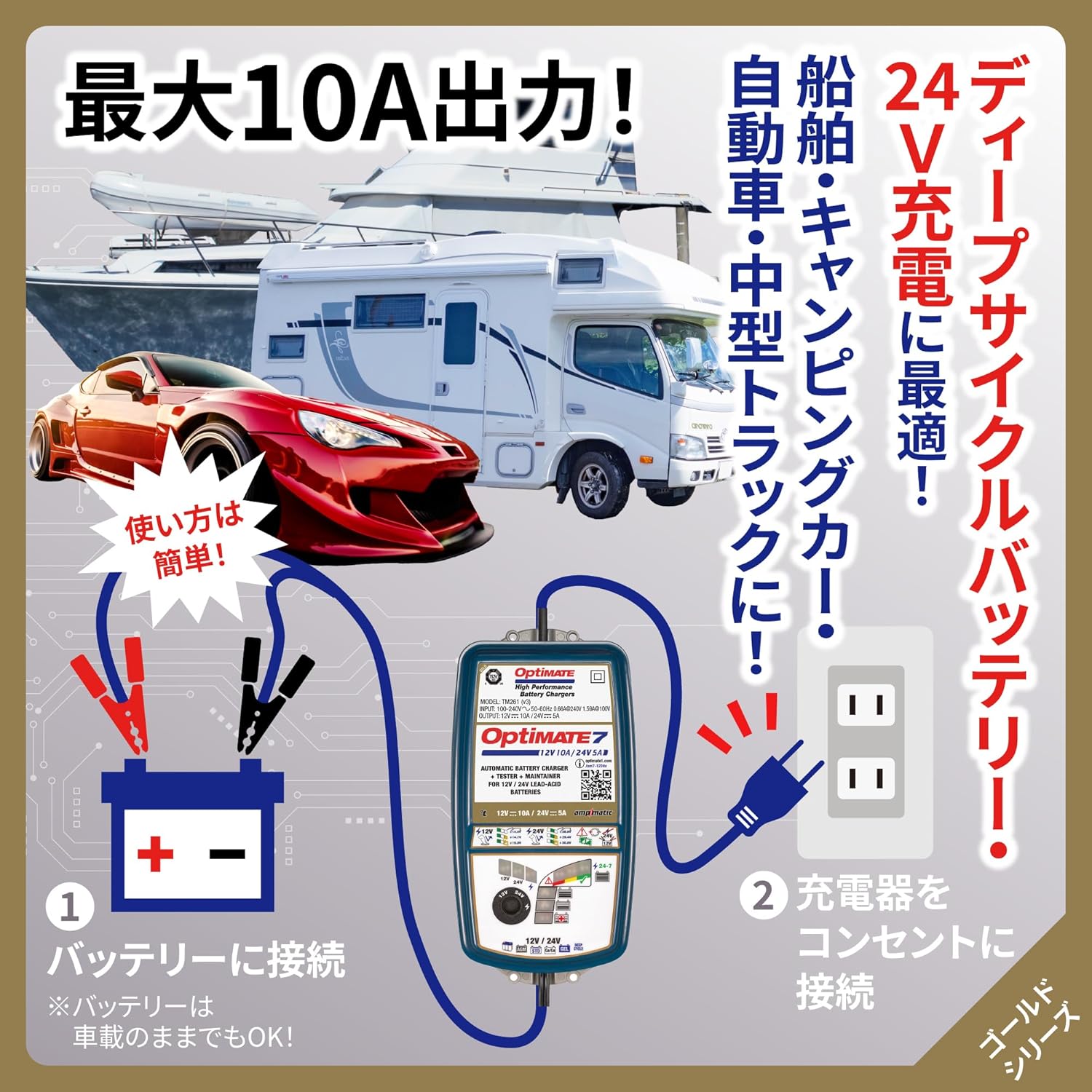
Figure 4: Simple two-step connection process for the OptiMate 7.
6. 操作手順
The OptiMate 7 features an intelligent multi-step charging program. Once connected, it automatically diagnoses the battery and proceeds through the charging stages。
6.1 充電プロセス終了view
- 診断: 充電器はまずバッテリーの容量をチェックしますtage and overall health.
- Desulfation (if needed): If a deeply discharged or sulfated battery is detected, the pulse recovery mode activates to break down lead sulfate crystals.
- バルクチャージ: Delivers maximum current to bring the battery to approximately 80% charge.
- 吸収電荷: Gradually reduces current while increasinグラムボリュームtage to fully charge the battery.
- 検証: Checks if the battery can retain charge.
- メンテナンス: Once fully charged, the charger enters a long-term maintenance mode, delivering small charges as needed to counteract self-discharge.
6.2 Mode Selection (12V / 24V and Voltageオプション)
The OptiMate 7 allows selection between 12V and 24V charging, and offers specific voltage settings for different battery types:
- Use the 'SELECT' dial on the charger to choose the appropriate voltage (12V or 24V) and charging mode for your battery.
- 12Vバッテリーの場合:
- 14.4V: For standard lead-acid batteries.
- 14.7V: For general deep cycle batteries.
- 15.0V: For Optima, Voyager, and other spiral cell type batteries.
- 24Vバッテリーの場合:
- 28.8V: For standard 24V lead-acid batteries.
- 29.4V: For general 24V deep cycle batteries.
- 30.0V: For 24V Optima, Voyager, and other spiral cell type batteries.

Figure 5: Selectable charging voltages for 12V and 24V batteries.
7. メンテナンス
The OptiMate 7 is designed for long-term battery maintenance, ensuring your battery remains in optimal condition, especially during periods of non-use.
- 接続して忘れる: The 24/7 maintenance function allows you to leave the charger connected to the battery indefinitely. It will automatically monitor the battery's state and deliver small, precise charges to prevent self-discharge.
- Pulse Recovery: The powerful pulse recovery feature helps to reverse sulfation, a common cause of battery failure, by dissolving lead sulfate crystals that build up on battery plates. This can extend battery life.
- バッテリーヘルスモニタリング: The charger continuously monitors the battery's health and provides feedback through its LED indicators. A green LED indicates a healthy, fully charged battery.

Figure 6: Pulse recovery charging for sulfation removal.

Figure 7: Long-term maintenance and battery diagnosis features.
8。 トラブルシューティング
If you encounter issues with your OptiMate 7 charger, refer to the following common problems and solutions:
- Charger does not start: Ensure the AC power cord is securely plugged into a live outlet and the battery connections are correct (red to positive, black to negative).
- Battery does not charge / Charger indicates error:
- バッテリー容量を確認するtage. If the battery is completely dead (e.g., 0V), the charger may not be able to initiate charging.
- 重要な注意1: The OptiMate charger cannot revive batteries that have reached the end of their service life or have an internal short circuit. If an internal short occurs, no charger can revive it, and the battery must be replaced.
- Green LED is on, but engine won't start:
- 重要な注意2: If the green LED indicates a full charge but the engine still won't start, a minor internal short may be present within the battery. While the surface voltage may appear normal, it drops sharply during engine cranking, preventing startup. The OptiMate charger's battery health diagnosis is a guideline and may not detect such minor internal shorts. In such cases, the battery requires replacement as internal shorts cannot be repaired by a charger.
- 異常な熱や臭い: Immediately disconnect the charger from both the AC outlet and the battery. Contact customer support.
9. 仕様
| 特徴 | 仕様 |
|---|---|
| モデル | TM267 |
| 入力ボリュームtage | 100-240V (Global Input) |
| 出力電流 | 10A(12V)、5A(24V) |
| バッテリー巻tage | 12V & 24V Lead-Acid Batteries |
| 互換性のあるバッテリータイプ | AGM, Wet, EFB, Spiral Cell, Gel |
| 推奨バッテリー容量 | 10-240Ah(12V)、5-120Ah(24V) |
| Charging Modes (12V) | 14.4V (Standard), 14.7V (Deep Cycle), 15.0V (Optima/Spiral Cell) |
| Charging Modes (24V) | 28.8V (Standard), 29.4V (Deep Cycle), 30.0V (Optima/Spiral Cell) |
| 特徴 | Ampmatic, Pulse Recovery, Battery Diagnosis, 24/7 Maintenance, Short Protection, Temperature Compensation |
| 侵入保護等級(IP) | IP54 (Rated down to -40°C/-40°F) |
| 製品寸法 | 27 x 18 x 13 cm |
| 製品重量 | 1.44キロ |

Figure 8: Detailed technical specifications and charging program overview.
10.保証とサポート
For warranty information, technical support, or service inquiries regarding your TecMate OptiMate 7 charger, please refer to the official TecMate webご購入の際は、サイトをご覧いただくか、お近くの販売店にお問い合わせください。保証請求の際は、購入証明としてレシートを保管してください。
- オンラインリソース: Visit the official TecMate webFAQ、製品登録、追加のサポート資料については、こちらのサイトをご覧ください。
- 顧客サービス: Contact details for customer support can typically be found on the TecMate webサイトまたは元の製品パッケージで返品してください。