
1. はじめに
ご購入ありがとうございますasing the KEPLUG Sunrise Alarm Clock. This device is designed to enhance your waking and sleeping experience with its unique features, including sunrise and sunset simulations, dual alarms, FM radio, and various natural sounds. Please read this manual carefully to ensure proper use and optimal performance.
パッケージ内容:
- 1 x KEPLUG Sunrise Alarm Clock
- マイクロUSBケーブル1本
- 壁アダプター x 1
- ユーザーマニュアル x 1
2.製品オーバーview
Familiarize yourself with the main components and controls of your KEPLUG Sunrise Alarm Clock.

画像2.1: フロント view of the KEPLUG Sunrise Alarm Clock, showing the digital time display and the illuminated light panel. The clock face is round with a white base.
コントロールボタンとポート:
Refer to the diagram below for button identification (exact button layout may vary slightly by model, but functions are consistent).
- 時間設定ボタン: 時刻設定モードに入るために使用します。
- アラーム1ボタン: Used to set and activate Alarm 1.
- アラーム2ボタン: Used to set and activate Alarm 2.
- FMラジオボタン: Activates and controls FM radio functions.
- ライトボタン: Controls the light brightness and color modes.
- 音量+/-ボタン: 音量を調節します。
- 上/下ボタン: メニューを移動し、値を調整します。
- Snooze/Sleep Aid Button: Activates snooze during an alarm or sleep aid function.
- USB充電ポート: 外部機器の充電に。
- マイクロUSB電源入力: 電源アダプタに接続します。
3. セットアップ
3.1電源接続
- Connect the micro USB cable to the power input port on the back of the alarm clock.
- 壁のアダプタを標準の電源コンセントに差し込みます。
- ディスプレイが点灯し、デバイスの電源がオンになっていることが示されます。
The clock includes a built-in backup battery to retain settings during power outages or disconnections.
3.2時間の設定
- を押す 時間設定ボタン (often represented by a clock icon). The hour display will start flashing.
- 使用 上/下ボタン 時間を調整します。
- を押す 時間設定ボタン again to confirm the hour and move to minute setting. The minute display will flash.
- 使用 上/下ボタン 議事録を調整します。
- を押す 時間設定ボタン a third time to confirm the minutes.
- 12時間形式と24時間形式を切り替えるには、 上/下ボタン while the time is flashing during setup, or refer to the specific instructions in your manual for a dedicated time format button.
3.3 Time Display Brightness
The time display offers three brightness settings: High, Low, and Off. This can typically be adjusted by repeatedly pressing a dedicated display brightness button or by holding the Time Setting button. Refer to your specific model's instructions for exact control.
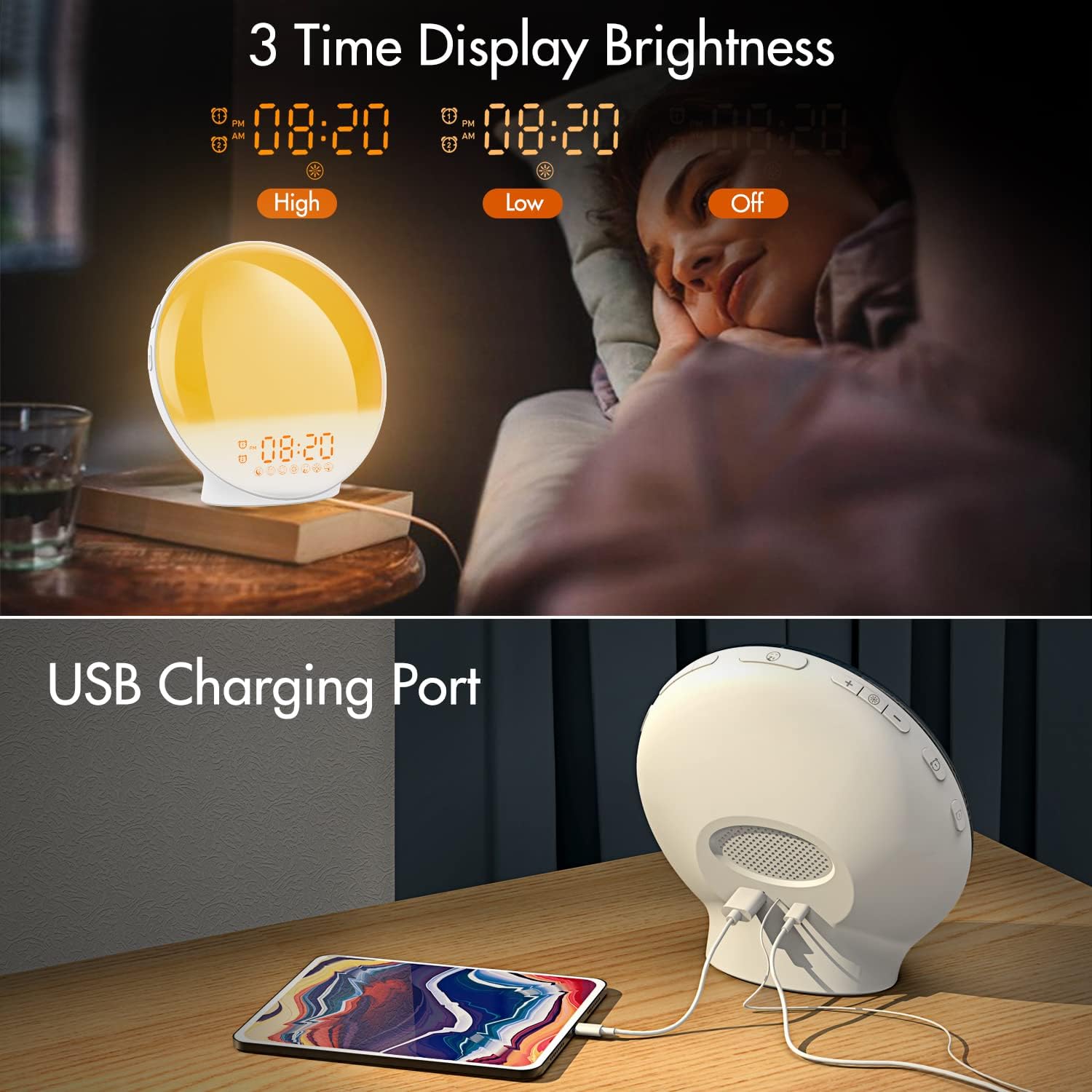
画像3.1: Illustration of the three time display brightness options: High, Low, and Off, allowing users to customize visibility for different times of day or night.
4. 操作手順
4.1 アラームの設定(アラーム1とアラーム2)
The clock features two independent alarms, allowing for separate wake-up times (e.g., weekday and weekend).

画像4.1: Depiction of the dual alarm functionality, allowing users to set different alarms for weekdays and weekends, along with the snooze feature.
- を押す アラーム1ボタン (または アラーム2ボタン) to activate and enter alarm setting mode. The alarm time will flash.
- 使用 上/下ボタン 希望するアラーム時間を設定します。
- を押す アラームボタン again to confirm the hour and set the minutes.
- 使用 上/下ボタン 希望するアラームの分数を設定します。
- を押す アラームボタン again to select the wake-up sound. Use 上/下ボタン to cycle through 7 nature sounds or FM radio.
- を押す アラームボタン again to set the volume level (1-16) for the alarm sound. Use 上/下ボタン 調整する。
- を押す アラームボタン one last time to confirm all settings and activate the alarm. An alarm icon will appear on the display.
4.2スヌーズ機能
アラームが鳴ったら、 スヌーズボタン (often the large button on top or front) to pause the alarm for 9 minutes. This can be repeated up to 5 times.
4.3 日の出シミュレーション
The sunrise simulation gradually brightens the light before your alarm time, mimicking a natural sunrise.

画像4.2: Visual representation of the sunrise simulation feature, where the light intensifies gradually over a set period before the alarm, designed for a gentle wake-up.
- When setting an alarm, after selecting the sound and volume, you will typically be prompted to set the sunrise duration.
- 使用 上/下ボタン to choose a duration between 10 to 60 minutes. The light will gradually increase from 0% to the set brightness level (0-20) during this period.
- The light color will transition from deep red to bright yellow, simulating a natural sunrise.
4.4 Sunset Simulation / Sleep Aid
The sunset simulation gradually dims the light and can play soothing sounds to help you fall asleep.

画像4.3: Illustration of the sunset simulation, where the light gradually dims over a period of 10 to 120 minutes, accompanied by optional sleep sounds like rain, forest, river, or FM radio.
- を押す Snooze/Sleep Aid Button (or a dedicated Sleep Aid button) to activate the sleep aid function.
- 使用 上/下ボタン to select a duration for the dimming process (10-120 minutes).
- You can also select a natural sound (Rain, Forest, River) or FM radio to play during this period.
- The light will gradually dim from 100% to 0% over the selected duration, and the sound will fade out.
4.5FMラジオ
The built-in FM radio allows you to listen to your favorite stations or use them as an alarm sound.

画像4.4: 以上view of the 7 available alarm sounds and the FM radio option, providing diverse choices for waking up.
- を押す FMラジオボタン ラジオのオン/オフを切り替えます。
- 保持する FMラジオボタン to automatically scan and save available stations.
- 使用 上/下ボタン to manually tune to a specific frequency or cycle through saved stations.
- を使用して音量を調整します 音量+/-ボタン.
4.6 Night Light / Color Light
The clock can function as a night light with various color options and adjustable brightness.

画像4.5: Display of the 7 color atmosphere light options and 20 brightness levels, highlighting the clock's versatility as a mood light or reading lamp.
- を押す ライトボタン ライトをオンにします。
- を押す ライトボタン repeatedly to cycle through 7 static colors (e.g., Red, Green, Blue, Yellow, Indigo, Purple, White) or an automatic color-changing mode.
- 使用 上/下ボタン to adjust the brightness level (0-20) of the selected color or white light.
- 保持する ライトボタン 明かりを消します。
4.7USB充電ポート
A 5V/2.4A USB port is located on the back of the device, allowing you to charge your smartphone or other small electronic devices.
画像4.6: 後方 view of the alarm clock showing the USB charging port in use, connected to a tablet for charging.
5. メンテナンス
- クリーニング: 柔らかく乾いた布で拭いてください。研磨剤入りの洗剤や溶剤は使用しないでください。
- ストレージ: 長期間使用しない場合は、デバイスを涼しく乾燥した場所に保管してください。
- 力: 損傷を防ぐため、必ず付属の電源アダプターを使用してください。
6。 トラブルシューティング
| 問題 | 考えられる原因 | 解決 |
|---|---|---|
| 時計の電源が入りません。 | 電源アダプターが接続されていないか故障しています。 | 電源アダプターが時計と電源コンセントの両方にしっかりと接続されていることを確認してください。別のコンセントでお試しください。 |
| アラームは鳴りません。 | アラームが作動していないか、音量が低すぎます。 | アラームアイコンが表示されているかどうかを確認してください。アラームを再設定し、音量が聞き取れるレベルに設定されていることを確認してください。 |
| 日の出シミュレーションが機能しません。 | Sunrise duration not set during alarm setup. | Ensure you have set a sunrise duration (10-60 minutes) when configuring the alarm. |
| FM ラジオの雑音または受信状態が悪い。 | 信号またはアンテナの位置が弱い。 | Extend the antenna wire fully. Reposition the clock to improve reception. Perform an auto-scan for stations. |
| USB充電が機能しません。 | デバイスに互換性がないか、ケーブルに障害があります。 | Ensure the device you are charging is compatible with 5V/2.4A USB charging. Try a different USB cable. |
7. 仕様
- ブランド: ケプラグ
- モデル: B09FRY71NH
- 製品寸法: 16 x 16 x 6.1 cm
- 商品の重量: 481グラム
- 巻tage: 5ボルト
- 電源: 電池駆動(ACアダプター付き)
- 表示タイプ: デジタル
- 特別な機能: Charging Port, Dimmable Light, Sunrise/Sunset Simulation, Dual Alarm, FM Radio, Nature Sounds
- 発売日: 12年2021月XNUMX日
8. 保証とサポート
For warranty information or technical support, please refer to the contact details provided with your purchase documentation or visit the official KEPLUG webサイトでご確認ください。購入証明として購入レシートを保管してください。