
導入
This manual provides detailed instructions for the setup, operation, and maintenance of your Moultrie W800 All-Purpose Series A Trail Camera. Please read this guide thoroughly to ensure proper use and optimal performance of your device.
製品終了view
The Moultrie W800 is a high-performance trail camera designed for capturing images and videos of wildlife. It features an Illumi-Night Sensor for clear nighttime captures and a robust design for outdoor use.
主な特徴:
- Captures 26 Megapixel images for high clarity.
- 70-foot flash and detection range.
- Fast 0.5 second trigger speed.
- Moultrie Smokescreen Camo Pattern for discreet placement.
箱の中身:
- Moultrie W800 Trail Camera
- 単三電池8本
- 取り付けストラップ

Image: Moultrie W800 Trail Camera in its retail packaging, showing the camera, batteries, and key features on the box.
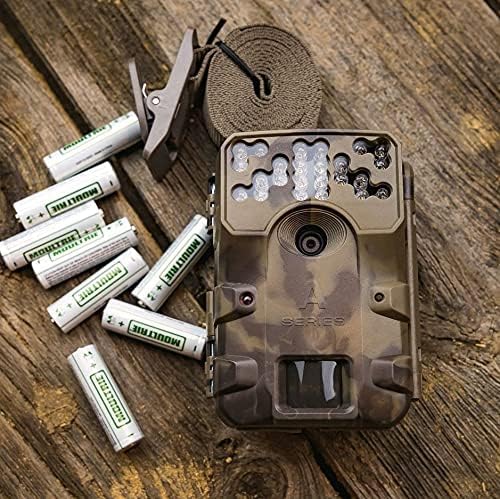
Image: The Moultrie W800 trail camera displayed with the included 8 AA batteries and a mounting strap, ready for setup.
設定
1. バッテリーの取り付け
- カメラハウジングのラッチを開きます。
- 正しい極性 (+/-) を確認して、単 3 電池 8 本を電池室に挿入します。
- カメラハウジングのラッチをしっかりと閉じます。
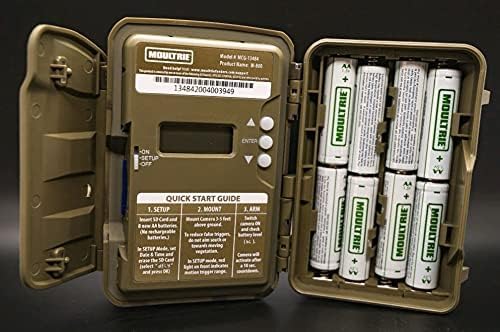
Image: An open Moultrie W800 camera, revealing the battery compartment on the right, the control panel with a small screen, and buttons on the left. This view is essential for battery and SD card installation.
2. SDカードのインストール
- カメラハウジングを開いたら、SD カード スロットを見つけます。
- Insert a standard SD card (up to 32GB) into the slot until it clicks into place. Ensure the card is inserted in the correct orientation.
- It is recommended to format the SD card using the camera's menu settings before first use.
3.カメラの取り付け
- Select a suitable location, typically a tree or post, where the camera can capture the desired area.
- Mount the camera approximately 3-5 feet above the ground.
- Use the provided mounting strap to secure the camera firmly. Thread the strap through the camera's mounting slots and tighten it around the object.
- Angle the camera to avoid direct sunlight and to minimize false triggers from swaying branches.

Image: A Moultrie W800 trail camera, in its camouflage casing, securely mounted to a tree trunk using a strap, demonstrating a typical field setup.
操作手順
基本操作
- 電源オン/オフ: Locate the power switch inside the camera housing. Slide it to the 'ON' position to power on the camera. Slide to 'OFF' to power off.
- 設定モード: After powering on, the camera will typically enter 'SETUP' mode. In this mode, you can adjust settings such as date, time, photo/video mode, resolution, and trigger delay using the control buttons and display.
- カメラの準備: Once settings are configured, slide the power switch to the 'ARM' position. The camera will initiate a countdown (e.g., 10 seconds) to allow you to leave the area without triggering a capture. After the countdown, the camera will be active and ready to detect motion.
- ステータスを確認しています: The small display inside the camera housing provides status information, including battery level, SD card status, and current mode.
メンテナンス
- クリーニング: Periodically clean the camera lens and sensor window with a soft, lint-free cloth. Avoid abrasive materials or harsh chemicals.
- バッテリーチェック: バッテリー残量を定期的に確認してください。特に長期にわたる運用の前には、すべてのバッテリーを同時に交換して、安定した電力供給を確保してください。
- SDカード管理: Format the SD card regularly to prevent data corruption and ensure optimal performance. Back up important images/videos before formatting.
- 住宅の健全性: Ensure the camera housing latch is always securely closed to protect against moisture and dust.
トラブルシューティング
- カメラが写真を撮らない:
- Check if the camera is in 'ARM' mode.
- SD カードが正しく挿入されており、十分な空き容量があることを確認してください。
- Verify that batteries have adequate charge.
- Check camera settings for trigger delay or sensitivity.
- SDカードをフォーマットします。
- 画像品質が悪い:
- カメラのレンズとセンサーウィンドウを清掃します。
- Ensure the camera is mounted at the recommended height and angle.
- カメラの前に障害物がないか確認してください。
- 短いバッテリー寿命:
- Use fresh, high-quality alkaline or lithium AA batteries.
- 極端な温度はバッテリーのパフォーマンスに影響を与える可能性があります。
- Frequent video recording or high trigger frequency can consume more power.
仕様
Detailed technical specifications for the Moultrie W800 Trail Camera:
| 特徴 | 仕様 |
|---|---|
| 実効静止画解像度 | 26 MP |
| トリガースピード | 0.5秒 |
| フラッシュ範囲 | 70フィート |
| 検出範囲 | 70フィート |
| 低照度テクノロジー | Illumi-Night Sensor (Night Color) |
| ビデオキャプチャ解像度 | 720p |
| ビデオキャプチャフォーマット | MPEG-4 |
| フラッシュメモリタイプ | SD(最大32GB) |
| 電源 | 単三電池8本 |
| 接続技術 | ワイヤレス(Wi-Fi) |
| 制御方法 | アプリ |
| 特集 | モーションセンサー、ナイトビジョン |
| 国際保護格付け | IP54 |
| アイテム重量 | 1.12ポンド |
| パッケージ寸法 | 8.62 x 5.39 x 3.43インチ |
| 欧州連合 | 053695134840 |

Image: The back of the Moultrie W800 retail box, detailing performance specifications such as trigger speed, detection range, flash range, battery life, and SD card compatibility.
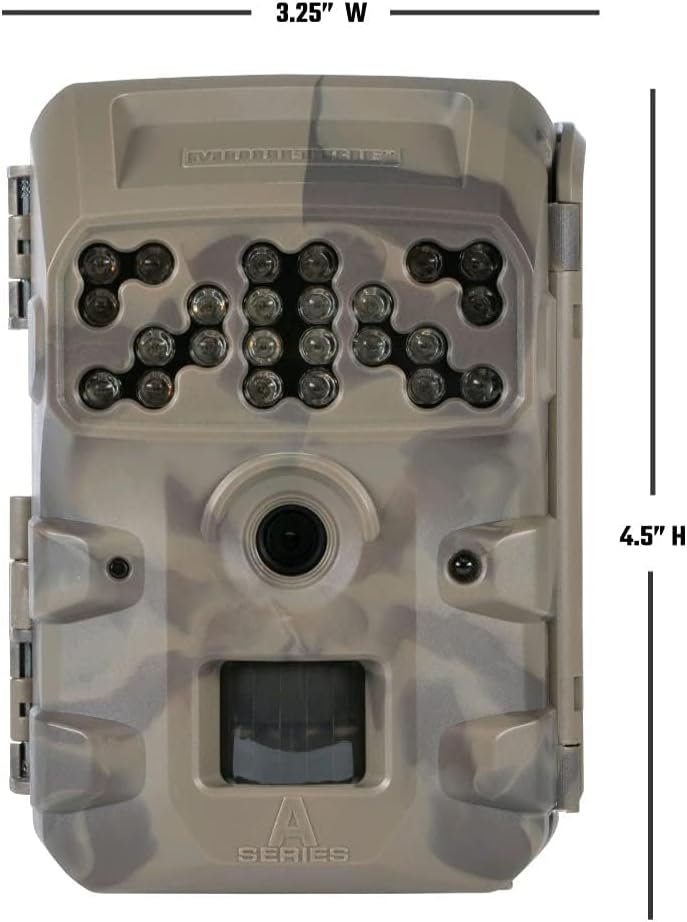
画像: 正面 view of the Moultrie W800 trail camera with its dimensions clearly labeled: 3.25 inches wide and 4.5 inches high.
保証とサポート
保証情報:
The Moultrie W800 Trail Camera comes with a 2年間保証 ご購入日から製造上の欠陥が保証対象となります。保証請求の際は、購入証明書を保管してください。
カスタマーサポート:
For technical assistance, troubleshooting, or warranty inquiries, please visit the official Moultrie support webサイト: