
DELTACO SH-P01-3P
DELTACO Smart Home SH-P01-3P Wi-Fi Smart Plug User Manual
Model: SH-P01-3P
導入
Thank you for choosing the DELTACO Smart Home SH-P01-3P Wi-Fi Smart Plugs. This pack includes three smart plugs designed to provide convenient control over your electronic devices. These plugs connect to your 2.4 GHz Wi-Fi network, allowing you to manage connected appliances remotely via a smartphone application, set schedules, and integrate with smart home assistants.
Please read this manual carefully before use to ensure proper installation, operation, and maintenance of your smart plugs.
安全情報
怪我やデバイスの損傷を防ぐために、常に次の安全上の注意事項を守ってください。
- デバイスを分解したり改造したりしないでください。
- デバイスを水、湿気、または極端な温度にさらさないでください。
- Ensure the connected appliance's power consumption does not exceed the smart plug's maximum rating (10A).
- 乾燥した屋内環境でのみ使用してください。
- お子様の手の届かない場所に保管してください。
- 清掃する前に、デバイスのプラグを壁のコンセントから抜いてください。
パッケージ内容
The DELTACO Smart Home SH-P01-3P package includes:
- 3 x DELTACO Smart Home SH-P01-3P Wi-Fi Smart Plugs
- ユーザーマニュアル (本書) x 1
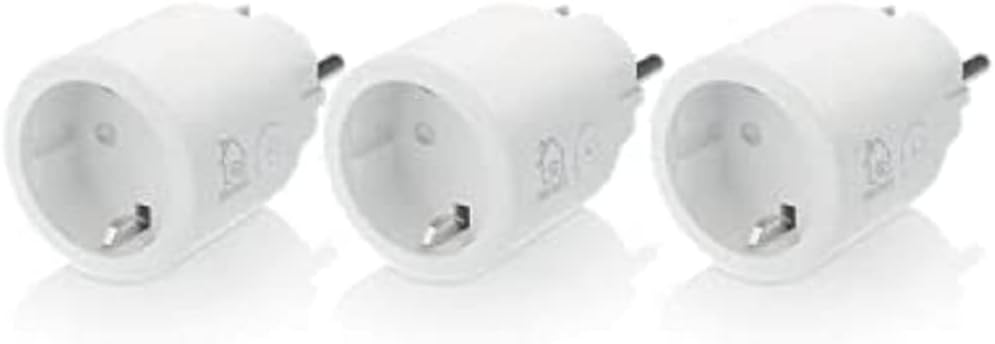
Image: Three DELTACO Smart Home SH-P01-3P Wi-Fi Smart Plugs, showing the compact design and standard European plug type.
製品終了view
Each SH-P01-3P smart plug features a compact design with a single power button and an indicator light.
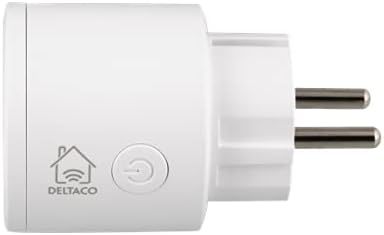
画像: サイド view of the smart plug, highlighting the DELTACO logo and the circular power button.
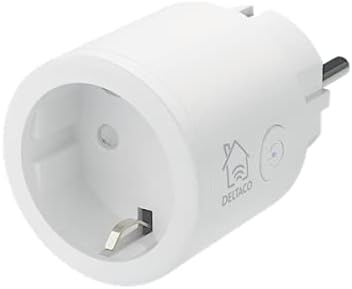
画像: 斜め正面 view of the smart plug, showing the outlet socket and the power button with an integrated indicator light.
主要コンポーネント:
- 電源ボタン: Press to manually turn the plug on/off. Press and hold for 5 seconds to reset and enter pairing mode.
- インジケーターライト: Shows the status of the plug (e.g., solid for on, blinking for pairing mode).
- Outlet Socket: 機器を接続するため。
- Plug Prongs: 壁のコンセントに差し込みます。
設定
Follow these steps to set up your DELTACO Smart Home SH-P01-3P smart plugs:
- アプリをダウンロード: 検索する "DELTACO Smart Home" in your smartphone's app store (Google Play Store for Android or Apple App Store for iOS) and download the application. Alternatively, the plugs are often compatible with the "Smart Life" app.
- 登録/ログイン: アプリを開いて新しいアカウントを登録するか、すでにアカウントをお持ちの場合はログインします。
- デバイスを接続する: Insert the SH-P01-3P smart plug into a standard wall outlet. The indicator light on the plug should start blinking rapidly, indicating it is in pairing mode. If it does not blink rapidly, press and hold the power button on the plug for 5 seconds until it starts blinking.
- アプリでデバイスを追加:
- In the DELTACO Smart Home app, tap the "+" icon (usually in the top right corner) to add a new device.
- デバイスリストから「電気コンセント」または「スマートプラグ」を選択します。
- Confirm that the indicator light on the smart plug is blinking rapidly.
- Enter your Wi-Fi network name (SSID) and password. Ensure your phone is connected to a 2.4 GHz Wi-Fi network, as the smart plugs do not support 5 GHz networks.
- The app will begin searching for the device. Once found, it will connect and add the smart plug to your account.
- デバイスの名前を変更する(オプション): After successful pairing, you can rename the smart plug to something easily recognizable (e.g., "Living Room Lamp、"コーヒーマシン"など。
- Repeat for Additional Plugs: Follow the same steps for the other smart plugs in the pack.
操作手順
Once set up, you can control your smart plugs using the DELTACO Smart Home app or through voice commands.
Controlling via App:
- オン/オフ制御: Open the app, select the desired smart plug from your device list, and tap the power icon to toggle it on or off.
- スケジュール: Use the "Schedule" or "Timer" function within the app to set specific times for the plug to turn on or off automatically. This is ideal for lights, coffee makers, or other appliances.
- カウントダウンタイマー: Set a countdown timer for the plug to turn off after a specified duration.
- Automation/Scenes: Create custom automation rules or scenes (e.g., "Good Morning" scene to turn on multiple devices, or turn on a light when motion is detected by another smart sensor).
音声コントロールの統合:
The DELTACO Smart Home system is compatible with popular voice assistants like Google Assistant and Amazon Alexa.
- アカウントをリンク: In your Google Home or Amazon Alexa app, navigate to the "Skills" or "Works with Google" section. 検索する "DELTACO Smart Home" (or "Smart Life" if you used that app) and link your account.
- デバイスの検出: Once linked, ask your voice assistant to "Discover devices."
- 音声コマンド: You can now control your smart plugs using voice commands, such as:
- "Hey Google, turn on Living Room Lamp."
- "Alexa, turn off Coffee Machine."
- "Hey Google, set Bedroom Light to 7 PM." (if supported by the app's scheduling)
メンテナンス
Proper maintenance ensures the longevity and optimal performance of your smart plugs.
- クリーニング: Disconnect the smart plug from the wall outlet before cleaning. Use a soft, dry cloth to wipe the surface. Do not use liquid cleaners, aerosols, or abrasive materials.
- ストレージ: If storing the smart plugs for an extended period, keep them in a cool, dry place, away from direct sunlight and extreme temperatures.
- ファームウェアの更新: Periodically check the DELTACO Smart Home app for any available firmware updates for your devices. Updates can improve performance and add new features.
トラブルシューティング
If you encounter issues with your DELTACO Smart Home SH-P01-3P smart plugs, refer to the following common solutions:
| 問題 | 考えられる原因 | 解決 |
|---|---|---|
| スマートプラグがWi-Fiに接続されません。 | Incorrect Wi-Fi password; 5 GHz Wi-Fi network; plug too far from router; router issues. |
|
| Smart plug offline in app. | Wi-Fi disconnected; power outage; プラグが抜かれています。 |
|
| 音声制御が機能しません。 | Accounts not linked; incorrect device name; internet issue. |
|
| Plug not responding to manual button press. | Device malfunction; no power. |
|
仕様
Technical specifications for the DELTACO Smart Home SH-P01-3P Wi-Fi Smart Plug:
| 特徴 | 詳細 |
|---|---|
| モデル | SH-P01-3P |
| ブランド | デルタコ |
| 接続性 | Wi-Fi 2.4 GHz (802.11b/g/n) |
| 最大電流定格 | 10 Ampここで |
| 最大ワットtage | Up to 2300W (at 230V) |
| 材料 | プラスチック、金属 |
| 寸法(長さx幅x高さ) | Compact design (individual plug dimensions not specified, package dimensions: 14.2 x 6.9 x 19.9 cm) |
| 動作モード | Automatic (via app/schedule) |
| 取り付けタイプ | Wall mount (direct plug-in) |
保証とサポート
For warranty information, please refer to the purchase terms and conditions provided by your retailer. Typically, products purchased from Amazon.se come with a 30-day return policy.
For technical support or further assistance, please visit the official DELTACO website or contact their customer service. You can often find FAQs and troubleshooting guides on their support pages.
オンラインリソース: