
1. はじめに
This manual provides detailed instructions for the installation, configuration, and operation of your ASUS TUF-AX5400 Dual Band WiFi 6 Gaming Router. Designed for high-performance networking, this router incorporates advanced features such as WiFi 6 (802.11ax) technology, AiMesh support, and dedicated gaming functionalities to enhance your internet experience. Please read this manual thoroughly before using the device.
2. 安全情報
- Place the router in a well-ventilated area, away from direct sunlight, heat sources, and moisture.
- Use only the power adapter supplied with the device. Using unauthorized adapters may damage the router and void your warranty.
- ルーターを開けないでくださいasing. 保守作業は許可された担当者のみが行う必要があります。
- デバイスを子供の手の届かない場所に保管してください。
- デバイスの電源を入れる前に、すべてのケーブルがしっかりと接続されていることを確認してください。
3. パッケージ内容
パッケージに次のアイテムが含まれていることを確認してください。
- ASUS TUF-AX5400 WiFi 6 Gaming Router
- 電源アダプター
- イーサネット ケーブル (RJ-45)
- クイックスタートガイド
- 保証書
不足または破損している品目がある場合は、販売店にご連絡ください。
4. フィジカルオーバーview
Familiarize yourself with the ports and indicators on your ASUS TUF-AX5400 router.

画像: 後方 view of the ASUS TUF-AX5400 router, highlighting its connectivity options. From left to right, the image shows the power port, power switch, USB 3.1 Gen1 port, four LAN ports (one labeled 'Gaming port'), a WPS button, a WAN port, and a reset button. Six fixed antennas are also visible, along with metal port protectors for enhanced durability.
- 電源ポート: 電源アダプタに接続します。
- 電源スイッチ: ルーターの電源をオンまたはオフにします。
- USB 3.1 Gen 1 ポート: USB ストレージ デバイスまたは 4G/5G ドングルを接続します。
- LAN ポート (1 ~ 4): Connect wired devices such as computers, gaming consoles, or network-attached storage (NAS). LAN 1 is a dedicated Gaming Port.
- WPS ボタン: WPS 対応デバイスをすばやく簡単に接続します。
- WANポート: モデムまたはインターネット サービス プロバイダー (ISP) のデバイスに接続します。
- リセットボタン: 5 ~ 10 秒間押し続けると、工場出荷時の設定に戻ります。
- アンテナ: Six fixed antennas for optimal wireless signal coverage.
5. セットアップ
5.1ハードウェア接続
- ルーターの位置: Place the router in a central location to maximize WiFi coverage.
- アンテナを接続します: Ensure all six antennas are securely attached and oriented vertically for best performance.
- モデムに接続します: Connect one end of the provided Ethernet cable to the WAN port of the TUF-AX5400 router and the other end to your modem's LAN port.
- 電源オン: Connect the power adapter to the router's power port and plug it into an electrical outlet. Press the power switch to turn on the router.
- インジケーターを待つ: Allow a few minutes for the router to boot up. The Power, 2.4GHz, 5GHz, and WAN LED indicators should illuminate.
5.2初期構成
ルーターの設定は web ブラウザまたはASUS Routerアプリ。
使用して Web ブラウザ:
- ルーターに接続: Connect your computer to the router via an Ethernet cable (to any LAN port) or wirelessly using the default WiFi network name (SSID) and password found on the router's label.
- アクセス Web インタフェース: 開く web ブラウザを開いて
router.asus.comor192.168.50.1. - セットアップウィザードに従います: The ASUS Setup Wizard will guide you through the initial configuration steps, including setting up your internet connection, WiFi network name (SSID), and password, and creating an administrator username and password for the router.
ASUSルーターアプリの使用:
- アプリをダウンロードする: モバイル デバイスのアプリ ストアから ASUS Router アプリをダウンロードします。
- ルーターに接続: Connect your mobile device to the router's default WiFi network.
- アプリを起動: Open the ASUS Router app and follow the on-screen instructions to set up your router.
6. 操作手順
6.1 WiFi 6 (802.11ax) Features
The TUF-AX5400 leverages WiFi 6 technology to deliver enhanced performance and efficiency.

画像: 進歩の詳細を示すインフォグラフィックtages of WiFi 6 (802.11ax) technology. Key features highlighted are OFDMA, TWT (Target Wake Time), MU-MIMO, and 160MHz channels. It also shows improvements such as 4X efficiency for multi-devices, 2X WiFi speed, 7X battery life for client devices, and an 80% increase in WiFi range, with speeds up to 5400Mbps.
- OFDMA(直交周波数分割多元接続): Improves network efficiency, especially in high-density environments, by allowing multiple devices to share a single channel simultaneously.
- MU-MIMO(マルチユーザー、マルチ入力、マルチ出力): ルータが複数のデバイスと同時に通信できるようにすることで、asing overall network capacity and speed.
- 160 MHz チャネル: Provides wider bandwidth for compatible devices, resulting in significantly faster wireless speeds.
- 目標起床時間(TWT): Reduces power consumption for connected devices by scheduling when they need to transmit or receive data.
6.2 ゲーム機能
The TUF-AX5400 is optimized for gaming performance.

画像: A visual representation of the router's three gaming optimization modes. It depicts a user playing on a PC with a 'Dedicated Gaming Port' label, another user playing on a mobile device with a 'Mobile Game Mode' label, and a console controller with an 'Open NAT' label, illustrating how the router optimizes for various gaming scenarios.
- 専用ゲーミングポート: Connect your gaming PC or console to the dedicated LAN port to automatically prioritize its network traffic, ensuring lower latency and stable connections during gameplay.
- モバイルゲームモード: Activate this mode via the ASUS Router app to prioritize mobile gaming traffic, reducing lag for smartphone and tablet games.
- Open NAT (Network Address Translation): Simplifies port forwarding for online gaming, allowing for easier setup of game servers and improved connectivity for multiplayer games. This feature can be configured in the router's web インタフェース。
6.3 AiMeshサポート
Create a seamless whole-home mesh WiFi system with AiMesh-compatible routers.
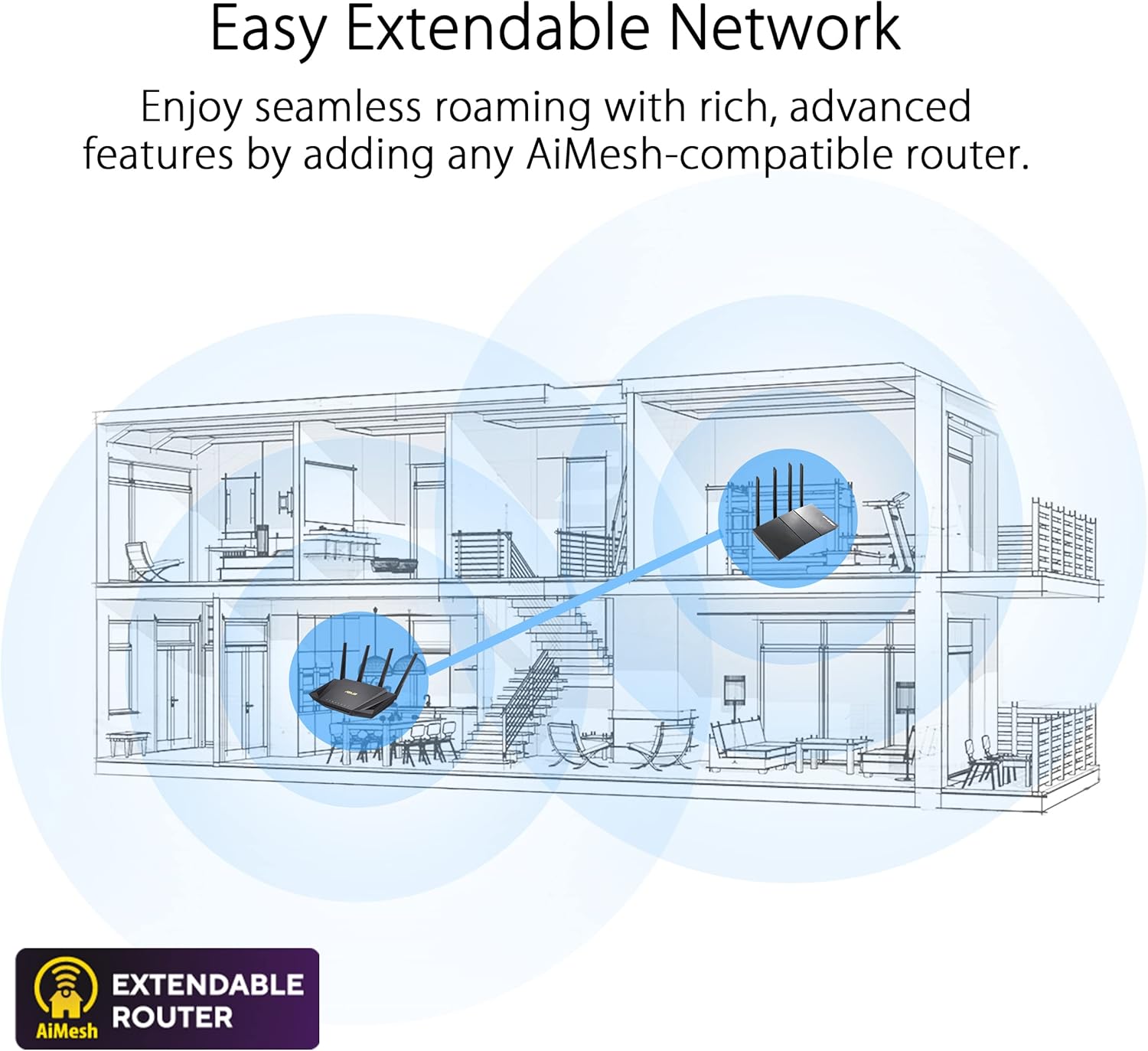
画像: A diagram illustrating an 'Easy Extendable Network' using ASUS AiMesh technology. It shows a multi-story house with a main router on the ground floor and an AiMesh-compatible router on the upper floor, working together to provide seamless WiFi coverage across the entire home, eliminating dead zones.
AiMesh allows you to combine multiple ASUS routers into a single, unified WiFi network, providing extended coverage and eliminating WiFi dead zones. Your devices will automatically switch to the strongest signal as you move around your home.
6.4 高度なペアレンタルコントロール
家族のインターネット使用状況を管理および監視します。

画像: A visual representation of 'Advanced Parental Controls' for WiFi management. The image shows a child using a smartphone under a blanket, while an overlay highlights features like 'Timing' (setting internet access schedules), 'Filtering' (blocking inappropriate content), and 'Scheduling' (managing device online times).
Access these features through the router's web interface or the ASUS Router app to set time limits, filter content, and schedule internet access for specific devices.
6.5 アクセスポイント(AP)モード
The TUF-AX5400 can function as an Access Point, extending an existing wired network with wireless capabilities. In AP mode, the router disables its NAT functions and acts as a switch and wireless access point.
7. メンテナンス
- ファームウェアの更新: ルーターのファームウェアアップデートを定期的に確認し、インストールしてください。 web インターフェース。アップデートには、セキュリティ パッチ、パフォーマンスの改善、新機能などが含まれることがよくあります。
- 定期的な再起動: Rebooting your router periodically (e.g., once a month) can help maintain optimal performance and resolve minor network issues.
- クリーニング: Use a soft, dry cloth to clean the router's exterior. Do not use liquid cleaners or solvents. Ensure ventilation openings are free from dust.
- バックアップ構成: 大きな変更やファームウェアのアップデートを実行する前に、ルーターの設定をバックアップすることをお勧めします。
8。 トラブルシューティング
8.1 インターネット接続なし
- Check if the WAN LED indicator is lit. If not, ensure the Ethernet cable from your modem is securely connected to the router's WAN port.
- Reboot your modem and then your router. Wait for both devices to fully boot up.
- ルーターのインターネット接続設定を確認してください web interface. Contact your ISP if the issue persists.
8.2 Slow WiFi Speed
- Ensure your devices are WiFi 6 compatible to fully utilize the router's capabilities.
- 他の電子機器(電子レンジ、コードレス電話など)からの干渉がないか確認してください。
- Adjust router placement to minimize obstacles and maximize signal strength.
- ルーターのファームウェアを最新バージョンに更新します。
8.3 ルータにアクセスできない Web インタフェース
- デバイスがルーターに接続されていることを確認します(有線または無線)。
- ブラウザのキャッシュをクリアするか、別のブラウザを使用してみてください。
- 正しいIPアドレスを使用していることを確認してください(
router.asus.comor192.168.50.1). - If you forgot your login credentials, you may need to perform a factory reset (see Physical Overview for Reset Button location).
9. 仕様
| 特徴 | 仕様 |
|---|---|
| モデル名 | TUF-AX5400 |
| ネットワーク標準 | IEEE 802.11a, IEEE 802.11b, IEEE 802.11g, WiFi 4 (802.11n), WiFi 5 (802.11ac), WiFi 6 (802.11ax), IPv4, IPv6 |
| AX Technology | はい |
| データレート | AX5400 ultimate AX performance: 574+4804 Mbps (up to 5400 Mbps total) |
| アンテナ | 外部アンテナ×6 |
| 送信/受信 | 2.4 GHz 2 x 2, 5 GHz 4 x 4 |
| プロセッサ | 1.5GHz トライコアプロセッサ |
| メモリ | 256 MBフラッシュ、512 MB RAM |
| Boosts Speed | OFDMA, Beamforming, 1024-QAM, 20/40/80/160 MHz bandwidth |
| 動作周波数 | 2.4G Hz / 5 GHz |
| ポート | RJ45 for Gigabits BaseT for WAN x 1, RJ45 for Gigabits BaseT for LAN x 4, USB 3.2 Gen 1 x 1 |
| ボタン | WPSボタン、リセットボタン、電源ボタン |
| LEDインジケーター | Power x 1, 2.4GHz x 1, 5GHz x 1, WAN x 1, LAN x 4 |
| 製品重量 | 600グラム |
| 製品寸法 | 29.7 x 33.5 x 6.8 cm |
| 特集 | Access Point Mode, AiMesh Support, AiProtection Pro |
10. 保証とサポート
The ASUS TUF-AX5400 router comes with a manufacturer's warranty. Please refer to the warranty card included in your package for specific terms and conditions. For technical support, driver downloads, and further product information, please visit the official ASUS support webサイト。
ASUS サポート Webサイト: www.asus.com/サポート/