
Anova Culinary AN900-10
Anova Precision スマートオーブン ユーザーマニュアル
モデル: AN900-10
導入
The Anova Precision Smart Oven is a versatile countertop appliance designed to bring professional-grade cooking capabilities to your home kitchen. It combines convection, steam, bake, broil, roast, and dehydrate functions, offering precise temperature control for a wide range of culinary tasks. This manual provides essential information for the safe and effective operation and maintenance of your Anova Precision Smart Oven.
For optimal performance and longevity, please read this manual thoroughly before first use and retain it for future reference.
安全情報
火災、感電、人への傷害のリスクを減らすために、電気製品を使用するときは常に基本的な安全上の注意事項に従ってください。
- 熱い表面に触れないでください。ハンドルまたはノブを使用してください。
- 感電を防ぐため、コード、プラグ、機器を水やその他の液体に浸さないでください。
- いかなる機器も、子供が使用したり、子供の近くで使用したりする場合には、厳重な監視が必要です。
- 使用していないときや清掃する前には、コンセントからプラグを抜いてください。部品の取り付けや取り外しは、冷めてから行ってください。
- コードやプラグが損傷している機器、または機器が故障したり何らかの損傷を受けたりした後は、機器を操作しないでください。
- 機器メーカーが推奨していない付属品を使用すると、けがをする可能性があります。
- 屋外では使用しないでください。
- コードをテーブルやカウンターの端から垂らしたり、熱い表面に触れたりしないでください。
- 高温のガスバーナーや電気バーナーの上や近く、または加熱されたオーブンの中に置かないでください。
- 熱い油やその他の熱い液体が入った器具を移動させるときは、細心の注意を払う必要があります。
- 本来の用途以外には機器を使用しないでください。
コンポーネントオーバーview
Familiarize yourself with the main components of your Anova Precision Smart Oven:
- オーブンキャビティ: The main cooking chamber.
- 水タンク: Removable tank for steam generation. Located on the side.
- コントロールパネル: Digital display and knobs for setting temperature, time, and cooking modes.
- 食品プローブ: Detachable probe for precise internal temperature monitoring.
- Removable Racks: Multiple racks for various cooking needs.
- ベーキングパン: Included pan for general baking and roasting.

図1: 前面 view of the Anova Precision Smart Oven, showing the main oven cavity, control panel, and side-mounted water tank.

図2: 内部 view of the Anova Precision Smart Oven, illustrating the two removable racks and the included baking pan.

Figure 3: A user demonstrating the removal of the clear water tank from the side of the Anova Precision Smart Oven for refilling or cleaning.
設定
開梱と配置
- オーブンとすべての付属品をパッケージから慎重に取り出します。
- Remove any protective film or packaging materials from the oven.
- Place the oven on a stable, level, heat-resistant surface with adequate clearance from walls and other appliances for ventilation. Ensure at least 4 inches of space on all sides and above the oven.
- 電源コンセントに簡単にアクセスできることを確認してください。
初期クリーニング
- 初めて使用する前に、オーブンの内部と外部を洗剤で拭いてください。amp 布。
- Wash the removable racks, baking pan, and water tank with warm, soapy water. Rinse thoroughly and dry completely.
水槽の準備
- Remove the water tank from its housing on the side of the oven.
- Fill the water tank with distilled water. Do not use tap water as it can lead to mineral buildup.
- Securely reinsert the water tank into its housing until it clicks into place.
電源接続
Plug the oven into a grounded electrical outlet. The display will illuminate, indicating the oven is ready for use.
操作手順
コントロールパネルオーバーview
The Anova Precision Smart Oven features an intuitive control panel with a digital display and rotary knobs for setting cooking parameters. The display shows temperature, time, and current cooking mode.
Connecting to the Anova App
For enhanced control and access to a recipe library, download the Anova Oven app on your smartphone. Follow the in-app instructions to connect your oven via Wi-Fi.
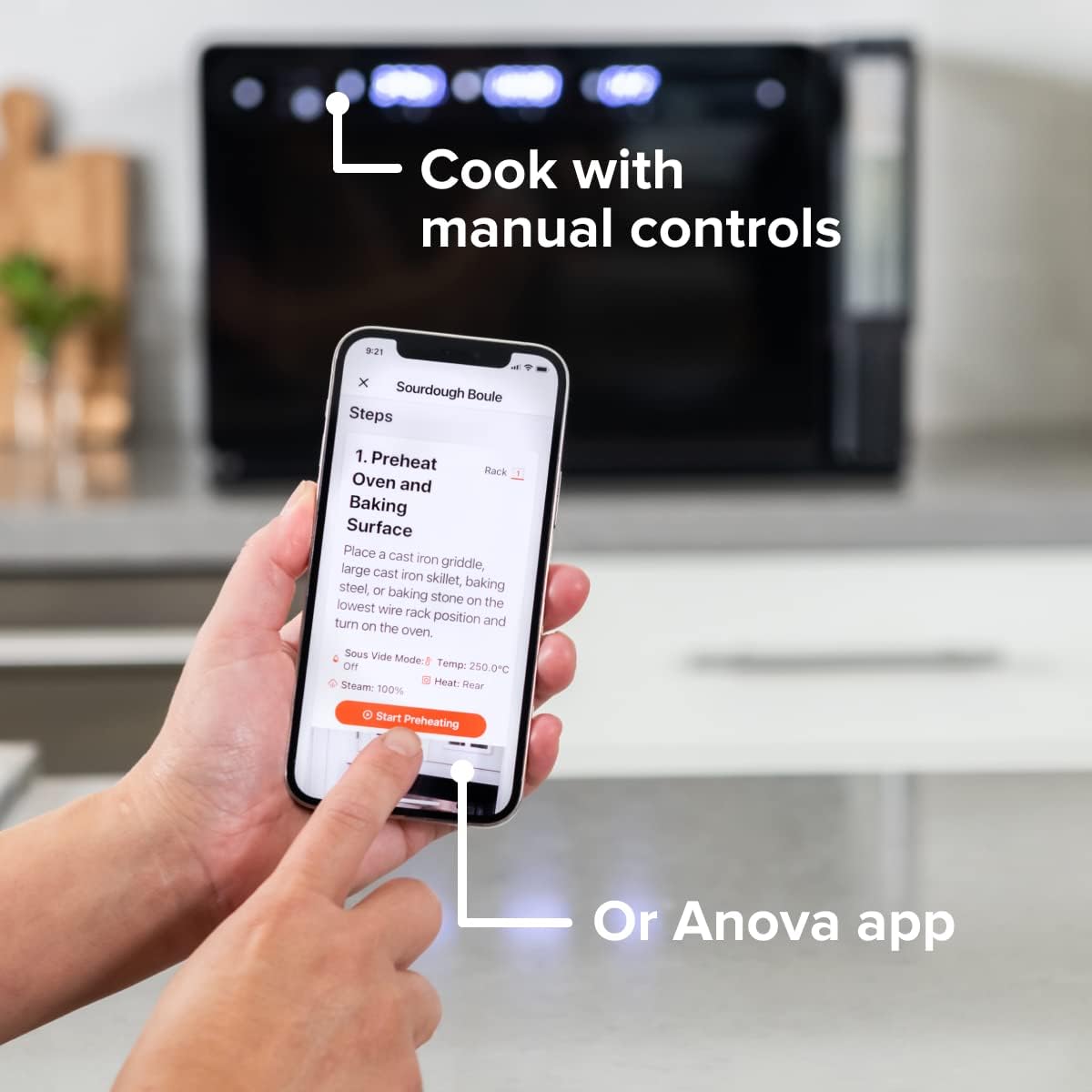
Figure 4: A user interacting with the Anova app on a smartphone, demonstrating remote control capabilities for the oven.
基本的な調理モード
The oven offers several cooking modes:
- 対流: Uses a fan to circulate hot air for even cooking and browning.
- スチーム: Injects steam into the oven cavity, ideal for baking bread, steaming vegetables, or sous vide style cooking.
- Combi (Convection + Steam): Combines hot air and steam for moist interiors and crispy exteriors.
- 焼く/ロースト: Standard oven functions for baking and roasting.
- 焼き: High heat from the top element for searing and browning.
- 脱水: Low heat and fan circulation for drying foods.
Setting a Program (Manual Control)
- Turn the mode knob to select your desired cooking mode.
- Adjust the temperature using the temperature knob.
- 時間ノブを使用して調理時間を設定します。
- スタート/一時停止ボタンを押して調理を開始します。
- To use the food probe, insert it into the thickest part of your food before starting. The oven will cook until the target internal temperature is reached.
真空調理モード
The Anova Precision Oven can achieve sous vide style results without a water bath. Use the steam function and the food probe to cook food to a precise internal temperature, ensuring tenderness and juiciness.
Steam Injection for Baking
For perfect breads with crispy crusts and soft interiors, utilize the steam injection feature. Ensure the water tank is filled before starting a steam-assisted baking program.

Figure 5: Two loaves of freshly baked bread, showcasing the results of steam injection for a perfect crust and crumb. The Anova Precision Smart Oven is visible in the background.
メンテナンスと清掃
Regular cleaning and maintenance will ensure the longevity and optimal performance of your Anova Precision Smart Oven.
毎日の清掃
- 使用後は毎回オーブンを完全に冷ましてください。
- 内側と外側の表面を広告で拭きますamp 布と中性洗剤を使用してください。研磨剤入りの洗剤やたわしの使用は避けてください。
- Remove and clean the racks and baking pan with warm, soapy water.
- Empty and rinse the water tank after each use, especially if using steam functions. Allow it to air dry before reinserting.
Descaling (Steam Function Users)
If you frequently use the steam function, mineral buildup may occur. The oven may indicate when descaling is needed. Refer to the Anova app or online resources for detailed descaling instructions using a descaling solution.
ストレージ
長期間使用しない場合は、オーブンが清潔で乾燥していることを確認してください。涼しく乾燥した場所に保管してください。
トラブルシューティング
This section addresses common issues you might encounter with your Anova Precision Smart Oven.
| 問題 | 考えられる原因 | 解決 |
|---|---|---|
| Oven not turning on. | プラグが差し込まれていない; 電源が切れているtage; 回路ブレーカーが作動しました。 | オーブンがコンセントにしっかりと差し込まれていることを確認してください。家庭用ブレーカーも確認してください。 |
| 蒸気は発生しません。 | Water tank empty or not properly seated; mineral buildup. | Fill water tank with distilled water and ensure it is correctly inserted. Perform descaling if necessary. |
| 食べ物が均等に調理されない。 | Improper rack placement; overcrowding; fan obstruction. | Refer to recipe for recommended rack position. Avoid overcrowding the oven. Ensure nothing obstructs the convection fan. |
| Wi-Fi接続の問題。 | Wi-Fi パスワードが間違っている、ルーターが遠すぎる、ネットワーク干渉がある。 | Double-check Wi-Fi password. Move oven closer to router or use a Wi-Fi extender. Restart oven and router. |
If the problem persists after attempting these solutions, please contact Anova Customer Support.
仕様
- ブランド: アノヴァ料理
- モデル名: 精密オーブン
- 商品モデル番号: AN900-10
- 製品寸法: 奥行き18インチ x 幅22インチ x 高さ14インチ
- 商品の重量: 59ポンド
- 色: 黒
- コントロールタイプ: ノブ
- 電源: 電気
- 含まれるコンポーネント: Water tank, pan, temp probe
- 特集: プログラム可能
保証とサポート
The Anova Precision Smart Oven comes with a manufacturer's warranty. Please refer to the warranty card included with your product or visit the official Anova Culinary web詳細な保証条件については、サイトをご覧ください。
For technical support, troubleshooting assistance, or to inquire about replacement parts, please contact Anova Customer Support:
- オンラインサポート: 訪問する Anova Culinary Store on Amazon またはそのオフィシャル webサイト。
- ユーザーガイド(PDF): 包括的なユーザーガイドは、以下からダウンロードできます。 このリンク.

Figure 6: The Anova Precision Smart Oven integrated with a smart home assistant (Alexa), demonstrating its connectivity features.
Ask a question about this manual
Ask about setup, troubleshooting, compatibility, parts, safety, or missing instructions. Manuals+ will review the question and use this page’s manual context to help answer it.