
1. はじめに
Thank you for choosing the FLEXISPOT E9 Electric Standing Desk. This manual provides essential information for the safe and efficient assembly, operation, and maintenance of your new desk. Please read it thoroughly before use and keep it for future reference.
The FLEXISPOT E9 is designed for easy assembly with minimal parts, ensuring a smooth setup experience. It offers a wide height adjustment range from 73 cm to 123 cm, with a swift adjustment speed of 25mm/s for a stress-free transition between sitting and standing positions. Its robust design supports up to 50 kg, allowing you to safely adjust the desk height with your equipment in place.
The desk features a smart touch panel for intuitive one-touch operation, enabling you to effortlessly switch between sitting and standing postures to optimize your workspace for health and activity. The compact 60 cm x 120 cm tabletop provides ample workspace while harmonizing with various room aesthetics. Its minimalist design makes it suitable for home offices, studies, or even as a versatile dining or hobby table in your living room.

Image: The FLEXISPOT E9 Electric Standing Desk, highlighting its adjustable height from 73-123cm and 120cm width.
2. セットアップと組み立て
The FLEXISPOT E9 desk is designed for straightforward assembly. Follow these steps to set up your desk:
- コンポーネントを解凍します: すべての部品をパッケージから慎重に取り出し、付属のマニュアルの部品リストと照合します。
- Attach the Beam: The desk's beam is pre-attached to the tabletop. Simply rotate the support columns into place.
- 取り付け脚: Securely attach the desk feet to the support columns using the provided screws and tools.
- リモコンを接続する: Connect the remote control cable to the control box under the desk.
- 電源接続: 電源ケーブルをコントロールボックスに差し込み、壁のコンセントに差し込みます。
All necessary assembly tools are included in the package. Assembly typically requires one person and can be completed in approximately 15 minutes.
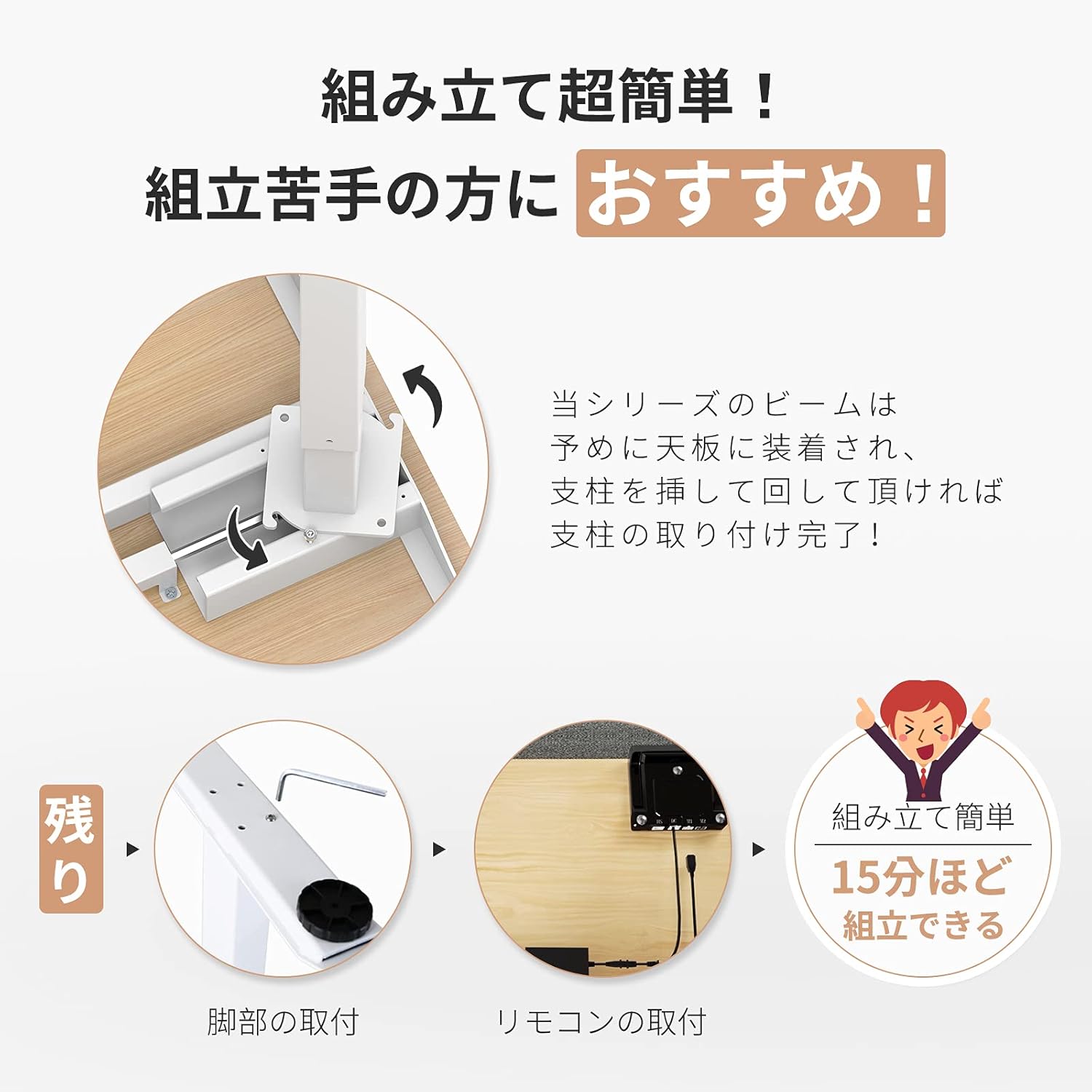
Image: Visual guide demonstrating the simple assembly process, including beam rotation, foot attachment, and remote control connection.
3. 操作手順
The FLEXISPOT E9 features an intuitive control panel for easy height adjustment and memory functions.
3.1コントロールパネルオーバーview

Image: The control panel, indicating the LED panel, up button, down button, and four height memory preset buttons.
- LEDパネル: 現在のデスクの高さを表示します。
- 上/下ボタン(▲/▼): Press and hold to adjust the desk height upwards or downwards. Release to stop at the desired height.
- メモリプリセットボタン(1、2、3、4): 好みの高さ設定を保存して呼び出します。
3.2 メモリプリセットの設定
- 上/下ボタンを使用して、デスクを希望の高さに調整します。
- Press and hold one of the memory preset buttons (1, 2, 3, or 4) until the LED panel flashes or beeps, indicating the height has been saved.
3.3 メモリプリセットの呼び出し
Simply press the desired memory preset button (1, 2, 3, or 4). The desk will automatically move to the saved height.
3.4 Safety Features (Anti-Collision)
The desk is equipped with a built-in sensor to detect obstacles during height adjustment. If an obstruction is encountered, the desk will automatically stop and reverse slightly to prevent damage or injury.
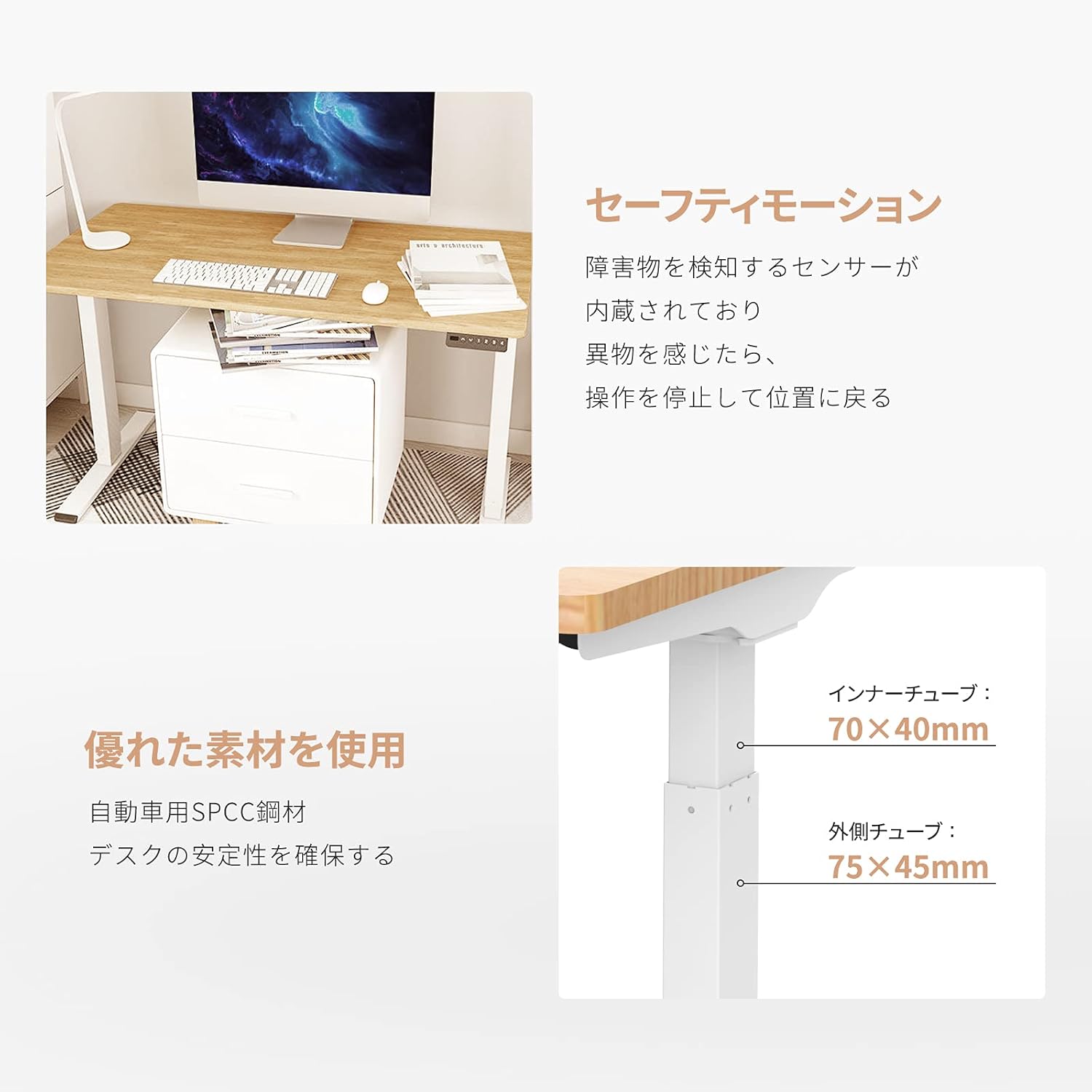
Image: Explanation of the safety motion feature, where the desk stops and reverses upon detecting an obstacle. Also shows inner tube (70x40mm) and outer tube (75x45mm) dimensions.
4. メンテナンス
To ensure the longevity and optimal performance of your FLEXISPOT E9 Electric Standing Desk, follow these maintenance guidelines:
- 定期清掃: 机の表面と脚を柔らかくて乾いた布で拭いてください。amp 布で拭いてください。仕上げを傷める可能性のある研磨剤入りの洗剤や刺激の強い化学薬品は使用しないでください。
- ケーブル管理 Ensure all cables are neatly organized and not tangled or pinched, especially during height adjustments. Use cable ties or management trays if necessary.
- 接続を確認してください: Periodically check that all screws and connections are secure. Tighten if any looseness is detected.
- 過負荷を避ける: 最大耐荷重50kgを超えないようにしてください。
- 環境条件: デスクは乾燥した環境に保ち、極端な温度や直射日光を避けてください。
5。 トラブルシューティング
If you encounter any issues with your FLEXISPOT E9 Electric Standing Desk, please refer to the following common troubleshooting steps:
- 机が動かない:
- 電源ケーブルがデスクと壁のコンセントの両方にしっかりと差し込まれているかどうかを確認します。
- 移動を妨げる障害物がないことを確認してください。
- デスクのプラグを 30 秒間抜いてから再度差し込み、リセットしてみてください。
- 不均一な動き:
- 机が水平な場所に設置されていることを確認してください。
- Verify that the weight on the desk is evenly distributed.
- LEDディスプレイのエラーコード:
- Refer to the full product manual (if provided separately) for specific error code meanings and solutions.
- Often, an error can be cleared by resetting the desk (unplugging and replugging).
これらの手順を実行しても問題が解決しない場合は、FLEXISPOT カスタマー サポートに問い合わせて、さらにサポートを受けてください。
6. 仕様
Detailed technical specifications for the FLEXISPOT E9 Electric Standing Desk:
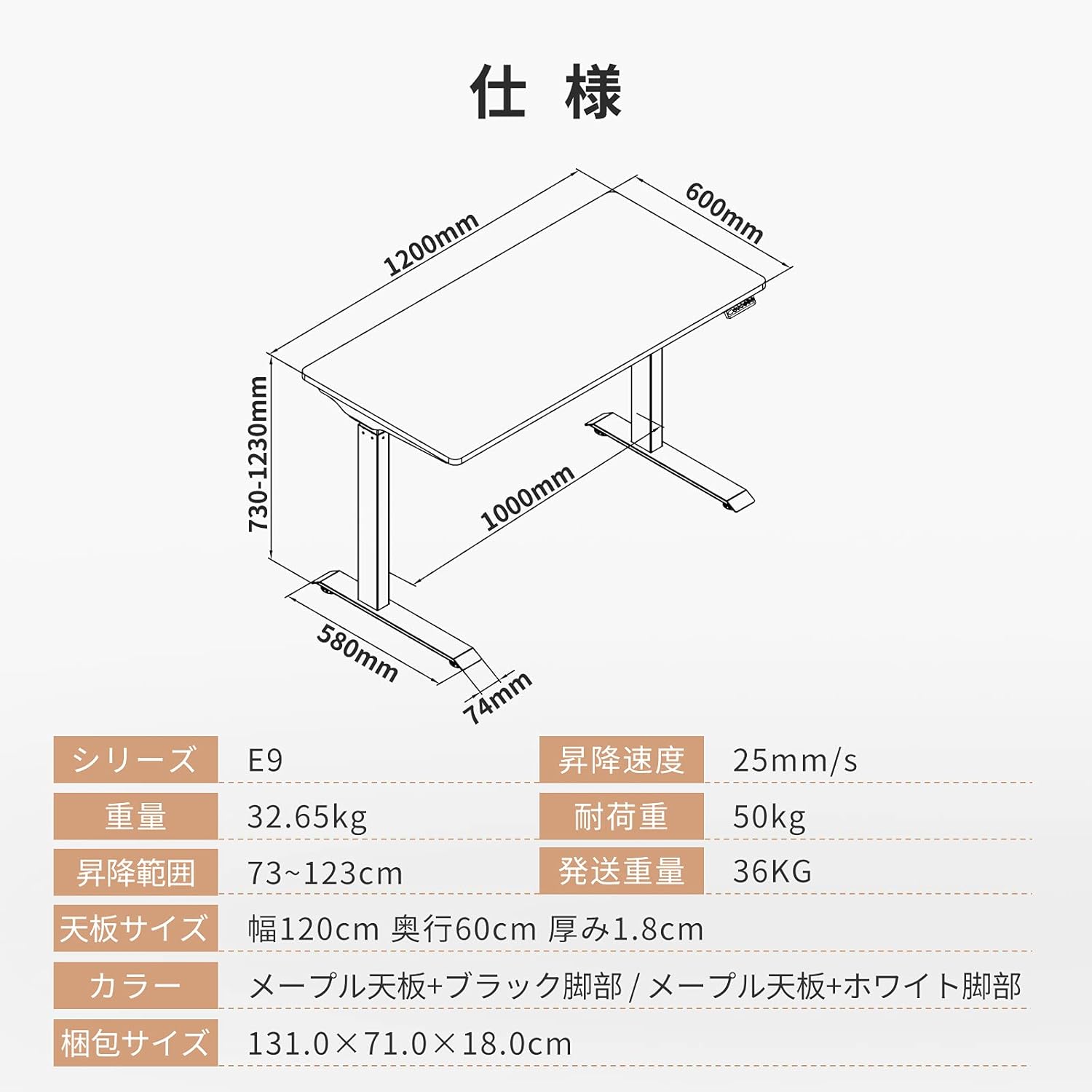
Image: Technical drawing with key dimensions: 1200mm width, 600mm depth, 730-1230mm height range, 1000mm base width, 580mm base depth, 74mm foot height.
| 特徴 | 詳細 |
|---|---|
| ブランド | フレキシポット |
| モデル | E9 |
| デスクタイプ | Computer Desk, Electric Standing Desk |
| 製品寸法(奥行き×幅×高さ) | 60 cm x 120 cm x 73-123 cm |
| 高さ調整範囲 | 73cm~123cm |
| 高さ調整速度 | 25mm/秒 |
| 最大推奨重量容量 | 50キロ |
| テーブルトップサイズ | 120 cm (Width) x 60 cm (Depth) x 1.8 cm (Thickness) |
| テーブルトップ素材 | Maple (Finish: Paint) |
| ベース素材 | Wood (Legs: Black) |
| 組み立てが必要 | はい |
| Recommended Persons for Assembly | 1 |
| 特集 | Height Adjustment Function, Anti-Collision Sensor |
| アイテム重量 | 35.9キロ |
| 発送重量 | 36キロ |
| GTIN / UPC | 810072794987 |
7. 保証とサポート
FLEXISPOT provides a free long-term manufacturer's warranty for the E9 Electric Standing Desk. This warranty includes unlimited support responses during the warranty period, offering complete peace of mind.
FLEXISPOT has established a dedicated support system in Japan, including a call center, to ensure excellent after-sales service for our customers. In the event that you require support, our team will assist you in Japanese, eliminating any language concerns.
For warranty claims, technical assistance, or any other inquiries, please contact FLEXISPOT customer service through the official webサイトまたは購入時に提供された連絡先情報を参照してください。