
1. はじめに
The Kinhank Super Console X Cube is a compact retro gaming system designed to provide access to a vast library of classic games across multiple emulators. This device supports high-definition output, wireless controllers, and offers multiplayer capabilities for an engaging gaming experience. This manual provides essential information for setting up, operating, and maintaining your console.
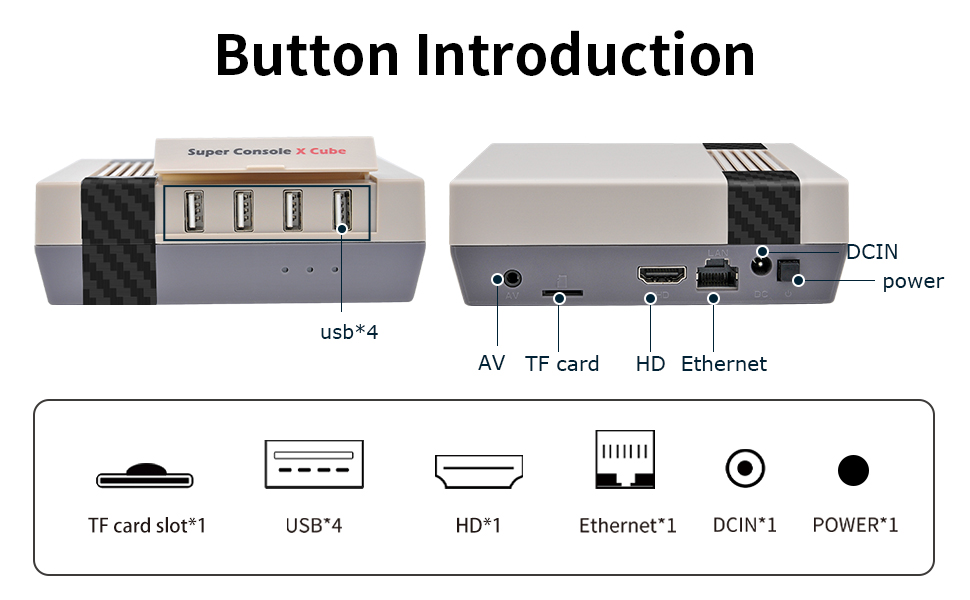
Image: The Super Console X Cube connected to a television, showcasing its dual function as a TV and game system.
The console comes pre-loaded with over 65,000 retro games and supports more than 50 emulators, allowing you to revisit many classic titles. It features an upgraded S905 chip for smooth performance and supports 4K TV output for clear visuals.

Image: The console connected to a TV, illustrating the vast library of over 65,000 built-in games and support for 50+ emulators.
2. パッケージ内容
下記のすべての品目がパッケージに含まれていることをご確認ください。不足品や破損品がある場合は、カスタマーサポートまでご連絡ください。

Image: A visual representation of the items included in the package: Super Console X Cube, one controller, one HD cable, one 256GB card, one power adapter, and one user manual.
- Super Console X Cube Console x 1
- Wireless Controller x 1 (Note: Some packages may include two controllers. Check your specific product variant.)
- HDケーブル×1
- 256GB Micro SD Card (pre-installed) x 1
- 電源アダプター x 1
- ユーザーマニュアル x 1

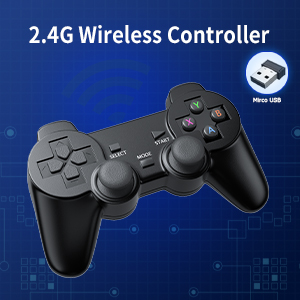
Image: A 2.4G wireless controller, typically included with the console, shown with its micro USB receiver.
3.製品オーバーview
Familiarize yourself with the ports and buttons on your Super Console X Cube for proper connection and operation.

画像: 上 view of the Super Console X Cube, highlighting the four USB ports for connecting controllers and other peripherals.
画像: 背面 view of the Super Console X Cube, detailing the AV port, TF card slot, HD (HDMI) port, Ethernet port, DCIN (power input), and power button.
ポートの説明:
- USBポート(x4): For connecting wired controllers, wireless controller receivers, or other USB peripherals.
- AVポート: For connecting to older televisions using an AV cable (not included).
- TFカードスロット: Contains the pre-installed Micro SD card with games and system software. Do not remove during operation.
- HD (HDMI) ポート: For connecting to modern televisions or monitors via an HDMI cable for high-definition video and audio output.
- イーサネットポート: 有線インターネット接続用。
- DCIN Port: 電源アダプタを接続します。
- 電源ボタン: コンソールの電源をオンまたはオフにします。
4.セットアップガイド
Follow these steps to set up your Kinhank Super Console X Cube:
- テレビに接続する:
- For HD TVs: Connect one end of the included HDMI cable to the HD port on the console and the other end to an HDMI input on your television.
- For older TVs: Connect an AV cable (not included) to the AV port on the console and the corresponding inputs on your television.

Image: The console connected to a television, demonstrating HD output capability.
- 接続電源: Insert the power adapter into the DCIN port on the console, then plug the adapter into a wall outlet.
- マイクロ SD カードを挿入します。 Ensure the pre-installed Micro SD card is securely seated in the TF card slot. Do not remove it during operation.
- コントローラーを接続する:
- For wireless controllers: Insert the 2.4GHz USB receiver (usually found in the controller's battery compartment or included separately) into one of the USB ports on the console. Ensure batteries are installed in the controller(s).
- For wired controllers: Plug the USB cable of the wired controller directly into a USB port on the console.
- 電源オン: Press the power button on the console. The system will boot up and display the main menu on your TV.
- ネットワーク接続(オプション):
- Wi-Fi: Navigate to the system settings, select network options, and connect to your Wi-Fi network.
- LAN: Connect an Ethernet cable from your router to the Ethernet port on the console.

Image: Illustration of the console's WiFi and LAN connection capabilities.
5. 操作手順
5.1 システムの操作
Use your controller's D-pad or analog stick to navigate through the main menu and select emulators or games. The 'A' button (or equivalent) typically confirms selections, and the 'B' button (or equivalent) usually goes back.
5.2 Launching Games
From the main menu, select an emulator (e.g., "NES", "SNES", "PS1"). A list of available games for that emulator will appear. Select a game from the list to launch it. The system will automatically load the necessary emulator.
5.3 ゲームの進行状況の保存と読み込み
Most emulators support "save states" which allow you to save your exact progress at any point in a game. The method to access this feature varies by emulator, but commonly involves pressing a combination of buttons (e.g., both joysticks down simultaneously, or a 'Hot Key' + 'Start' button). Refer to the on-screen prompts or the system's internal settings for specific key combinations.
- Save State: Select an empty slot and save your current game progress.
- 負荷状態: Select a previously saved slot to resume gameplay from that exact point.
5.4 マルチプレイヤーゲーム
The Super Console X Cube supports up to four players simultaneously. Connect additional controllers to the available USB ports. The system should automatically recognize them. Many classic games support local multiplayer, allowing you to share the experience with friends and family.

Image: Four individuals enjoying a multiplayer gaming session on the Super Console X Cube, demonstrating its support for multiple players.

Image: A collage depicting different groups of people, including adults and children, engaging in multiplayer gaming, highlighting the social aspect of the console.
6. メンテナンス
- クリーニング: コンソールの清掃には、柔らかく乾いた布をご使用ください。液体クリーナーや研磨剤は使用しないでください。
- ストレージ: コンソールは、直射日光や極端な温度を避け、涼しく乾燥した場所に保管してください。
- 換気: Ensure the console's ventilation openings are not blocked to prevent overheating.
- マイクロSDカード: Do not remove the Micro SD card while the console is powered on or operating, as this can corrupt data.
- 電源を切る: Always power off the console properly before disconnecting power.
7。 トラブルシューティング
| 問題 | 考えられる原因 | 解決 |
|---|---|---|
| テレビに表示されない |
|
|
| コントローラーが応答しない |
|
|
| ゲームの動作が遅くなったりフリーズしたりする |
|
|
| Cannot save game progress |
|
|
8. 仕様
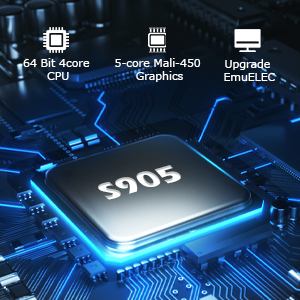
Image: Close-up of the S905 chip, highlighting its 64-bit 4-core CPU and 5-core Mali-450 Graphics for enhanced performance.
- モデル名: スーパーコンソールXキューブ
- プロセッサ: Upgraded S905 Chip (64-bit 4-core CPU)
- グラフィック: 5-core Mali-450 Graphics
- オペレーティング·システム: Linux-based (EmuELEC)
- ストレージ: 256GB Micro SD Card (pre-installed with 65,000+ games and 50+ emulators)
- ビデオ出力: HD (HDMI) / AV (1080P/720P)
- 接続性: Wi-Fi, LAN (Ethernet)
- USB ポート: USB 4 x 2.0
- コントローラー: Supports 2.4GHz wireless controllers and wired USB controllers
- マルチプレイヤーサポート: 最大4人まで
- 寸法: 約8.62×6.77×4.61インチ
- 重さ: 約1.65ポンド
- メーカー: キンハンク
9. 保証とサポート
Kinhank products are designed for reliability and performance. For warranty information, please refer to the documentation included with your purchase or contact your retailer. If you encounter any issues or have questions regarding your Super Console X Cube, please contact Kinhank customer support through the official website or your purchase platform for assistance.
顧客サービス: If you have any questions or require technical support, please reach out to our customer service team. We are committed to providing assistance.