
1.製品オーバーview
The AI Carecam NPK Intelligent Camera is a wireless indoor security camera designed for home and office use. It features 360° pan and tilt capabilities, 2MP 1080P Full HD resolution, night vision, two-way audio communication, and motion detection. The camera supports up to a 128GB Micro SD card for local storage and is controlled via a mobile application.
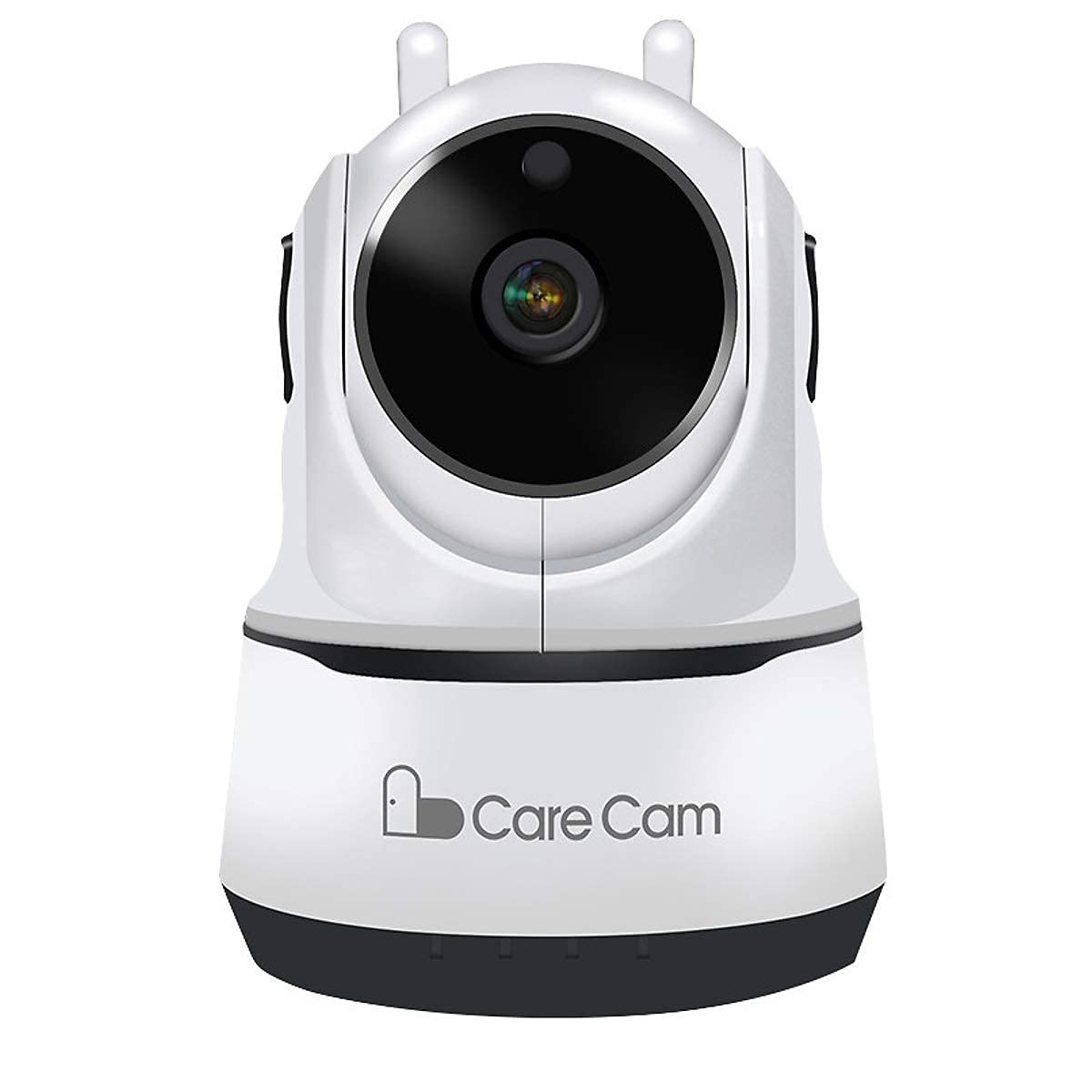
図1: フロント view of the AI Carecam NPK Intelligent Camera, showing the lens and base.
2. パッケージ内容
- AI Carecam NPK Intelligent Camera
- 電源アダプター
- ユーザーマニュアル(このドキュメント)
3. セットアップ手順
3.1 Identifying Camera Ports
Before setup, familiarize yourself with the camera's ports and interfaces.
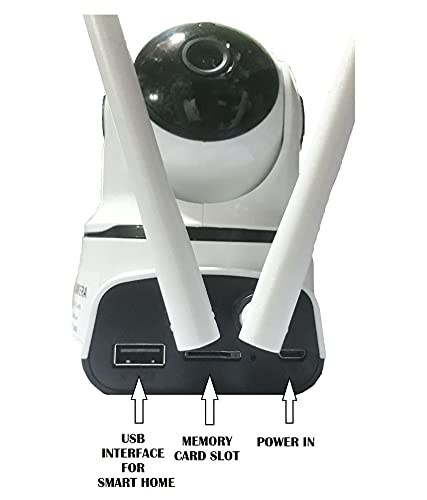
図2: 後方 view of the camera showing the USB interface, memory card slot, and power input port.
- USBインターフェース: For smart home integration (if applicable).
- メモリーカードスロット: Insert a Micro SD card (up to 128GB) for local video storage.
- 電源: 付属の電源アダプターをここに接続します。
3.2 カメラの電源を入れる
- Connect the provided power adapter to the "Power In" port on the camera.
- アダプタを標準の電源コンセントに差し込みます。
- The camera will power on and initiate its self-test sequence. Wait for the camera to indicate readiness (e.g., a specific LED indicator or voice prompt).
3.3 Installing the Mobile Application
The camera is controlled via a dedicated mobile application, compatible with Android and iOS devices. 検索する "Carecam" or the recommended app name in your device's app store.

図3: The camera supports control via Android and iOS mobile applications.
3.4 Wi-Fiへの接続
- Ensure your mobile device is connected to the 2.4GHz Wi-Fi network you intend to use for the camera.
- Open the installed Carecam application.
- Follow the in-app instructions to add a new device. This typically involves scanning a QR code on the camera or entering Wi-Fi credentials.
- 接続されると、カメラのステータスインジケーターが変わり、アプリで確認が表示されます。
4. 操作手順
4.1 ライブ View パン/チルトコントロール
After successful setup, open the app to view the live feed from your camera. Use the on-screen controls to adjust the camera's view角度。

図4: Control the camera's 355° pan and 90° tilt movements directly from the mobile application.
- パン: カメラを水平方向に最大 355° 回転させます。
- カメラを垂直方向に最大 90° まで調整します。
4.2 双方向音声通信
The camera supports two-way audio, allowing you to listen and speak through the camera using the mobile app.

図5: The camera features clear two-way audio with a sensitive microphone to restore vocals.
- ライブでは view、話すにはマイクのアイコンをタップします。
- スピーカーアイコンをタップすると、カメラの場所からの音声を聞くことができます。
4.3 ナイトビジョン
The camera automatically switches to night vision mode in low-light conditions, providing clear monitoring even in darkness using infrared light.
4.4 動きの検出とアラート
Configure motion detection settings within the app to receive alerts on your mobile device when movement is detected. The camera is designed for motion-only alerts.
- アプリ内のカメラ設定に移動します。
- Locate the "Motion Detection" or "Alert Settings" section.
- Enable motion detection and customize sensitivity levels and alert schedules as needed.
4.5 マイクロSDカードストレージ
The camera supports local storage on a Micro SD card up to 128GB. Ensure a compatible card is inserted for continuous recording or event-triggered recordings.

図6: The camera supports Micro SD (TF) card storage up to 128GB for recording video footage.
- Insert the Micro SD card into the designated slot with the contacts facing the correct direction.
- Format the Micro SD card through the camera's app settings for optimal performance.
5. メンテナンス
5.1 カメラのクリーニング
- 清掃する前に、カメラの電源がオフになっており、プラグが抜かれていることを確認してください。
- 柔らかく乾いた布でカメラ本体を優しく拭いてください。
- For the lens, use a specialized lens cleaning cloth to avoid scratches. Do not use liquid cleaners directly on the lens.
5.2 マイクロSDカードの管理
- Regularly check the storage status of your Micro SD card via the app.
- Format the card periodically to maintain optimal recording performance and free up space.
- Back up important recordings before formatting the card.
6。 トラブルシューティング
- カメラがWi-Fiに接続できない:
- Wi-Fiネットワークが2.4GHzであることを確認してください。カメラは5GHzネットワークをサポートしていません。
- アプリに Wi-Fi パスワードが正しく入力されていることを確認します。
- 信号強度を改善するには、カメラを Wi-Fi ルーターに近づけます。
- カメラとルーターを再起動します。
- 画像がない、または画質が悪い:
- Check the power connection to ensure the camera is on.
- カメラのレンズがきれいで、障害物がないことを確認してください。
- インターネット接続速度を確認してください。
- モーション検出が機能しない:
- Check the motion detection settings in the app to ensure it is enabled and configured correctly.
- 感度レベルを調整します。
- カメラの視野が view 明らかです。
- Micro SD カードに記録されない:
- Micro SD カードが正しく挿入されていることを確認してください。
- Format the Micro SD card through the app.
- Check if the card is full; if so, back up data and format it.
- Verify the card is not damaged.
7. 仕様
| 特徴 | 詳細 |
|---|---|
| ブランド | AI |
| モデル名 | NPK Carecam (HVG Carecam) |
| 接続技術 | ワイヤレス(Wi-Fi) |
| 特集 | 2MPカメラ |
| 屋内/屋外での使用 | 屋内 |
| 電源 | コード式電気 |
| 接続プロトコル | Wi-Fi |
| コントローラータイプ | Android, iOS (App) |
| 色 | 白 |
| フォームファクター | ドーム |
| 耐水性レベル | 耐水性はありません |
| アラートの種類 | モーションのみ |
| 部屋タイプ | オフィス、ホーム |
| 光源 | Infrared (for Night Vision) |
| 制御方法 | アプリ |
| ネットワーク接続技術 | 無線 |
| 無線技術の種類 | Wi-Fi |
| ビデオキャプチャ解像度 | 1080P (FHD), H.264 |
| ビデオキャプチャフォーマット | MP4, AVI |
| ナイトビジョン | 夜の色 |
| アイテムの寸法 | 10 x 10 x 10 センチメートル |
| アイテム重量 | 200グラム |
| ユニット数 | 1 カウント |
| アイテム数 | 1 |
| 内蔵メディア | アダプタ |
| View角度 | 360度 |
| の分野 View | 360度 |
| ズームタイプ | 光学ズーム |
| フォトセンサー技術 | シーモス |
| フラッシュメモリタイプ | マイクロSD(最大128GB) |
8. 保証情報
The AI Carecam NPK Intelligent Camera comes with a 1年間のメーカー保証 from the date of purchase. This warranty covers defects in materials and workmanship under normal use. Please retain your proof of purchase for warranty claims. The warranty does not cover damage caused by misuse, accidents, unauthorized modifications, or natural disasters.
9. サポート
For technical assistance, troubleshooting, or warranty inquiries, please contact the manufacturer or your point of purchase. The packer contact information is provided below:
Packer Contact: HOTSPOT ELECTRONICS, MUMBAI 400004
Please have your product model number (NPK Carecam) and proof of purchase ready when contacting support.