
1. はじめに
The M-Wave ST-C2.1 Ahead Handlebar Stem is designed to allow precise adjustment of your bicycle's handlebar position. This stem features a 0-90° adjustable angle, enabling riders to fine-tune their optimal sitting and riding posture for enhanced comfort and control. It is compatible with 1 1/8 inch steerer tubes and handlebars with a 31.8 mm clamp 直径。
2. 安全情報
- Always ensure all bolts are tightened to the manufacturer's specified torque settings. Overtightening or undertightening can lead to component failure or injury.
- Regularly inspect the stem for any signs of damage, cracks, or wear. Replace immediately if any damage is found.
- 取り付けや調整の手順が不明な場合は、プロの自転車整備士にご相談ください。
- Do not modify the stem in any way.
- Wear appropriate safety gear when riding.
3. パッケージ内容
- 1 x M-Wave ST-C2.1 Ahead Handlebar Stem
4. セットアップとインストール
Before installation, ensure you have the necessary tools, including appropriate Allen keys and a torque wrench. Proper torque application is critical for safety.
4.1 Attaching to Steerer Tube
- Remove your existing stem from the bicycle's steerer tube.
- Slide the M-Wave ST-C2.1 stem onto the 1 1/8 inch steerer tube. Ensure the stem is oriented correctly.
- Install the top cap and bolt, tightening it just enough to remove play from the headset, but allowing the fork to turn freely.
- ステムを前輪に合わせます。
- Tighten the two steerer clamp bolts on the side of the stem. Refer to the torque specification printed on the stem, typically 9-10 N.m. Tighten bolts alternately and evenly.
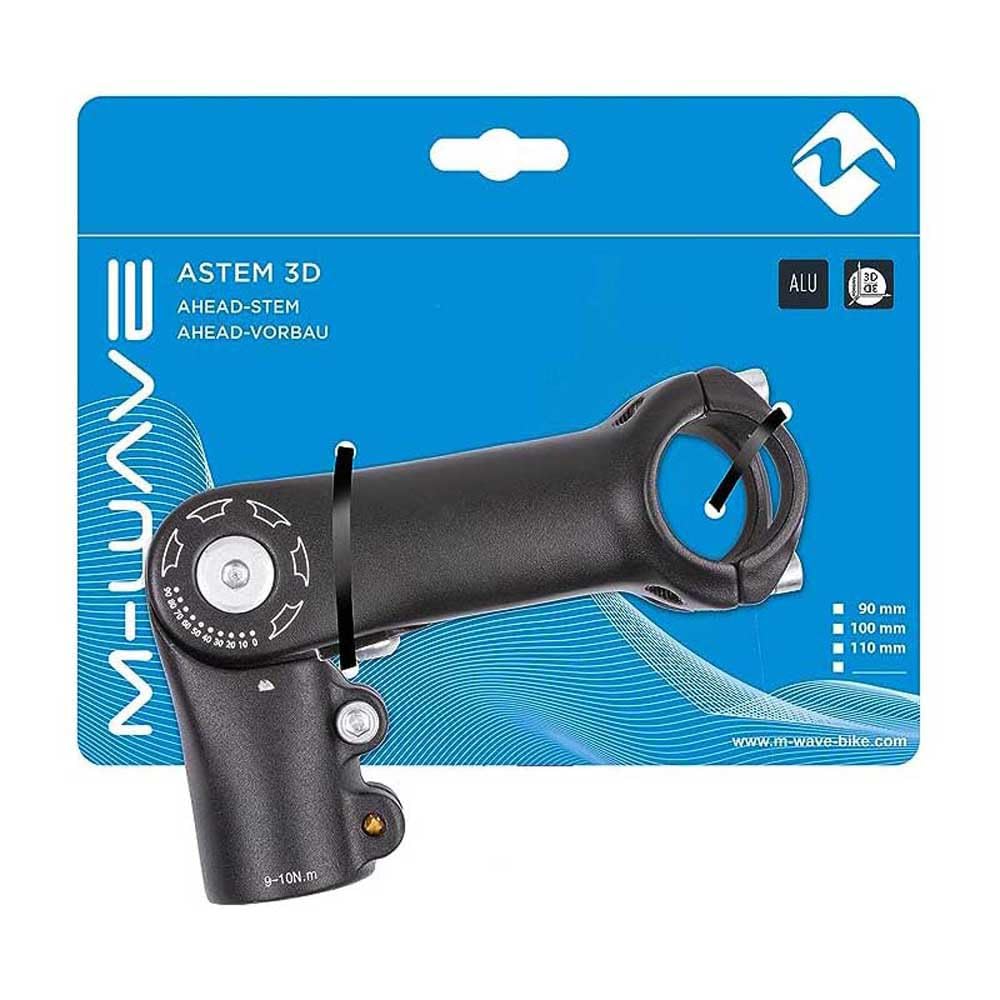
図1: The M-Wave ST-C2.1 stem. The two bolts on the lower part clamp the stem to the steerer tube. The four bolts on the front clamp ハンドルバー。
4.2 Attaching Handlebar
- Loosen the four bolts on the front faceplate of the stem.
- Carefully position your 31.8 mm diameter handlebar into the stem's clamp エリア。
- Re-install the faceplate and its four bolts.
- Tighten the four faceplate bolts evenly in a cross pattern, gradually increasing torque until the specified value (typically 5-6 N.m for handlebars) is reached. Ensure there is an even gap between the faceplate and the stem body.

図2: 閉じる view of the handlebar clamp area, showing the four bolts that secure the handlebar.
5. 操作と調整
The M-Wave ST-C2.1 stem allows for angle adjustment from 0° to 90° to customize your riding position.
- Locate the main adjustment bolt on the side of the stem, near the steerer clamp.
- Loosen this adjustment bolt sufficiently to allow the stem body to pivot. Do not remove the bolt completely.
- Adjust the stem to your desired angle. Reference the angle markings (0, 10, 20... 90) printed on the stem body for precise positioning.
- Once the desired angle is set, tighten the adjustment bolt firmly. Refer to the torque specification, which is typically 9-10 N.m.
- After adjustment, always check that the handlebar is secure and does not rotate or slip.
図3: The adjustment bolt and angle markings (0-90°) on the side of the stem, used to set the handlebar angle.
6. メンテナンス
- クリーニング: Wipe the stem clean with a damp 布で拭いてください。仕上げを傷める可能性のある強い化学薬品は使用しないでください。
- ボルト検査: Periodically check all bolts (steerer clamp、ハンドルバーclamp, and angle adjustment) for tightness. Re-torque to specifications if necessary.
- 腐食: If riding in wet or corrosive conditions, inspect bolts and threads for corrosion. Apply a thin layer of grease to bolt threads during reassembly to prevent seizing.
7。 トラブルシューティング
- Handlebar Slipping: If the handlebar slips, ensure the four faceplate bolts are tightened evenly and to the correct torque specification. Check for grease or dirt on the clamp表面を作成します。
- Stem Rotating on Steerer: If the stem rotates on the steerer tube, ensure the two steerer clamp bolts are tightened evenly and to the correct torque specification (9-10 N.m). Also, verify the headset top cap bolt is tightened enough to remove play but not overtightened.
- きしみ音: Creaking can often be resolved by disassembling, cleaning, lightly greasing (where appropriate, e.g., bolt threads, not clamping surfaces), and reassembling the stem and handlebar components, ensuring all bolts are torqued correctly.
- 角度調整の難しさ: If the adjustment bolt feels stiff or difficult to turn, ensure it is sufficiently loosened. Do not force it. If the issue persists, disassemble, clean, and lightly grease the pivot bolt and contact surfaces.
8. 仕様
| モデル | ST-C2.1 |
| ブランド | M-Wave |
| Steerer Tube Diameter | 1 1/8インチ |
| ハンドルバーClamp 直径 | 31.8ミリメートル |
| 角度調整可能 | 0°~90° |
| Length (External) | 90ミリメートル |
| 材料 | アルミニウム |
| 色 | 黒 |
| アイテム重量 | 0.39キログラム |
| 製品寸法(長さ×幅) | 3.54インチ×1.13インチ |
| UPC / GTIN | 887539033019 |
9. 保証とサポート
This M-Wave product comes with a Limited Warranty. For specific details regarding warranty coverage, duration, and claims, please refer to the documentation included with your purchase or visit the official M-Wave website. For technical support or further assistance, please contact M-Wave customer service.