
導入
This manual provides detailed instructions for the installation, operation, and maintenance of your Yunir Brushless Motor Controller Kit. This kit is designed for electric scooters, bikes, and similar vehicles, offering reliable performance with its brushless motor controller and clear LCD display. Please read this manual thoroughly before installation and use to ensure proper function and safety.
安全情報
- インストール、メンテナンス、トラブルシューティングを実行する前に、必ず電源を切ってください。
- 短絡を防止するために、すべての接続が安全かつ適切に絶縁されていることを確認してください。
- Do not expose the controller or display to extreme temperatures, direct sunlight for prolonged periods, or corrosive substances.
- While the LCD display is rainproof, avoid submerging the components in water.
- インストール手順について不明な点がある場合は、資格のある技術者にご相談ください。
製品終了view
The Yunir Brushless Motor Controller Kit provides efficient and sensitive control for your electric vehicle. It features a robust, rainproof design and includes an LCD display for clear data visualization.
- 耐久性のある構造: Made from premium materials, ensuring a light, robust, and rainproof design suitable for various weather conditions.
- クリアなLCDディスプレイ: The backlit LCD display clearly shows status and data, making it easy to read even in dim environments. Intuitive buttons allow for quick operation.
- Quiet and Sensitive Control: The brushless controller operates quietly and offers high sensitivity for smooth vehicle performance.
- 多彩な互換性: Supports 36V/48V systems with 350W power output, ensuring efficient operation for compatible electric vehicles.

Image: The Yunir Brushless Motor Controller Kit, including the controller unit and the LCD display.
セットアップとインストール
Follow these steps for proper installation of the controller and LCD display.
1. コントローラー配線図
Refer to the diagram below for connecting the controller to your electric vehicle's components. Ensure each wire is connected to its corresponding function.

Image: Detailed wiring diagram for the Yunir Brushless Motor Controller, showing connections for accelerator, lamp, brake, display, Hall sensor, and power.
2. Cable Identification
Each cable in the kit is color-coded for easy identification and connection:
- 赤: Positive power connection
- 黒: Negative power connection
- 黄: 出力
- 茶色: Positive lamp 電極
- 白: Negative lamp 電極
- 青: 信号を表示
- 緑: 信号を受信しました
3. LCD Display Mounting
The LCD display comes with a holder designed to fit 22.5 mm handlebars. Mount the display securely in a position that allows for easy viewing while operating your vehicle.

Image: The LCD display holder, designed for secure mounting on 22.5mm handlebars.

Image: The rainproof LCD display mounted on handlebars, showing its suitability for all weather conditions.
操作手順
1. LCDディスプレイ機能
The LCD display provides real-time information about your vehicle's status and performance. Use the intuitive buttons to navigate through different modes and settings.

画像: クローズアップ view of the LCD display screen, showing various parameters like speed, battery level, and distance.
- バックライト: The display features a backlight for clear visibility in low-light conditions.
- データ表示: Shows essential data such as speed, battery level, distance, and more.
- ボタン: Use the buttons to power on/off, adjust settings, and switch display modes.
2. Parameter Settings (P13)
The controller allows for adjustment of certain parameters. One important setting is P13, which relates to the product power and booster type.
- The factory default setting for product power is 8. This is suitable for most standard split boosters.
- If your vehicle uses an integrated booster, you may need to adjust the P13 setting to 12.
- In cases of incompatible booster types, adjust P13 to either 8 or 12 as required for optimal performance.
Note: The controller model may be sent randomly. Ensure compatibility before ordering and installation.
メンテナンス
- クリーニング: コントローラーとディスプレイを柔らかくて乾いた布で拭いてください。amp 布で拭いてください。強力な化学薬品や研磨剤入りの洗剤は使用しないでください。
- 接続: すべての配線接続が安全で腐食がないことを定期的に確認してください。
- 検査: Inspect the cables and housing for any signs of damage, wear, or fraying. Replace damaged components immediately.
- ストレージ: If storing the vehicle for an extended period, ensure the components are clean and stored in a dry environment.
トラブルシューティング
If you encounter issues with your Yunir Brushless Motor Controller Kit, consider the following common troubleshooting steps:
- 電源なし/ディスプレイオフ: Check all power connections, including battery and main switch. Ensure the battery is charged.
- モーターが応答しません: Verify all motor phase lines and Hall sensor connections are correct and secure. Check the speed throttle connection.
- 速度/データが正しくありません: Ensure the LCD display signal wire is properly connected. If applicable, check P13 settings for booster compatibility.
- 断続動作: すべての配線の接続が緩んでいないか、絶縁体が損傷していないか検査します。
- エラーコード: If the LCD display shows an error code, consult the specific error code documentation for your display model (if available) or contact support.
これらの手順を試しても問題が解決しない場合は、カスタマー サポートに連絡してサポートを受けてください。
仕様
| 特徴 | 詳細 |
|---|---|
| モデル番号 | Yunirfq7a8cnm1g7609-02 |
| 巻tage互換性 | 36V/48V |
| 出力 | 350W |
| コントローラーの寸法 | 約8.8 cm x 5.2 cm x 3 cm(3.46インチ x 2.04インチ x 1.18インチ) |
| LCD Display Dimensions | 約8 cm x 5 cm(3.15インチ x 1.97インチ) |
| Handlebar Diameter (for display) | 22.5ミリメートル |
| アイテム重量 | 11.4オンス(約323グラム) |
| 防雨 | はい(LCDディスプレイ) |
| 電池が必要 | No (for controller/display operation, relies on vehicle battery) |
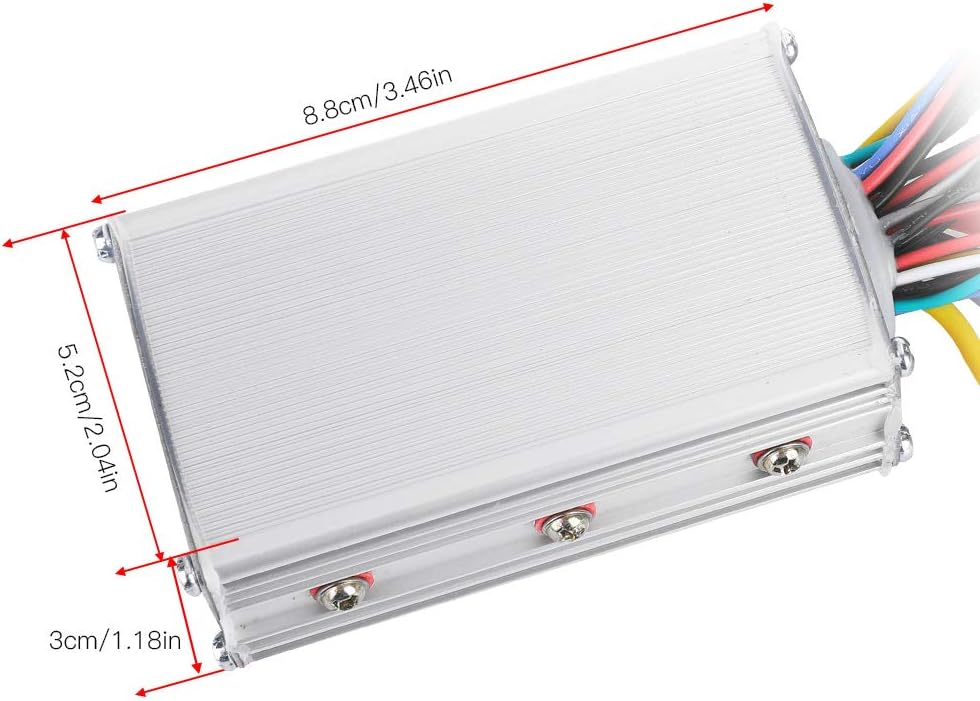
Image: Dimensions of the Yunir Brushless Motor Controller unit.

Image: Dimensions of the Yunir LCD Display unit.
保証情報
This product is covered by a standard manufacturer's warranty. Please refer to your purchase documentation or contact the retailer for specific warranty terms and conditions. Keep your proof of purchase for any warranty claims.
カスタマーサポート
For technical assistance, troubleshooting, or inquiries regarding your Yunir Brushless Motor Controller Kit, please contact Yunir customer support through the retailer where the product was purchased. Provide your model number (Yunirfq7a8cnm1g7609-02) and a detailed description of the issue for efficient service.