1. はじめに
The SINGCALL E57 is a wireless SOS emergency call button designed to function as a transmitter within a caregiver pager system. This device is intended to be used in conjunction with a compatible SINGCALL receiver (not included) to create a complete call system. It provides a simple and effective way for individuals needing assistance, such as the elderly, patients, or those with disabilities, to alert a caregiver.
重要な注意: The E57 call button cannot be used as a standalone device. A SINGCALL receiver is required for the system to function.
2.製品オーバーview
The E57 call button features a large, easily identifiable button for quick activation. Its compact and durable design ensures reliability in various environments.

図2.1: 前面 view of the SINGCALL E57 Wireless SOS Emergency Call Button.
主な特徴:
- コンパクトサイズ: Approximately 5.5 x 5.5 cm (2.2 x 2.2 inches).
- 防水設計: IP55 rated, offering protection against dust and low-pressure water jets.
- 広範囲の動作温度: Functions reliably between -20℃ to 50℃ (-4℉ to 122℉).
- 長い伝送距離: オープンエリアでは最大 150 メートル (500 フィート)。
- ポータブル: Can be carried in a pocket, worn around the neck with a lanyard, or mounted on a wall.
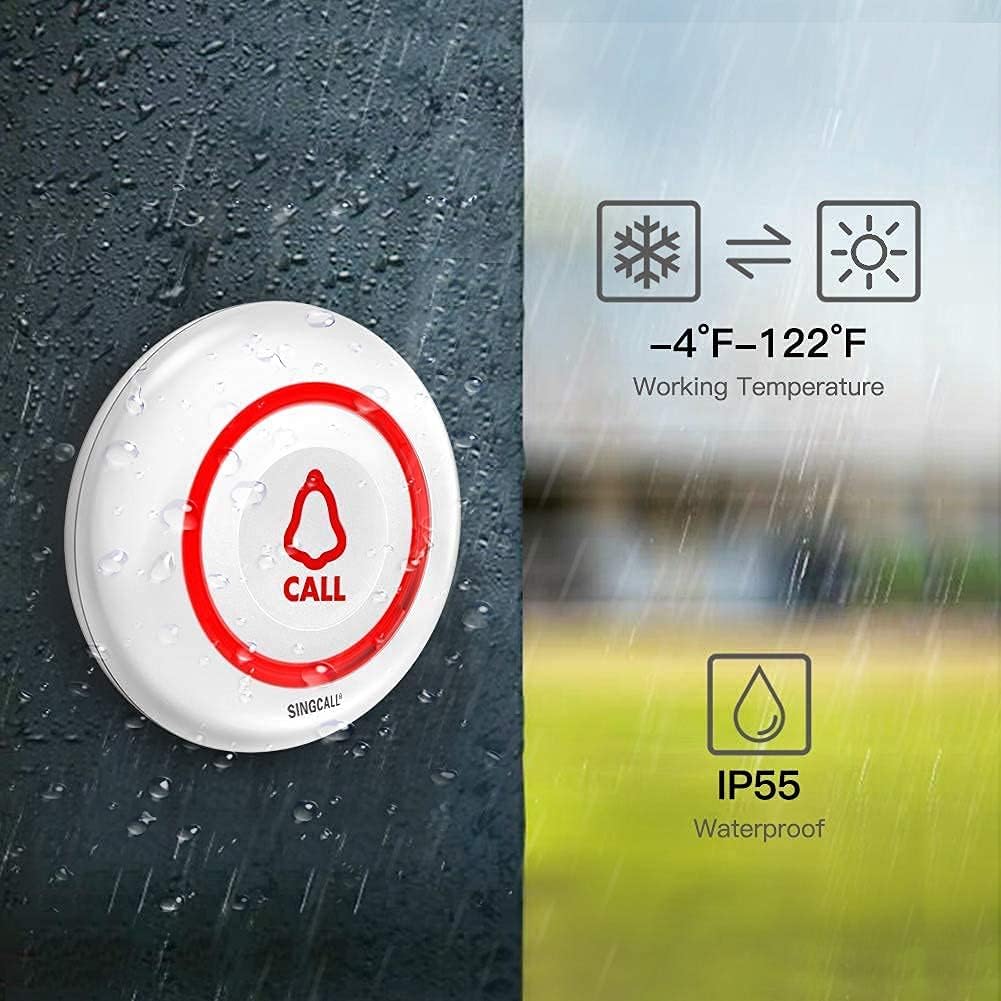
Figure 2.2: Dimensions of the SINGCALL E57 Call Button.

Figure 2.3: The E57 button demonstrating its IP55 waterproof rating and operating temperature range.
3. セットアップ
3.1 バッテリーの取り付け
The E57 call button is powered by two CR2 batteries, which are typically included. To install or replace batteries:
- 通話ボタンの裏カバーを慎重に開けます。
- 正しい極性 (+/-) を確認して、2 個の CR2 電池を挿入します。
- 背面カバーをしっかりと閉じます。
3.2 Pairing with a SINGCALL Receiver
The E57 call button must be paired with a compatible SINGCALL receiver to function. The pairing process typically involves placing the receiver into a pairing mode and then activating the call button.
General Pairing Steps (refer to your receiver's manual for specific instructions):
- Ensure your SINGCALL receiver is powered on and in close proximity to the E57 button.
- Activate the pairing mode on your SINGCALL receiver. This usually involves pressing a specific button on the receiver for a few seconds until an indicator light or sound confirms pairing mode.
- While the receiver is in pairing mode, press the large "CALL" button on the E57 transmitter.
- The receiver should indicate successful pairing (e.g., a beep, flash, or display update).
- Test the connection by pressing the E57 button again to ensure the receiver responds.
3.3 取り付けと配置
The E57 button offers flexible placement options:
- ポータブル使用: Attach a lanyard (if provided) to wear it around the neck, or simply carry it in a pocket.
- 壁掛け: The button can be affixed to a wall using adhesive or screws (not included) for fixed locations like bathrooms or beside a bed. Ensure it is placed within the transmission range of the receiver.

図3.1:例ample of the E57 button being worn for easy access.
4. 操作手順
Once the E57 call button is paired with a SINGCALL receiver, operation is straightforward:
- To send an alert, simply press the large "CALL" button firmly.
- The button will transmit a wireless signal to the paired receiver.
- The receiver will then activate its alert mechanism (e.g., sound, vibration, light) to notify the caregiver.
Ensure the button is within the effective transmission range of the receiver for reliable operation. Obstacles such as thick walls or electronic interference can reduce the effective range.
Figure 4.1: Illustration of the wireless range of the E57 button within a typical home environment.
5. メンテナンス
5.1 電池の交換
When the call button's signal weakens or if it stops responding, it may be time to replace the batteries. Follow the battery installation steps in Section 3.1.
- Use only CR2 type batteries.
- 古い電池は、地域の規制に従って責任を持って処分してください。
5.2 クリーニング
To clean the E57 call button, wipe it with a soft, slightly damp cloth. Avoid using abrasive cleaners, solvents, or harsh chemicals, as these can damage the device's surface or internal components.
5.3 耐水性
The E57 is IP55 rated, meaning it is protected against dust ingress and low-pressure water jets from any direction. This makes it suitable for use in environments where it might be exposed to splashes, such as a bathroom. However, it is ない 水中に沈めるように設計されています。
6。 トラブルシューティング
- ボタンが反応しない:
- Check the batteries. Replace them if necessary.
- Ensure the button is within range of the receiver.
- Receiver not receiving signal:
- Verify that the E57 button is properly paired with the receiver (refer to Section 3.2 and your receiver's manual).
- Check the distance between the button and the receiver. Move them closer if possible.
- Ensure there are no significant obstructions (e.g., thick concrete walls, large metal objects) between the button and the receiver.
- Check if the receiver is powered on and functioning correctly.
- 干渉:
- If experiencing intermittent signals, try relocating the receiver or the button to avoid potential sources of wireless interference (e.g., Wi-Fi routers, cordless phones, microwaves).
For persistent issues, consult the user manual of your specific SINGCALL receiver or contact SINGCALL customer support.
7. 仕様
| 特徴 | 仕様 |
|---|---|
| モデル | E57 |
| 寸法(長さ×幅×高さ) | 6.5 x 6.5 x 2.3 cm(2.56 x 2.56 x 0.91インチ) |
| 重さ | 40グラム |
| 防水等級 | IP55 |
| 動作温度 | -20℃〜50℃(-4℉〜122℉) |
| 電源 | 2 x CR2バッテリー(付属) |
| 巻tage | 3ボルト |
| 最大範囲 | 開けた場所では150メートル(500フィート) |
| 欧州連合 | 702563609880 |
| 内部参照 | 1939529031 |

図7.1:戻る view of the E57 button with model and regulatory information.
8. 保証とサポート
SINGCALL provides spare parts availability for 5 years within the EU for this product. For warranty claims, technical support, or further assistance, please contact SINGCALL customer service through their official web製品を購入したサイトまたは小売店。
保証に関するお問い合わせに備えて、購入証明書を保管しておいてください。