
1. はじめに
This manual provides comprehensive instructions for the assembly, operation, and maintenance of your FLEXISPOT EN2 Electric Height Adjustable Standing Desk. Please read this manual thoroughly before assembly and use to ensure safe and efficient operation.
The FLEXISPOT EN2 desk features a spacious one-piece desktop, an electric height adjustment system with memory presets, and a removable clamp power strip for convenient device charging and cable management. It is designed to support a dynamic work environment, allowing seamless transitions between sitting and standing positions.
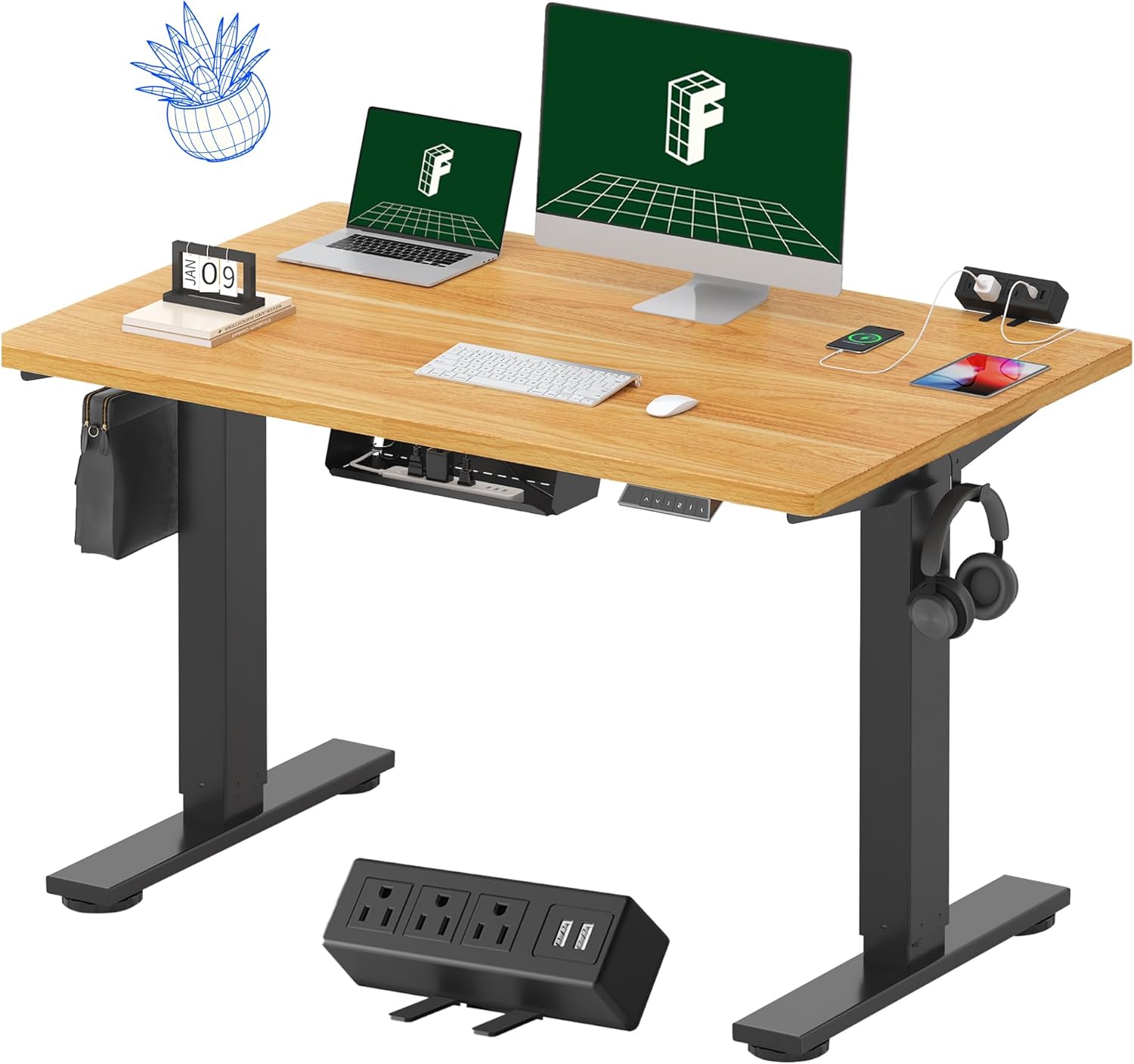
Image 1.1: FLEXISPOT EN2 Standing Desk with Maple Top and Black Frame, showcasing a typical setup with monitors, a laptop, and a clamp 電源コード。
2. 安全情報
警告: これらの安全指示に従わなかった場合、怪我をしたり製品が損傷する可能性があります。
- 組み立て説明書には常に注意深く従ってください。
- An electric drill (not included) may be required for assembly.
- Ensure the desk is properly anchored to prevent tipping.
- 推奨最大重量 176 ポンド (80 kg) を超えないようにしてください。
- Keep the work surface clear of items that could fall and cause injury during height adjustments.
- Always unplug the desk before performing any maintenance or making adjustments to the frame or electrical components.
- 操作中は子供やペットをデスクから遠ざけてください。
3. パッケージ内容
Your FLEXISPOT EN2 Standing Desk will arrive in two separate packages, which may be shipped separately. Please ensure you have received both packages and all components before beginning assembly.

Image 3.1: Illustration showing the desk components arriving in two separate packages: one for the desktop and one for the desk frame.
含まれるコンポーネント:
- One-piece desktop (48" x 30" Maple Top)
- Electric height-adjustable frame (Black)
- 4つのメモリプリセットを備えた6ボタンデジタルコントローラー
- Removable clamp power strip (3 AC outlets, 2 USB charging ports)
- ケーブル管理装置
- Assembly hardware and tools (excluding electric drill)
4. セットアップと組み立て
Assembly typically requires two people and an electric drill (not included). Follow the detailed instructions provided in the separate assembly guide included with your product. The process involves attaching the legs to the desktop and connecting the control panel and motor.
組み立てのヒント:
- 傷がつかないように、すべてのコンポーネントを柔らかく清潔な表面に並べます。
- すべてのネジがしっかりと締められていることを確認しますが、締めすぎないようにしてください。
- Properly route all cables using the provided cable management solutions to avoid interference with desk movement.
Video 4.1: Official FLEXISPOT Standing Desk Frame Installation Guide. This video demonstrates the step-by-step process of assembling the desk frame and attaching it to the desktop.
5. 操作手順
5.1 デジタルコントロールパネル
The desk is operated using a 6-button digital controller, typically mounted on the underside of the desktop. It features up/down arrows, an LED display for height, and four programmable memory presets.

Image 5.1: Digital control panel with LED display showing current height, up/down arrows, and four numbered memory preset buttons.
5.2 高さ調整
- を押し続けます 上矢印(^) 机を上げるボタン。
- を押し続けます 下矢印(v) 机を下げるボタン。
- The desk adjusts smoothly from 28.1 inches (71.4 cm) to 45.7 inches (116.1 cm).
- The motor operates quietly at less than 50 dB.
5.3 メモリプリセットの設定
The controller allows you to save up to four preferred height settings for quick adjustments.
- 上/下矢印を使用して、デスクを希望の高さに調整します。
- を押す メモリ(M) ボタンを押します。LEDディスプレイが点滅します。
- 3秒以内に、番号付きプリセットボタンの1つを押します(1、2、3、または4) をクリックして、現在の高さをそのプリセットに保存します。
- 保存した高さを呼び出すには、対応する番号のプリセットボタンを押すだけです。デスクは自動的に保存した位置に移動します。
Video 5.2: FlexiSpot Brand Store video demonstrating the desk's height adjustment and memory preset functions.
6. 特徴
6.1 One-Piece Desktop
The desk features a spacious, single-piece desktop made of FSC-Certified wood. This design provides a smooth, seamless work surface, enhancing stability and aesthetics compared to multi-piece desktops.

Image 6.1: Visual comparison highlighting the smooth surface of a single-piece desktop against the visible seams of a two-piece desktop.
6.2 Removable Clamp 電源コード
A desktop-mounted power strip is included, featuring 3 AC outlets (125V/12A) and 2 USB charging ports (5V/2A). This allows for convenient charging of electronic devices directly from your desk. The power strip can be clipped to the back or side of your desk.

Image 6.2: Close-up of the removable clamp power strip, detailing its 3 AC outlets and 2 USB-A ports, and how it attaches to the desk edge.
6.3 ケーブル管理
The desk includes a cable management device to help organize and tidy up your workspace, preventing cables from dangling and interfering with desk movement.

Image 6.3: Illustration demonstrating effective cable management with an under-desk tray, showing a tidy setup compared to unmanaged cables.
7. メンテナンス
- すべてのネジと接続部がしっかりと締まっているか定期的に点検してください。
- デスクトップの表面を柔らかくてきれいな布で拭いてください。amp 布。仕上げにダメージを与える可能性がある研磨剤入りのクリーナーは避けてください。
- モーターと電気部品をほこりや湿気から守ってください。
- Do not place hot items directly on the desktop without protective coasters.
8。 トラブルシューティング
8.1 Desk Not Moving or Displaying Error Code (e.g., "r5t")
If your desk is not responding or the LED display shows an error code like "r5t", a system reset may be required.
- デスクの電源プラグをコンセントから抜きます。
- 少なくとも10〜15秒お待ちください。
- デスクを電源コンセントに差し込みます。
- Press and hold the "Down Arrow (v)" button until the desk reaches its lowest position and then slightly rises. This indicates a successful reset.
- 問題が解決しない場合は、カスタマーサポートに連絡してください。
8.2 Desk Wobbling at Higher Heights
While the desk is designed for stability, minor wobbling can occur at maximum heights. Ensure the adjustable feet on the leg bases are properly leveled to compensate for uneven flooring.
9. 仕様
| 特徴 | 仕様 |
|---|---|
| ブランド | フレキシポット |
| モデル | EN2 |
| デスクトップ素材 | FSC認証メープル材 |
| デスクトップの寸法 | 48インチ(幅)×30インチ(奥行き) |
| デスクトップの厚さ | 1インチ |
| フレーム素材 | Industrial-grade Alloy Steel (Black) |
| 高さ調整範囲 | 28.1インチ~45.7インチ(71.4cm~116.1cm) |
| モーター騒音レベル | 50dB未満 |
| 重量容量 | 176ポンド(80kg) |
| コントロールパネル | 4つのメモリプリセットを備えた6ボタンデジタルコントローラー |
| 電源コンセント | 3 AC outlets (125V/12A), 2 USB charging ports (5V/2A) |
| 組み立てが必要 | Yes (electric drill recommended) |
10. 保証とサポート
10.1 保証情報
- 5年間保証: フレーム、モーター、その他の機械装置をカバーします。
- 2年間保証: コントローラー、スイッチ、電子機器をカバーします。
保証請求のために購入証明書を保管してください。保証は、通常の使用における材料および製造上の欠陥を対象とします。
10.2 カスタマーサポート
For any questions, troubleshooting assistance, or warranty claims, please contact FLEXISPOT customer support through their official web製品を購入したサイトまたは小売店にお問い合わせください。


