導入
The Steca Solarix PLI is a comprehensive hybrid inverter solution designed for photovoltaic island systems. It integrates an MPPT solar charge controller, a 230V pure sine wave inverter, and an integrated battery charger into a single unit. This device enables the creation of an independent 230V power grid using a solar generator and battery bank. It also supports recharging batteries via generator or grid connection.
The Solarix PLI functions as a grid-guided UPS hybrid inverter with zero export capability and blackout protection. In grid-connected operation, solar power helps reduce electricity costs. In the event of a power outage, the battery seamlessly takes over power supply within 10 milliseconds, ensuring continuous operation of essential loads.
安全に関する注意事項
設置および操作の前に、すべての安全に関する指示をよくお読みください。これらの指示に従わないと、感電、火災、または重傷を負う可能性があります。
- 設置は有資格者のみが行ってください。
- 配線やメンテナンスを行う前に、すべての電源が切断されていることを確認してください。
- インバータを雨、雪、水しぶき、その他の液体にさらさないでください。
- Do not disassemble the unit. There are no user-serviceable parts inside. Refer all servicing to qualified service personnel.
- 過熱を防ぐために、インバーターの周囲に適切な換気を確保してください。
- Connect the inverter only to battery systems with the correct voltage (このモデルの場合は24V)。
- Always use appropriate overcurrent protection devices (fuses/breakers) for all circuits connected to the inverter.
- インバーターおよびその接続部に子供を近づけないでください。
製品終了view
The Steca Solarix PLI unit features a robust design with a clear display and intuitive controls for monitoring and configuration.
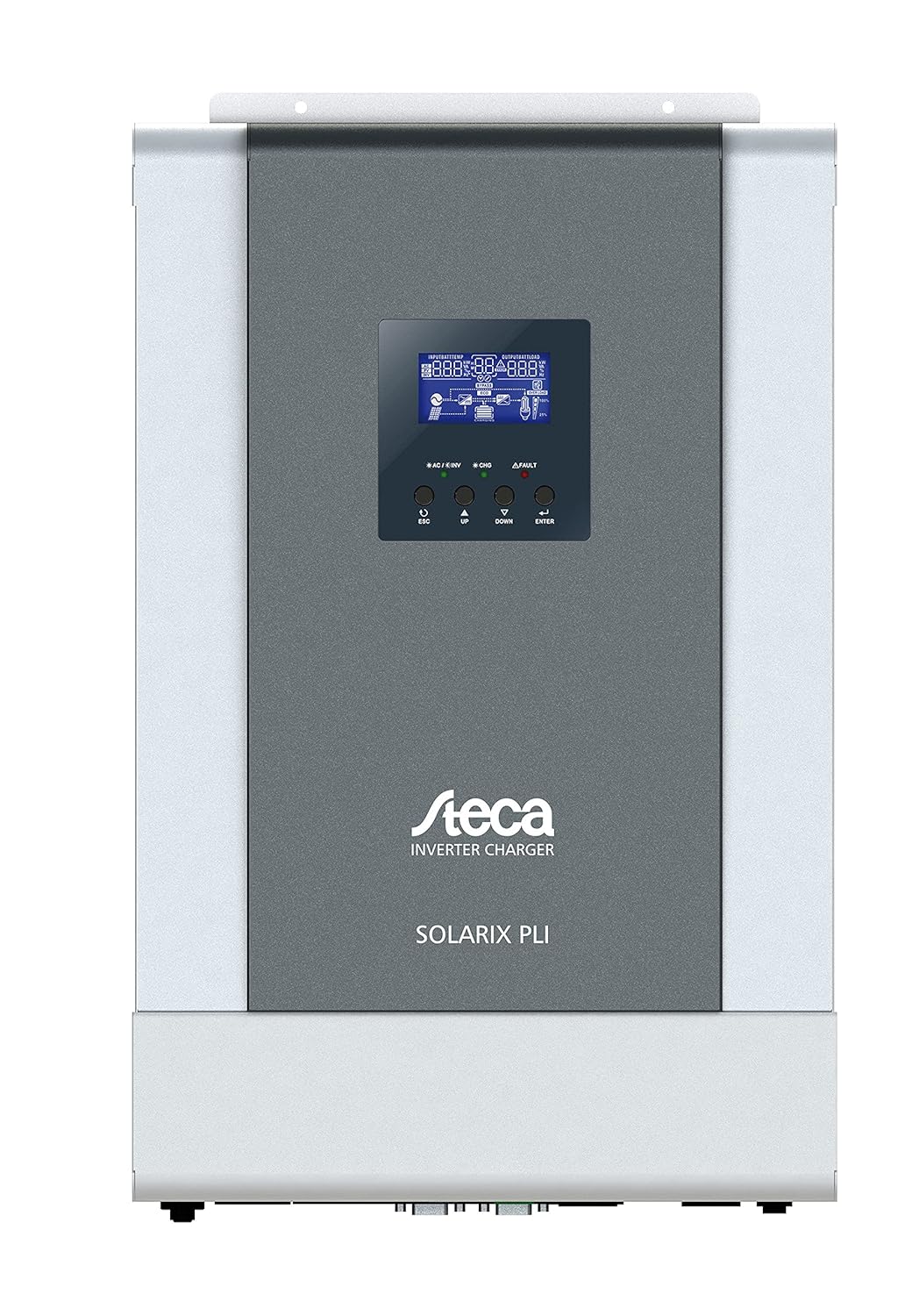
図1: 前面 view of the Steca Solarix PLI 2400-24V Hybrid Inverter. The central display shows operational status, while buttons below allow navigation and setting adjustments.
主なコンポーネントは次のとおりです。
- LCDディスプレイ: Shows real-time system data, operating status, and error codes.
- コントロールボタン: Used for navigating menus and adjusting settings (ESC, UP, DOWN, ENTER).
- AC Input/Output Terminals: For connecting to the grid and supplying AC loads.
- バッテリー端子: バッテリーバンクに接続します。
- PV入力端子: For connecting to the solar panel array.
- 通信ポート For external monitoring and control (e.g., USB, RS232).

Figure 2: Dimensional drawing of the Steca Solarix PLI, indicating its physical size and mounting points. Dimensions are provided in millimeters.
設定
Proper installation is crucial for the safe and efficient operation of your Solarix PLI inverter. Follow these general steps:
- 取り付け: Select a suitable location for mounting the inverter. It should be indoors, dry, well-ventilated, and away from direct sunlight or heat sources. Ensure the mounting surface can support the inverter's weight (approx. 9.01 kg).
- バッテリー接続: Connect the battery bank to the inverter's battery terminals. Ensure correct polarity (+ to + and - to -). Use appropriately sized cables and fuses. This model is designed for 24V battery systems.
- PVアレイ接続: Connect the solar panel array to the PV input terminals. Observe correct polarity and ensure the PV array voltage と電流はインバータの仕様範囲内です。
- AC入力接続(グリッド/発電機): If connecting to the utility grid or a generator, connect the AC input cable to the designated terminals. Ensure proper grounding.
- AC出力接続(負荷): Connect your AC loads (appliances, circuits) to the AC output terminals of the inverter.
- 初期パワーアップ: Once all connections are secure and verified, switch on the battery breaker, then the PV array breaker (if applicable), and finally the AC input breaker. The inverter display should power on.
- 構成: Use the control buttons and LCD display to configure operating parameters such as battery type, charging current, output voltage, and operating modes according to your system requirements.
Refer to the detailed wiring diagrams and specific instructions in the full user manual for precise connection procedures and safety precautions.
オペレーティング
The Steca Solarix PLI offers various operating modes to optimize energy flow. The LCD display provides real-time information on input voltage、出力ボリュームtage, battery status, charging current, and load power.
ディスプレイとナビゲーション
The LCD display shows various screens cycling through system parameters. Use the UP and DOWN buttons to manually cycle through screens or adjust values in settings. The ENTER button confirms selections, and ESC returns to the previous menu or screen.
動作モード
- Utility Priority (UPS Mode): The inverter primarily uses grid power to supply loads and charge batteries. Solar power is used when available to supplement or reduce grid consumption. In case of grid failure, it switches to battery power.
- 太陽光の優先順位: Solar power is prioritized for loads and battery charging. Grid power is only used when solar power is insufficient or batteries are low.
- バッテリー優先度: Loads are primarily supplied by battery power. Solar charges the battery. Grid power is used as a last resort when battery voltage が設定されたしきい値を下回ります。
Standby Functionality
The inverter features a standby mode to conserve energy. It typically enters standby when the load is below a certain threshold (e.g., <40W) and reactivates when the load increases (e.g., >100W). This threshold may be configurable in advanced settings.
メンテナンス
Regular maintenance ensures the longevity and optimal performance of your Steca Solarix PLI inverter.
- クリーニング: インバーターの外装は、定期的に乾いた柔らかい布で拭いてください。液体洗剤や溶剤は使用しないでください。通気口に埃やゴミが詰まっていないことを確認してください。
- 接続チェック: Annually inspect all electrical connections (battery, PV, AC input/output) for tightness and signs of corrosion. Loose connections can cause overheating and damage.
- 換気: 適切な空気の流れと放熱を確保するために、インバーターの周囲がクリアであることを確認してください。
- バッテリーの状態: Monitor your battery bank's health according to the battery manufacturer's recommendations. Ensure proper charging and discharge cycles.
Always disconnect all power sources before performing any maintenance or inspection.
トラブルシューティング
This section addresses common issues you might encounter with your Steca Solarix PLI inverter.
| 問題 | 考えられる原因 | 解決 |
|---|---|---|
| No 230V output / Error Code 09 (Soft Start Failure) | Internal main board defect. | This often indicates a hardware failure that cannot be user-repaired. Contact Steca customer support or a qualified service technician. |
| Inverter does not activate from standby with low loads. | Load is below the inverter's standby activation threshold (e.g., <100W). | Increase the load connected to the inverter above the activation threshold. Check if the standby threshold is configurable in the settings. |
| Persistent warning tone. | Indicates a system warning (e.g., low battery, overload, high temperature). | Check the LCD display for specific error codes or warning messages. Address the underlying issue (e.g., reduce load, check ventilation, charge batteries). While the tone can be disabled, it's recommended to address the cause. |
| Display/Menu navigation buttons (UP/DOWN) seem reversed. | Minor firmware quirk or design choice. | Adapt to the button behavior. It does not affect functionality. |
| Inverter not charging batteries from PV. | Insufficient solar input, PV connection issue, or charge controller settings. | Check PV array connections and ensure sufficient sunlight. Verify PV input voltage on the display. Check charge controller settings (e.g., battery type, charging current). |
For issues not listed here or if solutions do not resolve the problem, please contact Steca customer support.
仕様
| 属性 | 価値 |
|---|---|
| ブランド | STECA |
| モデル番号 | 4250852802154 |
| アイテム重量 | 9.01キログラム |
| 製品寸法 | 49.6 x 47.79 x 23 cm(パッケージ) |
| 色 | 黒 |
| 製品の厚さ | 130ミリメートル |
| ドライブタイプ | バッテリー、ソーラー |
| 巻tage | 230ボルト |
| ワットtage | 5700 Watt (Max. PV Generator) |
| 含まれるコンポーネント | ハイブリッドインバータ |
| 電池が必要 | No (for inverter operation, but requires external battery bank for energy storage) |
| 初回利用可能日 | 16年2021月XNUMX日 |
| フォームファクター | ラック |
保証とサポート
The Steca Solarix PLI typically comes with a manufacturer's warranty. Based on available information, the warranty period for this product is generally 2年 ご購入日より1年間有効です。保証請求の際は購入証明書を保管してください。
For technical support, troubleshooting beyond this manual, or warranty service, please contact Steca customer service. You may need to provide your product model number (4250852802154) and serial number (if applicable).
Note: Warranty terms may vary by region and retailer. Always refer to the official warranty documentation provided with your product for precise details.


