
1. はじめに
The Pymeter Thermostat Controller PY-21TS is a dual-relay temperature control device designed for precise temperature management. It allows for simultaneous control of heating and cooling equipment, making it suitable for a wide range of applications including seedling germination, greenhouse temperature regulation, reptile terrariums, fermentation, and more. This manual provides essential information for the safe and effective operation of your device.
2. 安全情報
- デバイスを操作する前に、すべての指示をよくお読みください。
- Do not immerse the controller unit or the temperature probe in water or other liquids.
- 電源のボリュームを確認してくださいtage はデバイスの要件 (120V AC) に適合します。
- Do not exceed the maximum output load of 1200W (10A) for the combined outlets.
- デバイスを子供やペットの手の届かない場所に保管してください。
- 清掃やメンテナンスを行う前に電源を切ってください。
3 製品の特徴
- 温度制御: Allows presetting of temperatures to automatically activate heating and cooling equipment.
- Dual Relay System: Supports simultaneous connection and control of both heating and cooling devices.
- デュアルディスプレイウィンドウ: Shows both the measured (PV) and set (SV) temperatures concurrently. Supports both Celsius (°C) and Fahrenheit (°F) display.
- Alarm Device: Features a beeping alarm for high temperature conditions or sensor failure, enhancing safety.
- プラグアンドプレイ: Designed for easy setup and operation across various settings and devices.
- Higher Power Output: Maximum output load of 1200W (10A).
- 高度な機能: Includes temperature calibration and a power-on delay function to prevent frequent compressor cycling.
- 多用途なアプリケーション: Ideal for heat mats, heat lamps, heating pads for reptile terrariums, aquarium heaters/chillers, greenhouses, grow tents, breeding, seedling, and fermentation processes.
4. パッケージ内容
- 1 x Pymeter Thermostat Controller PY-21TS
- 1 x温度プローブ
- ユーザーマニュアル (本書) x 1

Image: Pymeter Thermostat Controller PY-21TS with its temperature probe and power cord.
5. セットアップ
- 温度プローブを接続します。 Insert the metal tip of the temperature probe into the designated port on the side of the controller. Ensure it is securely connected.
- コントローラーの電源をオンにします。 Plug the controller's power cord into a standard 120V AC electrical outlet. The display will illuminate, showing the current temperature (PV) and the set temperature (SV).
- アプライアンスを接続する: Plug your heating device into one of the outlets (OUT 1 or OUT 2) and your cooling device (if applicable) into the other. The controller can manage both simultaneously.
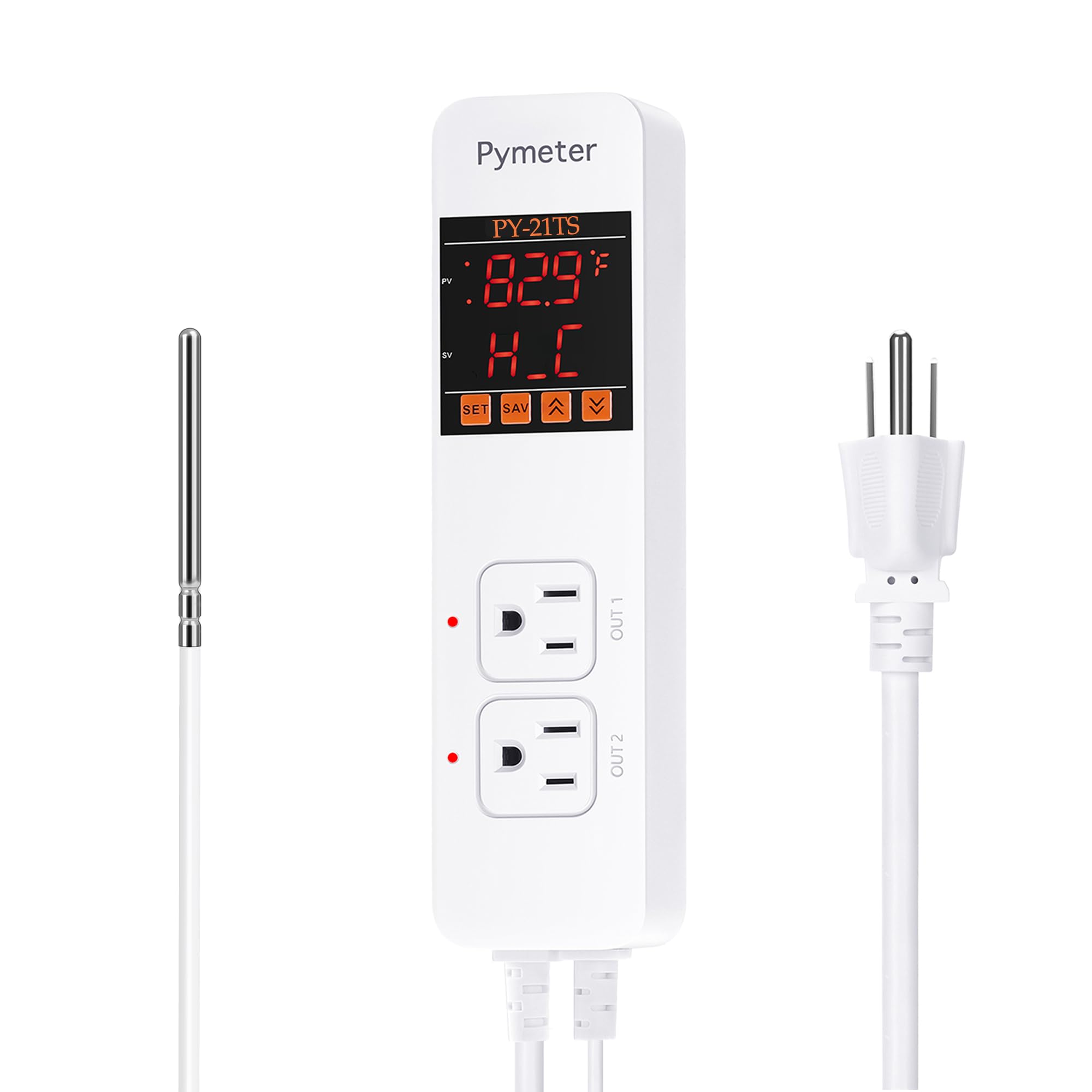
Image: The Pymeter controller connected to a heat mat for seedling germination, illustrating a typical setup.
6. 操作手順
6.1 表示の見方
The controller features a dual display:
- PV(プロセス値): Displays the current measured temperature from the probe.
- SV(設定値): Displays the target temperature or the ON/OFF temperature settings.
6.2 Setting Temperature (Heating Mode)
In heating mode, the device turns ON when the temperature drops below the ON-Temperature and turns OFF when it reaches the OFF-Temperature. For heating, the ON-Temperature must be set より低い than the OFF-Temperature.
- を押す セット button once. The ON-Temperature (e.g., '1oN' for Outlet 1) will flash.
- 使用 UP or 下 arrows to adjust the desired ON-Temperature.
- プレス セット again. The OFF-Temperature (e.g., '1oF' for Outlet 1) will flash.
- 使用 UP or 下 arrows to adjust the desired OFF-Temperature.
- を押す 保存 button to confirm and save your settings.
Example: For heating, if you set ON-Temp to 70°F and OFF-Temp to 75°F, the heater will turn on at 70°F and turn off at 75°F.
6.3 Setting Temperature (Cooling Mode)
In cooling mode, the device turns ON when the temperature rises above the ON-Temperature and turns OFF when it reaches the OFF-Temperature. For cooling, the ON-Temperature must be set より高い than the OFF-Temperature.
- Follow steps 1-4 from the Heating Mode instructions to adjust ON-Temperature and OFF-Temperature.
- Ensure the ON-Temperature is set より高い than the OFF-Temperature for cooling operation.
- を押す 保存 button to confirm and save your settings.
Example: For cooling, if you set ON-Temp to 80°F and OFF-Temp to 75°F, the cooler will turn on at 80°F and turn off at 75°F.
6.4 温度単位の選択(°C/°F)
摂氏と華氏を切り替えるには、 UP arrow button for approximately 3 seconds. The display will change units accordingly.
6.5温度校正
The Pymeter controller is factory-calibrated for accuracy. If you suspect an inaccurate reading, you can perform a calibration using an ice-water mixture. An ice-water mixture (melting ice) should read 32°F (0°C).
- Place the temperature probe into a mixture of ice and water, ensuring the ice is melting.
- Allow a few minutes for the probe to stabilize. The reading should be 32°F or 0°C.
- If the reading is off, consult the full manual for specific calibration steps, which typically involve an offset adjustment in the settings menu.
6.6 Power-On Delay Function
This function prevents rapid cycling of compressors (e.g., in chillers) by introducing a delay before restarting after a power interruption or temperature change. This protects the equipment and extends its lifespan. The delay time can usually be adjusted in the advanced settings.
6.7 アラーム設定
The controller can be configured to sound an alarm if the temperature exceeds or falls below a set range, or if the sensor malfunctions. Refer to the detailed manual for specific steps to set high/low temperature alarm thresholds and enable/disable the sensor fault alarm.

Image: The Pymeter controller regulating temperature in a greenhouse, connected to both a space heater and an exhaust fan.

Image: The Pymeter controller providing temperature regulation for a reptile terrarium, connected to a heat lamp and a heating mat.
7. メンテナンス
- クリーニング: Wipe the controller's exterior with a soft, dry cloth. Do not use abrasive cleaners or immerse in water.
- プローブのお手入れ: 温度プローブは清潔に保ち、ゴミなどが付着しないようにしてください。プローブケーブルを曲げたり損傷したりしないようにしてください。
- ストレージ: 使用していないときは、直射日光や極端な温度を避け、涼しく乾燥した場所にデバイスを保管してください。
- 接続チェック: Periodically inspect all electrical connections for wear or damage.
8。 トラブルシューティング
| 問題 | 考えられる原因 | 解決 |
|---|---|---|
| デバイスの電源が入りません。 | No power to the outlet; loose power cord. | Check the power outlet with another device. Ensure the controller's power cord is fully inserted. |
| Appliance (heater/cooler) not activating. | Incorrect ON/OFF temperature settings; appliance not plugged in or faulty. | Verify ON-Temp and OFF-Temp settings are correct for heating/cooling mode. Ensure appliance is properly plugged into the controller and is functional. |
| 温度の読み取りが不正確です。 | Sensor dirty or damaged; need for calibration. | Clean the sensor. Perform temperature calibration using an ice-water mixture (refer to section 6.5). |
| Alarm beeping continuously. | Temperature outside set alarm limits; sensor fault. | Check the current temperature and compare it to your alarm settings. Inspect the sensor connection and cable for damage. |
9. 仕様
- モデル: PY-21TS
- 巻tage: 120ボルトAC
- 最大出力負荷: 1200W(10A)
- Operating Temperature (Device): 最大210°F(99°C)
- 製品寸法: 長さ8.26インチ x 幅2.16インチ x 高さ1.57インチ (210mm x 55mm x 40mm)
- 商品の重量: 16オンス(1ポンド)
- 表示タイプ: LCDまたはLED
- 色: 白
10. 保証とサポート
Pymeter products are designed for reliability and performance. For specific warranty details, technical support, or service inquiries, please refer to the warranty card included with your purchase or visit the official Pymeter website. Please have your model number (PY-21TS) and purchase information ready when contacting support.