
CDIYTOOL 4yhujuyj
CDIYTOOL 100A MPPT Solar Charge Controller User Manual
Model: 4yhujuyj
導入
This manual provides essential information for the safe and efficient operation of your CDIYTOOL 100A MPPT Solar Charge Controller. This controller is designed for 36V, 48V, and 60V battery systems and features an LCD display, multiple load control modes, and dual USB outputs. Please read this manual thoroughly before installation and use.
The controller automatically adapts to 36V/48V/60V systems and is not suitable for 12V/24V systems. It utilizes innovative MPPT technology for high tracking efficiency, detecting the maximum charging current.
安全に関する注意事項
Always adhere to the following safety guidelines to prevent injury and damage to the controller or other components.
- バッテリーの容量が十分であることを確認するtage for the controller to recognize the correct battery type upon first use.
- Connect the battery to the controller first, then connect the solar panels. Reversing this order can damage the controller.
- 最大入力ボリュームtage is 50V. Ensure your solar panel configuration does not exceed this limit. For example, a 19V photovoltaic panel matches a 12V battery, and a 38V photovoltaic panel matches a 24V battery. When a 38V panel is connected, the maximum voltage may reach 42V.
- The controller is suitable for various battery types (including open, lead-acid, gel, and lithium batteries). Refer to the controller's settings for specific battery types.
- The controller provides protection against overvoltage, short circuit, overload, overcharge, and over-discharge.
- コントローラーをご自身で分解したり修理したりしないでください。修理が必要な場合は、資格のある担当者にご相談ください。

Image: Excerpt from the user manual detailing safety instructions and a connection diagram.
製品の特徴
- 多機能LCDディスプレイ: Provides real-time display of charging current, discharge current, and power generation.
- MPPT テクノロジー: Innovative Maximum Power Point Tracking with high efficiency (up to 99%) for optimal solar energy harvesting.
- 信頼できる保護: オーバーボリュームを含むtage, short circuit, overload, overcharge, and over-discharge protection.
- Automatic Focusing MPPT Tracking: Ensures high charging efficiency and bidirectional focusing tracking.
- 温度補正: 充電量を自動調整tag周囲温度の変化に基づきます。
- デュアル USB 出力: Provides 5V/2A output for charging mobile devices.

画像: 正面 view of the CDIYTOOL 100A MPPT Solar Charge Controller, highlighting the LCD display and dual USB ports.
セットアップとインストール
ソーラー充電コントローラーを適切に設置するには、次の手順に従ってください。
- 配線の準備: Ensure all wires are correctly sized for the expected current and are properly insulated.
- バッテリーを接続します: Connect the battery to the charge controller first. Ensure correct polarity (+ to + and - to -). The controller requires sufficient battery voltage to recognize the system type.
- ソーラーパネルを接続する: Connect the solar panel(s) to the charge controller. Ensure correct polarity. Do not exceed the maximum input voltag50Vのe。
- 負荷を接続する(オプション): Connect your DC load to the load terminals of the controller. The controller can manage load output based on settings.
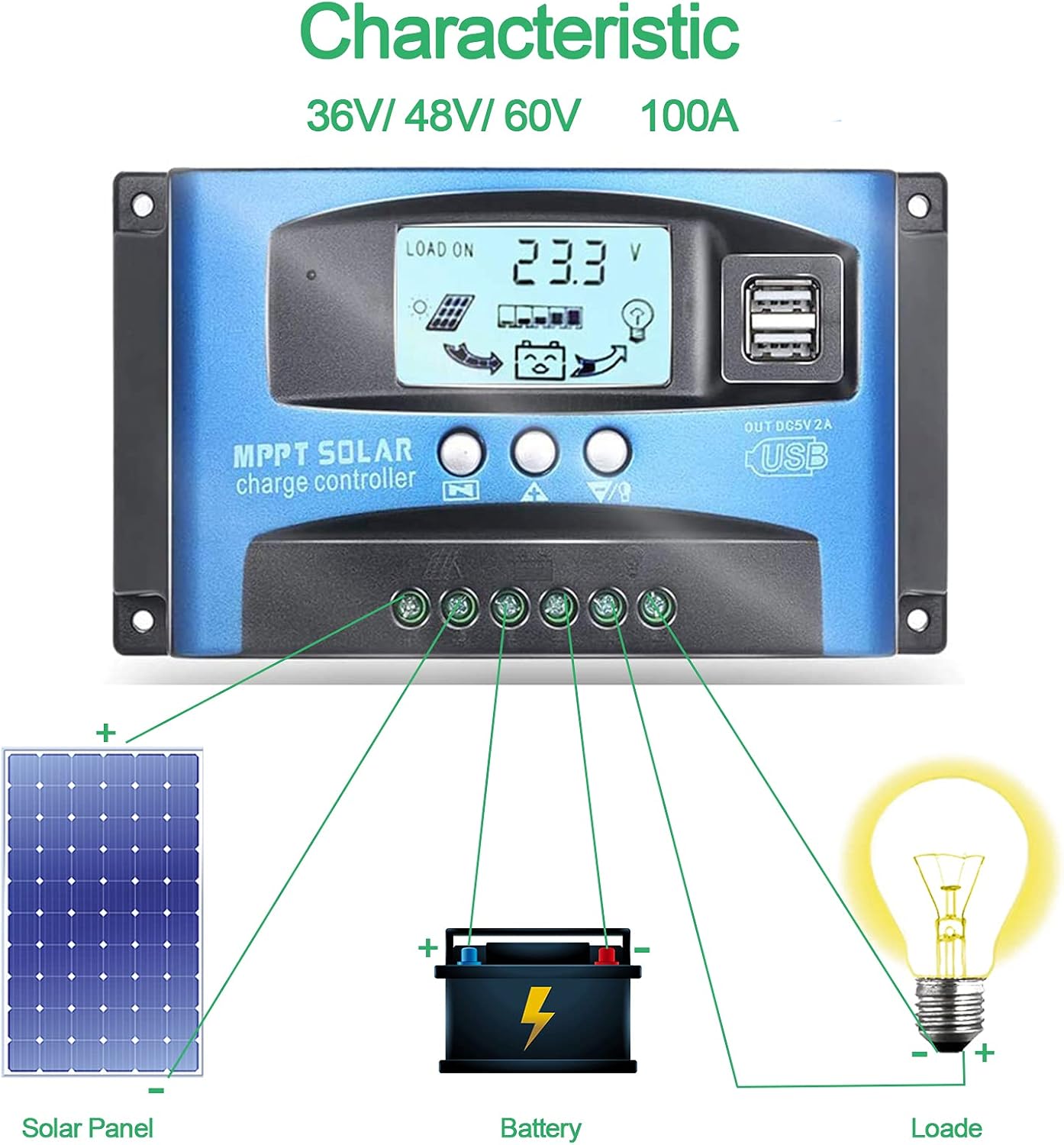
Image: Connection diagram illustrating how to connect solar panels, battery, and load to the charge controller.

画像: 詳細 view of the controller with labels for its components, including buttons, LCD, USB ports, and connection points.
操作手順
The controller features an LCD display and three buttons for operation: Menu, Page Up, and Page Down/Manual.
LCDディスプレイ
LCDにはバッテリー容量を含むさまざまなパラメータが表示されます。tage, charging current, discharge current, and system status. The icons on the display indicate solar panel activity, battery charge level, and load status.
ボタンの機能
- メニューボタン: Press to enter the menu interface and cycle through different settings. Long press to modify parameters.
- ページアップボタン: 値を増やしたり、メニュー内で上へ移動したりするために使用されます。
- ページダウン/手動ボタン: Used to decrease values or navigate downwards in menus. Also functions as a manual load control switch (on/off) when on the main interface.
USB充電
The controller is equipped with dual USB ports providing 5V/2A output for charging compatible devices such as mobile phones and tablets.

Image: Demonstration of the controller's dual USB ports being used to charge a mobile phone.
メンテナンス
定期的なメンテナンスにより、ソーラー充電コントローラーの寿命が長くなり、最適なパフォーマンスが確保されます。
- 接続を検査する: すべての配線接続部がしっかりと締まっていないか、腐食していないか定期的に点検してください。接続が緩んでいると、電力損失や過熱につながる可能性があります。
- クリーンコントローラー: コントローラーは清潔に保ち、ほこりやゴミが付かないようにしてください。表面は乾いた布で拭いてください。液体クリーナーは使用しないでください。
- パフォーマンスを監視: Regularly check the LCD display for normal operation and expected voltage/現在の読み取り値。
- バッテリーの状態: Ensure your battery is well-maintained and within its recommended operating parameters.
トラブルシューティング
このセクションでは、発生する可能性のある一般的な問題に対する解決策を示します。
| 状況 | 考えられる原因 | 解決 |
|---|---|---|
| 画面に表示されない | バッテリーが接続されていないか、電圧が低いtage | Connect battery, check battery voltage |
| No charge when sunny | Solar panel reversed or open circuit | Reconnect solar panel, check wiring |
| ロードが機能しない | Load short circuit, overload, or over-discharge protection | Check load wiring, reduce load, or charge battery |
| コントローラーが充電されない | ソーラーパネル量tage too low or battery full | Ensure sufficient solar input, check battery status |
The controller includes built-in protections for reverse polarity, overvoltage, short circuit, overload, overcharge, and over-discharge. If an issue persists after troubleshooting, contact customer support.
仕様
| パラメータ | 価値 |
|---|---|
| モデル | 4yhujuyj |
| ブランド | CDIYTOOL |
| 定格電流 | 100A |
| システム巻tage | 36V/48V/60V Auto Adapt (Not for 12V/24V) |
| 最大ソーラー入力Voltage | 50V |
| USB出力 | Dual 5V/2A |
| 表示タイプ | 液晶 |
| アイテム重量 | 14.4オンス |
| パッケージ寸法 | 6.81 x 3.98 x 2.01インチ |

Image: Diagram showing the physical dimensions of the solar charge controller.
追加のリソースとサポート
For further assistance or to access the mobile application for monitoring, please refer to the following:
モバイルアプリケーション
The BL-912V APP can be installed on your Android phone to monitor and control the solar charge controller. Scan the QR code below or visit the provided link to download and install the application.
ダウンロードリンク: http://fir.sdhzwl.cn/5w4b
The mobile phone app allows for remote monitoring of charging and discharging data, daily power generation, and other functions.
Image: Section of the user manual detailing the BL-912V APP installation process, including a QR code.
保証とカスタマーサービス
For warranty information or technical support, please contact CDIYTOOL customer service through the platform where you purchased the product. Keep your purchase receipt for warranty claims.
代表的な用途
The CDIYTOOL MPPT Solar Charge Controller is suitable for a variety of off-grid solar power applications, including:
- Residential solar power systems
- RV and marine solar setups
- ソーラー街路灯
- 遠隔監視ステーション
- 農業用灌漑システム

画像: Examples of typical applications for the solar charge controller in various settings.
Ask a question about this manual
Ask about setup, troubleshooting, compatibility, parts, safety, or missing instructions. Manuals+ will review the question and use this page’s manual context to help answer it.