
1. はじめに
The eufy Security Floodlight Cam S330 is an advanced outdoor security camera system designed to provide comprehensive surveillance and intelligent lighting for your property. With its 360-degree pan and tilt capabilities, 2K Full HD video, and powerful 3,000-lumen floodlights, it ensures detailed monitoring day and night. The integrated AI subject lock and tracking feature enhances security by intelligently following detected individuals.
含まれるもの:
- Floodlight Cam 2 Pro unit
- 取り付けキット
- スクリューパック
- クイックスタートガイド
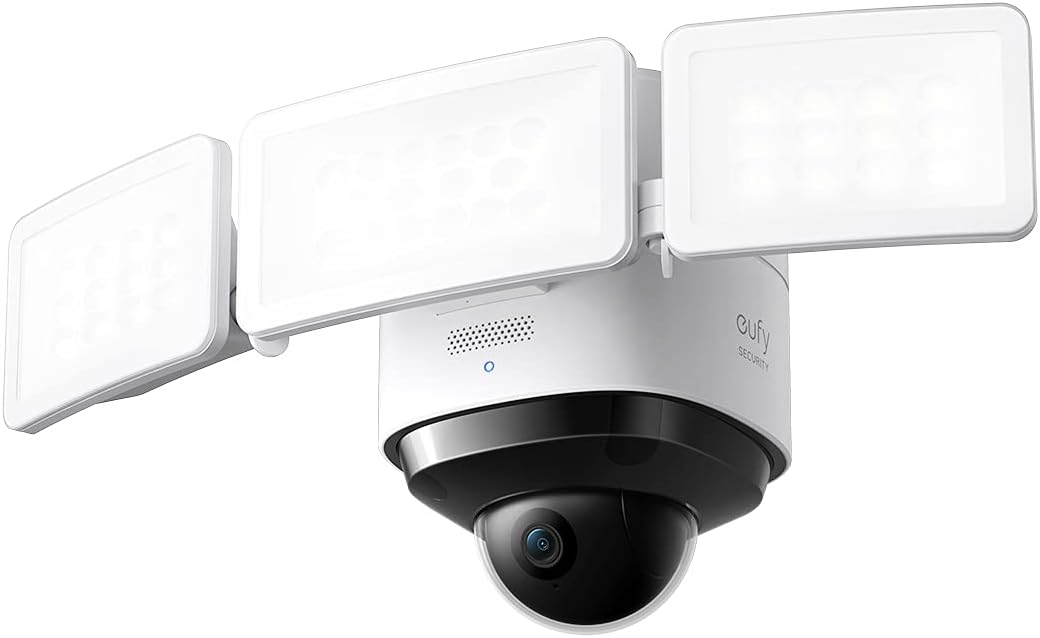
Image: The eufy Security Floodlight Cam S330, featuring a central camera unit with two adjustable floodlight panels.
2. セットアップ
2.1 インストール前の考慮事項
- 電源: This device is hardwired and requires a 120-volt power supply. Ensure power is turned off at the circuit breaker before beginning installation.
- Wi-Fi接続: The camera connects via Wi-Fi. Ensure a strong Wi-Fi signal at the installation location for optimal performance.
- 取り付け場所: The Floodlight Cam is designed for outdoor wall mounting. Choose a location that provides the desired coverage area and is within reach of existing electrical wiring.
2.2物理的な設置
- 電源を切ります: Locate the circuit breaker controlling the outdoor light fixture you intend to replace and turn off the power. Verify the power is off using a voltageテスター。
- 既存の器具を削除する: Carefully remove your existing floodlight or outdoor fixture from the junction box. Disconnect all wiring.
- 取り付けブラケットの取り付け: Attach the provided mounting bracket to the junction box using the screw packs. Ensure it is securely fastened.
- Wire the Floodlight Cam: Connect the wires from the Floodlight Cam to your home's electrical wiring according to the Quick Start Guide. Typically, this involves connecting live, neutral, and ground wires.
- ユニットを固定する: Mount the Floodlight Cam S330 onto the installed mounting bracket and secure it with the provided screws.
- 電力を回復する: Once the installation is complete and all connections are secure, turn the power back on at the circuit breaker.
2.3 アプリのセットアップ
- eufy Security アプリをダウンロードしてください: Download the eufy Security app from your smartphone's app store (iOS or Android).
- アカウントを作成する: If you are a new user, create a eufy Security account and log in.
- デバイスを追加: In the app, tap the '+' icon or select "Add Device" and choose "Floodlight Cam S330" from the list.
- 画面上の指示に従ってください: The app will guide you through connecting the camera to your Wi-Fi network and completing the setup process. This typically involves scanning a QR code on the device.
3. Operating the Floodlight Cam S330
3.1 360° Pan and Tilt Camera Coverage
The Floodlight Cam S330 features a motorized pan and tilt lens, allowing you to remotely adjust the camera's viewing angle. This provides 360-degree horizontal coverage, eliminating blind spots and giving you a complete view of your property. Use the controls within the eufy Security app to pan (move horizontally) and tilt (move vertically) the camera lens.

画像: 航空写真 view demonstrating the 360-degree coverage provided by a single eufy Floodlight Cam, ensuring no blind spots around a property.

Image: A close-up of the camera's dome, illustrating its ability to rotate 360 degrees for comprehensive surveillance.
3.2 2K Full HD Video
The camera records and streams video in crisp 2K Full HD resolution, ensuring clear and detailed footage. This high resolution is crucial for identifying subjects and capturing important details, even when zoomed in.

Image: A scene demonstrating the clarity of 2K resolution, capturing fine details of a child and a dog.
3.3 Smart Lighting with Tunable Light Panels
The Floodlight Cam S330 features three tunable light panels that provide 3,000 lumens of super-bright illumination. You can adjust the spotlight color temperature (from warm to cool) and brightness levels directly from the eufy Security app. Lighting can be configured based on:
- 日の出と日の入り: Automatically adjust light behavior based on natural light cycles.
- スケジュール: Set custom schedules for when the lights should turn on or off.
- モーション検出: Lights can be activated automatically when motion is detected, deterring intruders and illuminating the area for clear recordings.

Image: A visual representation of the adjustable brightness feature, allowing users to set the floodlight from super bright to a gentle glow.
3.4 AI Subject Lock and Tracking
The on-device AI recognizes when a person is present within the camera's view. Once a person is detected, the camera can automatically lock onto, track, and record the subject as they move across the monitored area. This ensures that critical events are captured even if the subject moves out of the initial field of view.

Image: A graphic illustrating the AI subject lock and tracking feature, showing the camera's ability to follow a moving person.
3.5 ナイトビジョン
With its 3,000-lumen super-bright motion-activated floodlights, the Floodlight Cam S330 effectively turns night into day. This ensures that recordings are in detailed, full-color even in low-light conditions, enhancing visibility and deterrence.
4. メンテナンス
To ensure optimal performance and longevity of your eufy Security Floodlight Cam S330, regular maintenance is recommended:
- Cleaning the Lens and Lights: Periodically wipe the camera lens and floodlight panels with a soft, damp 布で埃や汚れ、水滴を拭き取ってください。 view または光出力を低下させます。研磨剤入りの洗剤の使用は避けてください。
- 障害物の確認: Ensure no tree branches, foliage, or other objects are blocking the camera's view or the floodlights.
- 耐候性: The unit is weatherproof (IP65 rated). However, ensure all seals and connections remain intact and free from damage to maintain its resistance to outdoor elements.
5。 トラブルシューティング
If you encounter issues with your Floodlight Cam S330, consider the following common troubleshooting steps:
- 電源が入らない/ライトが点灯しない: Double-check the circuit breaker to ensure power is on. Verify all electrical connections are secure and correctly wired.
- Wi-Fi接続が悪い: Ensure the camera is within range of your Wi-Fi router. If necessary, consider using a Wi-Fi extender to boost the signal strength.
- Blurry Video/Moisture Inside Dome: If moisture appears inside the camera dome, it may indicate a seal issue. Contact eufy support for assistance.
- モーション検出の問題: Adjust the motion detection sensitivity settings in the eufy Security app. Ensure the detection zones are correctly configured to cover the desired areas.
- AI Tracking Inaccuracy: Ensure the camera's mounting height and angle are appropriate for effective AI tracking. Adjust settings in the app if the camera overshoots or loses track of subjects.
- アプリの接続の問題: Ensure your eufy Security app is updated to the latest version. Try restarting the app or your smartphone.
6. 仕様
| 特徴 | 仕様 |
|---|---|
| 屋内/屋外での使用 | 屋外 |
| 対応デバイス | スマートフォン |
| 電源 | ハードワイヤード |
| 接続プロトコル | Wi-Fi |
| コントローラータイプ | アップルホームキット |
| 取り付けタイプ | 壁掛け |
| ビデオキャプチャ解像度 | 2K |
| 色 | 白 |
| アイテム数 | 1 |
| 含まれるコンポーネント | Floodlight Cam 2 Pro, Mounting Kit, Screw Packs, Quick Start Guide |
| チャンネル数 | 1 |
| 無線通信技術 | Wi-Fi |
| フォームファクター | ドーム |
| View角度 | 360度 |
| インストールタイプ | ねじ込みます |
| 材料 | プラスチック |
| 巻tage | 120ボルト |
| ワットtage | 30ワット |
| 商品の寸法(長さ×幅×高さ) | 12.2 x 7.87 x 7.09インチ |
| 耐水性レベル | 防水(IP65) |
| 電池は必要ですか? | いいえ |
| アイテム重量 | 3.02 ポンド |
| 光束 | 3000ルーメン |
| アラートの種類 | モーションのみ |
| モデル名 | eufy Security Floodlight Cam 2 Pro |
7. 保証とサポート
7.1 保証情報
The product's warranty description states: "None." Please refer to your purchase documentation or contact eufy Security directly for the most current and detailed warranty information.
7.2 カスタマーサポート
For technical assistance, troubleshooting, or further inquiries, please visit the official eufy Security support website or contact their customer service. Keep your product model number (T8423121) and purchase details ready when contacting support.