
1. はじめに
Thank you for choosing the MEDION X64060 Party Speaker. This manual provides essential information for the safe and efficient use of your device. Please read it thoroughly before operating the speaker and keep it for future reference.
The MEDION X64060 is a versatile party speaker designed for various entertainment needs, featuring powerful audio output, integrated DJ and karaoke functions, and dynamic light effects.
2. 安全に関する注意事項
- 使用前にすべての指示をよくお読みください。
- スピーカーを水、湿気、極端な温度から遠ざけてください。
- 換気口をふさがないでください。
- デバイスに付属の電源コードのみを使用してください。
- ご自身でデバイスの修理を試みないでください。すべての修理は資格のある専門家にご依頼ください。
- Ensure the speaker is placed on a stable, level surface to prevent tipping.
- 聴覚障害を防ぐために、大音量に長時間さらされることは避けてください。
3. パッケージ内容
パッケージに以下の項目が含まれているか確認してください。
- MEDION X64060 Party Speaker
- マイク x 1
- 電源コード
- ユーザーマニュアル(このドキュメント)
4.製品オーバーview
Familiarize yourself with the main components and controls of your MEDION X64060 Party Speaker.

Image: Control Panel Overview
This image displays a close-up of the speaker's top control panel, showing various knobs and buttons for audio adjustments, DJ functions, and input selections.

Image: Speaker Dimensions and Connections
This image illustrates the overall dimensions of the speaker (980mm height, 350mm width, 340mm depth) and highlights the available connection ports: 1x USB, 2x Microphone (6.3 mm), 1x Guitar (6.3 mm), 1x Audio Input (3.5 mm), and 1x Audio Input (RCA).
4.1フロントパネル
- 講演者: Two main speakers with integrated LED lighting.
- 光の効果: 音楽と同期するダイナミックな LED ライト。
4.2 トップコントロールパネル
- 電源ボタン: スピーカーの電源をオン/オフにします。
- ボリュームコントロール: Main volume, microphone volume (MIC1 VOL, MIC2 VOL), guitar volume (GUITAR VOL), and echo volume (ECHO VOL).
- イコライザー(EQ): 5-band equalizer for sound adjustment.
- 入力セレクター: Buttons for Bluetooth, USB, AUX.
- DJ Functions: Cross-fader, scratch wheel, drum pads (HI-HAT, SNARE, BASS DRUM, CYMBAL, TOM1, TOM2), and record function.
- USBポート: USB再生用。
- マイク入力: Two 6.3 mm jack inputs.
- ギター入力: One 6.3 mm jack input.
- AUX入力: 3.5 mm jack input.
4.3 背面パネル
- 電源入力: 電源コードを接続します。
- RCAオーディオ入力: Additional audio input.
4.4 モビリティ機能
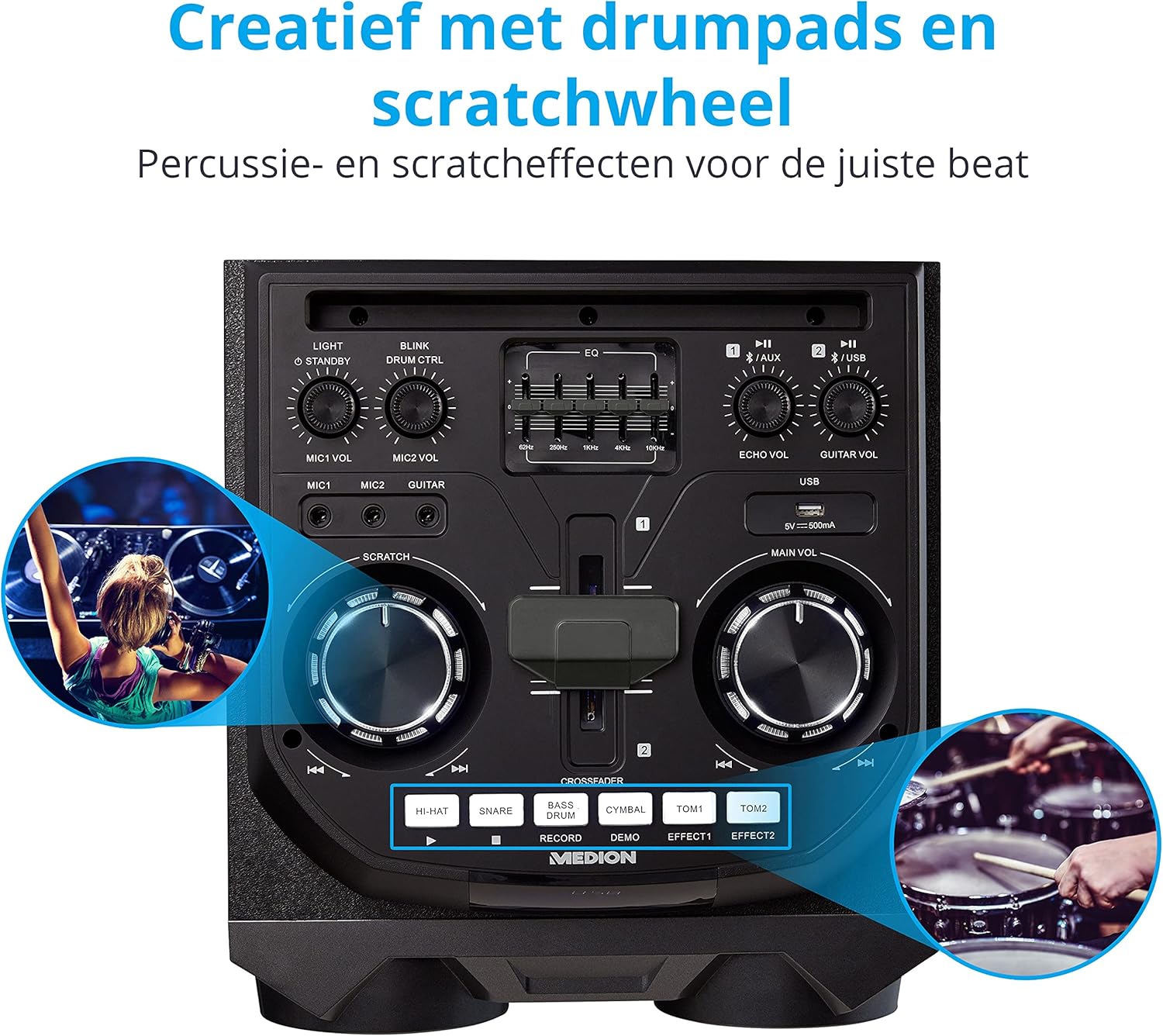
Image: Integrated Wheels for Portability
This image shows the back of the speaker, highlighting the integrated wheels at the bottom, designed for easy transport.
- 一体型ホイール: For easy transportation of the speaker.
- ハンドル: Ergonomic handles for lifting and moving.
5. セットアップ
5.1 初期配置
スピーカーは安定した平らな場所に置いてください。周囲に十分な換気があることを確認してください。熱源の近くや直射日光の当たる場所に置かないでください。
5.2電源接続
- 付属の電源コードをスピーカー背面の電源入力に接続します。
- 電源コードのもう一方の端を適切な壁のコンセントに差し込みます。
- Press the power button on the top control panel to turn on the speaker. The LED lights will illuminate.
5.3 Connecting a Microphone or Guitar
For karaoke or live instrument performance:
- Plug your microphone(s) into the MIC1 or MIC2 6.3 mm jack inputs on the top panel.
- Plug your guitar into the GUITAR 6.3 mm jack input on the top panel.
- Adjust the respective volume knobs (MIC1 VOL, MIC2 VOL, GUITAR VOL) and ECHO VOL to your preference.
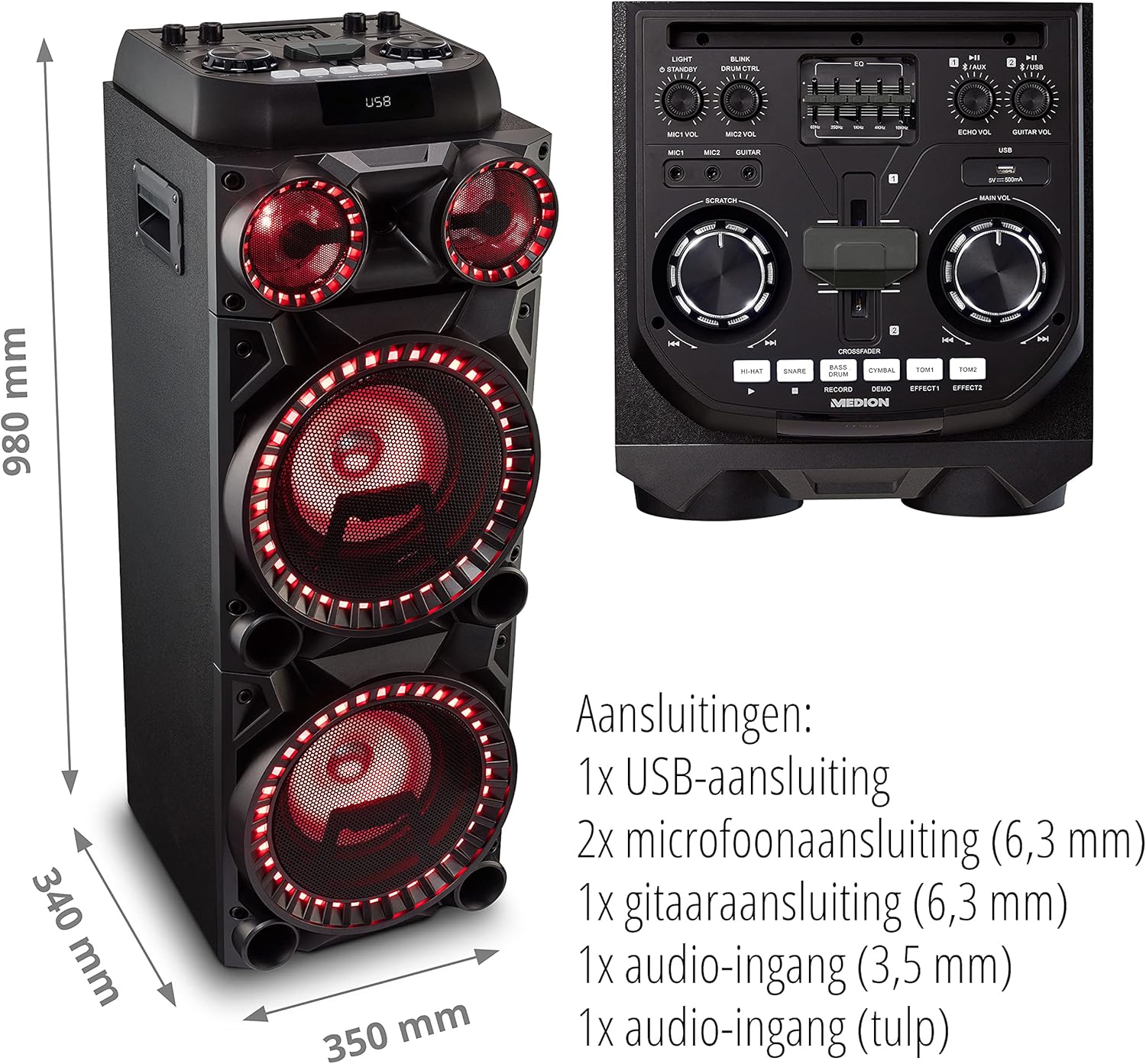
Image: Microphone and Guitar Connection for Karaoke
This image shows individuals enjoying karaoke, demonstrating the use of a microphone connected to the speaker for singing.
6. 操作手順
6.1 Bluetooth接続
- を押す ブルートゥース button on the control panel. The Bluetooth indicator will blink.
- スマートフォン、タブレット、その他のオーディオ デバイスで Bluetooth を有効にします。
- 検索する "MEDION X64060" in your device's Bluetooth settings and select it to pair.
- Once connected, the Bluetooth indicator will stop blinking and remain solid. You can now play music wirelessly.

Image: Bluetooth Music Playback
This image shows a smartphone displaying a music application, indicating a wireless Bluetooth connection to the speaker for audio streaming.
6.2 USB再生
- オーディオを含む USB フラッシュ ドライブを挿入します files into the USB port on the top panel.
- を押す USB ボタンを押して USB モードを選択します。
- The speaker will automatically detect and begin playing audio files from the USB drive. Use the playback controls (play/pause, skip track) on the control panel.
6.3 AUX入力
- Connect an external audio device (e.g., MP3 player, laptop) to the 3.5 mm AUX input or the RCA audio input on the rear panel using an appropriate audio cable (not included).
- を押す 補助 AUXモードを選択するボタン。
- Play audio from your connected device. The speaker will output the sound.
6.4 DJ Functions
The MEDION X64060 includes various DJ features for creative sound mixing.

Image: DJ Function Controls
この画像は詳細な view of the DJ control section, including the cross-fader, scratch wheel, and various drum pads.
- Cross-fader: Use the cross-fader to smoothly transition between different audio sources or effects.
- Scratch Wheel: Manipulate the scratch wheel for classic DJ scratch effects.
- ドラムパッド: を押す HI-HAT, スネア, バスドラム, シンバル, トム1、 そして トム2 pads to add drum sound effects to your music.
- 記録機能: 使用 記録 button to record your drum pad sequences.
6.5 カラオケ機能
Connect a microphone as described in section 5.3. Play your chosen karaoke track via Bluetooth, USB, or AUX. Adjust the microphone and echo volumes for the desired effect.
6.6 光の効果
The speaker features dynamic LED light effects that respond to the music. These lights automatically activate when the speaker is on. There may be a dedicated button (e.g., "LIGHT" or "BLINK") to control or cycle through different light modes, refer to the control panel for specific options.

Image: Dynamic Blue Light Effects
This image showcases the speaker with its blue LED lights illuminated, demonstrating the atmospheric light effects.

Image: Dynamic Red Light Effects
This image shows the speaker with its red LED lights illuminated, highlighting another color option for the atmospheric light effects.
7. メンテナンス
7.1 クリーニング
- 清掃する前に必ずスピーカーを電源コンセントから抜いてください。
- 外側の表面を拭くときは、柔らかく乾いた布を使用してください。
- Do not use liquid cleaners, aerosols, or abrasive materials, as these can damage the finish or internal components.
7.2 ストレージ
When not in use for extended periods, store the speaker in a cool, dry place, away from direct sunlight and extreme temperatures. Cover the unit to protect it from dust.
8。 トラブルシューティング
| 問題 | 考えられる原因 | 解決 |
|---|---|---|
| 電源なし | 電源コードが正しく接続されていない。電源コンセントが機能していない。 | Ensure the power cord is securely plugged into both the speaker and a working wall outlet. Test the outlet with another device. |
| 音が出ない | Volume too low; Incorrect input selected; Device not paired (Bluetooth); Cable not connected (AUX/Guitar/Mic). | Increase the main volume and individual input volumes. Select the correct input source (Bluetooth, USB, AUX). Re-pair Bluetooth device. Check all cable connections. |
| Bluetooth接続に失敗しました | スピーカーがペアリング モードになっていません。デバイスが遠すぎます。干渉があります。 | Ensure the speaker is in Bluetooth pairing mode (blinking indicator). Move your device closer to the speaker. Avoid obstacles and other wireless devices. |
| マイク/ギターが機能しない | Volume too low; Cable faulty; Incorrect input. | Increase MIC/GUITAR VOL. Check microphone/guitar cable. Ensure the instrument is properly connected. |
9. 仕様
| ブランド | MEDION |
| モデル番号 | X64060 | MD44060 |
| 出力電力 | 2 x 100 W RMS (2 x 1000 W max. music output power) |
| 接続技術 | Bluetooth 5.0, USB, AUX (3.5mm, RCA) |
| オーディオ入力 | 2 x Microphone (6.3 mm), 1 x Guitar (6.3 mm), 1 x AUX (3.5 mm), 1 x RCA |
| イコライザ | 5バンド |
| 色 | 黒 |
| 材料 | プラスチック |
| 製品寸法(長さ x 幅 x 高さ) | 38.8 x 35 x 101 cm |
| アイテム重量 | 15キロ |
| 取り付けタイプ | 床立ち |
| 電源 | コード式電気 |
| 対応デバイス | ノートパソコン、スマートフォン |
10. 保証とサポート
For warranty information and technical support, please refer to the warranty card included with your product or visit the official MEDION webサイトでご確認ください。保証請求に備えて購入証明書を保管してください。
MEDION Customer Service: For assistance, please contact MEDION customer support through their official channels. Contact details can typically be found on the MEDION webサイトまたは製品のパッケージ内。