
1. はじめに
This manual provides detailed instructions for the setup, operation, and maintenance of your new Richmat Wireless Remote Control. This remote is designed to operate specific adjustable bed bases from Mlily, Bedtech, and Mattress Firm. Please read this manual thoroughly before use to ensure proper functionality.
重要な互換性に関する注意:
- This remote is compatible only with Mlily, Bedtech, or Mattress Firm 3000 Richmat bases that originally featured a remote identical to the ones pictured (white or black versions).
- Minor button label variations may exist (e.g., M3 button as a flat button, flat button as under bed light, anti-snore as TV lounge on certain Classic Brands remotes). These are functional equivalents.
- This remote will NOT work if your original remote had a Bluetooth logo in the bottom right corner.
- This remote will NOT work if your original remote had a flashlight button on the top row or other button icons/words not listed here.
2. 安全情報
- リモコンを水や過度の湿気から遠ざけてください。
- リモコンを直射日光や極端な温度にさらさないでください。
- Do not attempt to disassemble or repair the remote control yourself. Contact qualified service personnel.
- 電池はお子様の手の届かないところに保管してください。 飲み込んだ場合は、直ちに医師の診察を受けてください。
- 使用済みバッテリーは、地域の規制に従って廃棄してください。
3. パッケージ内容
パッケージを開封したら、次の品目が届いていることを確認してください。
- Richmat Wireless Remote Control (White or Black version)
4.製品オーバーview およびコントロール
The Richmat Wireless Remote Control provides a clear layout for operating your adjustable bed base. You may receive either a white or black version of the remote, both offering identical functionality.

Figure 1: White and Black Remote Control Versions. You will receive one of these two versions based on current inventory. Both versions function identically.
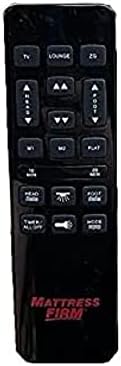
Figure 2: White Remote Control (Example with Mlily branding). This image displays the button layout and functions.

Figure 3: Black Remote Control (Example with Mattress Firm branding). This image displays the button layout and functions.
ボタンの機能:
- TV / LOUNGE / ZG (Zero Gravity): Preset positions for watching TV, lounging, or achieving a zero-gravity posture.
- HEAD UP/DOWN Arrows: ベッドのヘッド部分を上向きまたは下向きに調整します。
- FOOT UP/DOWN Arrows: ベッドの足部分を上または下に調整します。
- M1 / M2: Memory preset buttons to save and recall your favorite bed positions.
- フラット: ベッドを完全に平らな位置に戻します。
- 10分 / 20分: Timer buttons for massage functions (if applicable to your base).
- HEAD / FOOT Massage: Activates or adjusts massage intensity for the head or foot sections.
- タイマー / すべてオフ: Turns off all active functions, including massage and under-bed lighting.
- LIGHT (Under Bed Light): Toggles the under-bed lighting on or off.
- モード: Cycles through different massage modes (if applicable).
Note: Button labels and specific functions may vary slightly depending on the adjustable base model. Refer to your adjustable base's manual for full details on its features.
5. セットアップとペアリングの手順
To use your new Richmat Wireless Remote Control, it must first be paired with your adjustable bed base. The pairing process is typically straightforward.
5.1. バッテリーの取り付け
- リモコンの背面にある電池収納部を見つけます。
- バッテリーカバーをスライドさせて開きます。
- Insert the required batteries (typically AAA, check markings inside the compartment) according to the polarity indicators (+ and -).
- 電池カバーをしっかりと閉じてください。
5.2. リモコンのペアリング
The exact pairing procedure may vary slightly depending on your adjustable bed base model. Generally, the steps involve:
- 電力の確保: Make sure your adjustable bed base is plugged into a working power outlet.
- Locate Pairing Button: Find the pairing button on the control box of your adjustable bed base. This box is usually located under the bed frame, near the head or foot end. It may be labeled "PAIR," "SYNC," or have a small button.
- Activate Pairing Mode on Base: Press and hold the pairing button on the control box for approximately 3-5 seconds until you hear a beep or see an indicator light flash. This indicates the base is in pairing mode.
- リモコンでペアリングモードを有効にする: While the base is in pairing mode (within 10-20 seconds), press and hold the "FLAT" button on your new remote control. Some remotes may require pressing and holding the "HEAD UP" and "FOOT DOWN" buttons simultaneously, or a dedicated "PAIR" button if present.
- ペアリングの確認: Release the button(s) on the remote when the indicator light on the control box stops flashing or you hear another beep, signifying successful pairing.
- テスト機能: Test all remote functions (head/foot adjustment, flat, presets) to ensure proper operation.
If you encounter difficulties, refer to the original instruction manual for your specific adjustable bed base model for precise pairing instructions.
6. 操作手順
Once paired, your Richmat Wireless Remote Control allows you to easily adjust your bed to your desired comfort position.
- Adjusting Head/Foot: を押し続けます 頭を上げる/下げる or FOOT UP/DOWN arrows to move the respective sections. Release the button when the desired position is reached.
- フラットポジション: を押す フラット button to return the bed to a completely flat position.
- プリセット位置: プレス TV, ラウンジ、 または ZG (Zero Gravity) to move the bed to these pre-programmed comfort positions.
- Saving Memory Presets (M1/M2):
- Adjust the bed to your desired position.
- を押し続けます M1 or M2 button for approximately 3 seconds until the bed slightly moves or the remote indicates the position is saved.
- To recall a saved position, simply press the M1 or M2 ボタン。
- Massage Functions (if applicable):
- プレス HEAD Massage or FOOT Massage to activate the massage for the respective section. Press again to cycle through intensity levels or modes.
- 使用 10分 or 20分 buttons to set a timer for the massage function.
- プレス モード to change massage patterns.
- Under Bed Light: を押す ライト button to turn the under-bed light on or off.
- すべてオフ: プレス タイマー / すべてオフ to stop all active functions.
7. メンテナンス
7.1. バッテリーの交換
When the remote control's range decreases or buttons become unresponsive, it's time to replace the batteries.
- リモコンの背面にある電池コンパートメントカバーをスライドさせて開きます。
- 古い電池を取り外します。
- Insert new batteries (e.g., AAA) ensuring correct polarity (+ and -).
- 電池カバーをしっかりと閉じてください。
- 古い電池は、地域の規制に従って責任を持って処分してください。
7.2. 清掃
リモコンを清掃する際は、柔らかく乾いた布をご使用ください。液体クリーナー、エアゾール、研磨剤は使用しないでください。リモコンの表面や内部部品を損傷する恐れがあります。
8。 トラブルシューティング
| 問題 | 考えられる原因 | 解決 |
|---|---|---|
| リモコンが応答しません。 |
|
|
| Bed base only moves in one direction or partially. |
|
|
| リモート範囲が狭いです。 |
|
|
If troubleshooting steps do not resolve the issue, please refer to the support section for further assistance.
9. 仕様
- モデル番号: 685650227221
- メーカー: リッチマット
- 対応デバイス: Mlily, Bed Tech, or Mattress Firm 3000 Richmat adjustable bases (specific models HJH55, Classic Brands Innova NU203CB, and others featuring identical remote as pictured).
- サポートされるデバイスの最大数: 1 (one remote per base)
- カラーオプション: White, Silver (Black)
- 特集: 人間工学に基づいたデザイン
10. 保証情報
Specific warranty details for this Richmat Wireless Remote Control are not provided in the product information. Please refer to the documentation that came with your adjustable bed base or contact the original seller/manufacturer of the remote for warranty terms and conditions.
11. カスタマーサポート
If you require further assistance, have questions, or need to report an issue that cannot be resolved using the troubleshooting guide, please contact the seller or manufacturer of your adjustable bed base or the remote control.
For purchases made through Amazon, you may contact the seller, UTAH RUSTIC FURNITURE, via your Amazon order history for support.