
1. はじめに
This manual provides comprehensive instructions for the installation, operation, and maintenance of your AWESAFE 2DIN Car Radio, model Wince für Golf. Please read this manual thoroughly before using the device to ensure proper functionality and safety.
The AWESAFE car radio is designed for VW Golf 5 and Golf 6 models, featuring a 7-inch touchscreen, CD/DVD player, Mirrorlink, Bluetooth, USB, SD card support, and GPS navigation.
2. セットアップとインストール
This section details the steps for installing your AWESAFE car radio. Professional installation is recommended.
2.1 互換性
This radio is specifically designed for the following Volkswagen models:
- VW ゴルフ 5 (2003-2008)
- VW ゴルフ 6 (2008-2013)
- VW Golf R32 (2003-2008)
- VW ゴルフ GTI (2003-2008)
- VW ゴルフ プラス (2005-2012)
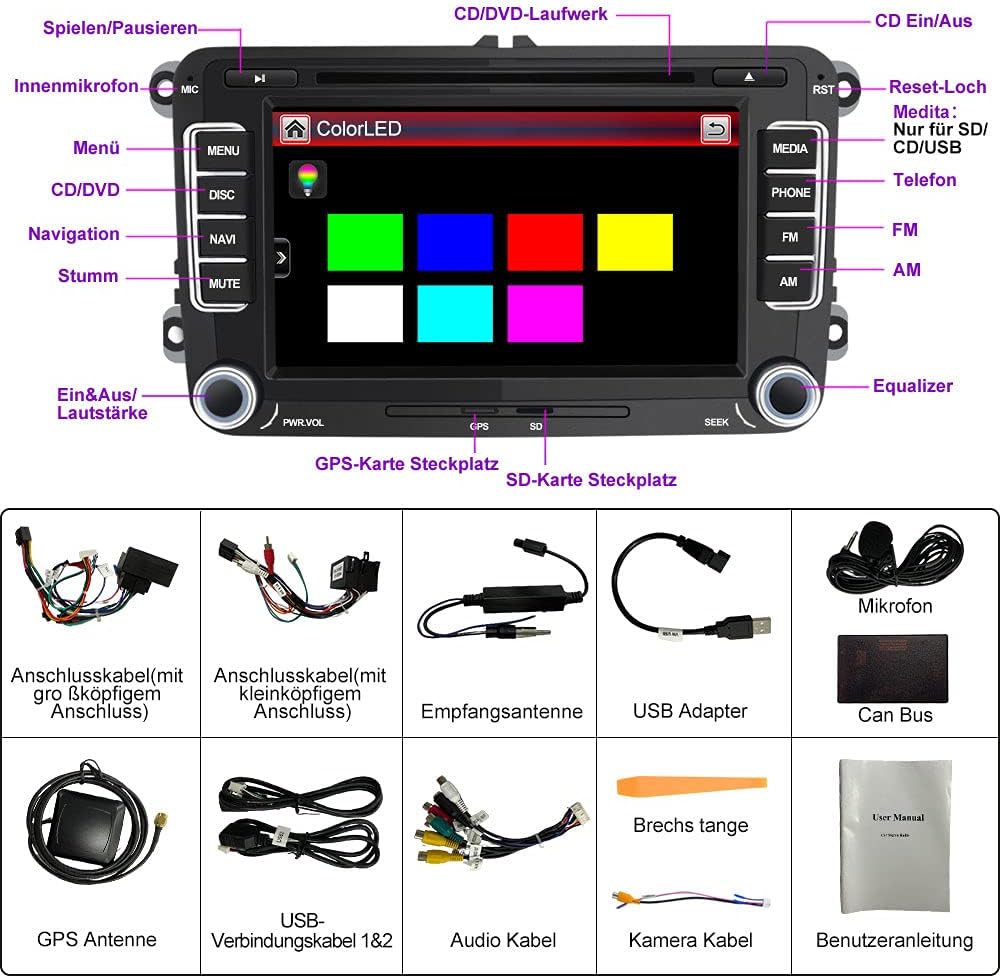
Image: AWESAFE car radio installed in a VW Golf dashboard, illustrating its compatibility with various Golf models.
2.2 パッケージ内容
パッケージにすべてのコンポーネントが含まれていることを確認します。

Image: A visual representation of all items included in the AWESAFE car radio package, such as the main unit, wiring harnesses, GPS antenna, USB cables, microphone, and the user manual.
- AWESAFE 2DIN Car Radio Unit
- Power Cable (large head connector)
- Power Cable (small head connector)
- 受信アンテナ
- USBアダプタ
- マイクロフォン
- CANバスデコーダー
- GPSアンテナ
- USB Connection Cables (1 & 2)
- オーディオケーブル
- カメラケーブル
- こじ開けツール
- ユーザーマニュアル
2.3配線と接続
Proper wiring is crucial for the radio's functionality. Refer to the wiring diagram and specific instructions for your vehicle's CAN-BUS type.

Image: CAN-BUS wiring instructions for different vehicle types, showing connections for low and high CAN-BUS systems.
- For Low CAN-BUS Car Types (A): If there is NO "CAN" label on your original radio's wiring diagram, connect the CAN-BUS and the 8-pin connector, then remove the small black connection.
- For High CAN-BUS Car Types (B): If there IS a "CAN" label on your original radio's wiring diagram, connect the CAN-BUS to the 8-pin connector and remove the small black connection.

Image: Detailed wiring diagram for the car radio, illustrating connections for various peripherals and power.
注記: If your car supports steering wheel controls, you can configure them thanks to the included Canbus decoder.
2.4 CD/DVD Drive Preparation
Before using the CD/DVD drive, ensure to remove the two transport screws located on the top of the unit.

Image: Instructions for removing the transport screws from the CD/DVD drive.
2.5 DAB+ Installation (Optional)
If you have purchased a DAB+ module, follow these steps for installation:
- Connect the antenna and plug it into a USB port.
- Peel off the protective film from the copper strip and connect the copper strips of the antenna (adhesive strip) to the chassis (ground, -pole).
- Add the DAB app to the start page function in the factory settings.

Image: Visual guide for DAB+ antenna installation.
2.6 リア View カメラ接続(オプション)
リアを接続するには view camera (sold separately), follow the wiring diagram:

画像: リア接続用配線図 view カメラ。
- Connect the RCA connector to the CAMERA input on the device.
- Connect the red wire to the positive electrode "+" of the reverse light.
- Connect the black wire to the negative electrode "-" of the reverse light.
3. 操作手順
This section covers the main functions and how to operate your AWESAFE car radio.
3.1 基本的な操作とインターフェース
The 7-inch touchscreen with 800 x 480 pixels resolution allows for intuitive operation using slide and scroll functions. The unit also features physical buttons for common functions.

画像: 上view of the car radio's main features and interface.
3.2GPSナビゲーション
The device comes with offline maps and supports various languages including German, Dutch, English, and Turkish. The dual-zone function allows you to play music or radio while navigating.
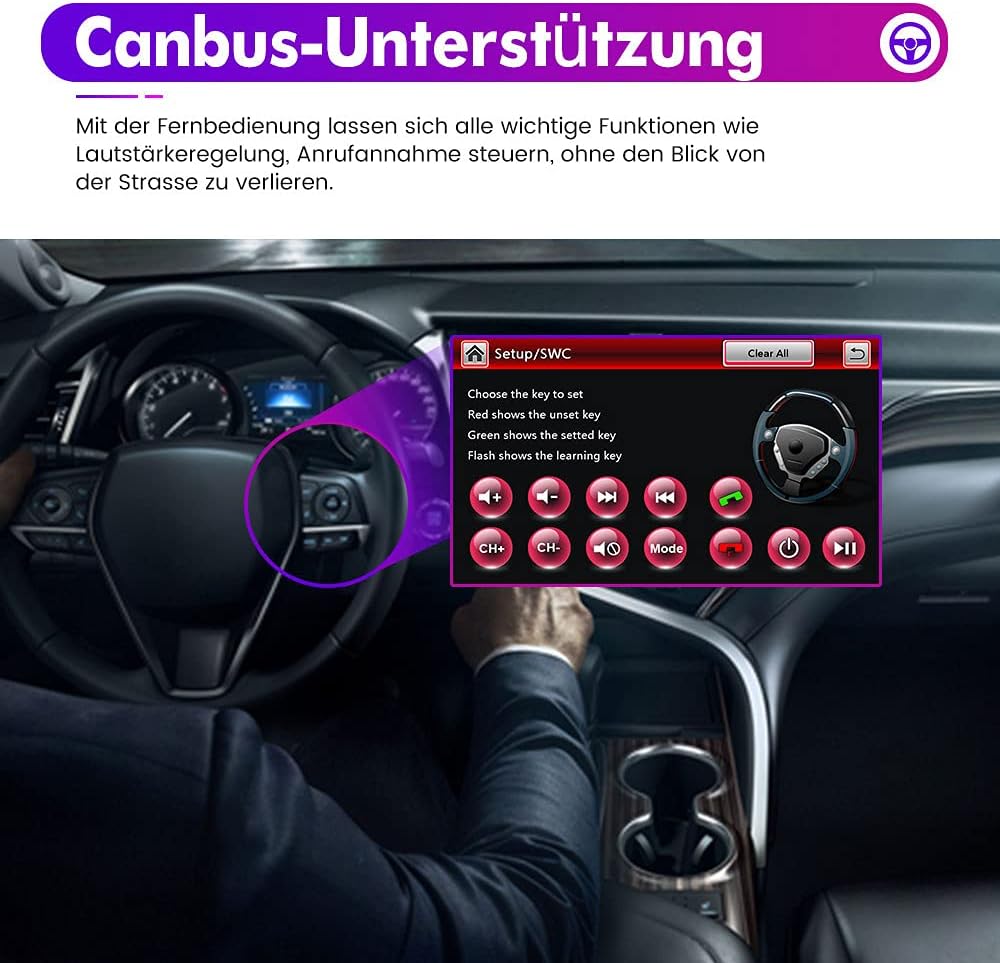
Image: GPS navigation screen displaying a map.
3.3 Bluetooth接続
Connect your mobile phone via Bluetooth for hands-free calling and wireless music playback. The system supports Apple iOS and Android smartphones.
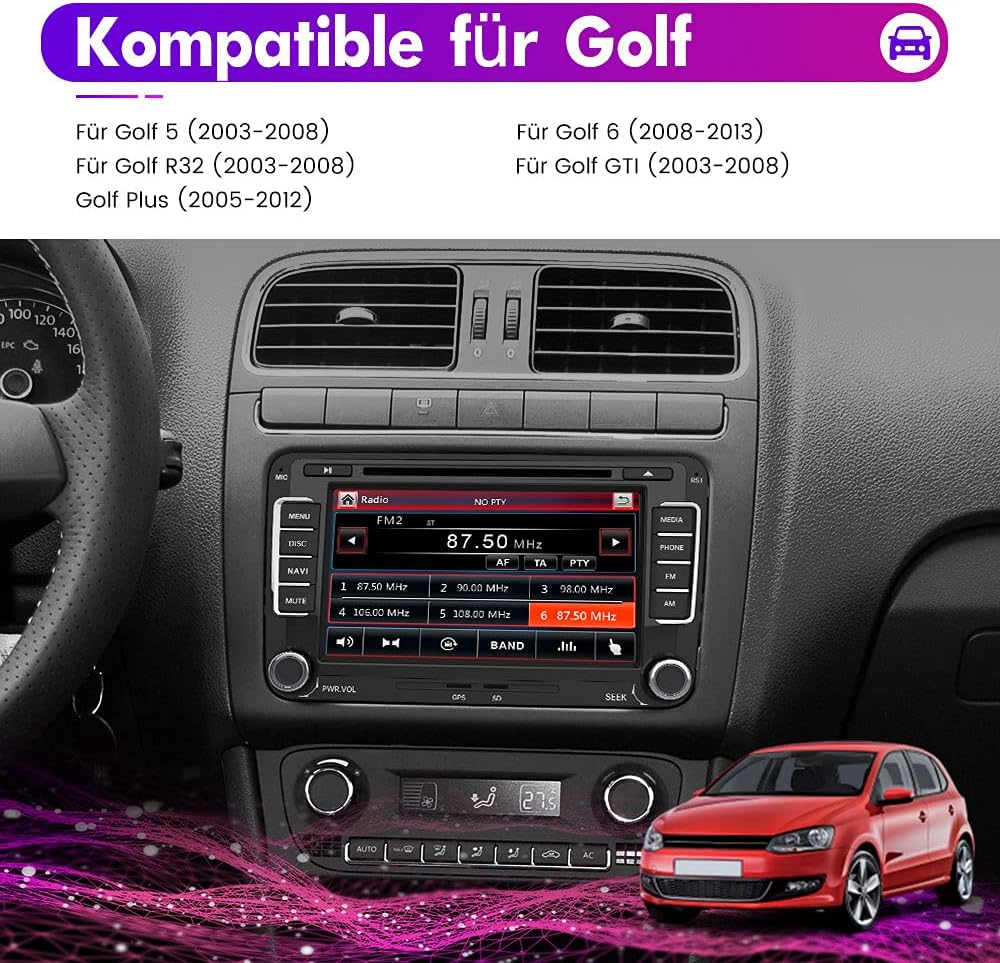
Image: Bluetooth connection interface.
3.4 マルチメディア再生
カーラジオはさまざまなメディアソースをサポートしています。
- CD/DVD ドライブ: Play audio CDs and video DVDs.
- USB / SDカード: View videos, photos, or listen to music from a USB stick or SD card.
- AUX入力: 外部オーディオデバイスを接続します。
- AM/FM RDS Radio: Enjoy radio broadcasts with RDS information.
The unit also features a preset equalizer (Pop, Rock, Jazz, Classical, User-defined) for audio customization.
3.5 ミラーリンク機能
Mirror your Android smartphone screen onto the radio display. This allows you to control content from your phone directly on the car radio. Audio is transmitted via Bluetooth.

Image: Mirrorlink feature in action, displaying a smartphone screen on the car radio.
3.6 ステアリングホイールコントロール
The device supports connection to your vehicle's steering wheel remote control, allowing you to manage important functions like volume control and call answering without taking your eyes off the road.

Image: Steering wheel control setup interface.
3.7 AV Output / Headrest Monitor Function
The AV output function allows for connecting headrest monitors, enabling passengers in the back to enjoy movies or videos.

Image: Headrest monitors connected via AV output.
3.8 Customizing Start Logo and Lighting
You can customize the start logo and choose from 7 adjustable lighting colors.
To customize the start logo:
- Copy the desired LOGO (image format 800 x 480 pixels) to an SD card.
- Insert the SD card into the GPS slot.
- From the main menu, navigate to "Settings" -> "Start Logo" -> Enter password (7749) -> Set the desired LOGO.

Image: Customizing the start logo.
4. メンテナンス
To ensure the longevity and optimal performance of your AWESAFE car radio, follow these maintenance guidelines:
- 画面の掃除: 柔らかく糸くずの出ない布でタッチスクリーンを優しく拭いてください。ディスプレイを傷める可能性のある研磨剤入りのクリーナーや溶剤は使用しないでください。
- CD/DVD ドライブ: CD/DVDスロットに埃やゴミが付着しないようにしてください。破損または汚れたディスクの挿入は避けてください。
- ソフトウェアアップデート: While guaranteed software updates are unknown for this model, periodically check the manufacturer's web利用可能なファームウェア アップデートについては、サイトを参照してください。
- 一般的なケア: 極端な温度、長時間の直射日光、過度の湿気からユニットを保護してください。
5。 トラブルシューティング
このセクションでは、カーラジオで発生する可能性のある一般的な問題について説明します。
5.1 一般的な問題と解決策
- 電源なし:
- すべての電源接続とヒューズを確認してください。
- 車のバッテリーが十分に充電されていることを確認してください。
- 音が出ない:
- スピーカーの接続を確認します。
- Check volume settings and ensure the unit is not muted.
- Confirm audio source selection is correct.
- GPSが機能しない/不正確:
- GPSアンテナが正しく接続され、クリアな view 空の。
- Verify map data is loaded correctly.
- Bluetooth接続の問題:
- ラジオとモバイル デバイスの両方で Bluetooth が有効になっていることを確認します。
- 以前のペアリングを削除して、再度ペアリングをお試しください。
- Move your mobile device closer to the radio.
- CD/DVD Playback Errors:
- Ensure the transport screws have been removed (see Section 2.4).
- Use clean, unscratched discs.
- ステアリングホイールコントロールが反応しない:
- Verify CAN-BUS connection (see Section 2.3).
- Ensure controls are properly configured in the radio's settings.
If problems persist, please contact AWESAFE customer support.
6. 仕様
| 特徴 | 仕様 |
|---|---|
| ブランド | 素晴らしい |
| モデル名 | Wince für Golf |
| 製品寸法 | 22 x 15 x 13 cm |
| アイテム重量 | 2.62キログラム |
| 画面 | 7-inch Touchscreen, 800 x 480 pixels |
| オペレーティング·システム | ウィンドウズ |
| 接続技術 | ブルートゥース、USB |
| コネクタタイプ | 3.5 mm jack, USB Type-A |
| サポートされているオーディオ形式 | MP3 |
| サポートされているメディア形式 | Audio-CD |
| 対応デバイス | Mobile phone, MP3 player, USB device, microSD card |
| チャンネル数 | 2 |
| ヘッドホンジャック | なし |
| 含まれるコンポーネント | USB cable (among others, see package contents) |
| ソフトウェアアップデートの保証期間 | 未知 |
7. 保証情報
The AWESAFE 2DIN Car Radio comes with a 1年間保証 ご購入日から有効です。この保証は、通常の使用における製造上の欠陥および故障を対象としています。
Please retain your proof of purchase for warranty claims. The warranty does not cover damage caused by improper installation, misuse, accidents, unauthorized repairs, or normal wear and tear.
8. カスタマーサポート
技術的なサポート、トラブルシューティング、または保証に関するお問い合わせは、AWESAFEカスタマーサポートまでご連絡ください。製品パッケージに記載されている連絡先情報を参照するか、AWESAFEの公式ウェブサイトをご覧ください。 webサイト。
When contacting support, please have your product model number (Wince für Golf) and ASIN (B092ZB3FQQ) ready.