
1. はじめに
Thank you for choosing the Caliber HPG318DAB Portable DAB+/FM Radio. This device offers high-quality digital and analog radio reception, a compact design for portability, and convenient alarm functions. This manual provides essential information for the safe and efficient use of your radio.
2. 安全情報
- 使用前にすべての指示をよく読んで、今後の参考のために保管してください。
- デバイスを雨、湿気、または極端な温度にさらさないでください。
- デバイスを熱源の近くや直射日光の当たる場所に置かないでください。
- ご自身で本製品を分解したり修理したりしないでください。修理はすべて資格を持った専門家にご依頼ください。
- 付属の充電ケーブルとアダプターのみを使用してください。
- お子様の手の届かない場所に保管してください。
3. パッケージ内容
パッケージにすべてのアイテムが揃っていることを確認します。
- Caliber HPG318DAB Portable DAB+/FM Radio Unit
- ユーザーマニュアル
- USB充電ケーブル
- 電源アダプター
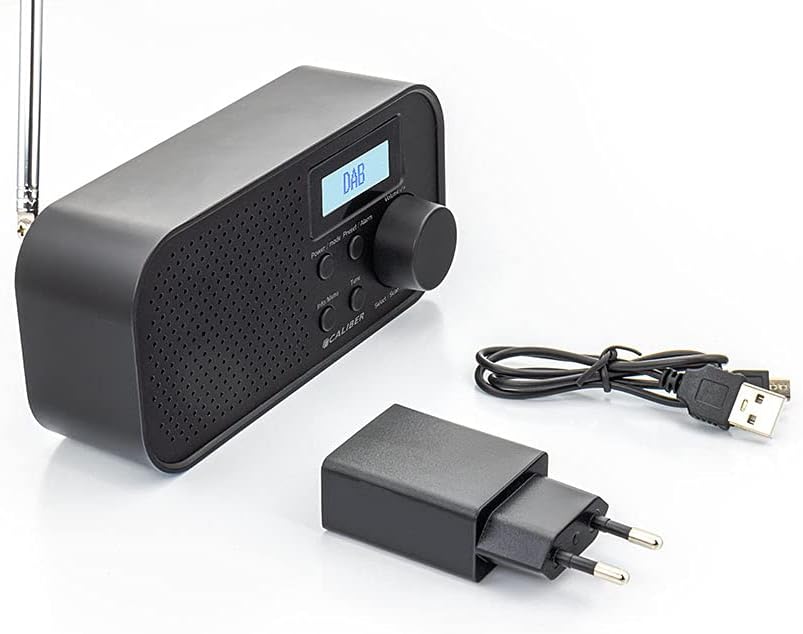
Image: Caliber HPG318DAB radio unit, USB charging cable, and power adapter.
4.製品オーバーview
4.1 フロントパネルコントロール
画像: 正面 view of the Caliber HPG318DAB radio, highlighting the LCD screen, speaker grille, and control buttons.
- LCDスクリーン: Displays station information, time, and menu options.
- 電源/モードボタン: Turns the radio on/off and switches between DAB+ and FM modes.
- メニュー/情報ボタン: Accesses menu settings and displays additional information.
- Preset/Alarm Button: Saves/recalls preset stations and sets alarm functions.
- Select/Scan Button: Confirms selections and initiates station scans.
- スヌーズボタン: アラームを一時的に消音します。
- ボリュームノブ: オーディオの音量を調整します。
- スピーカーグリル: オーディオ出力。
4.2 リアパネルの接続

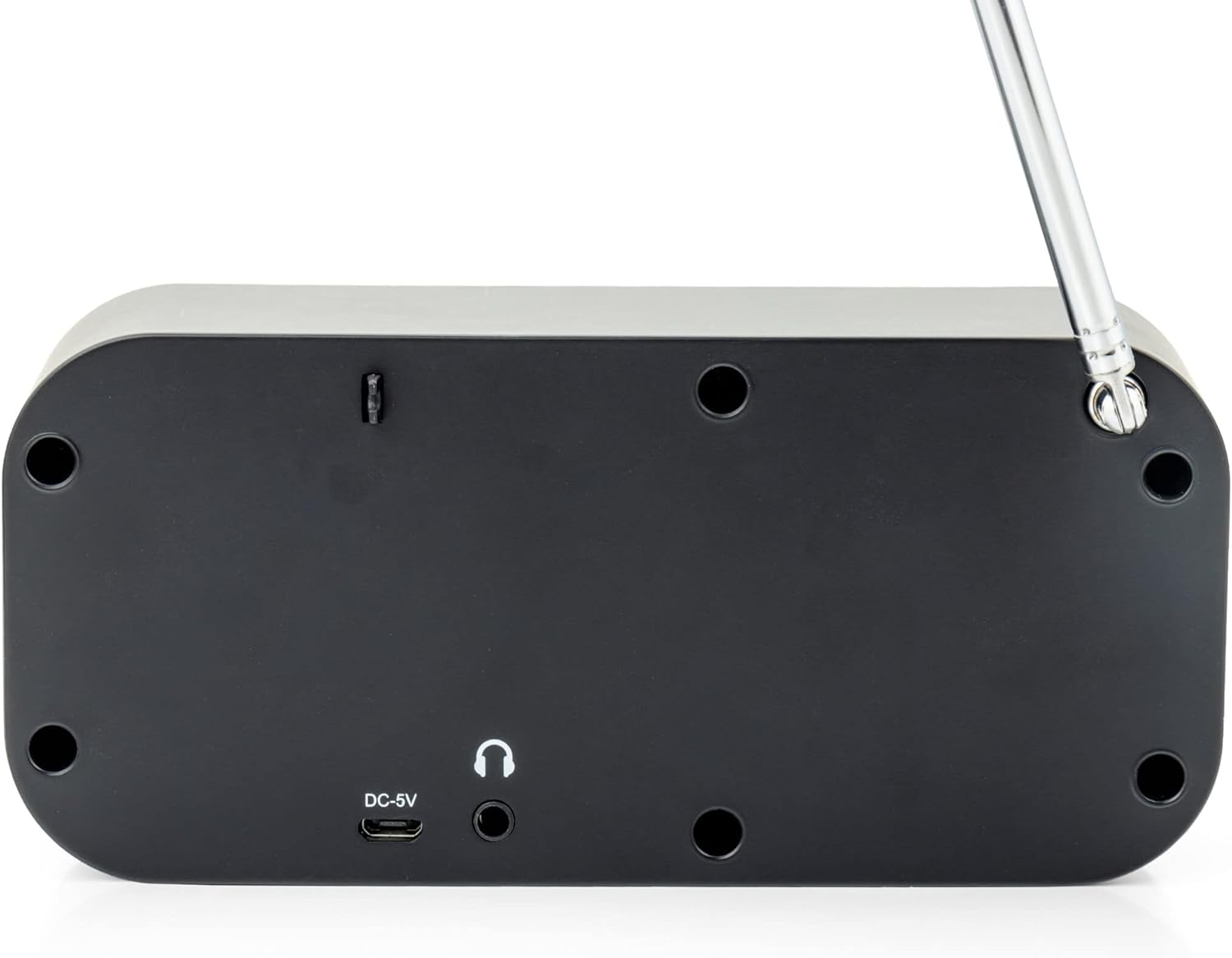
画像: 背面 view of the Caliber HPG318DAB radio, showing the DC-5V charging port, 3.5mm headphone jack, and telescopic antenna.
- DC-5V入力: ここにUSB充電ケーブルを接続します。
- 3.5mmヘッドフォンジャック: For connecting headphones or earphones.
- 伸縮アンテナ: 最適なラジオ受信のために延長します。
5. セットアップ
5.1 バッテリーの充電
The Caliber HPG318DAB features a built-in rechargeable battery, providing up to 8 hours of playback on a full charge.
- Connect the small end of the provided USB charging cable to the DC-5V入力 ラジオの背面にあるポート。
- USB ケーブルの大きい方の端を付属の電源アダプターに接続します。
- 電源アダプタを標準の壁コンセントに差し込みます。
- The charging indicator on the LCD screen will show the charging status. Once fully charged, the indicator will change.
Note: It is recommended to fully charge the battery before first use.
5.2 アンテナ調整
For optimal radio reception, fully extend the telescopic antenna located on the rear of the device. Adjust its position to improve signal strength if reception is poor.
6. 操作手順
6.1 電源のオン/オフとモードの選択
- ラジオをつけるには ONを押したままにします パワー/モード ボタン。
- ラジオをつけるには オフを押したままにします パワー/モード もう一度ボタンを押します。
- 切り替えるには ダブプラス そして FM modes, short press the パワー/モード button while the radio is on. The current mode will be displayed on the LCD screen.
6.2 DAB+ラジオの操作
- DAB+モードに切り替えるには、 パワー/モード ボタン。
- The radio will automatically perform a full scan for available DAB+ stations upon first use or if no stations are found. To initiate a manual scan, press the メニュー/情報 button, navigate to 'Full Scan', and press Select/Scan.
- 使用 ボリュームノブ 利用可能な放送局のリストをスクロールするには、 Select/Scan ステーションを選択します。
- To save a station as a preset (up to 10 presets): While listening to a station, press and hold the Preset/Alarm ボタンをクリックしてください。 ボリュームノブ プリセット番号(1~10)を選択し、 Select/Scan 確認します。
- To recall a preset station: Short press the Preset/Alarm ボタンを使用して、 ボリュームノブ 希望のプリセット番号を選択し、 Select/Scan.
- を押す メニュー/情報 ボタンを押す view additional information (e.g., program type, signal strength, time) provided by Radio Data System (RDS).
6.3 FMラジオの操作
- FMモードに切り替えるには、 パワー/モード ボタン。
- To automatically scan for stations: Press and hold the Select/Scan ボタンを押します。ラジオはスキャンし、次の受信状態の良い放送局で停止します。
- To manually tune: Rotate the ボリュームノブ 周波数を少しずつ調整します。
- To save a station as a preset (up to 10 presets): While listening to a station, press and hold the Preset/Alarm ボタンをクリックしてください。 ボリュームノブ プリセット番号(1~10)を選択し、 Select/Scan 確認します。
- To recall a preset station: Short press the Preset/Alarm ボタンを使用して、 ボリュームノブ 希望のプリセット番号を選択し、 Select/Scan.
- を押す メニュー/情報 ボタンを押す view additional information (e.g., station name, program type) provided by Radio Data System (RDS).
6.4 ボリュームコントロール
大きな ボリュームノブ 時計回りに回すと音量が上がり、反時計回りに回すと音量が下がります。
6.5 ヘッドホンの使用
Connect any standard 3.5mm headphones or earphones to the 3.5mmヘッドフォンジャック on the rear of the radio for private listening. The internal speaker will automatically mute when headphones are connected.
6.6つのアラーム機能
The radio includes alarm clock and sleep timer functions.
目覚まし時計の設定:
- を押し続けます Preset/Alarm button until the alarm setup menu appears.
- 使用 ボリュームノブ to navigate through options like Alarm 1, Alarm 2, Time, Source (Buzzer/DAB/FM), and Volume. Press Select/Scan 各設定を確認します。
- Set the desired alarm time, choose your preferred alarm source (buzzer, DAB+ station, or FM station), and set the alarm volume.
- Ensure the alarm is set to 'On' in the menu.
スヌーズ機能の使用:
アラームが鳴ったら、を押します スヌーズ button to temporarily pause the alarm for a short period (e.g., 9 minutes). The alarm will sound again after the snooze period.
スリープタイマーの設定:
- を押す メニュー/情報 ボタン。
- Navigate to the 'Sleep' option using the ボリュームノブ を押して Select/Scan.
- Select the desired sleep timer duration (e.g., 15, 30, 45, 60, 90 minutes, or Off). The radio will automatically turn off after the selected time.
7. メンテナンス
7.1 クリーニング
To clean the radio, use a soft, dry cloth. Do not use abrasive cleaners, waxes, or solvents as they may damage the finish.
7.2 ストレージ
When not in use for extended periods, store the radio in a cool, dry place away from direct sunlight and extreme temperatures. Ensure the battery is partially charged before storage to maintain its lifespan.
7.3バッテリーケア
To prolong the life of the built-in Lithium-ion battery, avoid fully discharging it frequently. Charge the radio regularly, even if not in constant use.
8。 トラブルシューティング
| 問題 | 考えられる原因 | 解決 |
|---|---|---|
| ラジオがオンになりません。 | 電池が消耗しています。 | Connect the radio to power using the USB cable and adapter to charge the battery. |
| ラジオの受信状態が悪い(DAB+/FM)。 | アンテナが拡張されていないか、信号エリアが弱い。 | Fully extend the telescopic antenna and adjust its position. Try moving the radio to a different location. |
| 音が出ません。 | 音量が低すぎるか、ヘッドフォンが接続されています。 | を使用して音量を上げます。 ボリュームノブ. Disconnect headphones if you want sound from the speaker. |
| アラームは鳴りません。 | Alarm not set correctly or turned off. | Check alarm settings (time, source, volume, 'On' status) in the menu. |
9. 仕様
| 特徴 | 仕様 |
|---|---|
| モデル番号 | HPG318DAB |
| 寸法(長さ×幅×高さ) | 15 x 4 x 6.5 cm |
| 重さ | 255グラム |
| 電源 | Battery-Powered (1 Lithium-ion battery required) |
| バッテリー寿命 | 最大8時間 |
| サポートされている無線バンド | 軽打+、FM |
| 接続技術 | AUX (for headphones), USB (for charging) |
| Maximum Speaker Output | 25ワット |
| 材料 | プラスチック |
| 色 | 黒 |
| 特集 | Portable, Alarm Function, RDS, LCD Screen |
10. 保証とサポート
For warranty information and customer support, please refer to the documentation provided with your purchase or visit the official Caliber webサイトでご確認ください。保証請求に備えて購入証明書を保管してください。