
フレキシスポット MAH0002191
FLEXISPOT Pro Corner Electric Standing Desk Instruction Manual
モデル: MAH0002191
導入
This manual provides detailed instructions for the assembly, operation, and maintenance of your FLEXISPOT Pro Corner Electric Standing Desk. Please read this manual thoroughly before assembly and use to ensure safe and correct operation. Keep this manual for future reference.
安全情報
- 組み立て前に、すべての部品が揃っていて損傷がないことを確認してください。部品が不足または破損している場合は使用しないでください。
- Assembly requires at least two people due to the weight and size of the components.
- 操作中は子供やペットをデスクから遠ざけてください。
- 高さ調整中は、机の進路に障害物がないことを確認してください。
- Do not sit or stand on the desk. The maximum weight capacity is 220 lbs.
- 付属の電源アダプターのみを使用してください。
- 清掃またはメンテナンスの前に電源を切ってください。
パッケージ内容
Your FLEXISPOT Pro Corner Electric Standing Desk arrives in two separate packages. Please verify all parts are included before beginning assembly.
- L-shaped Desktop (Splice Board)
- Desk Frame (Dual Motor Lift System)
- Control Pad with USB Charger
- 組み立てツール
- 電源アダプタとケーブル
- 取扱説明書

Image: All components of the FLEXISPOT Pro Corner Electric Standing Desk laid out, including the L-shaped desktop, dual motor frame, and control panel.
組み立て手順
Follow these steps carefully for proper assembly. It is recommended to have two people for certain steps, especially when handling the desktop and flipping the assembled desk.
ステップ1:開梱して部品を識別する
Carefully unpack all contents from both boxes. Refer to the package contents list to ensure all parts are present. Lay out all components on a clean, soft surface to prevent scratches.

Image: Illustration showing the desk components arriving in two separate packages.
ステップ2:デスクフレームを組み立てる
Connect the various parts of the steel frame according to the diagrams provided in the included paper manual. Ensure all screws are tightened securely. The dual motor system should be integrated into the frame structure.
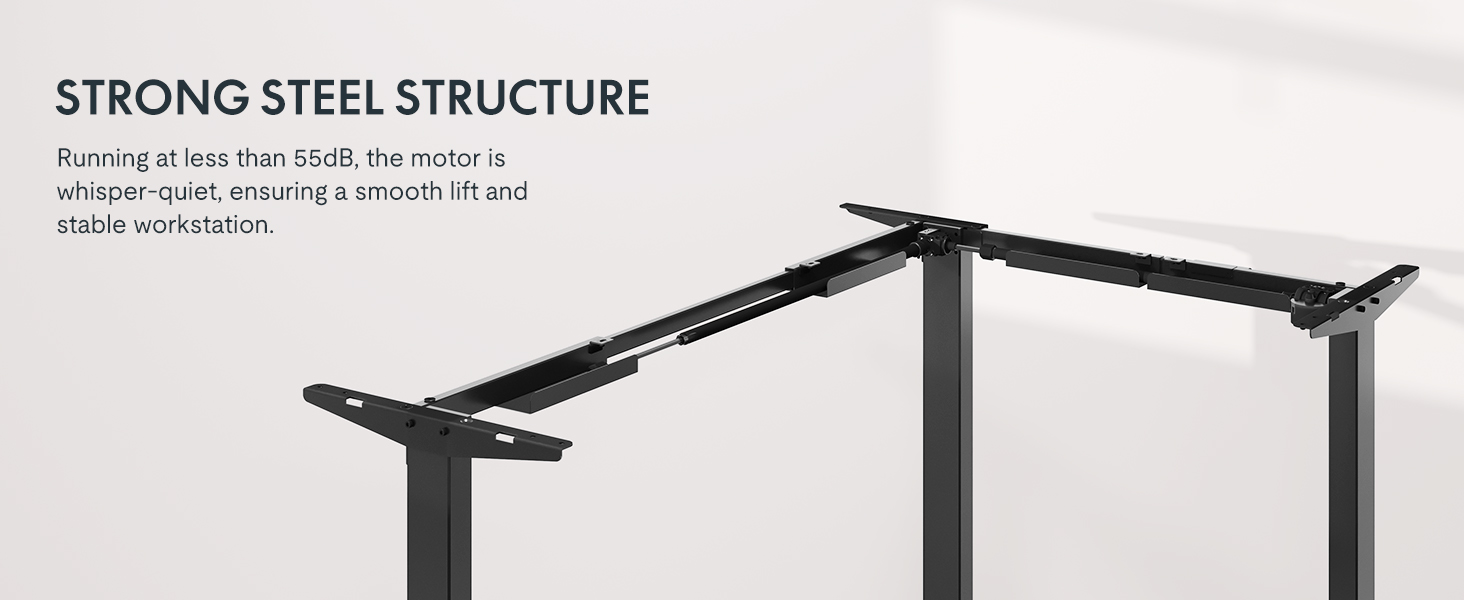
Image: Diagram illustrating the strong steel structure and dual motor system of the desk frame.
Step 3: Attach the Desktop
Place the L-shaped desktop upside down on a soft, protected surface. Position the assembled frame onto the desktop, aligning the pre-drilled holes. Secure the frame to the desktop using the provided screws. Note that the L-shape is reversible, allowing for left-hand or right-hand configuration. Choose your desired orientation before securing the desktop.

Image: The L-shaped desk shown with both left and right configurations, highlighting its reversible design.
ステップ 4: コントロール パネルをインストールする
Mount the control panel to the underside of the desktop in a convenient location. Connect the control panel cable to the motor control box as indicated in the wiring diagram. Ensure all connections are secure.

Image: Close-up of the advanced LED control panel with up/down movement buttons, height memory presets, sit/stand reminder, and a USB charger port.
Step 5: Connect Power and Position the Desk
With assistance, carefully flip the assembled desk upright and move it to its desired location. Connect the power adapter to the control box and then plug it into a wall outlet. Ensure cables are managed to prevent snagging during height adjustments.
操作手順
高さ調整
- 使用 ▲ そして ▼ arrows on the control panel to adjust the desk height. The desk will move smoothly between 28.9 inches and 48.2 inches.
- The current height is displayed on the LED screen.

Image: The desk shown at its minimum (28 inches) and maximum (47.2 inches) adjustable heights, demonstrating its versatility for sitting and standing positions.
メモリプリセット
- The control panel features three memory settings (1, 2, 3) to store your preferred sitting and standing heights.
- 高さを保存するには:デスクを希望の高さに調整し、 「M」 button followed by the desired number button (1, 2, or 3). The display will show "S-" and then the number, indicating the height is saved.
- To recall a saved height: Press the corresponding number button (1, 2, or 3). The desk will automatically move to the saved position.
座る/立つリマインダー
- The control panel includes a sit/stand reminder function. Press the 「あ」 button to activate or deactivate this feature. Refer to the detailed instructions in the included paper manual for setting reminder intervals.
USB充電ポート
- A USB charging port is integrated into the control panel for convenient charging of small electronic devices.
衝突防止機能
- デスクには衝突防止システムが搭載されています。高さ調整中に障害物に遭遇した場合、損傷を防ぐため、自動的に停止し、わずかに後退します。
Image: Illustration showing the anti-collision feature, where the desk stops and rebounds upon encountering an obstacle.
メンテナンス
- Regularly wipe the desktop and frame with a soft, damp 布で拭いてください。研磨剤入りの洗剤や溶剤は使用しないでください。
- すべてのネジと接続部がしっかりと締まっているか定期的に確認してください。
- Keep the area around the desk legs clear of dust and debris to ensure smooth operation of the lifting mechanism.
- Do not attempt to lubricate the motor or internal components.
トラブルシューティング
| 問題 | 考えられる原因 | 解決 |
|---|---|---|
| 机は動きません。 | 電源ケーブルが外れているか、モーターが過負荷になっているか、コントロール パネルにエラーが発生しています。 | Check power connections. Unplug and replug the desk after 30 seconds. Reduce weight on the desk if overloaded. Consult the full manual for specific error codes. |
| 机の動きが不均一であったり、異常な音がしたりします。 | 接続が緩んでいる、重量の配分が不均一である、または障害物がある。 | Ensure all screws are tight. Redistribute weight evenly on the desktop. Check for any obstructions under or around the desk. |
| メモリプリセットが機能しません。 | 保存手順が正しくありません。 | Refer to the "Memory Presets" section in Operating Instructions to correctly save heights. |
仕様
| 特徴 | 詳細 |
|---|---|
| モデル番号 | 0002191円 |
| 製品寸法 | 奥行き63インチ x 幅39.4インチ x 高さ28.9インチ |
| 高さ調整範囲 | 28.9インチ~48.2インチ(デスクトップの厚さ1インチを含む) |
| 最大重量容量 | 220ポンド |
| モータータイプ | デュアルモーター |
| 騒音レベル | 50 dB未満 |
| デスクトップ素材 | 木材(継ぎ板) |
| フレーム素材 | 工業用グレードのスチール |
| コントロールパネルの機能 | LED display, 3 memory presets, Sit/Stand reminder, USB charging port |
| 組み立てが必要 | はい(2名推奨) |
保証とサポート
FLEXISPOT provides the following warranty coverage for your product:
- 5年間の保証: デスクのフレームとモーター。
- 2年間の保証: コントロールパネルと電子機器。
For customer support, please contact FLEXISPOT directly or refer to the contact information provided with your purchase documentation. You can also visit the official FLEXISPOT store for more information and assistance.
売り手: フレキシスポット
Ask a question about this manual
Ask about setup, troubleshooting, compatibility, parts, safety, or missing instructions. Manuals+ will review the question and use this page’s manual context to help answer it.