
1. はじめに
The Energizer Connect Smart WiFi Plug allows you to control your electronic devices remotely using a mobile application or voice commands. This smart plug connects directly to your home's 2.4GHz Wi-Fi network, eliminating the need for a separate hub. It is compatible with Amazon Alexa, Google Assistant, and Siri for convenient voice control. This manual provides detailed instructions for setting up, operating, maintaining, and troubleshooting your smart plug.
2. 安全情報
本製品をご使用になる前に、すべての安全に関する指示をよくお読みになり、理解してください。これらの指示に従わない場合、感電、火災、または物的損害が発生する可能性があります。
- 屋内専用です。
- 最大負荷の15を超えないでください Amps (120 Volts).
- Do not immerse the plug in water or expose it to moisture.
- デバイスを分解または変更しようとしないでください。
- お子様の手の届かない場所に保管してください。
- プラグが壁のコンセントに完全に差し込まれていることを確認してください。
- 清掃する前に、コンセントからデバイスのプラグを抜いてください。
3. パッケージ内容
- 1 x Energizer Connect Smart WiFi Plug
- ユーザーマニュアル (本書) x 1
4.製品オーバーview
The Energizer Connect Smart WiFi Plug features a compact design that allows access to the second outlet. It includes a power button and an LED indicator for status.

画像4.1: The Energizer Connect Smart WiFi Plug shown with its retail packaging, highlighting key features like 15 Amps of power, grouping, voice control, and Wi-Fi connectivity. The plug itself is white and compact.

画像4.2: クローズアップフロント view of the Energizer Connect Smart WiFi Plug, showing the standard Type B electrical outlet configuration (two vertical slots and a round ground hole).

画像4.3: This image displays the compact dimensions of the Energizer Connect Smart WiFi Plug. The side view shows a depth of 1.0625 inches, and the front view indicates a diameter of 1.125 inches, illustrating its mini size.
4.1。 構成部品
- 電源ボタン: Press to manually turn the connected device on or off. Press and hold for 5 seconds to initiate pairing mode (LED will blink rapidly).
- LEDインジケーター:
- 青一色: デバイスがオンになっています。
- オフ: デバイスがオフになっています。
- Rapidly Blinking Blue: ペアリングモード。
- 青色でゆっくり点滅: Wi-Fiから切断されました。
5. セットアップ手順
Follow these steps to set up your Energizer Connect Smart WiFi Plug.
5.1. システム要件
- A stable 2.4GHz Wi-Fi network (5GHz networks are not supported).
- A smartphone or tablet running iOS 10.0 or higher, or Android 6.0 or higher.
- Access to the Apple App Store or Google Play Store.
5.2. アプリのダウンロードとインストール
- ダウンロード Energizer Connect App Apple App Store または Google Play Store から。 検索する "Energizer Connect".
- アプリを開き、画面の指示に従ってアカウントを作成するか、ログインします。

画像5.1: A smartphone displaying the Energizer Connect App interface, showing the smart plug in an "ON" state. The image also includes the physical smart plug and icons for downloading the app from the App Store and Google Play.
5.3. Pairing the Smart Plug
- Plug the Energizer Connect Smart WiFi Plug into a standard 120V wall outlet.
- The LED indicator on the plug should begin blinking rapidly, indicating it is in pairing mode. If not, press and hold the power button on the side of the plug for 5 seconds until it blinks rapidly.
- Open the Energizer Connect App.
- Tap the "+" icon (or "Add Device") to add a new device.
- デバイスリストから「電気コンセント」または「スマートプラグ」を選択します。
- アプリでインジケーターライトが高速点滅していることを確認します。
- Enter your 2.4GHz Wi-Fi network name and password. Ensure your phone is connected to the same 2.4GHz network.
- The app will attempt to connect to the smart plug. This may take a few moments.
- Once successfully paired, the LED indicator on the plug will turn solid blue, and the app will confirm the connection.
- You can then rename your smart plug within the app for easier identification (e.g., "Living Room Lamp、"コーヒーメーカー"など。

画像5.2: A visual guide showing the three easy steps for setting up the Energizer Connect Smart WiFi Plug: download the app, install the device, and set up and control via the app or voice assistants. The image also features the Energizer bunny mascot.
6. 操作手順
Control your smart plug using the Energizer Connect App or compatible voice assistants.
6.1.手動制御
スマートプラグの側面にある電源ボタンを押して、接続されたデバイスの電源を手動でオンまたはオフにします。
6.2.アプリ制御
- オン/オフ: Open the Energizer Connect App, select your smart plug, and tap the power icon to toggle its state.
- スケジュール: Set custom schedules for your plug to turn on or off automatically at specific times or days. This is useful for lights, coffee makers, or other appliances.
- タイマー: 設定された時間が経過した後にプラグがオフになるまでのカウントダウン タイマーを設定します。
- リモート アクセス: Control your smart plug from anywhere with an internet connection, even when you are away from home.
- グループ化: Group multiple Energizer Connect smart plugs together to control them simultaneously with a single command.
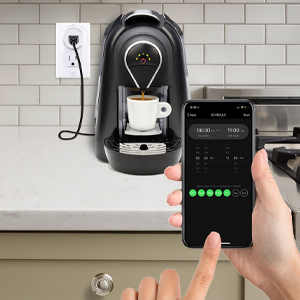
画像6.1: A hand holding a smartphone displaying the Energizer Connect App's scheduling interface, set to turn on a coffee maker at a specific time. The smart plug is visible in the background, connected to the coffee machine.

画像6.2: A person using a smartphone to remotely control a smart plug, demonstrating the ability to turn devices on or off from any location. The image shows a split view of the person and a living room with a lamp connected to a smart plug.
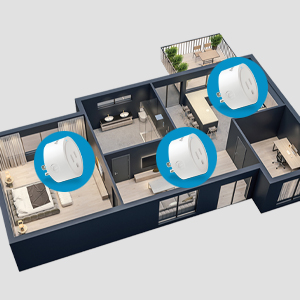
画像6.3: An overhead diagram of a home showing multiple Energizer Connect Smart WiFi Plugs placed in different rooms, illustrating the concept of grouping and controlling several devices simultaneously.
6.3. 音声コントロール
The Energizer Connect Smart WiFi Plug is compatible with Amazon Alexa, Google Assistant, and Siri. To enable voice control:
- Ensure your smart plug is successfully paired with the Energizer Connect App.
- Open your Amazon Alexa, Google Home, or Apple Home app.
- Follow the app's instructions to link the "Energizer Connect" skill or service. You will need to log in with your Energizer Connect account credentials.
- リンクすると、次のような音声コマンドを使用できるようになります。
- 「アレクサ、[プラグ名]をオンにして。」
- "Hey Google, turn off [Plug Name]."
- "Hey Siri, turn on [Plug Name]." (Requires setting up Siri Shortcuts in the Energizer Connect App)

画像6.4: A living room scene demonstrating voice control capabilities. The image shows a smart plug connected to a fan, with icons for Google Assistant, Alexa, and Siri Shortcuts, indicating compatibility with these voice assistants.
7. メンテナンス
スマートプラグの最適なパフォーマンスと寿命を確保するには:
- クリーニング: 清掃する前に、スマートプラグを電源コンセントから抜いてください。表面は柔らかく乾いた布で拭いてください。液体洗剤やエアゾールは使用しないでください。
- ストレージ: When not in use, store the smart plug in a cool, dry place away from direct sunlight and moisture.
- 環境条件: Avoid exposing the plug to extreme temperatures or humidity.
8。 トラブルシューティング
If you encounter issues with your Energizer Connect Smart WiFi Plug, refer to the following solutions:
| 問題 | 考えられる原因 | 解決 |
|---|---|---|
| Plug not connecting to Wi-Fi / LED blinking slowly | Incorrect Wi-Fi password, 5GHz network selected, plug too far from router, network interference. |
|
| App cannot find the plug during pairing | Plug not in pairing mode, incorrect app used, network issues. |
|
| 音声制御が機能しない | 音声アシスタントがリンクされていない、デバイス名が正しくない、インターネット接続に問題がある。 |
|
| Plug unresponsive | パワーアウトtage, device malfunction. |
|
9. 仕様
| 特徴 | 詳細 |
|---|---|
| モデル番号 | B0929DFGZY |
| 欧州連合 | 805106871352 |
| 入力ボリュームtage | 120ボルト |
| 最大負荷電流 | 15 Amps |
| Wi-Fi周波数 | 2.4GHz(IEEE 802.11 b/g/n) |
| 互換性 | Amazon Alexa, Google Assistant, Siri (via Shortcuts) |
| 認定資格 | FCC Certified, ETL Certified |
| 材料 | プラスチック、ゴム |
| 色 | 白 |
| アイテム重量 | 2.89オンス |
| Dimensions (Approx. Plug Body) | 1.125" (Diameter) x 1.0625" (Depth from outlet face) |
10. 保証とサポート
For warranty information and technical support, please contact the manufacturer or seller directly. The manufacturer of this product is Jem Accessories, and the brand is Energizer Connect (distributed by XTREME DIGITAL LIFESTYLE ACCESSORIES).
保証請求のために購入証明書を保管してください。
For further assistance, visit the Energizer Connect webサイトをご覧いただくか、製品パッケージに記載されている連絡先情報を参照してください。