
Unbranded DP-KK99
Unbranded DP-KK99 WiFi Panoramic Security Camera User Manual
Model: DP-KK99
1. はじめに
This manual provides detailed instructions for the installation, operation, and maintenance of your Unbranded DP-KK99 WiFi Panoramic Security Camera. Please read this manual thoroughly before using the product to ensure proper functionality and safety. This camera offers 360-degree panoramic surveillance, motion detection, night vision, and two-way audio communication for comprehensive home monitoring.
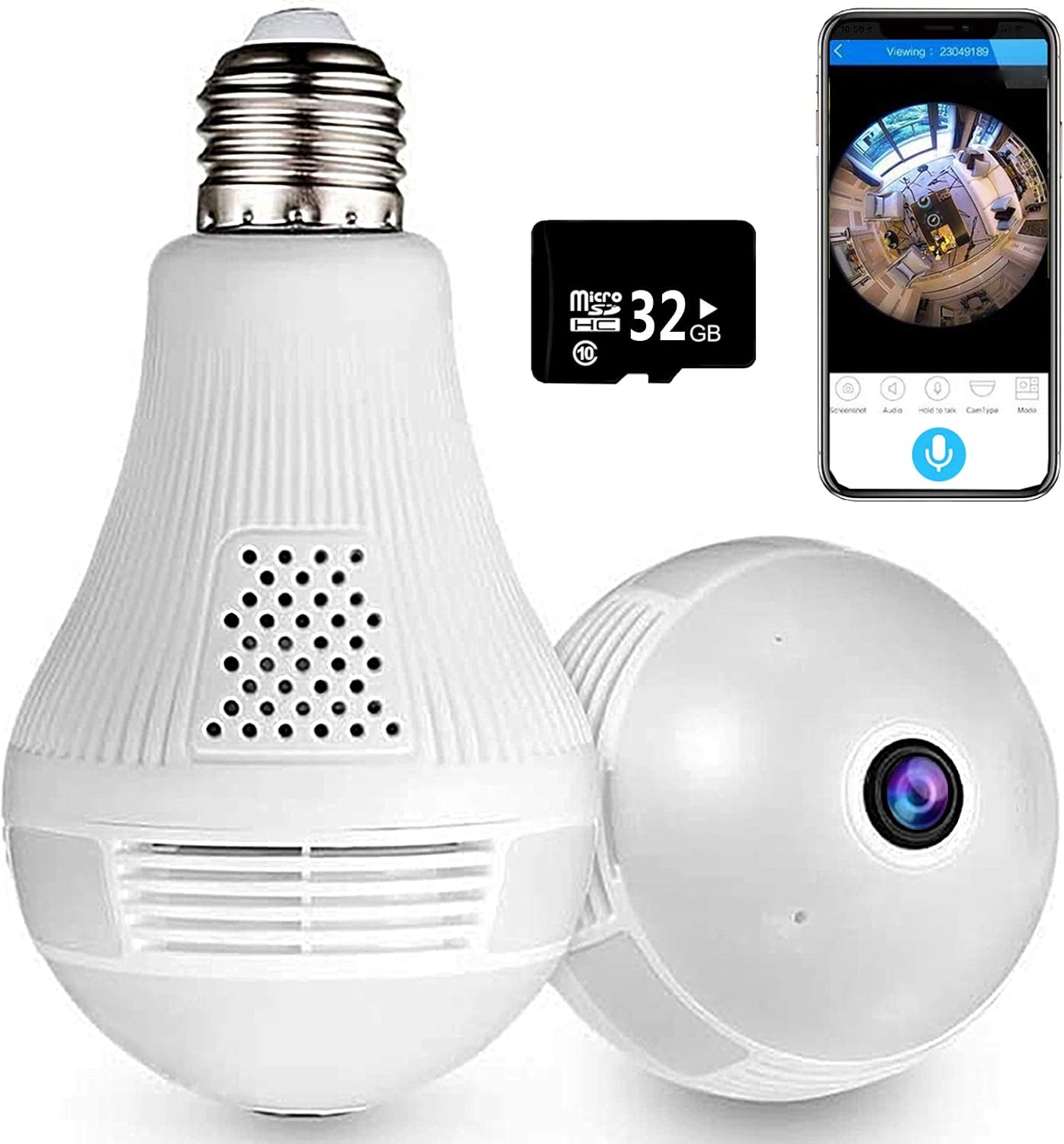
Image 1.1: The Unbranded DP-KK99 WiFi Panoramic Security Camera, showing its bulb-like design, a 32GB Micro SD card, and a smartphone displaying the camera's panoramic view.
2. パッケージ内容
商品をお受け取りになった後、パッケージの内容をご確認ください。不足品や破損品がございましたら、販売店までご連絡ください。
- Unbranded DP-KK99 WiFi Panoramic Security Camera
- 32GB マイクロ SD カード (プリインストールまたは別途付属)
- 取り付けブラケット
- ユーザーマニュアル(このドキュメント)
3.セットアップガイド
3.1 インストール
The camera is designed for easy installation into a standard E27 lamp ベース。
- Ensure the power to the E27 lamp base is turned off before installation.
- Screw the camera firmly into the E27 lamp ベース。
- 電源をオンにしますamp base. The camera will power on and begin its startup sequence.

Image 3.1: Visual guide for screwing the camera into a standard E27 lamp 設置用のベース。
3.2 アプリのダウンロードと接続
The camera operates via the 'iCsee' mobile application.
- アプリをダウンロード: Scan the QR code provided on the product packaging or search for "iCsee" in your smartphone's app store (iOS/Android).
- アカウントを登録する: Open the iCsee application and register a new account using your email address. Phone numbers are not required for registration.
- カメラを追加: Tap the '+' icon within the app to add a new device. Follow the on-screen prompts to select "Add Camera."
- Wi-Fiに接続します: Enter your 2.4GHz Wi-Fi network password. The camera only supports 2.4GHz Wi-Fi. Ensure the Wi-Fi name and password are spelled correctly.
- Initial Connection Tips: For the first connection, place the camera within 2 meters of your Wi-Fi router.
- Set New Password: Once successfully connected, set a new password for your camera for security.
3.3 Important Connection Notes
- Only 2.4GHz Wi-Fi networks are supported. 5GHz networks are not compatible.
- Ensure your Wi-Fi name and password are entered accurately.
- For initial setup, keep the camera close to your Wi-Fi router (within 2 meters).
4. 操作手順
4.1リモート Viewイングとコントロール
接続すると、次のことができます view ライブfootage and control camera functions remotely through the iCsee app.
- ライブ View: Access the camera feed to see a clear, all-round view of your monitored area. The 360-degree fisheye lens provides comprehensive coverage without blind spots.
- 捕獲: Use the app to capture pictures and record videos directly from the live feed.

Image 4.1: The camera's 360-degree panoramic view eliminates blind spots, providing coverage equivalent to multiple standard cameras.
4.2 双方向音声通信
カメラにはマイクとスピーカーが内蔵されており、双方向の音声通信が可能です。
- From the iCsee app, you can initiate audio calls and conversations with individuals near the camera.
- The clear microphone ensures effective vocal transmission.

Image 4.2: The camera supports two-way intercom/audio, allowing remote communication with family members.
4.3 動きの検出とアラート
The camera is equipped with a motion detection function to enhance security.
- When abnormal motion is detected, the camera will send an alert message directly to your mobile phone via the iCsee app.
- This feature helps keep your home or office secure by notifying you of unusual activity.

Image 4.3: The camera supports motion detection, sending alarm notifications to your smartphone upon detecting activity.
4.4 ナイトビジョン
The camera provides excellent night vision capabilities for monitoring in low-light or dark conditions.
- It features built-in infrared night vision and white light full-color night vision dual mode.
- This dual mode ensures clear visibility and security around the clock.
4.5ライト機能
The integrated light can be controlled via the app.
- You can set the light to turn on automatically in the dark, manually control it, or schedule it to turn on at specific times.
4.6 ストレージオプション
カメラは録画した映像をローカルとクラウドの両方で保存できる。tage.
- マイクロSDカード: ライブ viewing and recording are supported directly to the included 32GB Micro SD card.
- クラウドストレージ: Cloud storage options may be available through the iCsee app for additional backup and accessibility.

Image 4.4: The camera supports both Micro SD card and cloud storage for recording and viewing。
5. 仕様
| 特徴 | 詳細 |
|---|---|
| モデル番号 | DP-KK99 |
| 接続技術 | ワイヤレス(Wi-Fi) |
| 接続プロトコル | Wi-Fi(2.4GHzのみ) |
| 対応デバイス | スマートフォン(iOS/Android) |
| 電源 | AC/DC (E27 Lamp ベース) |
| 取り付けタイプ | 天井マウント |
| フォームファクター | ドーム |
| 色 | 白 |
| 商品の寸法 (長さ x 幅 x 高さ) | 6.5 x 3.94 x 3.54インチ |
| アイテム重量 | 7.8オンス |
| 特集 | Motion Sensor, Night Vision (Infrared & Full-Color), Two-Way Audio |
| 屋内/屋外での使用 | 屋内 |
| ビデオキャプチャフォーマット | MPEG-4 |
| 国際保護格付け | IP67 |
6。 トラブルシューティング
カメラに問題が発生した場合は、次の一般的な解決策を参照してください。
- 接続失敗:
- Wi-Fiネットワークが2.4GHzであることを確認してください。カメラは5GHz Wi-Fiをサポートしていません。
- Verify that the Wi-Fi name (SSID) and password are entered correctly in the iCsee app.
- During initial setup, ensure the camera is within 2 meters of your Wi-Fi router.
- カメラのリセット: If connection fails, insert a thimble or small pin into the reset hole on the camera. Press and hold for 10 seconds until you hear a prompt or see an indicator light change. Wait 2 minutes for the camera to restart, then attempt to reconnect.
- Hotspot Mode Activation: If you need to activate hotspot mode, insert a thimble into the reset hole and click 3 times. Then, search for a Wi-Fi network starting with "camera" on your phone. The default password for this hotspot is 1234567890.
- No Picture/Offline: Check the power supply to the E27 lamp base. Ensure the camera is securely screwed in and receiving power. Verify your Wi-Fi connection is stable.
- 画質が悪い: Ensure the camera lens is clean and free from dust or obstructions. Check your internet connection speed.
- SDカードに録画されない: Ensure the 32GB Micro SD card is properly inserted. Format the SD card through the app if necessary.
7. メンテナンス
- クリーニング: カメラのレンズと本体は、柔らかく乾いた布で優しく拭いてください。刺激の強い化学薬品や研磨剤入りの洗剤は使用しないでください。
- 配置: Ensure the camera is installed in a dry, indoor environment. Avoid direct exposure to water or extreme temperatures.
- ファームウェアの更新: Periodically check the iCsee app for available firmware updates to ensure optimal performance and security.
8. 保証とサポート
Specific warranty details for this Unbranded product are not provided in this manual. For warranty information, technical support, or service inquiries, please contact your original retailer or the seller directly. Keep your purchase receipt as proof of purchase.