
1. はじめに
ご購入ありがとうございますasing the Trevi CMP 588 DAB Portable Stereo System. This manual provides essential information for the safe and correct operation of your device. Please read it thoroughly before use and retain it for future reference.
The Trevi CMP 588 DAB is a versatile portable stereo system featuring DAB/DAB+ and FM radio with RDS, a CD/MP3 player, USB input, AUX-in, Bluetooth connectivity, and a headphone jack, all designed for an enhanced audio experience.
2. 安全情報
- 電源: 指定された電源アダプターまたは電池のみを使用してください。tageはユニットの要件を満たしています。
- 水と湿気: 本製品を雨や湿気にさらしたり、水に浸したりしないでください。花瓶など、液体の入った物を本製品の上に置かないでください。
- 換気: 十分な換気を確保してください。通気口を塞がないでください。
- 熱: ユニットをラジエーター、暖房口、ストーブ、その他の機器(電気を含む)などの熱源から遠ざけてください。 amp熱を発生する装置。
- クリーニング: 清掃する前に、本体の電源プラグをコンセントから抜いてください。柔らかく乾いた布を使用してください。液体洗剤やエアゾール洗剤は使用しないでください。
- サービス: この製品を自分で修理しようとしないでください。 すべてのサービスを資格のあるサービス担当者に依頼してください。
- CDプレーヤー: レーザービームを直接見ないでください。
3. パッケージ内容
すべてのアイテムが揃っていて良好な状態であることを確認します。
- Trevi CMP 588 DAB Portable Stereo System
- AC電源ケーブル
- リモートコントロール
- ユーザーマニュアル(このドキュメント)
4 製品の特徴
- DAB/DAB+ and FM Radio with RDS
- High Readability Dot Matrix Display
- CD Player (supports CD-DA, MP3)
- USB Input for MP3 Playback
- AUX-in for external audio devices
- Bluetooth接続
- ヘッドホンジャック
- キャリーハンドル付きのポータブルデザイン
- リモコンが含まれています
5. コントロールと接続

図1: 前面 view of the Trevi CMP 588 DAB, showing speakers, display, and main controls.
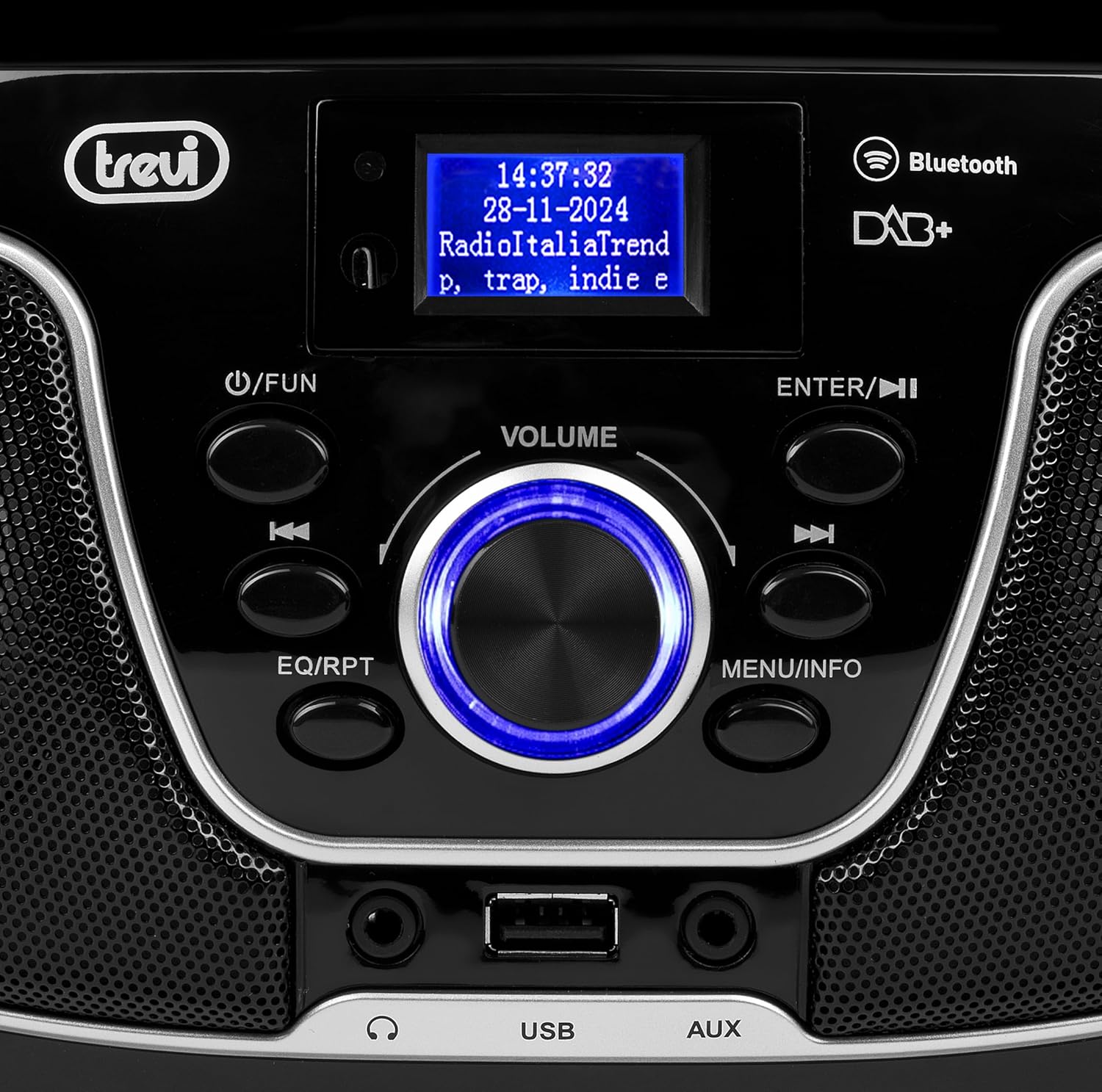
図2:詳細 view of the control panel, including power, function, volume knob, and navigation buttons.
フロントパネルのコントロール:
- POWER / FUN button: Press to turn on/off, press to switch functions (CD/USB/DAB/FM/Bluetooth/AUX).
- VOLUMEつまみ: Rotate to adjust volume. Press to confirm selections.
- ENTER / ►►I button: Confirm selection / Skip to next track/station.
- I▼▼ / EQ/RPT button: Skip to previous track/station / Equalizer settings / Repeat mode.
- MENU / INFO button: Access menu / Display information.
- USBポート: MP3 を再生するには USB ストレージ デバイスを接続します。
- AUX入力ジャック: 外部オーディオデバイスを接続します。
- ヘッドフォンジャック: プライベートリスニング用にヘッドフォンを接続します。

図3:背面 view of the Trevi CMP 588 DAB, showing the power input and telescopic antenna.
リアパネルの接続:
- AC電源入力: 付属のAC電源ケーブルを接続します。
- 伸縮アンテナ: 最適なラジオ受信のために延長します。

Figure 4: Remote control for the Trevi CMP 588 DAB, showing various function buttons.
リモートコントロール機能:
- 待機する: 電源のオン/オフ。
- FUNC: Switch between modes (CD, USB, DAB, FM, Bluetooth, AUX).
- ミュート: オーディオをミュート/ミュート解除します。
- RPT: リピート再生モード。
- スキャン: Auto scan for radio stations.
- F+/CH+, F-/CH-: Navigate folders/channels.
- EQ: イコライザーの設定。
- 再生/一時停止 (►II): 再生/一時停止します。
- PREV/TUN- (▼▼): Previous track/tune down.
- NEXT/TUN+ (►►): Next track/tune up.
- 停止(■): 再生を停止します。
- メニュー: アクセスメニュー。
- 情報: 情報を表示します。
- プログラム: Program tracks/stations.
- VOL + / VOL-: 音量を調整します。
6. セットアップ
6.1電源接続
- AC電源: Connect the supplied AC power cable to the AC power input on the rear of the unit, then plug the other end into a wall outlet.
- バッテリー駆動(オプション): For portable use, insert 6 x C-size batteries (not included) into the battery compartment on the bottom of the unit. Ensure correct polarity.
6.2初期電源オン
を押す POWER / FUN ユニットのボタンまたは STANDBY button on the remote control to turn on the system. The display will light up.
6.3 Setting Up the Antenna
For optimal radio reception, fully extend the telescopic antenna located at the rear of the unit. Adjust its position for the best signal.
7. 操作手順
7.1 DAB/DAB+ラジオの操作
- を押す POWER / FUN button repeatedly until "DAB" mode is selected.
- The unit will automatically scan for available DAB/DAB+ stations on first use. To perform a manual scan, press the メニュー button, navigate to "Full Scan" and press 入力.
- スキャンが完了したら、 ▼▼ or ►► buttons to browse through the available stations. Press 入力 ステーションを選択します。
- を押す 情報 button to cycle through different information displays (e.g., program type, signal strength, time).
7.2 FMラジオの操作
- を押す POWER / FUN 「FM」モードが選択されるまでボタンを繰り返し押します。
- To auto-scan and store stations, press the スキャン button on the remote. The unit will scan and save strong signals.
- 手動で調整するには、 ▼▼ or ►► buttons to search for the next available station. Press briefly to fine-tune the frequency.
- The RDS function will display station information (if available).
7.3 CD/MP3再生

図5:上 view of the Trevi CMP 588 DAB with the CD compartment open, ready for disc insertion.
- CDコンパートメントカバーを開きます。
- Place a CD (CD-DA or MP3 CD) onto the spindle with the label side facing up.
- CDコンパートメントカバーを閉じます。
- を押す POWER / FUN button repeatedly until "CD" mode is selected.
- The unit will read the disc. Press 再生/一時停止 (►II) 再生を開始します。
- 使用 ▼▼ or ►► to skip tracks. Press and hold to fast forward/rewind.
- プレス 停止(■) 再生を停止します。
7.4 USB再生
- MP3が入ったUSBフラッシュドライブを挿入します filesUSBポートに接続します。
- を押す POWER / FUN 「USB」モードが選択されるまでボタンを繰り返し押します。
- ユニットは自動的にMP3を検出し、再生を開始します。 files.
- 使用 ▼▼ or ►► トラックをスキップします。
7.5 Bluetoothのペアリングと再生
- を押す POWER / FUN button repeatedly until "Bluetooth" mode is selected. The display will show "BT" or "PAIRING".
- モバイルデバイス(スマートフォン、タブレットなど)で Bluetooth を有効にします。
- 検索する available devices and select "TREVI CMP 588 DAB" from the list.
- ペアリングすると、デバイスからのオーディオをステレオ システムを通じて再生できるようになります。
- Use the controls on your mobile device or the stereo system to manage playback.
7.6 AUX-in Operation
- Connect an external audio device (e.g., MP3 player, smartphone) to the AUX-in jack using a 3.5mm audio cable (not included).
- を押す POWER / FUN 「AUX」モードが選択されるまでボタンを繰り返し押します。
- Play audio from your connected device. The volume can be controlled via both the stereo system and the external device.
8. メンテナンス
8.1 ユニットのクリーニング
本体の外装は、柔らかく乾いた布で拭いてください。研磨剤入りの洗剤、ワックス、溶剤は塗装を傷める可能性があるため、使用しないでください。清掃の前に、必ず電源プラグを抜いてください。
8.2 CDレンズのケア
If the CD player experiences reading errors, the lens may be dirty. Use a commercially available CD lens cleaner to clean the lens. Do not touch the lens with your fingers.
8.3 ストレージ
If the unit will not be used for an extended period, remove the batteries (if applicable) and unplug the power cable. Store the unit in a cool, dry place away from direct sunlight and extreme temperatures.
9。 トラブルシューティング
| 問題 | 考えられる原因 | 解決 |
|---|---|---|
| 電源なし | 電源ケーブルが接続されていない、電池が消耗しているか正しく挿入されていない。 | 電源ケーブルの接続を確認してください。電池を交換するか、極性が正しいことを確認してください。 |
| 音が出ない | 音量が低すぎます。ミュート機能が有効です。選択したソースが正しくありません。 | Increase volume; Deactivate mute; Select correct function (CD, USB, DAB, FM, BT, AUX). |
| ラジオの受信状態が悪い | Antenna not extended or positioned incorrectly; Weak signal area. | 伸縮アンテナを完全に伸ばして調整し、ユニットを別の場所に移動してみてください。 |
| CD/USBが再生されない | ディスクが汚れている/傷がついている; 正しくない file format on USB; USB drive not properly inserted. | Clean or replace disc; Ensure MP3 format for USB; Reinsert USB drive. |
| Bluetoothペアリングに失敗しました | Device too far; Bluetooth not enabled on source device; Unit not in pairing mode. | Move devices closer; Enable Bluetooth on source device; Ensure unit is in Bluetooth mode and searching. |
10. 仕様
- モデル: CM 588 DAB
- 電源: AC 230V ~ 50Hz or 6 x C-size batteries (not included)
- 消費電力: 15ワット
- スピーカータイプ: Stereo (2 speakers)
- 接続性: Bluetooth、USB、AUX入力
- サポートされているオーディオ形式: CD audio (CD-DA), MP3
- 無線周波数: DAB/DAB+, FM with RDS
- 寸法(長さ×幅×高さ): 50 x 50 x 28 cm(おおよそ)
- 重さ: 1.5キログラム(おおよそ)
- 色: 黒
11. 保証とサポート
This product is covered by a standard manufacturer's warranty. Please refer to the warranty card included in your package for specific terms and conditions, including the warranty period and coverage details.
For technical support, service, or warranty claims, please contact your retailer or the official Trevi customer service. Contact information can typically be found on the Trevi webサイトまたは製品のパッケージ内。
Please retain your proof of purchase (receipt) for any warranty-related inquiries.