
1.製品オーバーview
The TEKMAGIC W60-OUS-WT is a robust digital watch designed for various activities, including swimming, snorkeling, and scuba diving, with a water resistance rating of 10 ATM (up to 100 meters). It features a clear digital display and multiple functions to assist with daily timekeeping and sports activities.
Key features include precise time, date, and day display, a chronograph (stopwatch), countdown timer, dual time zone functionality, alarm clock, hourly chime, and an electro luminescent backlight for visibility in low light conditions. The watch is also shock resistant and comes with a comfortable TPU band.

画像1.1:正面 view of the TEKMAGIC W60-OUS-WT digital watch, showcasing its robust design and digital display with water splashes, indicating its water-resistant nature.
2. ボタンの機能
Familiarize yourself with the watch buttons to operate its various functions:
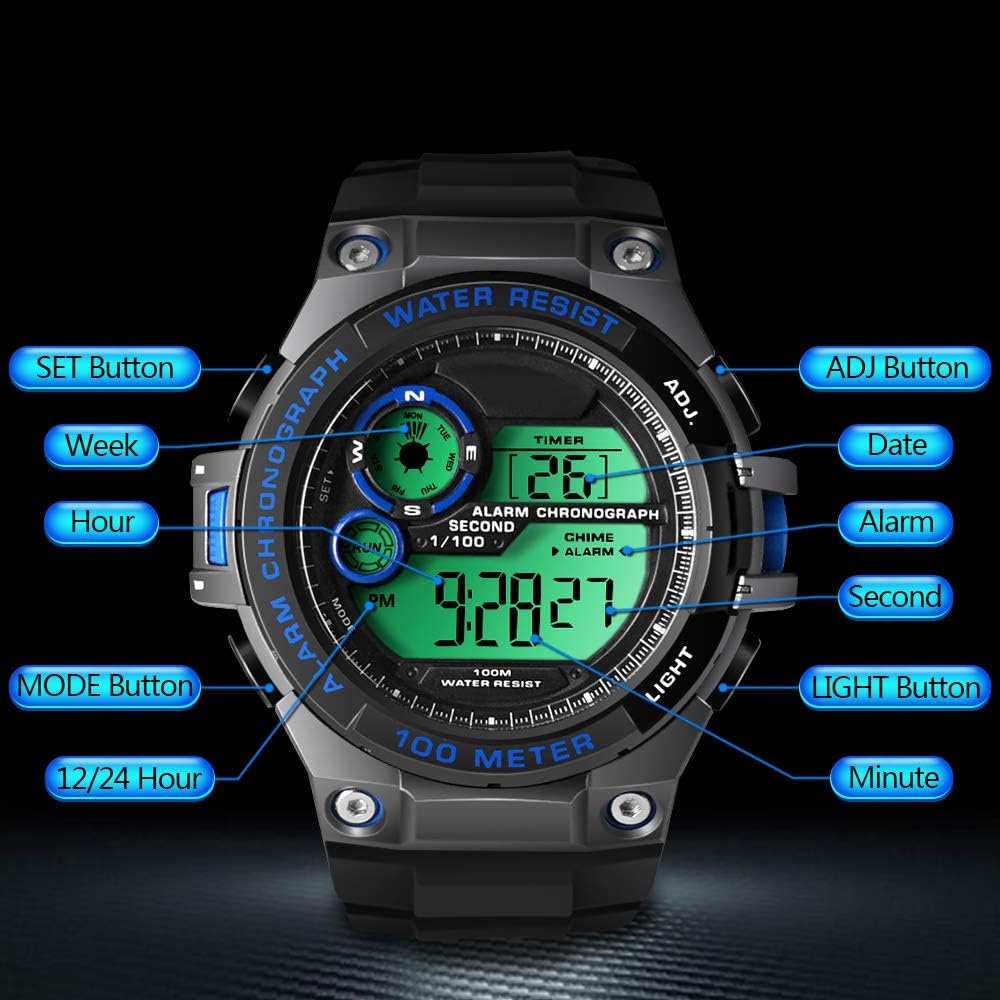
Image 2.1: Diagram illustrating the button layout and their respective functions on the TEKMAGIC W60-OUS-WT watch. Buttons include SET, MODE, 12/24 Hour, ADJ, Date, Alarm, Second, Light, and Minute.
- SETボタン: 設定モードに入るときや選択内容を確認するときに使用します。
- ADJボタン: 設定モード中に値を調整するために使用されます。
- モードボタン: Cycles through different operational modes (Time, Chronograph, Countdown, Alarm, Dual Time).
- ライトボタン: Activates the electro luminescent backlight.
- 12/24 Hour Button: 12 時間形式と 24 時間形式を切り替えます。
3. 初期設定
3.1 時刻と日付の設定
- タイムキーピングモードでは、 セット 秒が点滅し始めるまでボタンを押してください。これは設定モードに入ったことを示します。
- を押す モード button to cycle through the setting options: Seconds → Hours → Minutes → Year → Month → Day.
- 使用 調整済み ボタンを押すと点滅している数値が増加します。 調整済み 00にリセットされます。
- すべての設定が完了したら、 セット もう一度ボタンを押すと設定モードが終了します。
3.2 12/24 時間形式
タイムキーピングモードで、 12 / 24時間 12 時間形式 (AM/PM インジケーター付き) と 24 時間形式を切り替えるボタン。
4. 操作機能
4.1 タイムキーピングモード
This is the default mode, displaying the current time (hour, minute, second), date, and day of the week.
4.2 クロノグラフ(ストップウォッチ)モード
ストップウォッチ機能を使用するには:
- を押す モード ディスプレイに「CHRONO」または「STW」が表示されるまでボタンを繰り返し押します。
- を押す 調整済み ストップウォッチを開始するボタン。
- を押す 調整済み もう一度ボタンを押すと一時停止/再開します。
- To reset the stopwatch, ensure it is paused, then press the セット ボタン。

Image 4.1: The TEKMAGIC watch displaying the stopwatch function, with a runner in the background, illustrating its use for timing sports activities.
4.3 カウントダウンタイマーモード
カウントダウン タイマーを設定して使用するには:
- を押す モード button repeatedly until 'TIMER' or 'CD' appears.
- を押し続けます セット 時間が点滅し始めるまでボタンを押します。
- 使用 モード ボタンで時間、分、秒を選択し、 調整済み ボタンをクリックして値を調整します。
- プレス セット カウントダウン時間を確認します。
- プレス 調整済み カウントダウンを開始または一時停止します。
- カウントダウンがゼロになると、アラームが鳴ります。
4.4 Alarm Clock and Hourlyチャイム
アラームを設定するには:
- を押す モード 「ALARM」が表示されるまでボタンを繰り返し押します。
- を押し続けます セット 時間の数字が点滅するまでボタンを押します。
- 使用 調整済み ボタンを押して時間を設定し、 モード to select minutes and use 調整済み 設定します。
- プレス セット アラーム時間を確認します。
- を押す 調整済み button in Alarm Mode to toggle the alarm ON/OFF. An alarm icon will appear when activated.
ホーを有効/無効にするにはurlチャイムを鳴らすには、 セット button in Alarm Mode. A chime icon will appear when activated.

Image 4.2: The TEKMAGIC watch displaying its alarm and calendar functions, with visual cues for waking up and checking dates.
4.5 デュアルタイムゾーン
The watch allows you to set a second time zone:
- を押す モード button repeatedly until 'DUAL TIME' or 'DT' appears.
- を押し続けます セット 時間の数字が点滅するまでボタンを押します。
- 使用 調整済み ボタンを押して時間を設定し、 モード to select minutes and use 調整済み 設定します。
- プレス セット to confirm the dual time zone setting.
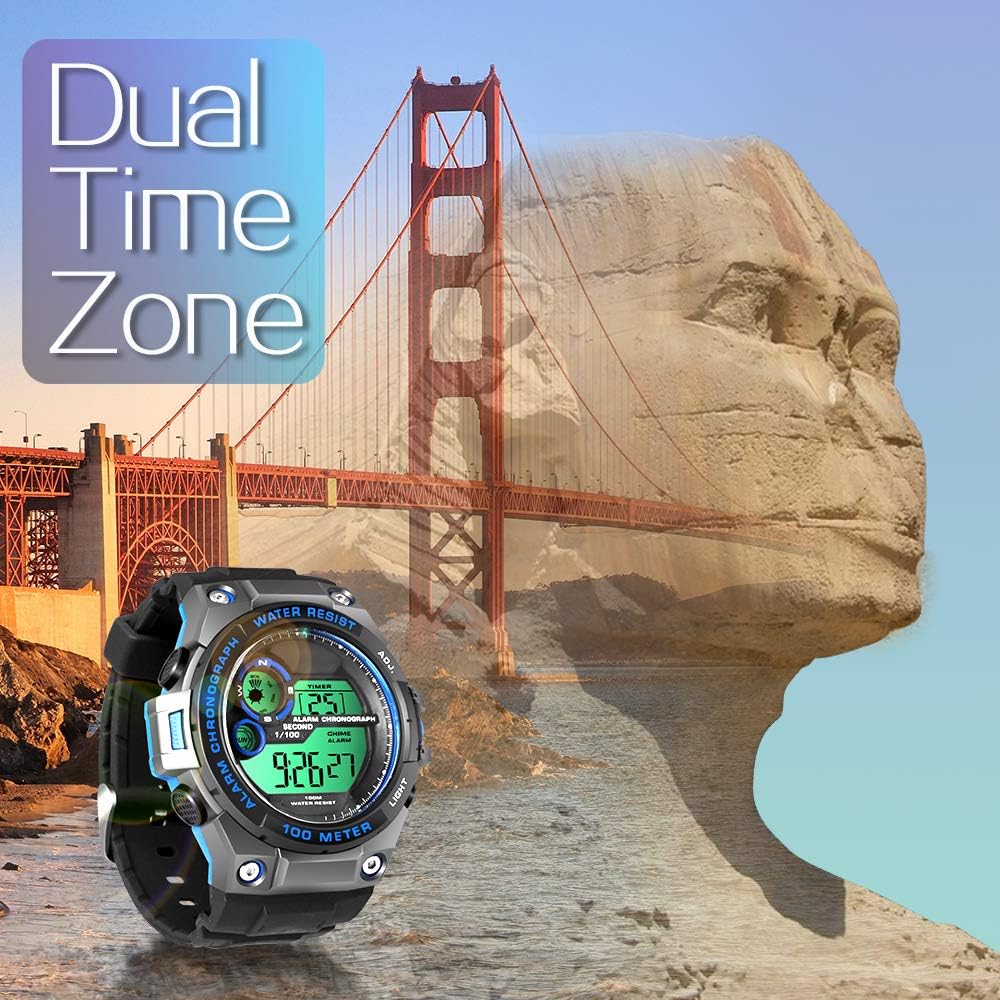
Image 4.3: The TEKMAGIC watch displaying its dual time zone feature, superimposed over an image of a bridge and a rock formation, suggesting travel and global timekeeping.
4.6バックライト
を押す ライト button to illuminate the display for a few seconds, enhancing visibility in dark environments.

Image 4.4: The TEKMAGIC watch with its backlight activated, shown in a dimly lit setting, highlighting its visibility feature.
4.7 Water Resistance (100m / 10 ATM)
This watch is designed to withstand water pressure up to 100 meters (10 ATM), making it suitable for swimming, snorkeling, and recreational scuba diving. It is important to note the following:
- 水中でボタンを操作しないでください。 Operating buttons while submerged can compromise the watch's water resistance.
- Avoid exposing the watch to hot water, steam, or extreme temperature changes, as this can damage the seals.
- 腐食を防ぐため、海水にさらされた後は時計を真水で洗い流してください。

Image 4.5: The TEKMAGIC watch displayed in an underwater scuba diving scene, emphasizing its suitability for deep-water activities.
Video 4.1: A demonstration of the TEKMAGIC watch being submerged in water, showcasing its water resistance capabilities. The watch remains functional and readable while wet.
5. メンテナンス
5.1 クリーニング
時計は定期的に柔らかくて乾いた布で拭いてください。amp cloth. For stubborn dirt, use a mild soap solution and rinse thoroughly with fresh water. Ensure the watch is completely dry before storage.
5.2 電池の交換
The watch uses a CR2025 battery, which typically lasts 1.5 to 2 years. When the display becomes dim or functions become erratic, it may be time to replace the battery. Battery replacement should ideally be performed by a qualified watch technician to ensure proper sealing and maintain water resistance.
5.3 ストレージ
Store the watch in a cool, dry place away from direct sunlight and extreme temperatures. Avoid exposing it to strong magnetic fields.
6。 トラブルシューティング
- ディスプレイが空白または暗い場合: バッテリーを確認してください。バッテリー残量が少ない場合は交換してください。
- ボタンが反応しない: Ensure the watch is not in a locked mode (if applicable, though this model does not specify one). Try a soft reset by allowing the battery to drain completely and then replacing it, or consult a technician.
- 時計内部の水: さらなる損傷を防ぐため、すぐに時計を専門家に点検・修理をご依頼ください。ご自身で乾燥させようとしないでください。
- 時刻/日付が正しくありません: セクション 3.1 の説明に従って、時刻と日付の設定を再度入力します。
7. 仕様

Image 7.1: Visual representation of the TEKMAGIC watch's dimensions, including case diameter (55mm), case thickness (18mm), band width (22mm), total length (258mm), and wrist circumference range (160mm-215mm).
| 特徴 | 仕様 |
|---|---|
| モデル番号 | W60-OUS-WT |
| 耐水深度 | 100m(10気圧) |
| 動き | デジタル |
| 時間の精度 | 月±30秒 |
| バッテリーコード | CR2025 |
| 動作バッテリー寿命 | 1.5~2年 |
| 文字盤窓素材 | High Transparency Resin |
| 時計ケースの素材 | ABSプラスチック |
| 文字盤カラー | Black + Gray + Blue |
| ケース直径 | 55ミリメートル |
| ケースの厚さ | 18ミリメートル |
| 時計バンドの素材 | TPU Band |
| バンドカラー | 黒 |
| 留め具タイプ | ピンバックル |
| バンド幅 | 22mm |
| 最大手首周囲径 | 215mm |
| 最小手首周囲径 | 160mm |
| 製品重量 | 62グラム |
8. 保証とサポート
For warranty information, technical support, or service inquiries, please refer to the documentation included with your purchase or contact TEKMAGIC customer service directly. Keep your proof of purchase for warranty claims.