
導入
This user manual provides comprehensive instructions for the installation, operation, and maintenance of your wansview W9 Outdoor Security Camera. Please read this manual carefully before using the product to ensure proper functionality and safety. Keep this manual for future reference.
箱の中身
パッケージにすべてのコンポーネントが含まれていることを確認します。
- ワンズview W9屋外防犯カメラ
- 5dBi WiFi Antenna
- USB電源
- 取り付けブラケットセット
製品終了view
Familiarize yourself with the key components of your wansview W9 camera.

図1: wansview W9 Outdoor Security Camera and Live View スマートフォンで。
This image shows the wansview W9 outdoor security camera mounted on a wall, alongside a smartphone displaying a live feed from the camera. The camera is white with a black lens area, and the phone screen shows a dog in a grassy yard, illustrating the live monitoring capability.
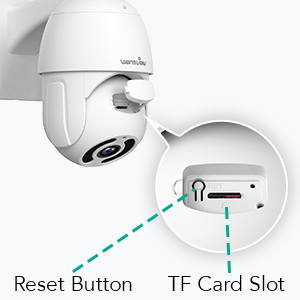
Figure 2: Reset Button and TF Card Slot Location.
This diagram highlights the location of the reset button and the TF (microSD) card slot on the wansview W9 camera, essential for initial setup and local storage.
セットアップガイド
1. カメラの電源を入れる
Connect the USB power supply to the camera and plug it into a power outlet. The camera will power on and initiate its self-test sequence.
2.アプリのインストール
Download the "Wansview Cloud" app from your smartphone's app store (available on iOS and Android). Register for a new account or log in if you already have one.
3. ネットワーク接続
ワンズview W9 camera supports both Wi-Fi (2.4GHz only) and Ethernet connections.
Wi-Fi接続:
- WANを開きますview クラウド アプリで「+」アイコンをタップして新しいデバイスを追加します。
- Select your camera model (W9) and follow the on-screen instructions.
- Ensure your phone is connected to a 2.4GHz Wi-Fi network. The camera does not support 5GHz Wi-Fi.
- 携帯電話に表示されるQRコードをカメラのレンズでスキャンします。
- Wait for the camera to connect to your Wi-Fi network.

Figure 3: Wi-Fi Compatibility (2.4GHz only).
This image illustrates the wansview W9 camera with its upgraded 5dBi antenna, emphasizing its compatibility with 2.4GHz Wi-Fi networks for extended signal range and faster connection speeds. It explicitly shows that 5GHz Wi-Fi is not supported.
イーサネット接続:
- Connect an Ethernet cable from your router to the RJ45 port on the camera.
- カメラは自動的にネットワークに接続します。
- アプリの指示に従って、カメラをアカウントに追加します。
4.カメラの取り付け
ワンズview W9 camera is designed for wall mounting and outdoor use (IP65 waterproof).
- 設置場所を適切に選択し、 view 安定した取り付け面。
- Use the provided mounting bracket set to securely attach the camera to the wall.
- 取り付け後、必要に応じてカメラの角度を調整します。
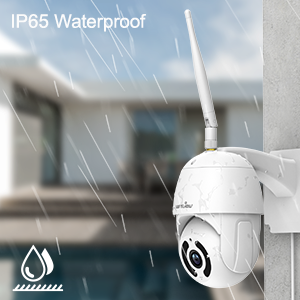
図 4: IP65 防水機能。
This image depicts the wansview W9 camera outdoors with rain falling on it, visually confirming its IP65 waterproof rating, making it suitable for various weather conditions.
操作手順
1. パンチルト制御
The camera features a 350° horizontal pan and 90° vertical tilt range, allowing you to monitor a wide area.
- ワンズでview Cloud app, access the live view あなたのカメラの。
- Use the directional controls on the screen to remotely adjust the camera's pan and tilt angles.

Figure 5: 2K FHD PTZ Coverage.
This image demonstrates the wansview W9 camera's 2K FHD resolution and its Pan-Tilt-Zoom (PTZ) capabilities, showing a 350° pan and 95° tilt range for comprehensive area coverage, with a house in the background to illustrate its outdoor application.
2. ナイトビジョン
The camera is equipped with 12pcs 850nm infrared LED lights, providing clear night vision up to 50 feet.
- 暗い場所ではカメラは自動的に暗視モードに切り替わります。
- あなたはできる view the night vision feed in real-time through the Wansview クラウドアプリ。

Figure 6: Excellent Night Vision Capability.
この画像は分割を示しています view comparing the daytime and night vision performance of the wansview W9 camera. The night vision segment clearly shows objects up to 50 feet away in darkness, highlighting the camera's effective infrared capabilities.
3. 双方向オーディオ
内蔵マイクとスピーカーを使用して、訪問者と通信したり、侵入者を阻止したりできます。
- ライブから view in the Wansview Cloud app, tap the microphone icon to speak.
- スピーカーアイコンをタップすると、カメラの場所からの音声を聞くことができます。

Figure 7: Two-Way Audio in Action.
This image illustrates the two-way audio feature of the wansview W9 camera, showing a person communicating with a delivery driver through the camera via a smartphone app. Speech bubbles indicate the conversation, demonstrating real-time interaction.

Figure 8: Deterring Intruders with Two-Way Audio.
This image shows the wansview W9 camera being used to deter an intruder. Speech bubbles indicate a command from the camera ("Move away from my house") and the intruder's response ("arrgg, no, I'm off"), demonstrating the camera's ability to act as a deterrent.
4. 動きの検知とアラート
The camera uses motion sensors to detect activity and sends instant alerts to your phone.
- Customize sensor sensitivity and detection areas within the Wansview クラウドアプリ。
- Receive 10-second video alerts when motion is detected.

Figure 9: Instant Detection and Alerts.
This image shows a smartphone displaying a "Motion alarm" notification from the Wansview Cloud app, indicating that the wansview W9 camera has detected activity and sent an immediate alert to the user's phone.
5. ストレージオプション(SDカードとクラウド)
ワンズview W9 camera offers flexible storage solutions for recorded footage.
- SDカードストレージ: Supports up to 128GB microSD cards. Insert the card into the TF card slot (refer to Figure 2). Recorded video and images can be stored locally for preview.
- クラウドストレージ: Subscribe to the paid Cloud service via the Wansview Cloud app to save and upload videos securely to the cloud. This provides an additional layer of security against camera theft or damage.

Figure 10: Dual Storage Choices.
This image highlights the dual storage options for the wansview W9 camera: secure TF (microSD) card storage and encrypted cloud storage, providing users with flexible ways to back up recorded footage.
6. Alexaとの統合
Control your wansview W9 camera and view live feeds using Amazon Alexa.
- WAN を有効にするview skill in the Alexa app.
- WANSをリンクするview Cloud account with Alexa.
- Use voice commands such as "Alexa, show me the [camera name]" to display the live video on compatible Alexa devices (e.g., Echo Show).
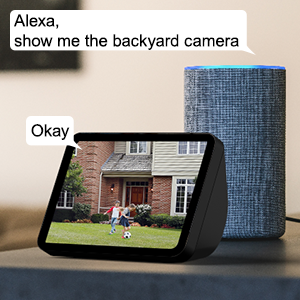
Figure 11: Alexa Integration.
This image shows an Amazon Echo Show displaying a live video feed from a wansview camera, with speech bubbles indicating a user's voice command ("Alexa, show me the backyard camera") and Alexa's response ("Okay"), demonstrating seamless integration with Alexa for voice control.
7. Multiple Family Members Sharing
Share access to your camera's live feed with up to 4 users simultaneously.
- Generate an invitation link within the Wansview クラウドアプリ。
- Share the link with family members to grant them access.
メンテナンス
- クリーニング: カメラのレンズと本体は、柔らかく乾いた布で優しく拭いてください。刺激の強い化学薬品や研磨剤入りの洗剤は使用しないでください。
- ファームウェアの更新: Regularly check for and install firmware updates via the Wansview Cloud app to ensure optimal performance and security.
- 電源: 電源がしっかりと接続され、損傷がないことを確認してください。
- ネットワーク接続: Verify a stable Wi-Fi or Ethernet connection for uninterrupted monitoring.
トラブルシューティング
| 問題 | 考えられる原因 | 解決 |
|---|---|---|
| カメラがオフライン | 電源なし、Wi-Fi 信号が弱い/切断されている、ルーターに問題がある。 | 電源接続を確認します。カメラをルーターに近づけるか、イーサネットを使用します。ルーターを再起動します。 |
| Wi-Fiに接続できません | Incorrect Wi-Fi password; Connecting to 5GHz network; Too far from router. | Double-check password; Ensure connection to 2.4GHz Wi-Fi; Relocate camera or router. |
| モーションアラートを受信できませんでした | Motion detection disabled; App notifications off; Sensitivity too low. | Enable motion detection in app; Check phone notification settings; Adjust sensitivity. |
| 夜間視力の質が悪い | Obstruction in front of lens; Infrared LEDs blocked. | Clear any obstructions; Ensure lens is clean. |
| 双方向オーディオの問題 | Microphone/speaker blocked; App permissions. | Ensure clear path for audio; Check app permissions for microphone. |
仕様
| モデル番号 | W9-W |
| ビデオキャプチャ解像度 | 1080p(2K HD) |
| パン/チルト範囲 | 350°パン、90°チルト |
| 接続技術 | Wireless (Wi-Fi 2.4GHz), Ethernet |
| 無線通信技術 | Wi-Fi |
| 電源 | コード式電気 |
| 暗視範囲 | 50フィート |
| 国際保護格付け | (防水)IP65 |
| ストレージオプション | SDカード(最大128GB)、クラウドストレージ |
| オーディオ | 双方向オーディオ(内蔵マイクとスピーカー) |
| 対応デバイス | Smartphone (iOS, Android), Alexa Echo Show |
| 取り付けタイプ | 壁掛け |
| 寸法(長さ×幅×高さ) | 6.3 x 6.1 x 3.94インチ |
| アイテム重量 | 1.6 ポンド |
保証とサポート
For warranty information and technical support, please refer to the wansview 正式 website or contact their customer service directly. Details are typically available on the product packaging or the wansview brand store on Amazon.
訪問する ワンズview 店 詳細についてはこちらをご覧ください。