
ALFAJR CW-15
ALFAJR CW-15 自動イスラム教アザン祈祷時計 ユーザーマニュアル
Model: CW-15 | Brand: ALFAJR
導入
This manual provides comprehensive instructions for setting up and operating your ALFAJR CW-15 Automatic Islamic Azan Prayer Clock. Designed for both wall mounting and table placement, this digital clock automatically calculates and plays the Azan five times a day based on your set location. Please read this manual carefully to ensure proper use and to fully utilize all features of your new clock.
パッケージ内容
パッケージにすべてのアイテムが揃っていることを確認してください:
- 1 x ALFAJR CW-15 Azan Clock
- 単三電池4本
- 取扱説明書(本書)1部
製品の特徴
- Automatic Azan for all five daily prayers.
- Multiple Azan reciters (Makkah, Madina, Egypt, AlQuds, Riyadh).
- Automatic Azan time adjustment after initial city/time setup.
- Gregorian and Hijri calendar display.
- 温度は摂氏または華氏で表示されます。
- Daylight Saving Time (DST) option.
- English and Arabic display languages.
- Wall-mountable or table-standing design.
- Dimensions: Approximately 9 inches (width) x 8.5 inches (height).
- Powered by 4 AA batteries (included) or USB-C (cable not included).
セットアップガイド
1. バッテリーの取り付け
The ALFAJR CW-15 clock operates on 4 AA batteries. These are included in your package.
- 時計の裏側にある電池収納部を見つけます。
- 電池ボックスのカバーを開きます。
- 単三電池 4 本を正しい極性 (+ と -) を確認して挿入します。
- 電池カバーをしっかりと閉じてください。
Alternatively, the clock can be powered via a USB-C cable (not included) connected to a compatible power adapter.
2. Initial Power On and Display Overview
Upon inserting batteries or connecting USB-C power, the clock will power on. The display will show the current time, date, and temperature. Familiarize yourself with the buttons on the side/back of the clock: UP, セット、 そして 下.

図1: 前面 view of the ALFAJR CW-15 clock, showing the digital display with time, date, and temperature. The speaker grilles are visible at the bottom.
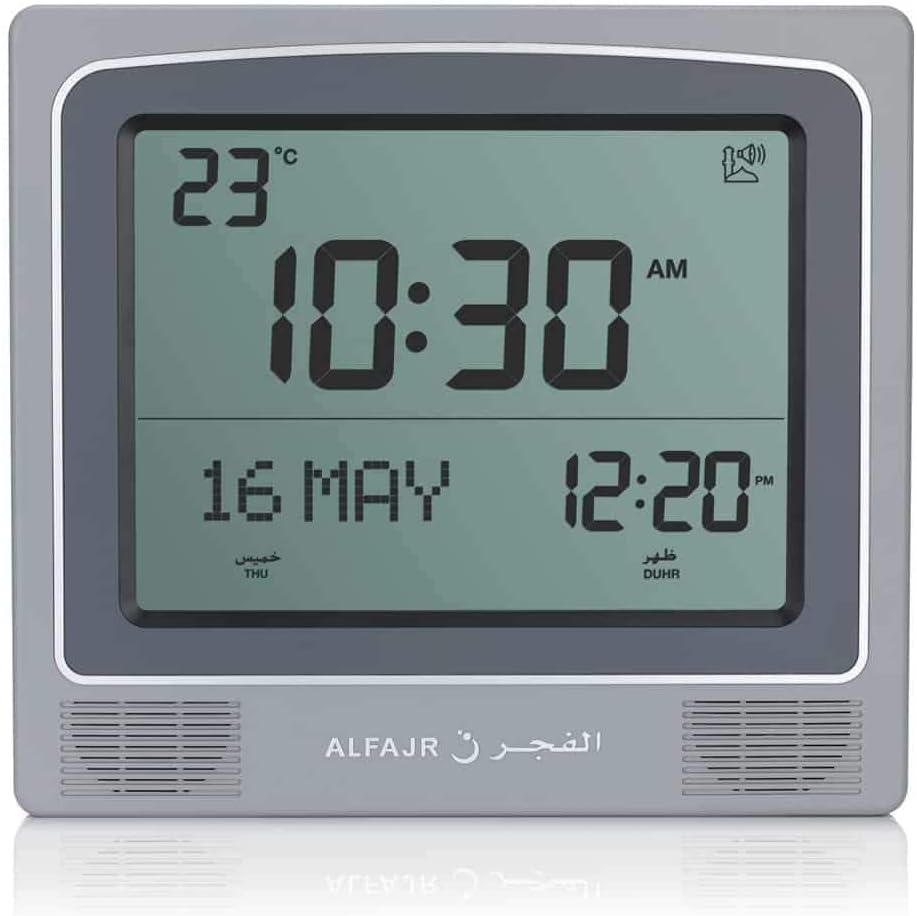
図2: 前面 view of the ALFAJR CW-15 clock, similar to Figure 1, but with the ALFAJR brand logo visible at the bottom center.
3. 時刻と日付の設定
- を押し続けます セット 時刻表示が点滅し始めるまで、ボタンを約 3 秒間押し続けます。
- 使用 UP そして 下 時間を調整するためのボタン。 セット 確認して議事録に進みます。
- 分を調整するには UP そして 下を押して セット.
- Continue this process to set the year, month, and day.
- 日付を設定したら、 セット to exit the time/date setting mode.
4. Setting Location (City or Coordinates)
Accurate Azan times depend on correct location settings. You can select a pre-programmed city or enter latitude/longitude.
- を押す セット button once (short press) to enter the main menu.
- 使用 UP or 下 to navigate to the "CITY" or "LOCATION" setting.
- プレス セット 場所の設定に入ります。
- Option A: Select Pre-programmed City: 使用 UP or 下 to scroll through the list of cities. Once your city is displayed, press セット 確認します。
- Option B: Enter Latitude/Longitude: If your city is not listed, select the option to enter coordinates. Use UP そして 下 to adjust the values for latitude, longitude, and time zone offset (GMT). Press セット 各値の後。
- After confirming your location, the clock will automatically calculate the Azan times.
5. Azan Calculation Method
The clock supports various Azan calculation methods. Consult local Islamic authorities for the recommended method in your region.
- From the main menu (short press セット), navigate to "CALC. METHOD".
- プレス セット 入力します。
- 使用 UP or 下 to select the desired calculation method (e.g., Muslim World League, Umm Al-Qura, Egyptian General Authority of Survey, etc.).
- プレス セット 確認します。
6. 夏時間(DST)
If your region observes Daylight Saving Time, enable this feature.
- From the main menu, navigate to "DST".
- プレス セット.
- 使用 UP or 下 「オン」と「オフ」を切り替えます。
- プレス セット 確認します。
7. 温度単位
You can choose to display temperature in Celsius or Fahrenheit.
- From the main menu, navigate to "TEMP UNIT".
- プレス セット.
- 使用 UP or 下 to select "C" (Celsius) or "F" (Fahrenheit).
- プレス セット 確認します。
8. カレンダー表示
The clock can display either the Gregorian or Hijri calendar.
- From the main menu, navigate to "CALENDAR".
- プレス セット.
- 使用 UP or 下 to select "GREGORIAN" or "HIJRI".
- プレス セット 確認します。
操作手順
1. Adjusting Azan Volume
The clock features adjustable Azan volume. The volume buttons are typically located on the side or back of the unit.
- During an Azan, press the UP or 下 音量を上げたり下げたりするボタン。
- Alternatively, some models may have a dedicated volume switch or buttons on the back. Refer to the physical clock for exact button placement.
2. Changing Azan Reciter
You can select from five different Azan reciters.
- From the main menu (short press セット), navigate to "AZAN VOICE" or "RECITER".
- プレス セット 入力します。
- 使用 UP or 下 to cycle through the available reciters (Makkah, Madina, Egypt, AlQuds, Riyadh).
- プレス セット 選択内容を確認します。
3. Daily Alarms
The clock includes daily alarm functions in addition to the Azan. These can be set for specific times.
- From the main menu, navigate to "DAILY ALARM".
- プレス セット.
- 使用 UP or 下 to set the desired alarm time (hour and minute).
- プレス セット to confirm and enable the alarm.
- To disable, navigate back to "DAILY ALARM" and set the time to "OFF" or a similar option.
4. 表示モード
The clock typically cycles through different display information or allows manual switching.
- The default display shows time, date, and temperature.
- を短く押す UP or 下 buttons outside of menu mode may cycle through additional information like next prayer time or Qibla direction (if available on this model).
取り付けオプション
The ALFAJR CW-15 clock is designed for versatile placement, either on a wall or a flat surface.
1.壁への取り付け
To mount the clock on a wall:
- Locate the keyhole slot on the back of the clock.
- 壁の適切な場所を選択します。
- Install a screw (not included) into the wall, leaving a small portion protruding. Ensure the screw head fits into the keyhole slot.
- Carefully hang the clock onto the screw, ensuring it is securely seated.
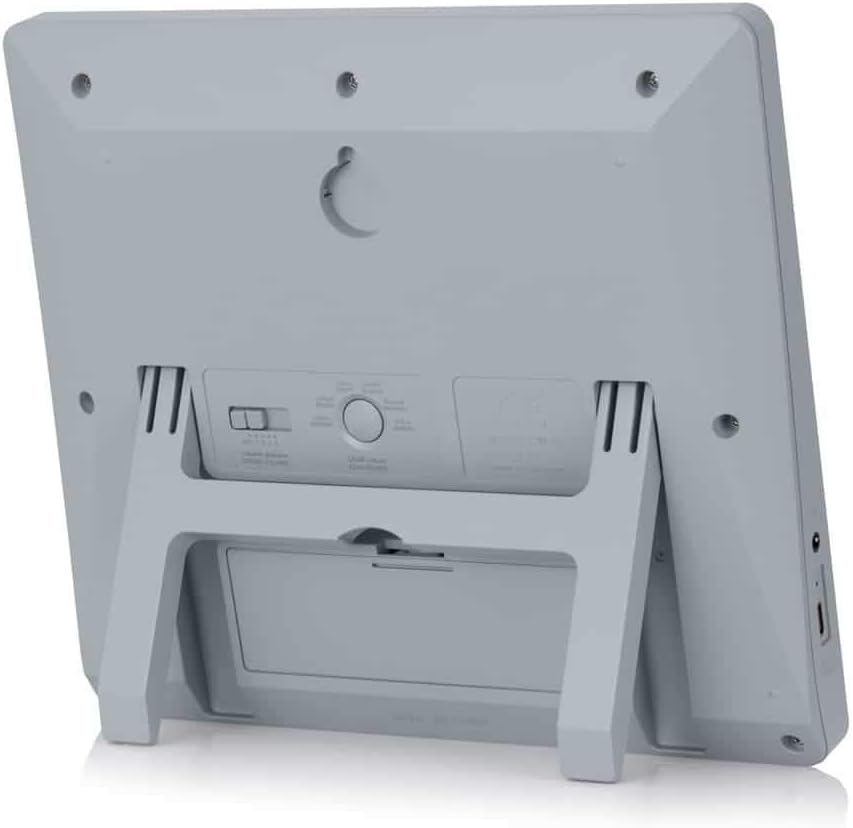
図3:背面 view of the ALFAJR CW-15 clock, highlighting the keyhole for wall mounting and the battery compartment.
2. Table Placement
For table or desk placement:
- Locate the integrated stand on the back of the clock.
- Pull out the stand until it locks into position.
- 時計を平らで安定した場所に置いてください。

図4:側面 view of the ALFAJR CW-15 clock, showing the integrated kickstand extended for stable table placement.
メンテナンス
1. 清掃
時計の外観と機能を維持するには:
- 時計の表面を柔らかく乾いた布で拭いてください。
- 研磨剤入りのクリーナー、溶剤、化学スプレーは使用しないでください。ディスプレイやコンピュータに損傷を与える可能性があります。asing.
- Avoid getting moisture into the clock's openings.
2. バッテリーの交換
When the display dims or the clock functions become erratic, it's time to replace the batteries.
- 時計の裏側にある電池コンパートメントを開きます。
- 古い単三電池を取り外します。
- 正しい極性に注意しながら、新しい AA 電池 4 本を挿入します。
- 電池ケースを閉じます。
- You may need to re-enter the time and location settings after battery replacement.
トラブルシューティング
| 問題 | 考えられる原因 | 解決 |
|---|---|---|
| 時計の電源が入りません。 | Batteries are dead or incorrectly inserted. No USB-C power. | Check battery polarity. Replace with new batteries. Ensure USB-C cable (if used) is connected and power source is active. |
| アザーンの時間が間違っています。 | Incorrect city/location settings. Wrong calculation method. DST setting incorrect. | Verify city, latitude, longitude, and GMT offset. Select the correct Azan calculation method for your region. Check DST setting. |
| Azan sound is too low or too high. | 音量設定を調整する必要があります。 | Adjust the volume using the dedicated buttons or through the menu. |
| ディスプレイが暗くなったり、ちらついたりします。 | バッテリー残量が少なくなっています。 | 単三電池4本すべてを新しいものに交換してください。 |
| Clock resets unexpectedly. | Intermittent power loss or very low batteries. | Ensure batteries are fresh and securely seated. If using USB-C, check the connection and power source stability. |
仕様
- モデル: CW-15
- ブランド: アルファジル
- 表示タイプ: デジタル
- 色: グレー
- 材料: プラスチック
- 製品寸法: 8.5インチ(幅)×9インチ(高さ)
- 商品の重量: 3オンス
- 電源: 4 AA batteries (included) or USB-C (cable not included)
- 取り付けタイプ: 壁掛け/テーブルスタンド
- 特別な機能: Automatic Azan, Multiple Azan Reciters, Gregorian/Hijri Calendar, Temperature Display, Daylight Saving Time
- 言語: 英語、アラビア語
保証とサポート
限定保証
The ALFAJR CW-15 Azan Clock comes with a limited warranty. Please refer to the warranty card included in your original packaging for specific terms, conditions, and duration. This warranty typically covers manufacturing defects under normal use.
カスタマーサポート
For technical assistance, troubleshooting not covered in this manual, or warranty claims, please contact ALFAJR customer support through their official website or the retailer from whom you purchased the product. Please have your model number (CW-15) and purchase date available when contacting support.
Ask a question about this manual
Ask about setup, troubleshooting, compatibility, parts, safety, or missing instructions. Manuals+ will review the question and use this page’s manual context to help answer it.