
1. はじめに
The Zenacasa AL-130 is a versatile 2-in-1 device designed for both banknote counting and counterfeit detection. It provides reliable verification for Euro, US Dollar, and British Pound currencies, ensuring the authenticity of banknotes and accurate counting of denominations. This manual provides essential information for the proper setup, operation, and maintenance of your device.

Image: The Zenacasa AL-130 in operation, detecting a 50 Euro banknote.
2. 安全情報
デバイスをご使用になる前に、すべての安全に関する指示をよくお読みになり、理解してください。このマニュアルは、今後の参考のために保管してください。
- デバイスを子供の手の届かない場所に保管してください。
- ご自身でデバイスの分解や修理を試みないでください。資格のあるサービス担当者にご相談ください。
- Use only the provided power adapter and batteries.
- デバイスを水や過度の湿気にさらさないでください。
3 製品の特徴
The Zenacasa AL-130 offers advanced features for reliable banknote verification:
- 2-in-1 機能: Acts as both a banknote counter and a counterfeit detector.
- 複数通貨のサポート: Detects and counts Euro, US Dollar, and British Pound banknotes.
- 5 Detection Points: Utilizes multiple security checks for accuracy:
- Ultraviolet (UV) security
- Magnetic (MG) ink quality control
- Infrared (IR) sensor detection
- Dimensional validation
- Paper quality control
- ECB Tested: 100% success rate in European Central Bank (ECB) counterfeit tests for Euro banknotes.
- ポータブルデザイン: Compact and durable, suitable for various environments, powered by an adapter or included rechargeable batteries.
- 無料ソフトウェアアップデート: Ensures compatibility with new banknote series.

Image: The AL-130 highlighting its dual function as a bill counter and counterfeit detector.
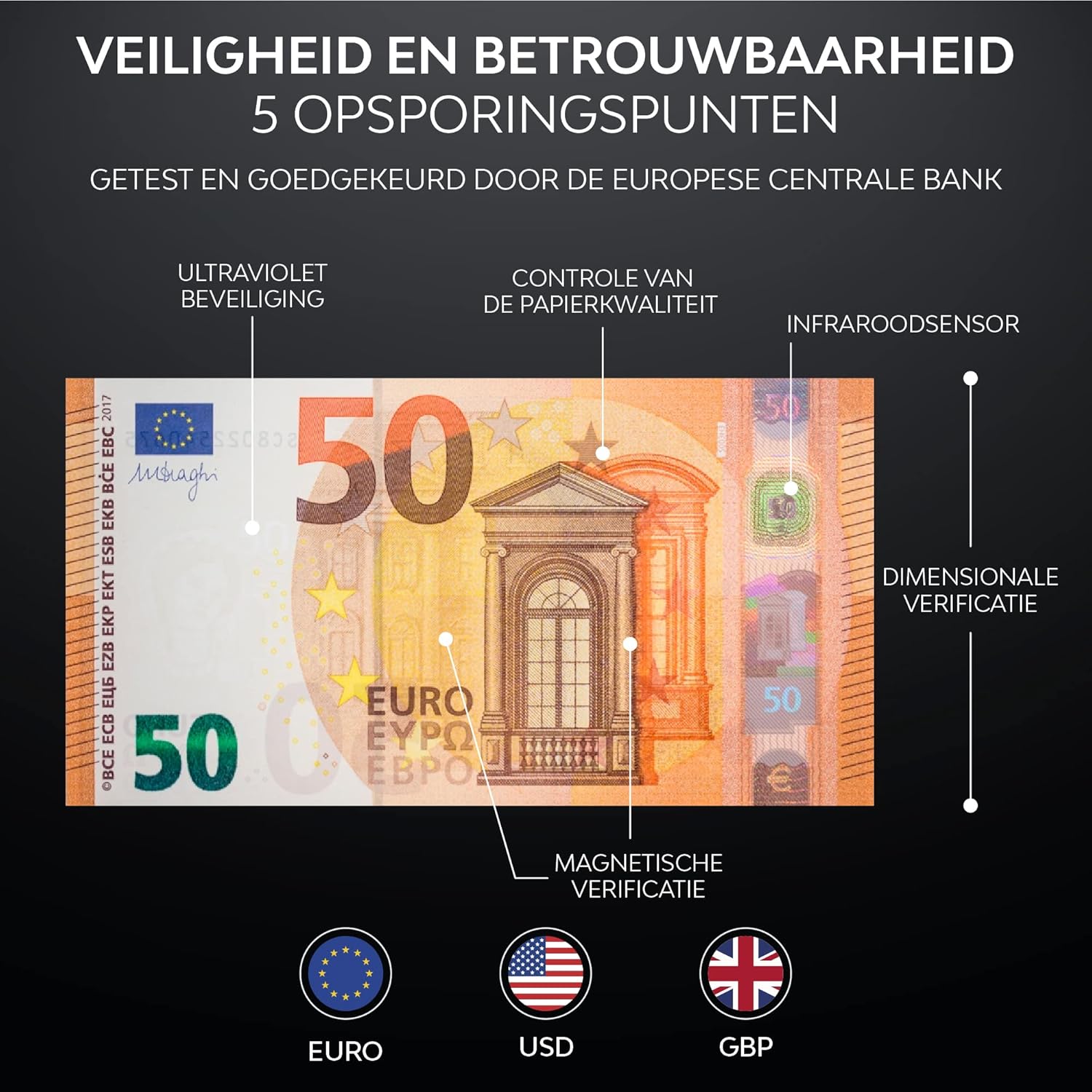
画像: 詳細 view of the 5 detection points for security and reliability.
4. セットアップ
4.1 開梱
すべての部品をパッケージから慎重に取り出します。以下のものがすべて揃っていることを確認してください。
- Zenacasa AL-130 Counterfeit Detector
- 電源アダプター
- 2 Rechargeable Lithium-ion Batteries
- ユーザーマニュアル
4.2 バッテリーの取り付け
The device operates on either the included power adapter or the two rechargeable Lithium-ion batteries. For portable use, install the batteries:
- デバイスの下部にあるバッテリー コンパートメントを見つけます。
- コンパートメントカバーを開きます。
- Insert the two Lithium-ion batteries, ensuring correct polarity.
- 電池カバーをしっかりと閉じてください。
4.3電源接続
Connect the power adapter to the DC input port on the device and then plug it into a standard electrical outlet. The device can be used while charging the batteries.

Image: The portable design of the AL-130, powered by an adapter or rechargeable battery.
5. 操作手順
5.1 電源のオン/オフ
Press the power button (usually indicated by a universal power symbol) to turn the device on or off. The LED display will illuminate upon startup.
5.2 Inserting Banknotes
Insert banknotes one by one into the designated slot. The device accepts banknotes in any orientation. Ensure the banknote is inserted smoothly and fully into the slot for accurate detection and counting.
5.3 表示の見方
LED ディスプレイにはリアルタイムの情報が表示されます。
- Currency Indicator: Shows the detected currency (e.g., EUR, USD, GBP).
- Detection Icons: Displays active detection methods (UV, MG, IR).
- Banknote Count: Shows the number of banknotes processed (PCS).
- Total Value: Displays the cumulative value of detected banknotes.
- エラーコード: Indicates issues or counterfeit detection.
5.4 Currency Selection (CUR/DIR Button)
使用 CUR / DIR button to cycle through available currencies (Euro, US Dollar, British Pound) if manual selection is required, or to change the direction of banknote output if supported.
5.5 Clearing Count (REP/CLR Button)
を押す REP / CLR button to clear the current count and total value on the display, or to repeat the last detection result.
5.6 偽造品検出
If a counterfeit banknote is detected, the device will typically:
- 音声アラートを発します。
- Display an error code (e.g., E11) or a clear message indicating a counterfeit.
- Stop processing the banknote, often ejecting it back or holding it in the output tray.

Image: The device indicating a counterfeit banknote with an 'E11 Matching failure' error.
6. メンテナンス
6.1デバイスのクリーニング
定期的な清掃により最適なパフォーマンスが保証されます。
- 清掃する前にデバイスの電源をオフにしてプラグを抜いてください。
- 外側を拭くときは、柔らかく乾いた布を使用してください。
- For the banknote path and sensors, use a soft brush or compressed air to remove dust and debris. Avoid using liquid cleaners directly on sensors.
6.2ソフトウェアアップデート
The Zenacasa AL-130 supports free software updates to ensure compatibility with new banknote series and improved detection algorithms. Refer to the manufacturer's website or contact customer support for instructions on how to download and install the latest software updates.

Image: The importance of free software updates for long-term reliability.
7。 トラブルシューティング
If you encounter issues with your Zenacasa AL-130, refer to the following common problems and solutions:
| 問題 | 考えられる原因 | 解決 |
|---|---|---|
| デバイスの電源が入らない | No power, dead batteries, faulty adapter | Check power adapter connection. Ensure batteries are charged or replace them. |
| Banknote rejected / Error code (e.g., E11) | Counterfeit detected, banknote damaged, incorrect insertion, dirty sensors | Remove the rejected banknote. Inspect for damage. Re-insert correctly. Clean sensors as per maintenance section. |
| 不正確なカウント | Dirty sensors, worn banknotes | Clean the sensors. Ensure banknotes are not excessively worn or folded. |
| デバイスがフリーズしたり故障したりする | 一時的なソフトウェアの不具合 | Turn off the device, wait a few seconds, then turn it back on. |
これらの解決策を試しても問題が解決しない場合は、カスタマー サポートにお問い合わせください。
8. 仕様
- モデル: AL-130
- ブランド: Zenacasa
- メーカー: BMSインターナショナル
- 製品寸法: 19 x 16 x 14 cm
- 重さ: 1.48キロ
- 電源: AC Adapter, 2 x Lithium-ion Batteries (included)
- Supported Currencies: Euro, US Dollar, British Pound
- Detection Methods: UV, MG, IR, Dimensional, Paper Quality
9. 保証とサポート
9.1 保証
The Zenacasa AL-130 comes with a 1年間保証 ご購入日から1年間有効です。本保証は、通常の使用における製造上の欠陥および故障を対象としています。誤用、事故、無許可の修理、または通常の摩耗や損耗による損傷は保証の対象外となります。
9.2 カスタマーサポート
For technical assistance, warranty claims, or any questions regarding your Zenacasa AL-130, please contact Zenacasa customer support through the retailer where the product was purchased or visit the official Zenacasa web連絡先情報のサイト。