
導入
This manual provides detailed instructions for the proper use and maintenance of your Borofone BC26 Wireless FM Transmitter. Please read this manual thoroughly before operating the device to ensure optimal performance and safety.
製品終了view
The Borofone BC26 is a versatile car accessory that combines an FM transmitter, Bluetooth connectivity, and a dual USB car charger. It allows you to stream audio from your smartphone or USB flash drive to your car's FM radio and charge your devices simultaneously.
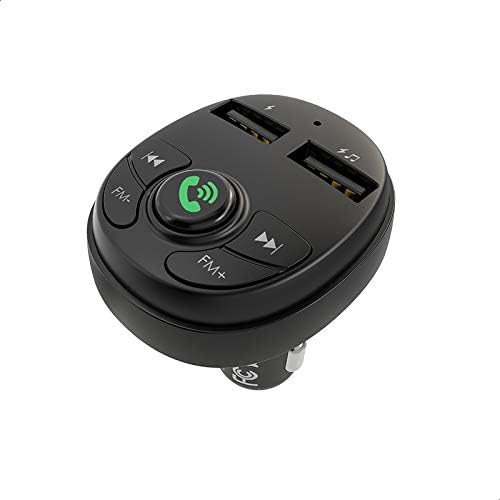
画像: トップダウン view of the Borofone BC26 FM Transmitter, highlighting its control buttons for FM tuning, call management, track control, and the two USB charging ports.
特徴
- Wireless FM transmission for audio streaming.
- Bluetooth connectivity for hands-free calls and music playback.
- Dual USB ports for charging mobile devices (2.1A output).
- Supports USB flash drive for music playback.
- Compatible with MP3, WMA, WAV, and FLAC audio formats.
- Digital LED display for FM frequency.
- Universal compatibility with 12V-24V car power outlets.
パッケージ内容
- Borofone BC26 Wireless FM Transmitter
- ユーザーマニュアル

Image: The retail packaging for the Borofone BC26, displaying the device and its main functionalities such as Bluetooth 5.0, 2.1A output, and USB flash drive support.
設定
- 送信機を挿入します: Plug the Borofone BC26 into your car's 12V or 24V cigarette lighter socket. The device will power on automatically, and the LED display will light up.
- FM周波数をチューニングする: Adjust your car's FM radio to an empty frequency (one with no broadcast). Then, press and hold the 'Call' button on the BC26 until the FM frequency on the LED display starts flashing. Use the 'FM-' and 'FM+' buttons to match the transmitter's frequency to your car's radio frequency. Once matched, press the 'Call' button again to confirm.
- Bluetoothのペアリング: On your smartphone, enable Bluetooth and search for available devices. Select 'BC26' from the list to pair. A voice prompt will confirm successful connection.

Image: The Borofone BC26 FM Transmitter plugged into a car's power outlet, showing the digital display set to an FM frequency, ready for use.
操作手順
音楽再生に
- Bluetooth経由: Once paired, open your music player on your smartphone. Audio will be transmitted to your car's FM radio. Use the 'Previous Track' and 'Next Track' buttons on the BC26 to control playback.
- Via USB Flash Drive: Insert a USB flash drive containing MP3/WMA/WAV/FLAC audio files into the designated USB port (usually marked with a music note or data symbol). The device will automatically detect and play music. Use the 'Previous Track' and 'Next Track' buttons to navigate.
ハンズフリー通話
- 通話の応答/終了: 「通話」ボタンを 1 回押すと、着信に応答するか、進行中の通話を終了します。
- 通話を拒否: Press and hold the 'Call' button to reject an incoming call.
- リダイヤル: 「通話」ボタンを2回押すと、最後の番号にリダイヤルします。
充電デバイス
Connect your mobile device to either of the USB charging ports using a compatible USB cable. The ports provide a total output of 2.1A for efficient charging.
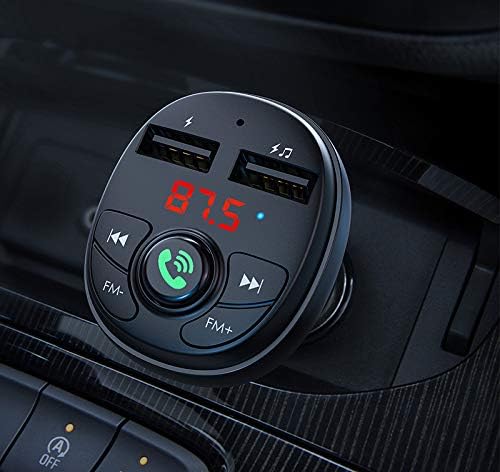
画像: 詳細な view of the Borofone BC26 in a car's console, illustrating the illuminated digital display, clearly labeled control buttons, and the dual USB charging ports.
メンテナンス
- デバイスを乾燥した状態に保ってください。湿気は内部回路に損傷を与える可能性があります。
- デバイスを極端な温度にさらさないでください。
- 柔らかく乾いた布でデバイスを拭いてください。刺激の強い化学薬品や研磨剤入りの洗剤の使用は避けてください。
- Ensure the cigarette lighter socket is clean and free of debris for proper connection.
トラブルシューティング
- 電源なし: Ensure the device is fully inserted into the car's cigarette lighter socket. Check if the car's power outlet is functioning.
- 音質が悪い/雑音: Adjust the FM frequency on both the transmitter and your car radio to an unused channel. Avoid frequencies occupied by strong radio stations. Ensure the volume on your phone and car radio is set appropriately.
- Bluetoothの切断: Re-pair the device with your phone. Ensure your phone's Bluetooth is enabled and within range.
- USBフラッシュドライブが再生されない: Ensure the USB flash drive is formatted correctly (FAT32) and contains supported audio files (MP3/WMA/WAV/FLAC). Try a different USB flash drive.
仕様
| 特徴 | 仕様 |
|---|---|
| ブランド | ボロフォン |
| モデル | BC26 |
| 入力ボリュームtage | DC 12-24V |
| USB出力 | 2.1A(最大) |
| Bluetoothバージョン | Supported (Specific version not provided, but typically 5.0 or higher for modern devices) |
| サポートされているオーディオ形式 | MP3、WMA、WAV、FLAC |
| 接続技術 | USB、Bluetooth、FM |
| 寸法 | 14 x 8.8 x 3.2 cm (approximate shipment dimensions) |
| 重さ | 52グラム |
安全情報
- デバイスを分解したり改造したりしないでください。
- お子様の手の届かない場所に保管してください。
- Avoid using the device in extremely dusty or humid environments.
- Do not expose to open flames or direct sunlight for extended periods.
- Ensure secure placement in the car's power outlet to prevent dislodging during driving.
保証とサポート
Borofone products are designed for reliability and performance. For warranty information, technical support, or service inquiries, please refer to the documentation provided with your purchase or contact your local retailer. Keep your proof of purchase for warranty claims.