
1. はじめに
The Sygonix SY-4599778 is a robust, surface-mounted code lock designed for secure access control. This device features a durable metal, vandal-resistant housing and is IP66 rated for weather resistance, making it suitable for both indoor and outdoor environments. Access can be granted via RFID card or a user-defined PIN code.
2. 安全情報
一般的な安全性
- インストールと操作の前に、すべての指示を注意深くお読みください。
- このマニュアルは将来の参照用に保管してください。
- ご自身でデバイスの改造や修理を試みないでください。すべてのメンテナンスは資格のある専門家にご依頼ください。
- デバイスが指定された動作条件内で使用されていることを確認してください。
電気安全
- The device operates on 18V/DC. Ensure the power supply matches this requirement.
- Disconnect power before performing any installation or wiring work.
- Wiring should be performed by a qualified electrician to prevent electrical hazards.
- 短絡を防ぐために、すべての接続が安全かつ絶縁されていることを確認してください。
環境への配慮
- The device has an IP66 rating, providing protection against dust ingress and powerful water jets.
- While weather-resistant, avoid submerging the device in water.
- デバイスを指定された動作範囲外の極端な温度にさらさないでください。
3.製品オーバーview
特徴
- Vandal-resistant metal housing for enhanced security.
- IP66 weather resistance for outdoor installation.
- Multiple access methods: RFID card or PIN code.
- Integrated keypad for code entry.
コンポーネント
パッケージには通常、次のコンポーネントが含まれます。
- Sygonix SY-4599778 Code Lock Unit (Keypad)
- 取り付けネジと壁プラグ
- Allen Key for secure mounting
- Diode (for electrical protection)
- Wiring Cable (integrated)
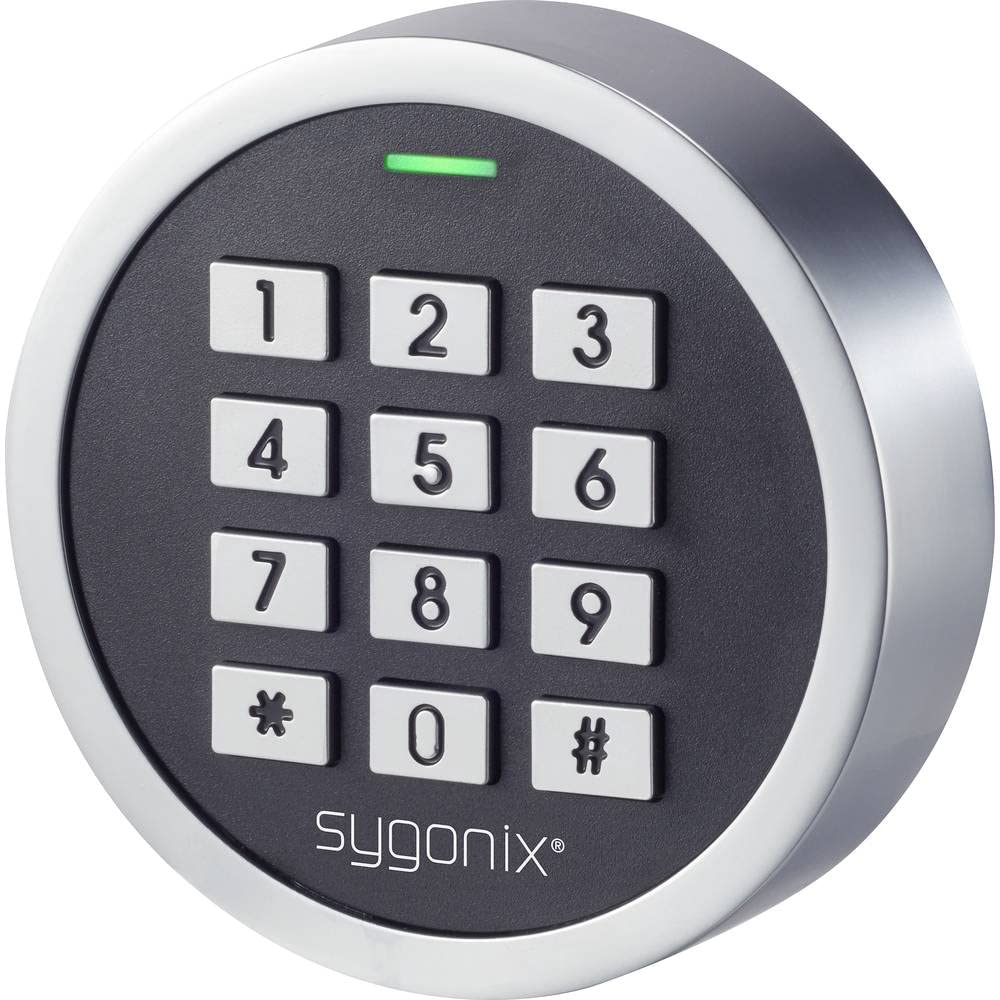
図1: 前面 view of the Sygonix SY-4599778 Code Lock, showing the numeric keypad and brand logo.
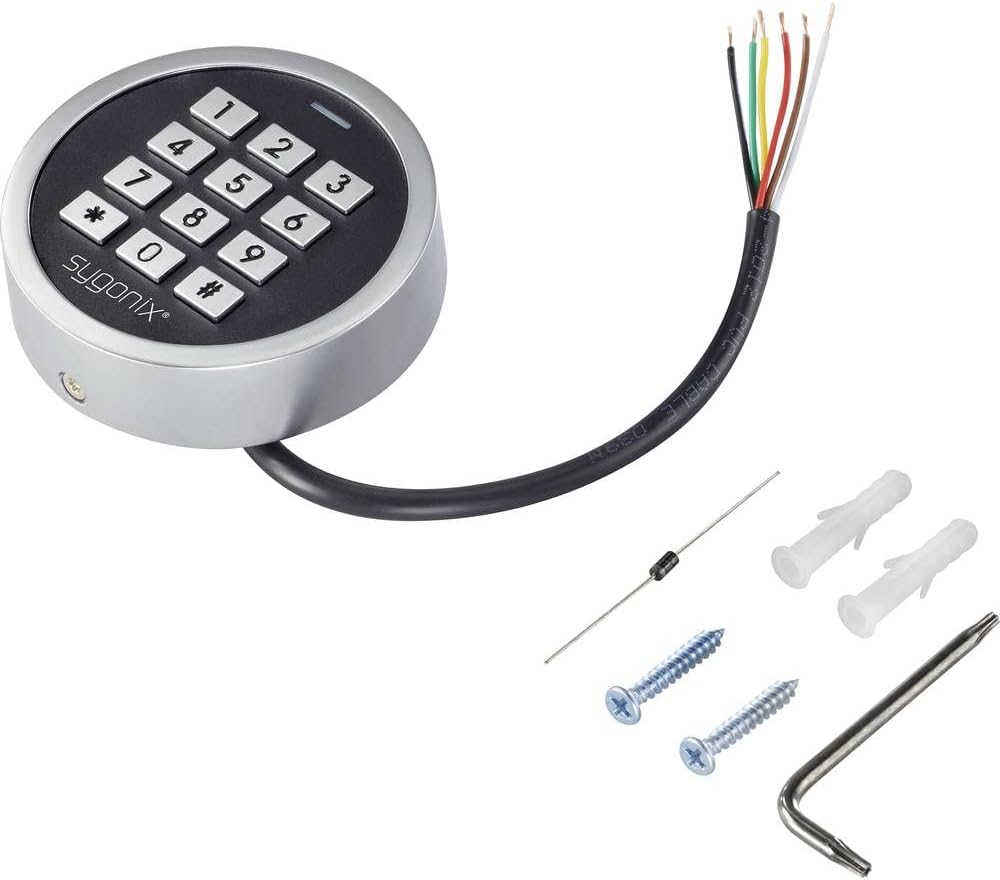
Figure 2: The Sygonix SY-4599778 Code Lock unit, displaying the integrated wiring cable, mounting screws, wall plugs, and a diode.
4. セットアップとインストール
ユニットの取り付け
- Choose a suitable surface for mounting, ensuring it is flat and stable.
- Use the back plate of the unit as a template to mark the drilling points for the mounting screws.
- マークした位置に穴を開け、付属の壁プラグを挿入します。
- Secure the back plate to the wall using the mounting screws.
- Attach the main unit to the secured back plate, ensuring a snug fit. Use the Allen key to tighten any security screws if present.
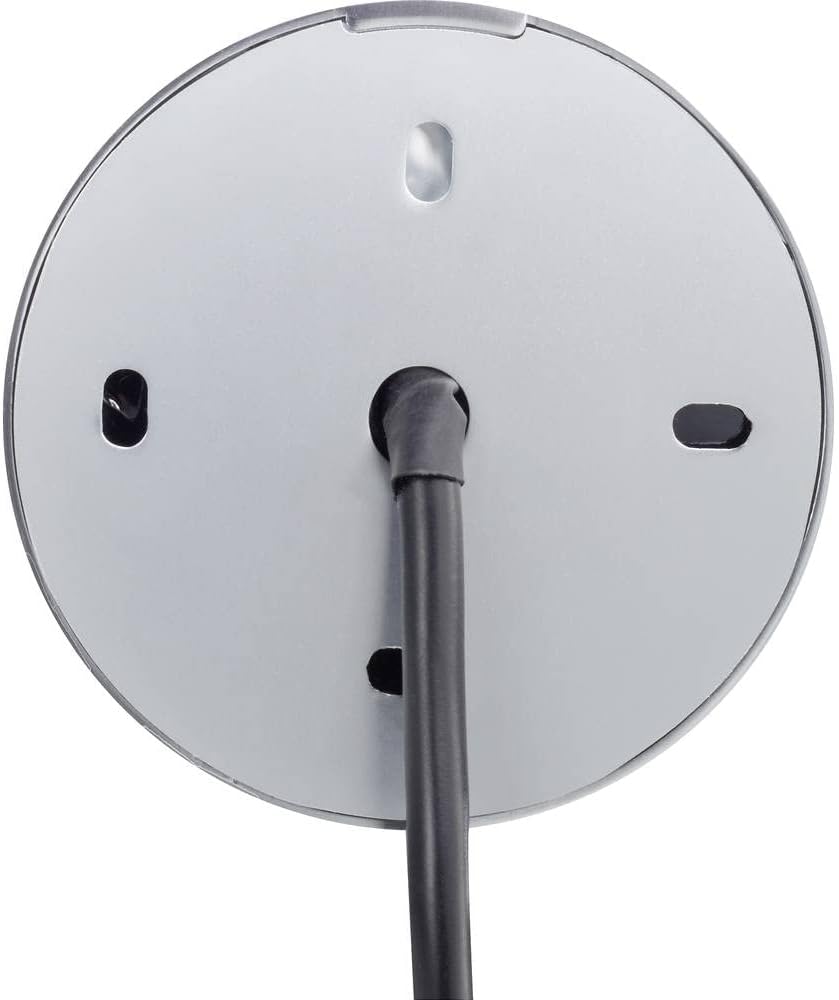
図3:背面 view of the code lock, illustrating the mounting points and the integrated wiring cable.
配線接続
The device requires an 18V/DC power supply. Connect the integrated wiring cable according to the following general guidelines. It is highly recommended that a qualified electrician performs the wiring.
- 電源入力ワイヤを識別します (通常、プラスは赤、マイナスは黒)。
- Connect the provided diode to the power line as instructed in the detailed wiring diagram (not provided in this general manual, refer to product-specific diagram). The diode helps protect the circuit from reverse polarity.
- Connect the output wires (e.g., for electric strike, alarm) to the corresponding terminals of your access control system.
- Ensure all connections are insulated and protected from environmental factors.
- After wiring, restore power to the unit. The unit should power on, indicated by an LED or audible signal.
5. 操作手順
This section outlines the basic operation and programming of the Sygonix SY-4599778 code lock. Specific programming steps may vary slightly; always refer to the detailed programming guide included with your product for precise instructions.
Initial Setup and Master Code
- Upon first power-up, the device will be in a default state.
- Enter the default master programming code (refer to your product's specific manual for this code, often a sequence like `*123456#`).
- Change the default master code immediately for security purposes. Follow the prompts or specific key sequences to set a new master code.
Adding User PIN Codes
- Enter the master programming code to enter programming mode.
- Select the option to add a new user code (e.g., press `1` or a specific key).
- Enter the desired new PIN code (typically 4-6 digits) and confirm it.
- プログラミングモードを終了します。
Adding RFID Cards
- Enter the master programming code to enter programming mode.
- Select the option to add a new RFID card (e.g., press `2` or a specific key).
- Present the RFID card to the reader area on the keypad. The unit will typically beep or flash to confirm registration.
- プログラミングモードを終了します。
ロックへのアクセス
アクセスするには:
- PINコードの使用: Enter your valid PIN code followed by the `#` key. The lock will activate (e.g., unlock an electric strike) for a set duration.
- RFID カードの使用: Present your registered RFID card to the reader area on the keypad. The lock will activate for a set duration.

Figure 4: The code lock keypad with a green indicator light, typically indicating successful operation or entry into programming mode.
6. メンテナンス
クリーニング
- キーパッドの表面を柔らかくてきれいな布で拭いてください。amp 布。
- 研磨剤入りの洗剤、溶剤、または刺激の強い化学薬品は、仕上げや電子部品を損傷する恐れがあるので使用しないでください。
- Ensure no liquid enters the internal components of the device.
検査
- Periodically inspect the unit for any signs of physical damage or wear.
- Check the mounting screws to ensure the unit remains securely attached to the surface.
- Verify that all wiring connections are intact and free from corrosion or damage.
7。 トラブルシューティング
If you encounter issues with your Sygonix SY-4599778 code lock, refer to the following common problems and solutions:
| 問題 | 考えられる原因 | 解決 |
|---|---|---|
| ユニットの電源が入りません。 | 電源が供給されていないか、配線が間違っています。 | Check the 18V/DC power supply connection. Ensure wiring is correct and secure. |
| PIN code not recognized. | Incorrect PIN entered or PIN not programmed. | Verify the PIN code. Re-program the PIN if necessary. Ensure the '#' key is pressed after the PIN. |
| RFID カードが機能しません。 | Card not programmed or not presented correctly. | Ensure the RFID card is registered. Present the card directly to the reader area. |
| Lock does not activate after valid entry. | Wiring issue to the electric strike/lock mechanism. | Check the output wiring from the code lock to the connected locking device. Ensure the locking device is functional. |
| ユニットが応答しません。 | 一時的な電子的な不具合。 | Disconnect power for a few seconds, then reconnect to perform a power cycle. |
これらの解決策を試しても問題が解決しない場合は、カスタマー サポートまたは資格のある技術者にお問い合わせください。
8. 仕様
| モデル番号: | SY-4599778 |
| ブランド: | シゴニックス |
| 電源: | 18V/DC |
| 保護等級: | IP66(防塵、強力な噴流水から保護) |
| アクセス方法: | PIN Code, RFID Card |
| 材料: | Metal (Vandal-resistant housing) |
| 寸法(長さ×幅×高さ): | 20 x 73 x 73 ミリメートル |
| 重さ: | 199グラム |
| 推奨用途: | Outdoor environments, weather-exposed areas |
9. 保証とサポート
保証情報
The availability of spare parts for this product is typically 1 year from the date of purchase. For specific warranty terms and conditions, please refer to the documentation provided at the time of purchase or contact your retailer.
カスタマーサポート
For technical assistance, troubleshooting beyond this manual, or warranty claims, please contact your point of purchase or the official Sygonix customer support channels. Contact information can usually be found on the product packaging or the manufacturer's official webサイト。