
KPREPUBLIC MXRSKEY 60U OTM Black Switch x1
KPREPUBLIC MXRSKEY 60U Mechanical Keyboard User Manual
Model: MXRSKEY 60U OTM Black Switch x1
1. はじめに
This manual provides comprehensive instructions for the KPREPUBLIC MXRSKEY 60U Mechanical Keyboard. Please read this manual thoroughly before using the product to ensure proper operation and longevity.
The MXRSKEY 60U is a 60% mechanical keyboard featuring Outemu switches and single-color mixed LED backlighting. It supports multimedia combination keys for enhanced functionality. Please note that this keyboard is not hot-swappable and does not feature RGB backlighting; each row has a single, fixed color LED.
2. パッケージ内容
パッケージにすべてのアイテムが含まれていることを確認してください。
- KPREPUBLIC MXRSKEY 60U Mechanical Keyboard
- USB-Cケーブル
- ユーザーマニュアル(このドキュメント)
3. 仕様
| 特徴 | 説明 |
|---|---|
| キーボードレイアウト | 60% コンパクト |
| スイッチタイプ | Outemu Mechanical Switches (Black Switch variant) |
| キーキャップ素材 | ABS Doubleshot Keycaps |
| バックライト | Single Color Mixed LED (Each row with one fixed color) |
| 接続性 | USB-C(取り外し可能なケーブル) |
| 特集 | Multimedia Combination Keys, Non-hot-swappable switches |
| メーカー | KPREPUBLIC |
| モデル番号 | MXRSKEY 60U |
4.セットアップガイド
4.1 キーボードの接続
- Locate the USB-C port on the back or side of the MXRSKEY 60U keyboard.
- 付属の USB-C ケーブルの一方の端をキーボードの USB-C ポートに挿入します。
- Insert the other end of the USB-A connector into an available USB port on your computer.
- キーボードはオペレーティングシステムによって自動的に認識されます。通常、追加のドライバーは必要ありません。
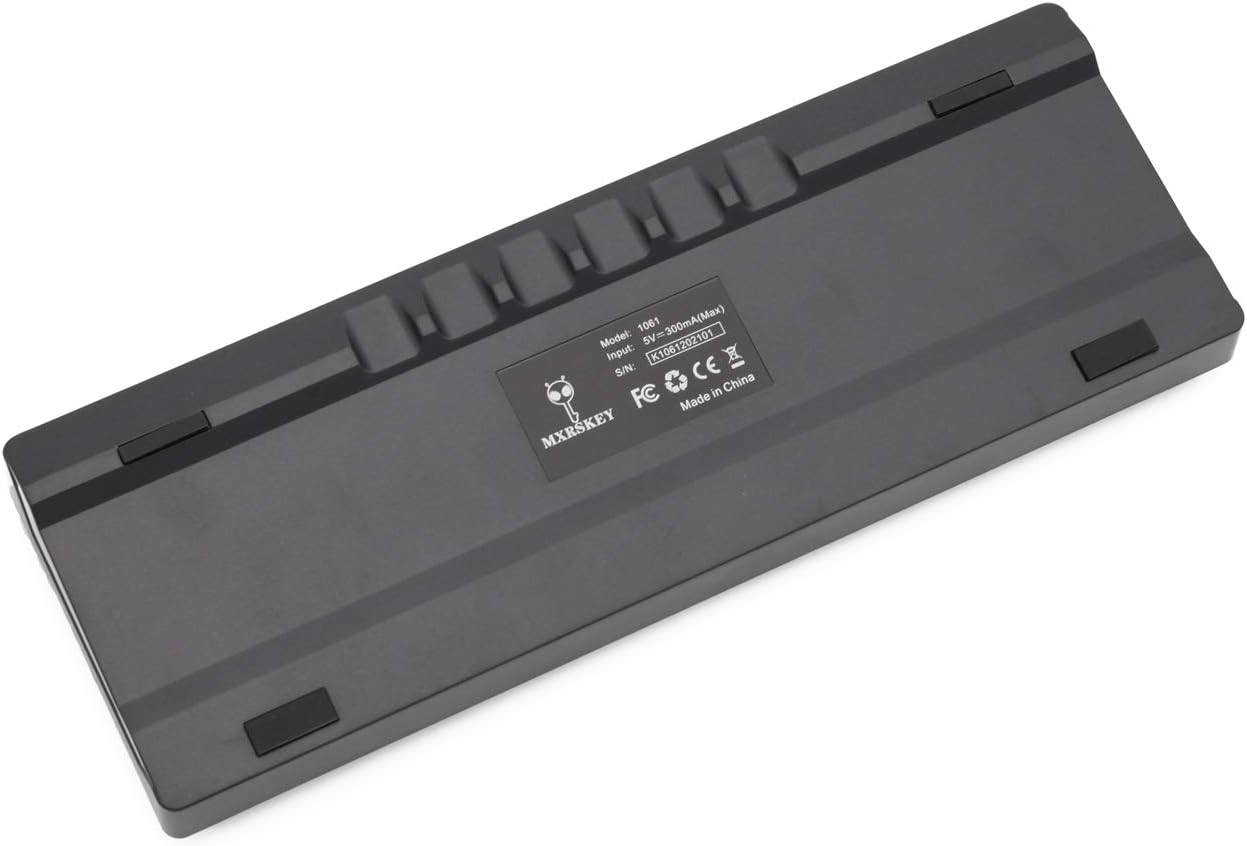
画像: 背面 view of the MXRSKEY 60U keyboard, highlighting the USB-C port for connection and the stable rubber feet.
5. 操作手順
5.1 基本的なキーボード機能
The MXRSKEY 60U is a standard QWERTY layout 60% keyboard. All standard alphanumeric and symbol keys function as expected.

画像: 上 view of the MXRSKEY 60U keyboard, showcasing its compact 60% layout and the single-color mixed LED backlighting.
5.2 ファンクションキー(FNキー)の組み合わせ
Due to its compact 60% layout, many functions are accessed via the Function (FN) key in combination with other keys. Refer to the table below for common FN key combinations.
| コンビネーションキー | 関数 | 注記 |
|---|---|---|
| FN + TAB | キーボードをリセットする | |
| FN+Esc | ~ | |
| FN + 1 | F1 | |
| FN + 2 | F2 | |
| FN + 3 | F3 | |
| FN + 4 | F4 | |
| FN + 5 | F5 | |
| FN + 6 | F6 | |
| FN + 7 | F7 | |
| FN + 8 | F8 | |
| FN + 9 | F9 | |
| FN + 10 | F10 | |
| FN + 11 | F11 | |
| FN + 12 | F12 | |
| FN + [ | 輝度- | |
| FN +] | 明るさ+ | |
| FN +; | 速度- | |
| FN+' | スピード+ | |
| FN+? | ↑ | |
| FN+Alt | ← | |
| FN+メニュー | ↓ | |
| FN+Ctrl | → | |
| FN + L | Back Lit Effect Change | |
| FN+バックスペース | Close Back lit | |
| マルチメディアキー | ||
| FN + A | 一時停止 | |
| FN + S | 前へ | |
| FN + D | 次 | |
| FN + F | ミュート | |
| FN+G | 巻+ | |
| FN + H | Vol- | |
| FN + J | 入れる | |
| FN + K | 家 | |
| FN+L Win | ウィンロック | |
| FN + L | PGUP | |
| FN+N | 削除 | |
| FN + M | 終わり | |
| FN + | PGDN | |
| FN +; | PRT | |
| FN + O | SCR | |
| FN + P | PS | |
Table: FN key combinations for various functions, including multimedia controls and navigation.

Image: Close-up of the keyboard's keycaps, illustrating the legends for primary and FN-accessed functions.
5.3 バックライト制御
The MXRSKEY 60U features single-color mixed LED backlighting. You can adjust the brightness and change the lighting effect using FN key combinations.
- FN+[: バックライトの明るさを下げます。
- FN +]: バックライトの明るさを上げます。
- FN +;: バックライトの速度/効果を下げます。
- FN + ': バックライトの速度/効果を上げます。
- FN+L: Change backlight effect.
- FN + バックスペース: Turn off backlight.

Image: The keyboard with its single-color mixed LED backlighting active, showing the distinct color zones per row.
6. メンテナンスとケア
6.1 キーボードのクリーニング
- 清掃する前に、キーボードをコンピューターから取り外してください。
- 柔らかく糸くずの出ない布で軽く拭き取ってください。ampキーキャップとシャーシを水または中性洗浄液で拭いてください。
- キーキャップ間のほこりやゴミを取り除くには、圧縮空気を使用してください。
- キーボードを損傷する恐れがあるため、刺激の強い化学薬品、研磨剤入りの洗剤、または過度の湿気の使用は避けてください。
6.2 ストレージ
長期間使用しない場合は、キーボードを直射日光や極端な温度を避け、乾燥した涼しい場所に保管してください。
7。 トラブルシューティング
| 問題 | 考えられる原因 | 解決 |
|---|---|---|
| キーボードが反応しない | ケーブル接続が緩んでいる、USB ポートが正しくない、システム ドライバーに問題がある。 | USB-Cケーブルがキーボードとコンピュータの両方にしっかりと接続されていることを確認してください。別のUSBポートを試してください。コンピュータを再起動してください。 |
| バックライトが動作しない | バックライトはオフ、明るさは最小に設定されています。 | Press FN + ] to increase brightness. Press FN + L to cycle through effects. Press FN + Backspace to toggle backlight. |
| 特定のキーが機能しない | キーキャップの下にゴミがあり、スイッチが故障しています。 | Use compressed air to clear debris. As switches are not hot-swappable, contact support if the issue persists. |
| FNキーの組み合わせが機能しない | 組み合わせが間違っています。一時的なソフトウェアの不具合です。 | Refer to the "Function (FN) Key Combinations" table. Try resetting the keyboard (FN+TAB). |
8. 保証とサポート
For warranty information and technical support, please refer to the official KPREPUBLIC web当サイトをご覧いただくか、販売店にお問い合わせください。保証請求のために購入時の領収書を保管してください。
Manufacturer: KPREPUBLIC
Date First Available: February 9, 2021
さらにサポートが必要な場合は、次のサイトをご覧ください。 KPREPUBLIC Brand Store on Amazon
関連文書 - MXRSKEY 60U OTM Black Switch x1
 |
PANTEON T14 HS Compact Mechanical Gaming Keyboard User Manual Comprehensive user manual for the PANTEON T14 HS compact mechanical gaming keyboard, covering setup, features, LED lighting controls, troubleshooting, technical specifications, and warranty information. |
 |
MMD Princess Plate Mounted Stabilizer V2 User Guide User guide for the MMD Princess Plate Mounted Stabilizer V2, a mechanical keyboard accessory. Provides product details, compatibility information, and essential safety warnings regarding fire risk, disposal, and choking hazards. |
 |
EDRA EK387 User Manual User manual for the EDRA EK387 keyboard, detailing instructions, key combinations, LED modes, specifications, and package contents. |
 |
Immersion Elite LED Display Lighting Installation Guide for Refrigerated Cases Comprehensive installation guide for Immersion Elite LED Display Lighting systems designed for refrigerated horizontal cases. Covers retrofit and OEM installations, component details, wiring, and safety precautions. |
 |
E-DRA EK3104 Keyboard User Manual and Specifications User manual for the E-DRA EK3104 keyboard, providing detailed information on key combinations, LED modes, technical specifications, and package contents. Learn how to maximize your E-DRA EK3104 keyboard's features. |
 |
REDRAGON K552RGB-JPTI Mechanical Gaming Keyboard Operating Instructions Comprehensive operating instructions and specifications for the REDRAGON K552RGB-JPTI mechanical gaming keyboard, covering setup, features, customization, safety, and warranty information. |