
1. 重要な安全情報
Before operating the Zipro Nix Rower, please read and understand all instructions in this manual. Keep this manual for future reference.
- 運動プログラムを開始する前に医師に相談してください。
- 使用する前に、すべての部品が正しく組み立てられ、締め付けられていることを確認してください。
- Place the rower on a flat, stable surface. Ensure adequate clear space around the equipment (at least 0.6 meters).
- 動作中は子供やペットを装置に近づけないでください。
- 使用者の最大体重容量 120 kg (264 ポンド) を超えないようにしてください。
- 適切な運動用の服と靴を着用してください。
- 痛み、めまい、息切れなどの症状が現れた場合は、直ちに運動を中止し、医師に相談してください。
- Regularly inspect the rower for wear and tear, especially cables, straps, and moving parts. Do not use if damaged.
2. パッケージ内容
Carefully unpack the carton and verify all parts are present and undamaged. If any parts are missing or damaged, contact customer support immediately.
- Main Rower Frame (pre-assembled components)
- Seat and Rail Assembly
- フットレスト
- ハンドルバー
- コンピューターコンソール
- ハードウェアキット(ボルト、ワッシャー、ナット、工具)
- ユーザーマニュアル
3. 組み立てとセットアップ
Follow these steps to assemble your Zipro Nix Rower. It is recommended to have two people for assembly.
- コンポーネントを解凍します: Lay out all parts on a clean, flat surface. Refer to the parts diagram in the included manual for identification.
- スタビライザーを取り付ける: 付属のボルトとワッシャーを使用して、フロントスタビライザーとリアスタビライザーをメインフレームに固定します。安定性を確保するために、しっかりと締め付けてください。
- シートレールの取り付け: Attach the seat rail to the main unit. Ensure the seat carriage slides smoothly along the rail.
- フットレストの取り付け: Secure the footrests to the main frame. Ensure the adjustable straps are correctly positioned.
- ハンドルバーを接続する: Attach the handlebar to the pulling mechanism. Verify the strap or chain is securely connected.
- Install Computer Console: Mount the computer console onto its designated bracket. Connect any necessary sensor cables from the main unit to the console. Insert batteries if required.
- 最終チェック: Double-check all bolts and connections to ensure they are secure. Test the seat movement and handlebar pull for smooth operation.

図3.1: The Zipro Nix Rower with its approximate dimensions: Length 183 cm, Width 46 cm, Height 48 cm. These dimensions are important for planning the placement of the rower in your home.
4. 操作手順
4.1. 抵抗の調整
The Zipro Nix Rower features an 8-level magnetic resistance system. To adjust the resistance, locate the rotary knob on the main unit, typically near the footrests. Turn the knob clockwise to increase resistance (levels 1-8) and counter-clockwise to decrease it. Start with a lower resistance level and gradually increase as your fitness improves.

図4.1: 閉じる view of the adjustable footrests and the 8-level resistance control knob on the Zipro Nix Rower.
4.2. Using the Computer Console
The easy-to-use LCD computer console displays various workout data to help you monitor your progress.
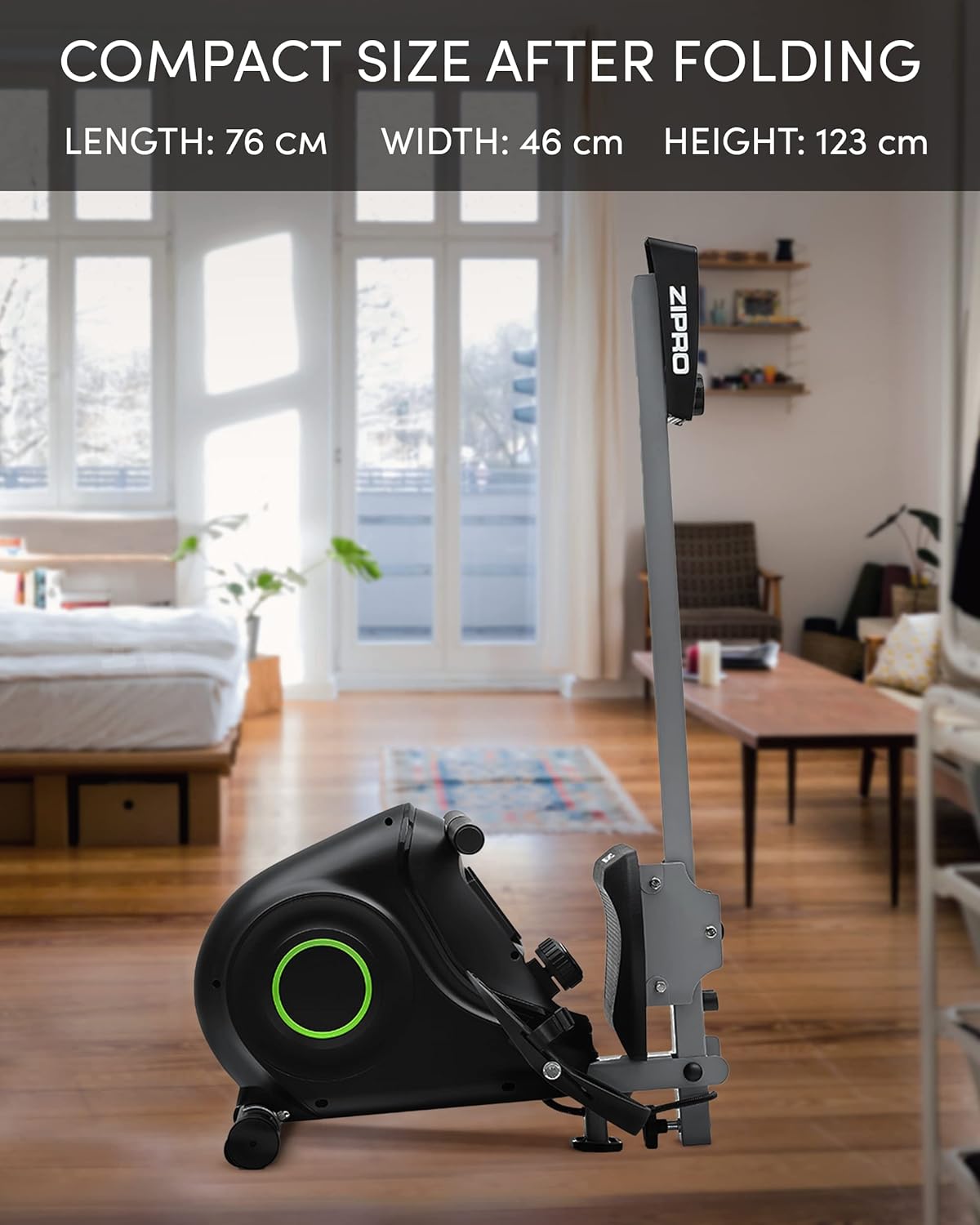
図4.2: The LCD computer display of the Zipro Nix Rower, showing icons for Time, Calories, Speed, and Pulse, along with numerical readouts.
- 電源オン/オフ: The console typically powers on automatically when you begin rowing or press any button. It will power off after a period of inactivity.
- 機能: The display cycles through or allows selection of the following metrics:
- 時間: ワークアウトの継続時間。
- COUNT (Strokes): 実行されたストロークの合計数。
- カロリー: トレーニング中に消費される推定カロリー。
- スピード: 現在の漕ぎ速度。
- パルス: Heart rate (if a compatible heart rate monitor is used and connected).
- リセット: Press and hold the button (usually marked 'MODE' or 'RESET') to clear all current workout data.
4.3. 適切な漕ぎ方
To maximize effectiveness and prevent injury, maintain proper form:
- キャッチ: Start with knees bent, arms extended forward, and back straight.
- ドライブ: Push off with your legs, then lean back slightly, and finally pull the handlebar towards your abdomen.
- 仕上げる: 足は伸ばし、体はわずかに後ろに傾き、ハンドルは腹部に位置づけます。
- 回復: 腕を前に伸ばし、次に前傾し、最後に膝を曲げてキャッチの姿勢に戻ります。

図4.3: The ergonomically designed seat of the Zipro Nix Rower, providing comfort during extended workouts.
5.メンテナンスと保管
5.1. 清掃
使用後は毎回ローワーを拭いて清潔にしてくださいamp cloth to remove sweat and dust. Do not use abrasive cleaners or solvents, as they may damage the finish or electronic components.
5.2. 潤滑
The magnetic resistance system is largely maintenance-free. However, periodically check the seat rail for any debris and wipe it clean. If the seat movement becomes less smooth, a small amount of silicone-based lubricant can be applied to the rail, but avoid oil-based lubricants.
5.3. ストレージ
The Zipro Nix Rower is designed to be foldable for compact storage, saving space when not in use.
- 折りたたみ: Follow the instructions in your assembly manual for folding the rower into its vertical position. This typically involves releasing a locking pin or knob and folding the rail upwards.
- 輸送: Utilize the integrated transport wheels located on the rear stabilizer to easily move the rower. Tilt the rower onto its wheels and push it to your desired storage location.

図5.1: The Zipro Nix Rower in its compact, folded position, ideal for space-saving storage.

図5.2: 閉じる view of the transport wheels on the Zipro Nix Rower, facilitating easy relocation of the unit.
6。 トラブルシューティング
If you encounter issues with your Zipro Nix Rower, refer to the following common problems and solutions:
| 問題 | 考えられる原因 | 解決 |
|---|---|---|
| No display on computer console | Batteries are dead or incorrectly installed. Loose sensor cable connection. | Replace batteries. Check battery orientation. Ensure sensor cable is securely plugged into the console. |
| Resistance feels inconsistent or too low/high | Resistance knob not set correctly. Internal magnetic mechanism issue. | Adjust the resistance knob to a different level. If problem persists, contact customer support. |
| シートがスムーズにスライドしない | Debris on the rail. Rail or wheels need lubrication. | Clean the seat rail and wheels. Apply a small amount of silicone-based lubricant to the rail. |
| 動作中に異常な音がする | Loose bolts or components. Internal friction. | Check and tighten all visible bolts. If noise persists, discontinue use and contact customer support. |
7. 仕様
Detailed technical specifications for the Zipro Nix Rower:
| 特徴 | 仕様 |
|---|---|
| モデル番号 | 6299217 |
| ブランド | ジプロ |
| 抵抗メカニズム | 磁気 |
| 抵抗レベル | 8 |
| 表示タイプ | 液晶 |
| 表示されるメトリック | Time, Strokes (Count), Calories, Speed, Pulse |
| フレーム素材 | 炭素鋼 |
| 最大ユーザー重量 | 120キログラム(264ポンド) |
| 製品寸法(長さ x 幅 x 高さ) | 183 x 46 x 48 cm(72 x 18.1 x 18.9インチ) |
| 折りたたみ時の寸法(長さ x 幅 x 高さ) | 約76 x 46 x 123 cm (30 x 18.1 x 48.4インチ) |
| アイテム重量 | 27キログラム(59.5ポンド) |
| 電源(コンソール) | 電池駆動 |
| 特集 | Adjustable foot strap, Foldable design, Transport wheels |
8. 保証とサポート
For warranty information, please refer to the warranty card included with your product or visit the official ZIPRO website. If you require technical assistance, replacement parts, or have any questions not covered in this manual, please contact ZIPRO customer support through their official channels.
サポートにお問い合わせの際は、モデル番号 (6299217) と購入証明をご用意ください。