
導入
This manual provides instructions for the operation and maintenance of your WIITHINK Portable CD Boombox, model WTB771. This device features multiple audio playback options including CD, FM radio, Bluetooth, USB, and AUX input, designed for versatile use.

画像: 正面 view of the WIITHINK Portable CD Boombox WTB771, black color, showing the display, control buttons, speakers, and handle.
パッケージ内容
- 1 x WIITHINK Portable CD Radio Boombox (WTB771)
- 電源ケーブル x 1
- 1xAUXライン
- ユーザーマニュアル x 1
- リモコン x 1
設定
電源
ブームボックスはAC電源または電池で駆動できます。
- AC電源: Connect the provided power cable to the AC port on the back of the unit and plug it into a standard wall outlet (AC voltage: 220V / 50Hz, 110V / 60Hz).
- バッテリー電源: For portable use, insert 4 C-sized batteries (not included) into the battery compartment located on the bottom of the unit. Ensure correct polarity.
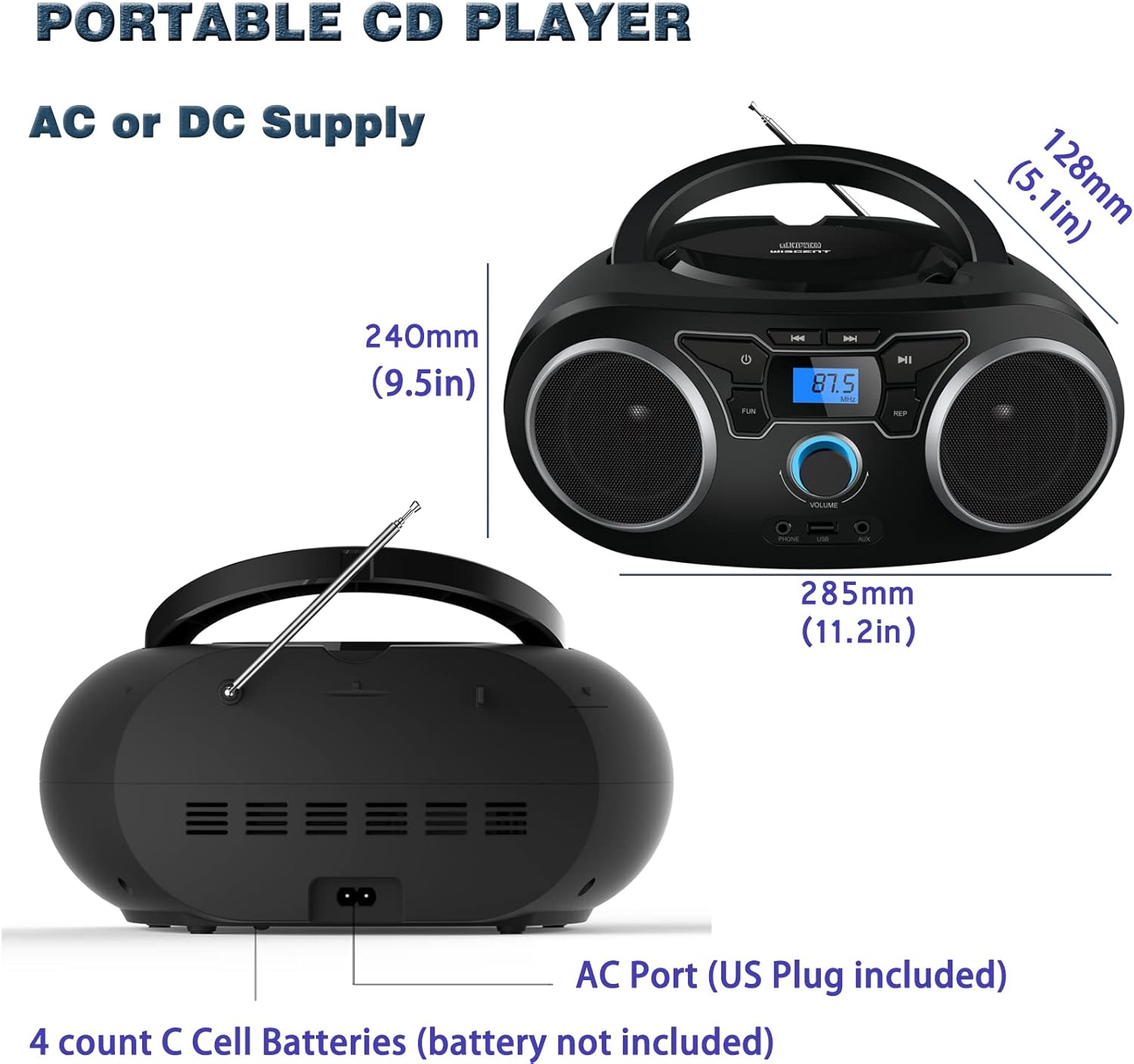
画像: 背面 view of the boombox, highlighting the AC power port and the battery compartment for 4 C-sized batteries.
操作手順
一般的なコントロール
The unit features a digital LCD screen and various control buttons and knobs. The main volume control is a rotary knob on the front. A remote control is also included for convenient operation.

画像: トップダウン view of the boombox, showing the CD compartment, control buttons, and volume knob.
1.CDの再生
- 本体上部にあるCDコンパートメントの蓋を開けます。
- Place a CD (CD, CD-R, CD-RW, MP3-CD) onto the spindle with the label side facing up.
- CDコンパートメントの蓋を閉じます。
- を押す モード ボタンをクリックしてCDモードを選択します。
- を押す 再生/一時停止 再生を開始するボタン。
- 使用 スキップ/検索 トラック間を移動するためのボタン。
- の 繰り返す button allows for repeating a single track or all tracks.
- の プログラム function allows you to create a custom playback order for tracks.
The boombox supports MP3 and WMA audio formats on compatible discs.
2. FMラジオの操作
- 最適な受信状態を得るために伸縮アンテナを伸ばします。
- を押す モード ボタンを押して FM ラジオ モードを選択します。
- 放送局を自動スキャンして保存するには、 スキャン button. The unit will automatically search for and store up to 30 FM stations.
- 手動で調整するには、 チューニング ノブまたは スキップ/検索 buttons to find desired frequencies.
- 使用 プリセット 保存されたステーション間を移動するためのボタン。
Video: A user demonstrating the FM radio tuning function on the WIITHINK Portable CD Boombox WTB771, showing the digital display changing frequencies.
3. Bluetooth接続
- を押す モード button to select Bluetooth mode. The display will indicate "BT" and the unit will enter pairing mode.
- On your Bluetooth-enabled device (e.g., smartphone, tablet), search for available devices and select "WTB771".
- ペアリングすると、デバイスからブームボックスにオーディオをワイヤレスでストリーミングできます。
ビデオ: 短い事前view demonstrating Bluetooth connectivity, showing a smartphone wirelessly connected to the boombox.
4.USB再生
- MP3が入ったUSBフラッシュドライブを挿入します filesユニット前面のUSBポートに接続します。
- を押す モード ボタンを押して USB モードを選択します。
- ユニットは自動的にMP3を検出し、再生を開始します。 fileUSB ドライブから s を取得します。
- Use the playback controls (PLAY/PAUSE, SKIP/SEARCH) to manage your music.
5.AUX入力
- Connect an external audio device (e.g., MP3 player, laptop) to the AUX input jack on the front of the unit using the provided 3.5mm AUX cable.
- を押す モード AUXモードを選択するボタン。
- 接続されたデバイスからの音声がラジカセのスピーカーから再生されます。再生は外部デバイスから操作できます。
コントロールとポートview
| 特徴 | 説明 |
|---|---|
| 電源ボタン | ユニットのオン/オフを切り替えます。 |
| モードボタン | CD、FM、Bluetooth、USB、AUX モードを切り替えます。 |
| ボリュームノブ | Adjusts the audio output level (up to 32 levels). |
| 再生/一時停止ボタン | Starts or pauses playback in CD, USB, and Bluetooth modes. |
| スキップ/検索ボタン | Navigates tracks in CD/USB mode; tunes frequencies in FM mode. |
| REPEATボタン | Repeats current track or all tracks in CD/USB mode. |
| プログラムボタン | Sets a custom playback order for CD/USB tracks. |
| FMアンテナ | FMラジオ受信用の伸縮アンテナ。 |
| USBポート | Connects USB flash drives for MP3 playback. |
| AUX入力ジャック | 外部オーディオデバイスを接続するための 3.5mm 入力。 |
| ヘッドホンジャック | プライベートリスニング用の3.5mm出力。 |
| リモートコントロール | Provides wireless control over all functions. |

Image: Close-up of the front panel, showing the USB port, AUX input, and headphone jack.
メンテナンス
- 本体は柔らかく乾いた布で拭いてください。研磨剤入りの洗剤や溶剤は使用しないでください。
- CD コンパートメントを清潔に保ち、ほこりが付かないようにしてください。
- 極端な温度、湿度、直射日光にさらさないでください。
- When not in use for extended periods, remove batteries and unplug the AC power cable.
トラブルシューティング
| 問題 | 解決 |
|---|---|
| 電源なし |
|
| 音が出ない |
|
| CD Skipping/Not Playing |
|
| FM受信が悪い |
|
| Bluetoothペアリングの問題 |
|
仕様
- モデル: WTB771
- 製品寸法: 7 x 10 x 4.8 インチ (17.8 x 25.4 x 12.2 cm)
- 商品の重量: 2.64ポンド(1.2kg)
- 出力: 2×2W RMS
- 接続性: 補助、Bluetooth、USB
- スピーカータイプ: 内蔵
- 電源: AC (220V/50Hz, 110V/60Hz) or 4 x C batteries (not included)
- サポートされているディスクタイプ: CD、CD-R、CD-RW、MP3-CD
- サポートされているオーディオ形式: MP3、WMA
- FMラジオプリセット: 最大30ステーション
保証とサポート
WIITHINK offers an 18-month after-sales service for this product. For any inquiries or technical support, please contact WIITHINK customer service through your purchase platform. Lifetime technical support is provided.
For further assistance, you may refer to the "Your Orders" section on Amazon, locate your order, and contact "WIITHINK Direct".
Image: Graphic illustrating WIITHINK's customer support, including 18-month replacement and lifetime technical support.