
1. はじめに
This manual provides essential information for the correct installation, safe use, and maintenance of your Candy Smart CS 1410TXME/1-S washing machine. Please read these instructions carefully before using the appliance and retain them for future reference. Proper use ensures optimal performance and extends the lifespan of your washing machine.
2. 安全情報
火災、感電、または人への傷害のリスクを軽減するために、電気製品を使用するときは常に基本的な安全上の注意事項に従ってください。
- アプライアンスが適切に接地されていることを確認してください。
- 子供が機器で遊ばないようにしてください。
- サイクル中にドアを無理やり開けないでください。
- 清掃やメンテナンスを行う前に、機器のプラグを抜いてください。
- アプライアンスを広告内に設置しないでくださいamp 環境または屋外。
- 梱包材は子供の手の届かないところに保管してください。
3. インストール
洗濯機を安全かつ効率的に操作するには、適切な設置が不可欠です。
3.1 開梱
Remove all packaging materials, including the polystyrene base and any inserts in the drum. Ensure all transit bolts are removed from the rear of the machine before use. Failure to remove transit bolts will cause severe vibration and damage.
3.2 位置決めと水平調整
Place the washing machine on a firm, flat floor. Adjust the feet to ensure the appliance is perfectly level. An unlevel machine can cause excessive noise and vibration.

Image: The Candy Smart CS 1410TXME/1-S washing machine positioned in a home environment.
3.3 水接続
Connect the water inlet hose to a cold water tap with a 3/4" thread. Ensure the hose is securely fastened to prevent leaks. Do not reuse old hoses.
3.4 排水接続
Position the drain hose at a height between 50 cm and 85 cm from the floor. Ensure the hose is not kinked or obstructed.
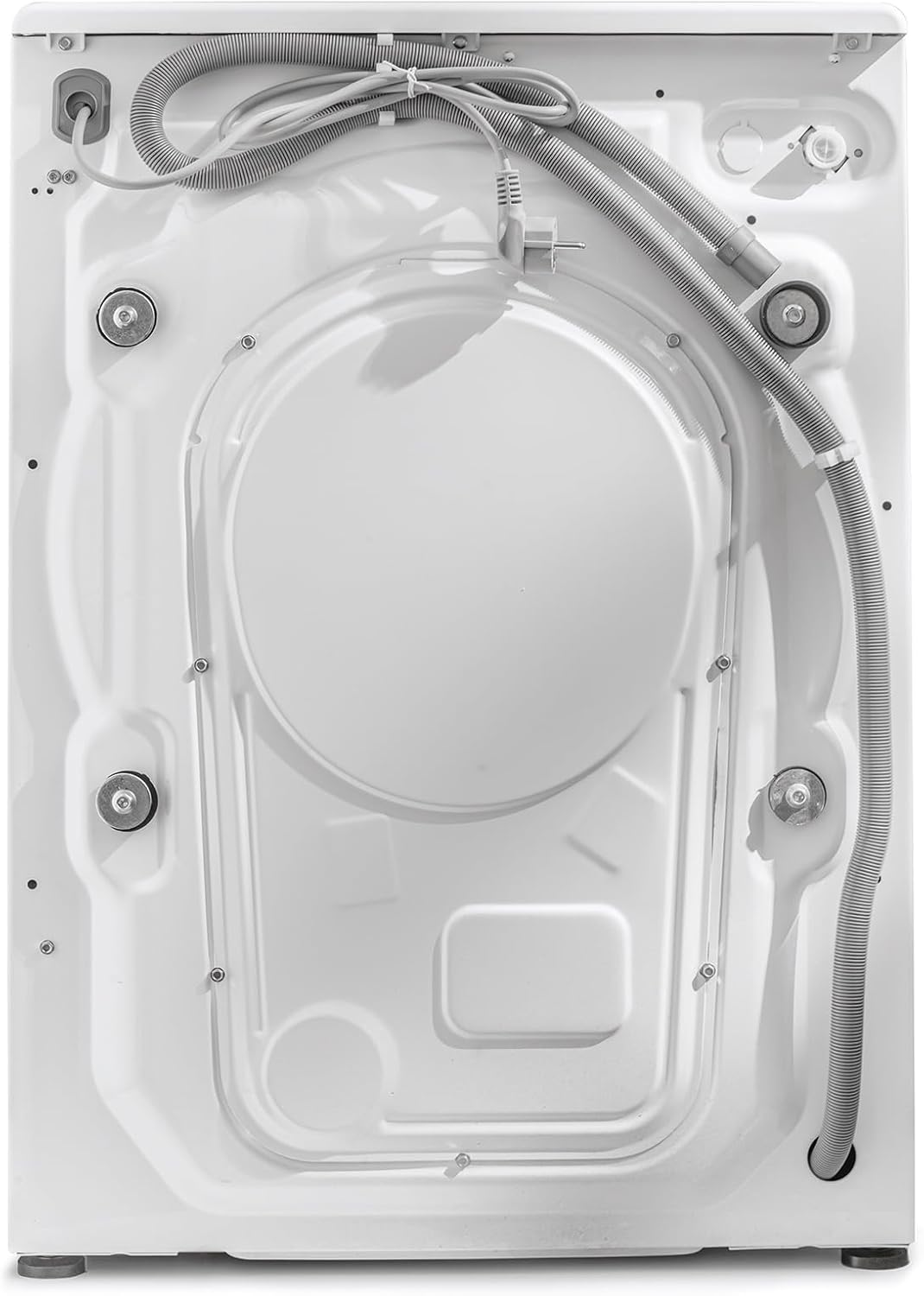
画像: 背面 view of the washing machine, illustrating hose connections.
3.5 電気接続
機器をアース付きコンセントに差し込んでください。電圧がtag電源と周波数は、機器の定格銘板に記載されている仕様と一致してください。延長コードや複数のアダプターを使用しないでください。
4. 操作手順
Familiarize yourself with the control panel and available programs for efficient washing.
4.1コントロールパネルオーバーview
The control panel features a program selector dial, a digital display, and various function buttons.

Image: Digital display showing temperature, spin speed, and program indicators.

Image: Program selector dial with various wash cycle options.
4.2 洗濯プログラム
Your washing machine offers 16 standard programs, including specialized cycles for different fabric types and rapid wash options ranging from 14 to 59 minutes. The Active Motion Technology enhances detergent cleaning action for improved results.

Image: Features panel highlighting 10kg capacity, 1400 RPM, Active Motion System, and Rapid Cycles.
4.3 NFC Connectivity (Simply-Fi App)
The appliance features NFC connectivity, allowing you to connect your smartphone via the Candy Simply-Fi app. This enables you to download additional wash programs and access extra functionalities.
4.4 洗濯物の投入
ドアを開けて洗濯物をドラムに入れます。洗濯機の最大容量は10kgです。詰め込みすぎにご注意ください。ドアをしっかりと閉めてください。

Image: The washing machine drum with the door open, ready for loading.
4.5洗剤ディスペンサー
ディスペンサー引き出しの指定されたコンパートメントに適切な量の洗剤と柔軟剤を追加します。
4.6 洗濯サイクルの開始
- プログラムセレクターダイヤルを回して、希望の洗濯プログラムを選択します。
- Adjust temperature and spin speed using the corresponding buttons on the display, if desired.
- サイクルを開始するには、「開始/一時停止」ボタンを押します。
5. メンテナンス
定期的なメンテナンスは、洗濯機の寿命と効率性を保つのに役立ちます。
5.1 外装の清掃
外側の表面を柔らかい布で拭きます。amp 布で拭いてください。研磨剤や溶剤は使用しないでください。
5.2 洗剤引き出しのクリーニング
残留物の蓄積を防ぐため、洗剤投入口を定期的に取り外して流水で洗浄してください。
5.3フィルターの清掃
The filter should be cleaned regularly to prevent blockages. Refer to the detailed instructions in the full user manual for filter access and cleaning procedures.
5.4 Care for the Drum
To prevent odors and mold, leave the washing machine door slightly ajar after each wash to allow the drum to air dry.

Image: Interior of the washing machine drum.
6。 トラブルシューティング
このセクションでは、よくある問題について説明します。より複雑な問題については、資格のある技術者にご相談ください。
- マシンが起動しない: Check if the power cord is plugged in, the door is closed properly, and the 'Start/Pause' button has been pressed.
- 水が満たされない: Ensure the water tap is open and the water inlet hose is not kinked.
- 過度の振動: Verify that the transit bolts have been removed and the machine is level.
- 水が排水されない: Check the drain hose for kinks or blockages, and clean the filter.
7. 仕様
Key technical specifications for the Candy Smart CS 1410TXME/1-S washing machine.
| 仕様 | 価値 |
|---|---|
| ブランド | あめ |
| モデル番号 | CS 1410TXME/1-S |
| 容量 | 10キログラム |
| 最大スピン速度 | 1400 回転 |
| 寸法(長さ×幅×高さ) | 58 x 60 x 85 cm |
| 重さ | 65キログラム |
| ノイズレベル(スピン) | 78デシベル |
| エネルギー効率クラス(新規) | A |
| エネルギー消費量(100サイクルあたり) | 51kWh |
| 水消費量(1サイクルあたり) | 51リットル |
| 接続性 | 非対称 |
| 特集 | Child Safety, Active Motion Technology, Rapid Cycles |

Image: EU Energy Label for the appliance. For more details, visit the official EPRELデータベース.
8. 保証とサポート
Your Candy Smart CS 1410TXME/1-S washing machine comes with a standard manufacturer's warranty. Please refer to the warranty card included with your purchase for specific terms and conditions. For technical support, spare parts, or service requests, please contact Candy customer service or visit their official webサイト。