
Logitech C505/C505e
Logitech C505/C505e HD Wired Business Webcamユーザーマニュアル
Model: C505/C505e
1。 オーバーview
The Logitech C505/C505e HD Wired Business Webcam is designed to enhance your video communication experience. It provides crisp, smooth, and colorful widescreen HD 720p video with a 60° diagonal field of view。 webcam features fixed focus and automatic light correction, adapting to various lighting conditions. Its single, omnidirectional microphone incorporates noise-reduction technology, supporting clear conversations up to 3 meters away, even in noisy environments. The extra-long USB-A cable and universal clip offer flexible placement options on your computer or up to 7 feet away.
2. セットアップ手順
Setting up your Logitech C505/C505e webcam is a straightforward plug-and-play process. No additional software installation or charging is required.
- 接続する Webカム: USB-Aケーブルを webcam into an available USB port on your desktop or laptop computer.
- 配置する Webカム: Use the universal clip to securely mount the webcam on your monitor, laptop screen, or place it on a flat surface. The extra-long cable allows for flexible positioning.
- 選択してください Webカム: コンピュータは自動的に検出するはずです webcam. If you have multiple cameras or microphones, you may need to select the "Logitech C505/C505e" in your application's settings (e.g., video conferencing software, recording applications) or your operating system's device settings.

Image: The Logitech C505/C505e webcam easily clips onto a monitor for convenient placement.
3. 操作方法 Webカム
Once connected, the Logitech C505/C505e is ready for use with most video conferencing and recording applications.
- ビデオ品質: の webcam delivers HD 720p video at 30 frames per second, providing clear visuals for your calls and recordings.
- 分野 View: の60°の対角フィールド view ensures you are framed appropriately without capturing excessive background.
- 固定フォーカス: The fixed focus lens maintains sharpness for subjects within its optimal range, simplifying operation.
- 自動光補正: の webcam automatically adjusts to the lighting conditions of your environment, helping to ensure you appear well-lit even in varying light. Optimal lighting conditions will yield the best video quality.
- マイクロフォン: The integrated omnidirectional microphone with noise-reduction technology is designed to capture your voice clearly from up to 3 meters away, minimizing background distractions.

Image: The Logitech C505/C505e provides HD 720p widescreen video for clear communication.
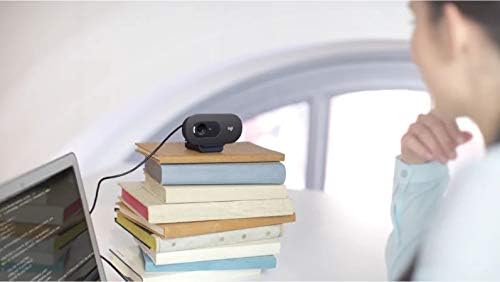
Image: Flexible placement options allow the webcam to be positioned on various surfaces.
4. メンテナンス
To ensure optimal performance and longevity of your Logitech C505/C505e webcam の場合は、次の簡単なメンテナンス ガイドラインに従ってください。
- レンズの掃除: 優しく拭き取ってください webカメラレンズは柔らかく糸くずの出ない布で拭いてください。レンズを傷つける可能性のある、刺激の強い化学薬品や研磨剤の使用は避けてください。
- ストレージ: 使用しないときは、 web極端な温度や直射日光を避け、清潔で乾燥した場所に保管してください。
- ケーブルのお手入れ: Avoid sharply bending or crimping the USB cable to prevent internal damage.
5。 トラブルシューティング
If you encounter issues with your Logitech C505/C505e webcam の場合は、次のトラブルシューティング手順を試してください。
- ビデオ/オーディオなし:
- USBケーブルが両方のポートにしっかりと差し込まれていることを確認してください。 webカメラとコンピューター。
- プラグを差し込んでみてください web別のUSBポートにカメラを接続します。
- Check your application's settings (e.g., Zoom, Microsoft Teams) to confirm the Logitech C505/C505e is selected as the active camera and microphone.
- Verify your operating system's privacy settings allow applications to access the camera and microphone.
- ビデオ品質が悪い:
- 周囲に十分な照明があることを確認してください。 webcam performs best with good illumination.
- 掃除する webカメラのレンズを柔らかい布で拭いてください。
- レンズの前に障害物がないか確認してください。
- 音質が悪い:
- 確実に webcam's microphone is selected in your application and system audio settings.
- 環境内のバックグラウンドノイズを低減します。
- Ensure you are within the 3-meter optimal range of the microphone.
- Webカムが認識されません:
- コンピュータを再起動します。
- コンピュータのデバイスマネージャー(Windows)またはシステム情報(macOS)で、 webcam is listed. You may need to update or reinstall drivers, though typically the webcam is plug-and-play.
6. 仕様
| ブランド | ロジテック |
| モデル番号 | Logitech C505/C505e |
| ビデオキャプチャ解像度 | 720p |
| ビデオ解像度 | 720p |
| 接続技術 | 有線(USB-A) |
| フォーカスタイプ | 固定フォーカス |
| View角度 | 60度 |
| マイクロフォン | Omnidirectional with Noise-Reduction |
| オペレーティング·システム | Multiple (Windows 8 or later, macOS 10.10 or later, ChromeOS) |
| 内蔵メディア | USB Cable, Universal Clip |
| 特徴 | Automatic Light Correction, Low Light Performance |
7. 保証とサポート
詳細な保証情報とテクニカルサポートについては、ロジクールの公式サポートをご覧ください。 webサイトをご覧ください。ドライバー、FAQ、カスタマーサービスの連絡先情報も掲載されています。